Restarting Instance
Overview
Restarting an instance restarts the database engine service without releasing instance resources. This operation will result in service interruption and momentary disconnections lasting from a few seconds to a few minutes. This operation is typically used to resolve specific runtime issues.
Making Parameter Changes Take Effect
After certain static parameters (such as performance-related parameters) that require a restart to take effect are modified, you must perform a mongod process restart to load and activate the new configuration on the current node.
Releasing Resources and Recovering Performance
When a database instance experiences performance degradation (such as slow responses or request backlog) due to abnormal connections, memory buildup, or specific types of soft errors, restarting the mongod process can quickly release system resources, terminate abnormal sessions, and restore the service to a stable state.
Operation Impact
You can restart specific components of a TencentDB for MongoDB instance to recover from service disruptions. Due to the architecture of TencentDB for MongoDB, instance restart is divided into mongos restart and mongod restart.
Note
Restarting the Mongod process for the entire instance is a high-risk operation. We recommend performing a restart on a per-node basis. For more information, see restart node.
You cannot cancel an ongoing restart operation; therefore, proceed with caution.
Restart a Node | Impact Description |
Restart Mongod (data storage process) | mongod is the core data storage engine of MongoDB. Restarting this process will directly impact the availability of data read and write operations. Restarting mongod for a shard will cause the data on that shard to be temporarily unavailable. Restarting the primary node mongod of a replica set will trigger a failover. |
Restart Mongos (routing service process) | mongos is the query router and coordinator for sharded clusters. Restarting this process temporarily interrupts all ongoing routed query requests, causing brief "cannot connect to the database" errors or query failures at the application layer. This may result in 1-2 momentary disconnections, though the data itself remains unaffected. It is recommended that applications implement an automatic reconnection mechanism. |
Version Description
This feature is supported on MongoDB 3.2 and later versions.
The replica set architecture of version 4.0 does not include the mongos component, so restarting a replica set instance does not involve restarting mongos.
Prerequisites
You have created a TencentDB for MongoDB instance. For more information, see Creating TencentDB for MongoDB Instance.
The TencentDB for MongoDB instance is in Running status.
Directions
Restarting one instance
1. Log in to the TencentDB for MongoDB console.
2. In the MongoDB drop-down list on the left sidebar, select Replica Set Instance or Shard Instance. The directions for replica set instances and sharded cluster instances are similar.
3. Above the instance list on the right, select the region.
4. In the instance list, find the target instance.
5. On the row of the target instance, click More > Restart in the Operation column.
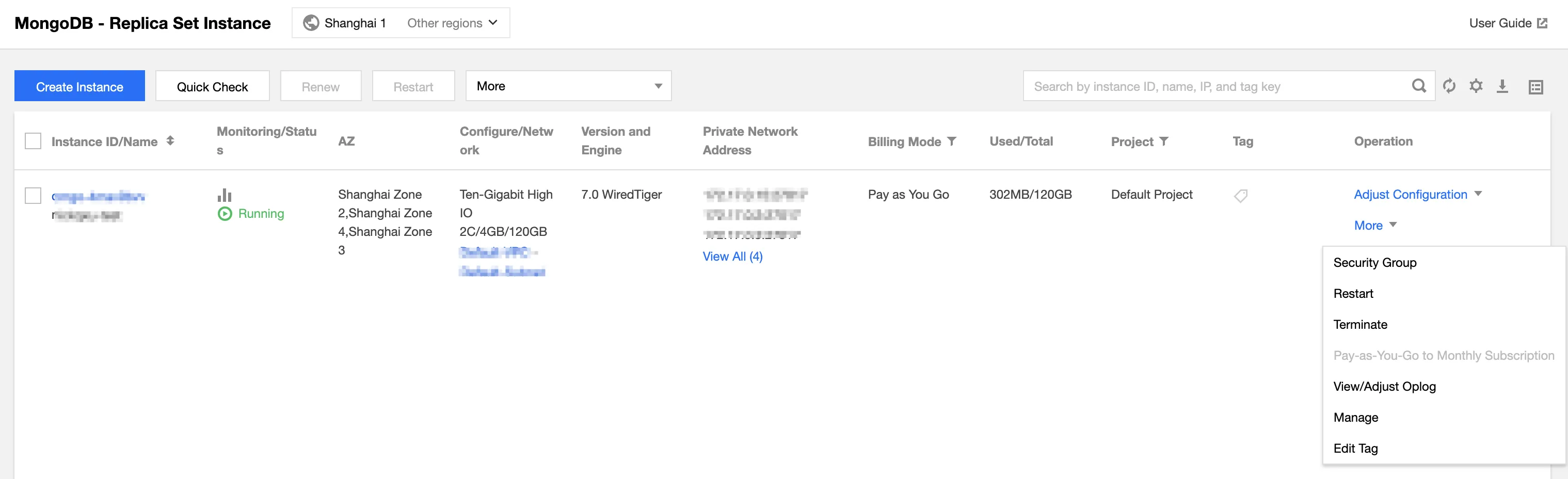
6. In the Restart MongoDB window, click View Details to confirm the information of the instance to be restarted.
7. Select the components to be restarted and click OK.
8. In the instance list, you can see that the instance enters the Restarting status. Wait for the task to be completed.
Restarting multiple instances
1. In the instance list, select the instances to be restarted.
2. Above the instance list, click Restart.
3. In the Restart MongoDB window, click View Details to confirm the information of all the instances to be restarted.
4. Select the components to be restarted and click OK.
API
API | Feature |
Restarts database nodes in batches |
Bantuan dan Dukungan
Apakah halaman ini membantu?
Anda juga dapat Menghubungi Penjualan atau Mengirimkan Tiket untuk meminta bantuan.
masukan