Maintenance window is the time period during which the backend system performs maintenance operations on your TencentDB for MongoDB instance. To minimize the potential impact on your business, we recommend setting the maintenance window during off-peak hours.
Proactive Planning to Minimize Business Impact
We recommend setting an acceptable maintenance window for each instance, typically during periods of low business traffic (such as late night hours), to minimize the impact on business continuity and ensure high availability during peak hours.
Performing High-Risk Operations Safely
For high-risk operations involving data migration, such as changing node specifications and adjusting AZs, we strongly recommend scheduling the task execution within the maintenance window.
Adjusting Mongod computational specifications and disk capacity
Scaling mongod nodes up or down typically involves resource reallocation, which may cause momentary database disconnections lasting a few seconds. Select **During maintenance window** to schedule the operation during the preset off-peak period, ensuring core business operations remain unaffected during peak hours.
Scaling up mongos node specifications may involve cross-machine data migration, potentially causing momentary disconnections. Select **During maintenance window** to schedule the operation during the preset off-peak period, ensuring core business operations remain unaffected during peak hours.
Adjusting the AZ involves data migration and may cause momentary database disconnections lasting a few seconds upon completion. Select **During maintenance window** to schedule the operation, minimizing the impact of disconnections on your business.
Note:
Before maintenance is carried out for TencentDB for MongoDB, notifications will be sent to the contacts configured in your Tencent Cloud account via SMS and email.
2. In the MongoDB drop-down list on the left sidebar, select Replica Set Instance or Sharded Instance. The directions for replica set instances and sharded cluster instances are similar.
3. Above the instance list on the right, select the region.
4. In the instance list, find the target instance.
5. Click the target instance ID to enter the Instance Details page.
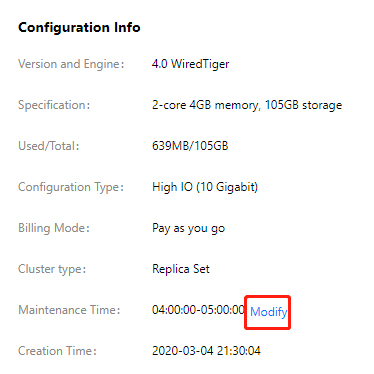
6. On the Instance Details page, click Modify on the right of Maintenance Time.
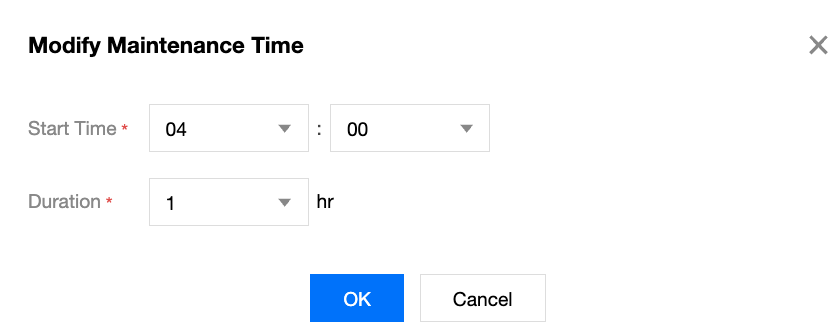
7. In the Modify Maintenance Time window, set Start Time and Duration.
8. Click OK. You can view the newly set maintenance time on the Instance Details page.