tencent cloud

Tencent Cloud Observability Platform

Release Notes and Announcements
Release Notes
Product Introduction
Overview
Strengths
Basic Features
Basic Concepts
Use Cases
Use Limits
Purchase Guide
Tencent Cloud Product Monitoring
Application Performance Management
Mobile App Performance Monitoring
Real User Monitoring
Cloud Automated Testing
Prometheus Monitoring
Grafana
EventBridge
PTS
Quick Start
Monitoring Overview
Instance Group
Tencent Cloud Product Monitoring
Application Performance Management
Real User Monitoring
Cloud Automated Testing
Performance Testing Service
Prometheus Getting Started
Grafana
Dashboard Creation
EventBridge
Alarm Service
Cloud Product Monitoring
Tencent Cloud Service Metrics
Operation Guide
CVM Agents
Cloud Product Monitoring Integration with Grafana
Troubleshooting
Practical Tutorial
Application Performance Management
Product Introduction
Access Guide
Operation Guide
Practical Tutorial
Parameter Information
FAQs
Mobile App Performance Monitoring
Overview
Operation Guide
Access Guide
Practical Tutorial
Tencent Cloud Real User Monitoring
Product Introduction
Operation Guide
Connection Guide
FAQs
Cloud Automated Testing
Product Introduction
Operation Guide
FAQs
Performance Testing Service
Overview
Operation Guide
Practice Tutorial
JavaScript API List
FAQs
Prometheus Monitoring
Product Introduction
Access Guide
Operation Guide
Practical Tutorial
Terraform
FAQs
Grafana
Product Introduction
Operation Guide
Guide on Grafana Common Features
FAQs
Dashboard
Overview
Operation Guide
Alarm Management
Console Operation Guide
Troubleshooting
FAQs
EventBridge
Product Introduction
Operation Guide
Practical Tutorial
FAQs
Report Management
FAQs
General
Alarm Service
Concepts
Monitoring Charts
CVM Agents
Dynamic Alarm Threshold
CM Connection to Grafana
Documentation Guide
Related Agreements
Application Performance Management Service Level Agreement
APM Privacy Policy
APM Data Processing And Security Agreement
RUM Service Level Agreement
Mobile Performance Monitoring Service Level Agreement
Cloud Automated Testing Service Level Agreement
Prometheus Service Level Agreement
TCMG Service Level Agreements
PTS Service Level Agreement
PTS Use Limits
Cloud Monitor Service Level Agreement
API Documentation
History
Introduction
API Category
Making API Requests
Monitoring Data Query APIs
Alarm APIs
Legacy Alert APIs
Notification Template APIs
TMP APIs
Grafana Service APIs
Event Center APIs
TencentCloud Managed Service for Prometheus APIs
Monitoring APIs
Data Types
Error Codes
Glossary

Creating Instance

PDF
Mode fokus
Ukuran font
Terakhir diperbarui: 2024-08-07 22:03:06
This document uses custom configuration as an example to describe how to create a TMP instance.

Preparations

Before creating a TMP instance, you must complete the following operations:
Sign up for a Tencent Cloud account and complete identity verification.
Create a VPC in the target region and create a subnet in the target AZ in the VPC.

Directions

1. Log in to the TMP console.
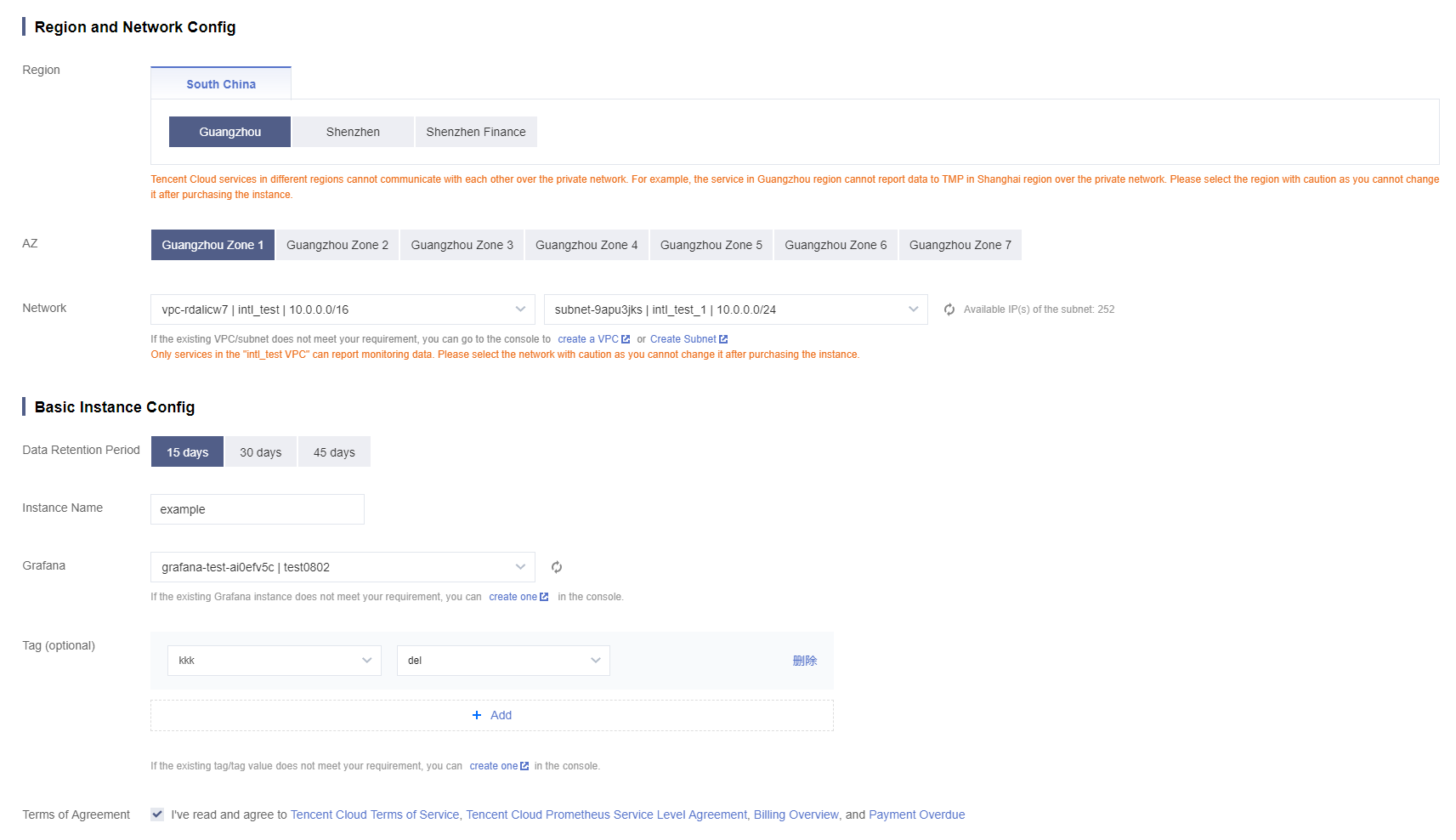
2. Click Create and configure the following information as prompted:
Type
Required
Configuration Description
Region
Yes
Select a region based on the region of your Tencent Cloud service. The price may vary by region, and the real-time price displayed on the purchase page shall prevail. Tencent Cloud services in different regions cannot communicate with each other over the private network; for example, a service in the Guangzhou region cannot report data to a TMP instance in the Shanghai region over the private network. Once an instance is purchased, the region cannot be changed. Therefore, please select the region with caution.
AZ
Yes
Select as needed.
Network
Yes
It indicates a logically isolated network space in Tencent Cloud. A VPC consists of at least one subnet. The system will provide a default VPC and subnet for you in each region. If the existing VPCs/subnets don't meet your requirements, you can create new ones as instructed in Creating VPCs or Creating Subnets.
Product Specs
Yes
The price varies by product specs. For more information, please see Pricing.
Data Retention Period
Yes
The price varies by data retention period. For more information, please see Pricing.
Instance Name
Yes
Enter a custom name of the TMP instance.
Grafana/Grafana Password
Yes
Grafana is enabled by default. After the instance is successfully created, the system will generate a domain name accessible over the public network. The default account of the Grafana service is `admin`, and the password is user-defined.
Validity Period
Yes
Multiple validity periods are available for your choice.
3. After completing the configuration, click Buy Now.


Bantuan dan Dukungan

Apakah halaman ini membantu?

masukan