tencent cloud

Tencent Kubernetes Engine

Release Notes and Announcements
Release Notes
Announcements
Release Notes
Product Introduction
Overview
Strengths
Architecture
Scenarios
Features
Concepts
Native Kubernetes Terms
Common High-Risk Operations
Regions and Availability Zones
Service Regions and Service Providers
Open Source Components
Purchase Guide
Purchase Instructions
Purchase a TKE General Cluster
Purchasing Native Nodes
Purchasing a Super Node
Getting Started
Beginner’s Guide
Quickly Creating a Standard Cluster
Examples
Container Application Deployment Check List
Cluster Configuration
General Cluster Overview
Cluster Management
Network Management
Storage Management
Node Management
GPU Resource Management
Remote Terminals
Application Configuration
Workload Management
Service and Configuration Management
Component and Application Management
Auto Scaling
Container Login Methods
Observability Configuration
Ops Observability
Cost Insights and Optimization
Scheduler Configuration
Scheduling Component Overview
Resource Utilization Optimization Scheduling
Business Priority Assurance Scheduling
QoS Awareness Scheduling
Security and Stability
TKE Security Group Settings
Identity Authentication and Authorization
Application Security
Multi-cluster Management
Planned Upgrade
Backup Center
Cloud Native Service Guide
Cloud Service for etcd
TMP
TKE Serverless Cluster Guide
TKE Registered Cluster Guide
Use Cases
Cluster
Serverless Cluster
Scheduling
Security
Service Deployment
Network
Release
Logs
Monitoring
OPS
Terraform
DevOps
Auto Scaling
Containerization
Microservice
Cost Management
Hybrid Cloud
AI
Troubleshooting
Disk Full
High Workload
Memory Fragmentation
Cluster DNS Troubleshooting
Cluster kube-proxy Troubleshooting
Cluster API Server Inaccessibility Troubleshooting
Service and Ingress Inaccessibility Troubleshooting
Common Service & Ingress Errors and Solutions
Engel Ingres appears in Connechtin Reverside
CLB Ingress Creation Error
Troubleshooting for Pod Network Inaccessibility
Pod Status Exception and Handling
Authorizing Tencent Cloud OPS Team for Troubleshooting
CLB Loopback
API Documentation
History
Introduction
API Category
Making API Requests
Elastic Cluster APIs
Resource Reserved Coupon APIs
Cluster APIs
Third-party Node APIs
Relevant APIs for Addon
Network APIs
Node APIs
Node Pool APIs
TKE Edge Cluster APIs
Cloud Native Monitoring APIs
Scaling group APIs
Super Node APIs
Other APIs
Data Types
Error Codes
TKE API 2022-05-01
FAQs
TKE General Cluster
TKE Serverless Cluster
About OPS
Hidden Danger Handling
About Services
Image Repositories
About Remote Terminals
Event FAQs
Resource Management
Service Agreement
TKE Service Level Agreement
TKE Serverless Service Level Agreement
Contact Us
Glossary

Description of Role Permissions Related to Service Authorization

PDF
Mode fokus
Ukuran font
Terakhir diperbarui: 2024-12-11 18:50:30
When you use Tencent Kubernetes Engine (TKE), you need to authorize services to use relevant cloud resources. Each scenario usually contains policies that are defined for different roles in advance. The main roles involved are TKE_QCSRole and IPAMDofTKE_QCSRole. This document introduces the details of each authorization policy, and the authorization scenarios and authorization steps for each role.
Note:
The sample role in this document does not contain the authorization policy related to container image repositories. For more information about TKE image related permissions, see TKE Image Registry Resource-level Permission Settings.

TKE_QCSRole

After TKE is activated, Tencent Cloud grants your account the permissions of the role TKE_QCSRole, which is associated with multiple preset policies by default. To obtain relevant permissions, you need to perform the corresponding preset policy authorization operations in specific authorization scenarios. After these operations are completed, the corresponding policy will appear in the role's list of authorized policies. The preset policies associated with TKE_QCSRole by default include:

The default associated preset policies

QcloudAccessForTKERole: The permission for TKE to access cloud resources.
QcloudAccessForTKERoleInOpsManagement: The permission for Ops management, including the log service.

Other associated preset policies

QcloudAccessForTKERoleInCreatingCFSStorageclass: The permission for TKE to operate on Cloud File Storage (CFS), including adding/deleting/querying CFS systems, and querying the mount targets of a file system.
QcloudCVMFinanceAccess: CVM finance permission

Preset policy QcloudAccessForTKERole

Authorization scenario

When you log in to the TKE console for the first time after registering and logging in to a Tencent Cloud account, you need to go to the "Cloud Access Management" page to grant the current account TKE permissions for operating on CVMs, CLBs, CBS, and other cloud resources.

Authorization steps

1. Log in to the TKE console and click Cluster in the left sidebar to pop up the Service authorization window.
2. Click Go to Cloud Access Management to enter the Role management page.
3. Click Grant to complete authentication.


Permission content

CVM
Permission Name
Permission Description
cvm:DescribeInstances
Querying the list of server instances
cvm:*Cbs*
CBS-related permissions
Tag
Permission Name
Permission Description
tag:*
All features related to tags
CLB
Permission Name
Permission Description
clb:*
All features related to CLB
TKE
Permission Name
Permission Description
ccs:DescribeCluster
Querying a cluster list
ccs:DescribeClusterInstances
Querying cluster node information

Preset policy QcloudAccessForTKERoleInOpsManagement

Authorization scenario

This policy is associated with TKE_QCSRole by default. After TKE is activated and TKE_QCSRole is granted, you have the permissions of various Ops-related features, including log features.

Authorization steps

This policy and the preset policy QcloudAccessForTKERole are authorized at the same time, so no extra operation is needed.

Permission content

Log service
Permission Name
Permission Description
cls:listTopic
Displaying the list of log topics under a specified logset
cls:getTopic
Viewing log topic information
cls:createTopic
Creating a log topic
cls:modifyTopic
Modifying a log topic
cls:deleteTopic
Deleting a log topic
cls:listLogset
Displaying the logset list
cls:getLogset
Viewing logset information
cls:createLogset
Creating a logset
cls:modifyLogset
Modifying a logset
cls:deleteLogset
Deleting a logset
cls:listMachineGroup
Displaying the server group list
cls:getMachineGroup
Viewing server group information
cls:createMachineGroup
Creating a server group
cls:modifyMachineGroup
Modifying a server group
cls:deleteMachineGroup
Deleting a server group
cls:getMachineStatus
Viewing server group status
cls:pushLog
Uploading logs
cls:searchLog
Querying logs
cls:downloadLog
Downloading logs
cls:getCursor
Getting the cursor based on time
cls:getIndex
Viewing indexes
cls:modifyIndex
Modifying indexes
cls:agentHeartBeat
Heartbeat
cls:getConfig
Getting the pusher configuration information


Preset policy QcloudAccessForTKERoleInCreatingCFSStorageclass

Authorization scenario

The Tencent Cloud CFS add-on can help you use file storage in TKE clusters. When using this add-on for the first time, you need to authorize relevant resources, such as file systems in CFS, via TKE.

Authorization steps

1. Log in to the TKE console and click Cluster in the left sidebar.
2. On the "Cluster management" page, select the region and ID of the target cluster to go to the cluster details page.
3. Select Add-on management and click Create.
4. On the Add-on management page, if the add-on is selected as "CFS" for the first time, click Service Authorization at the bottom of the page.


5. In the "Service authorization" window that pops up, click Cloud Access Management.
6. On the "Role management" page, click Grant to complete authentication.

Permission content

File storage
Permission Name
Permission Description
cfs:CreateCfsFileSystem
Creating a file system
cfs:DescribeCfsFileSystems
Querying a file system
cfs:DescribeMountTargets
Querying mount targets of a file system
cfs:DeleteCfsFileSystem
Deletes a file system


Preset policy QcloudCVMFinanceAccess

Authorization steps

1. Log in to the CAM console, and select Roles in the left sidebar.
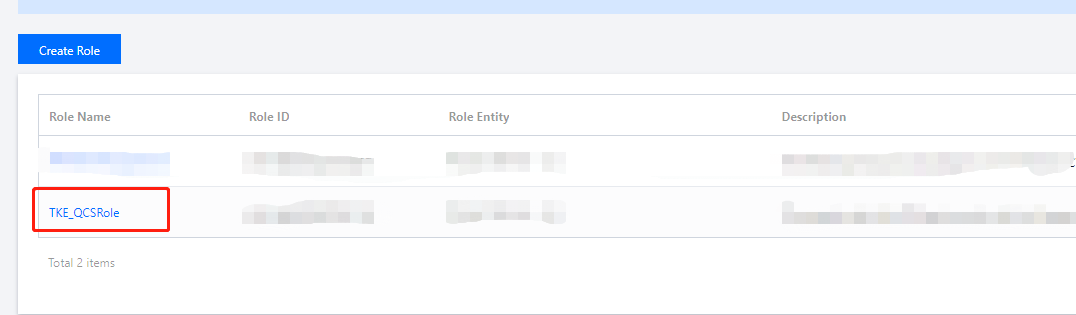
2. On the role list page, click TKE_QCSRole to enter the role management page.


3. Select Associate policy on the TKE_QCSRole page, and confirm the operation in the "Risk tips" pop-up window.
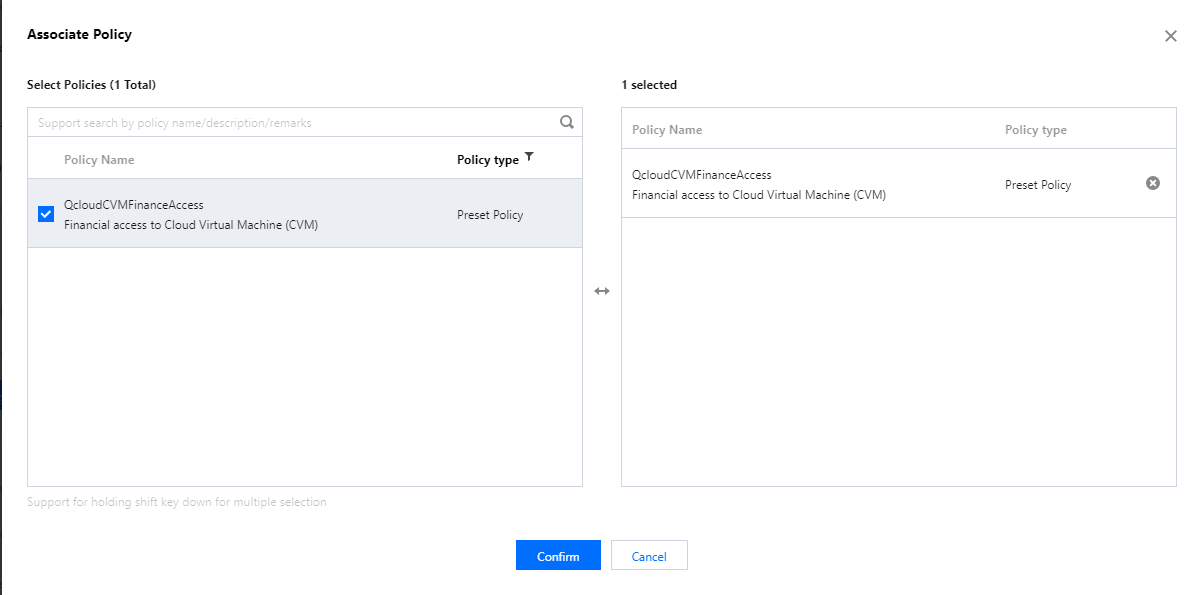
4. In the "Associate policy" window that pops up, find the policy QcloudCVMFinanceAccess and select it.


5. Click Confirm to complete the process.

Permission content

Permission Name
Permission Description
finance:*
CVM finance permission


IPAMDofTKE_QCSRole

IPAMDofTKE_QCSRole is the TKE IPAMD support service role. After the permissions of this role are granted, you need to associate preset policies in the authorization scenarios described in this document. After these operations are completed, the following policies will appear in the list of authorized policies of the role:
QcloudAccessForIPAMDofTKERole: The permission for TKE IPAMD to access cloud resources

Preset policy QcloudAccessForIPAMDofTKERole

Authorization scenario

When using the VPC-CNI network mode to create a cluster for the first time, you need to grant permission for TKE IPAMD to access cloud resources, so that you can use the VPC-CNI network mode normally.

Authorization steps

1. Log in to the TKE console and click Cluster in the left sidebar.
2. On the "Cluster Management" page, click Create or Create with a template above the cluster list.
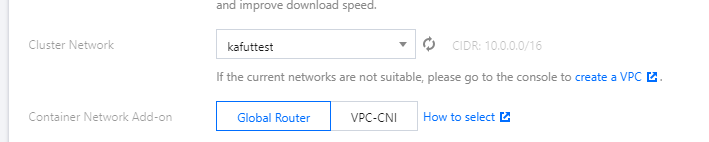
3. On the "Create cluster" page, select VPC-CNI for Container network add-on in "Cluster information" section, and click "Service Authorization".


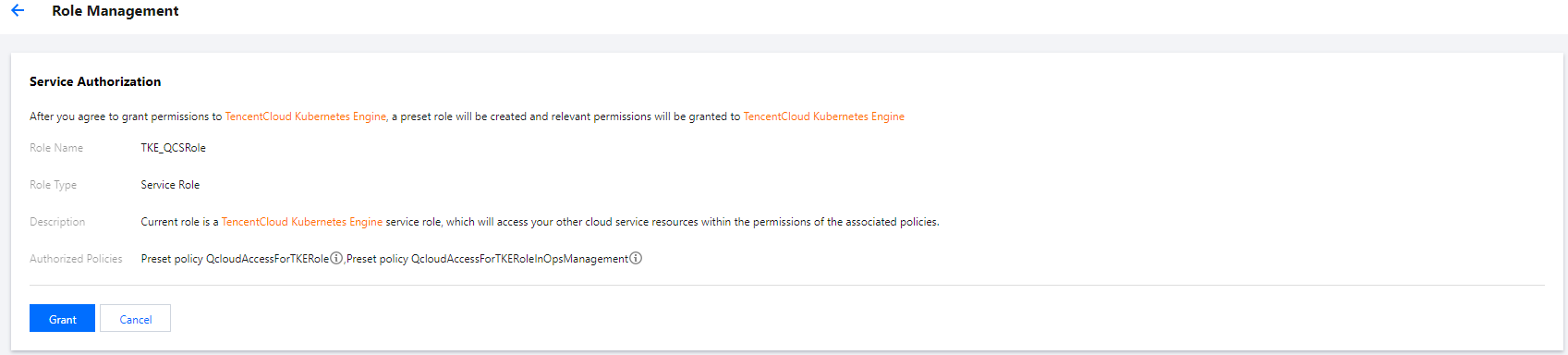
4. In the displayed "Service authorization" window, click Go to Cloud Access Management.
5. On the "Role management" page, click Grant to complete authentication.

Permission content

CVM
Permission Name
Permission Description
cvm:DescribeInstances
Viewing the list of instances
Tag
Permission Name
Permission Description
tag:GetResourcesByTags
Querying the resource list by tag
tag:ModifyResourceTags
Batch modifying tags associated with a resource
tag:GetResourceTagsByResourceIds
Querying tags associated with a resource
VPC
Permission Name
Permission Description
vpc:DescribeSubnet
Querying the list of subnets
vpc:CreateNetworkInterface
Creating an ENI
vpc:DescribeNetworkInterfaces
Querying the list of ENIs
vpc:AttachNetworkInterface
Binding an ENI with a CVM
vpc:DetachNetworkInterface
Unbinding an ENI from a CVM
vpc:DeleteNetworkInterface
Deleting an ENI
vpc:AssignPrivateIpAddresses
Applying for private IP addresses for an ENI
vpc:UnassignPrivateIpAddresses
Returning the private IP addresses of an ENI
vpc:MigratePrivateIpAddress
Migrating the private IP addresses of an ENI
vpc:DescribeSubnetEx
Querying the list of subnets
vpc:DescribeVpcEx
Querying peering connection
vpc:DescribeNetworkInterfaceLimit
Querying the ENI quota
vpc:DescribeVpcPrivateIpAddresses
Querying the private IP address of a VPC

Bantuan dan Dukungan

Apakah halaman ini membantu?

masukan