Security is a matter of utmost importance. Tencent Cloud considers security as a top priority in product design and requires all its products to be fully isolated and provides multiple layers of security protection with its basic network. TKE is a typical example. It adopts VPC as the underlying network of container services. This document describes the best practice of security group usage in TKE to help you select the most appropriate security group policy.
Security Groups
A security group is a virtual firewall capable of filtering stateful packets. As an important network security isolation means provided by Tencent Cloud, it can be used to configure network access control for one or more CVM instances. For more information, see Security Group.
How to Select a Security Group for TKE
In a container cluster, service pods are distributed on different nodes. We recommend that you bind all CVM instances in one cluster to the same security group and do not add non-clustered CVMs to a security group for a cluster.
A security group only grants the minimum permission externally.
You must enable the following rules for using TKE:
Open the container pod network and the cluster node network to the Internet.
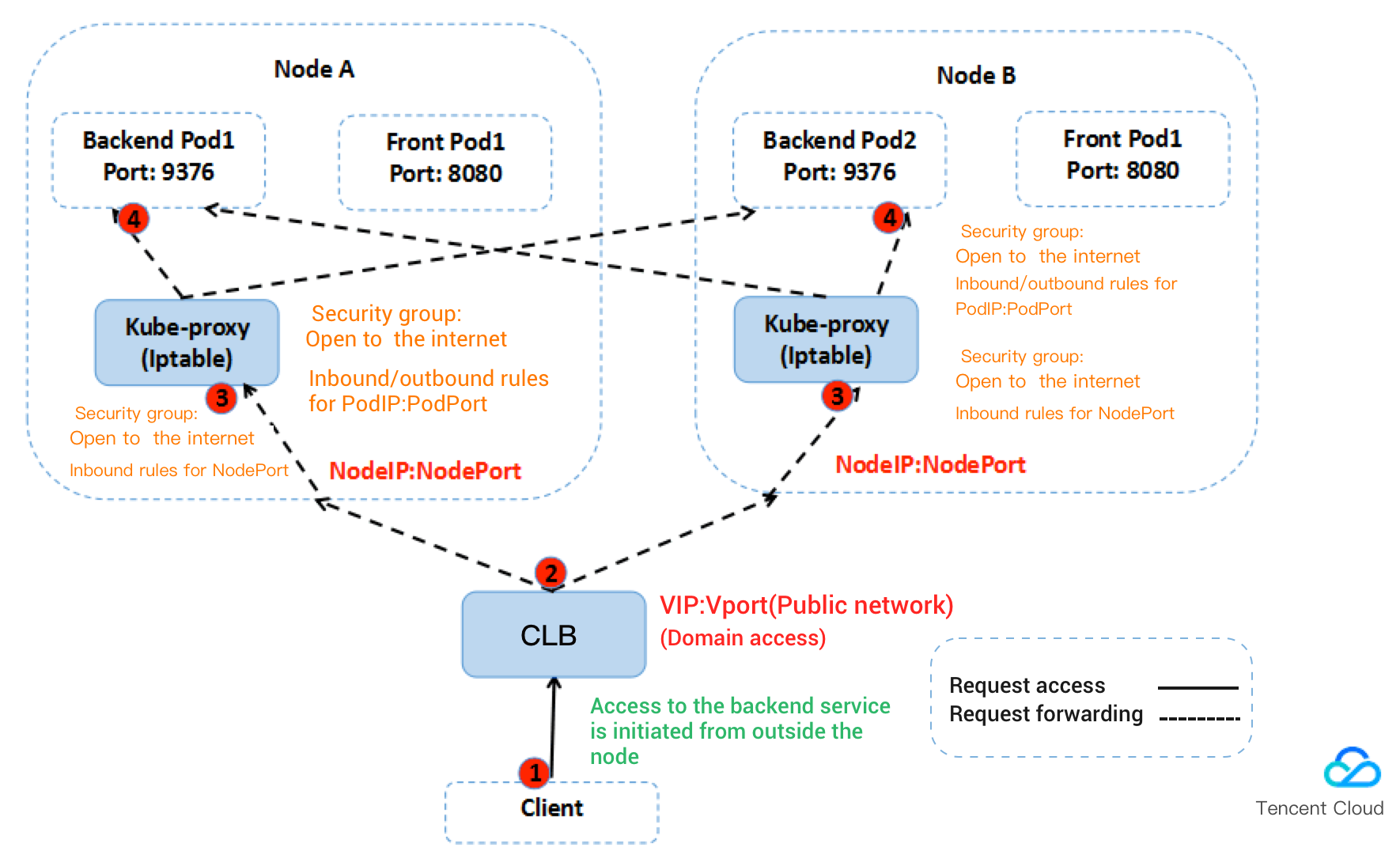
When a node receives a service access request, the node forwards the request to a service pod according to the iptables rule configured by the kube-proxy module. If the service pod is on another node, cross-node access occurs. For example, the destination IP addresses of the access request include the IP address of the service pod, IP addresses of other nodes in the cluster, and the IP address of the cluster’s cbr0 bridge on the node. In this case, the container pod network and the cluster node network on the peer node must be open to the Internet.
If clusters in the same VPC need to communicate with each other, you must open the container networks and node networks of the corresponding clusters to the Internet.
Open port 22 to the Internet if SSH login is required.
Open ports 30000 to 32768 on nodes to the Internet.
In the access path, you must use a load balancer to forward data packets to NodeIP:NodePort of the container cluster. NodeIP is the CVM instance IP of any node in the cluster. NodePort is assigned by the container cluster by default when the service is created. NodePort ranges from 30000 to 32768.
The following figure uses service access from the public network as an example.
Default Security Group Rules for TKE
Default security group rules for node
Some ports must be opened to the Internet to ensure normal communication between cluster nodes. To avoid cluster creation failures due to binding to invalid security groups, TKE provides default security group rules, as described in the following table.
Note:
If the current default security group cannot meet your service requirements and you have created a cluster bound to this security group, you can view and modify the security group rules for the cluster. For more information, please see Managing Security Group Rules.
Inbound rules
Protocol
Port Number
Source IP Address
Rule
Description
All
All
CIDR of the container network
Allow
Enable the communication between pods in the container network.
All
All
CIDR of the cluster network
Allow
Enable the communication between nodes in the cluster network.
tcp
30000 - 32768
0.0.0.0/0
Allow
Open NodePort to the Internet (Services in LoadBalancer type need to be forwarded through NodePort).
udp
30000 - 32768
0.0.0.0/0
Allow
Open NodePort to the Internet (Services in LoadBalancer type need to be forwarded through NodePort).
ICMP
-
0.0.0.0/0
Allow
Enable the support for Internet Control Message Protocol (ICMP) and ping operations.
Outbound rules
Protocol
Port Number
Source IP Address
Rule
All
All
0.0.0.0/0
Allow
Note:
To customize outbound rules, you need to open the node IP range and container IP range.
If you configure this rule for container nodes, the services in the cluster can be accessed using different access methods.
For more information on how to access a service in a cluster, please see "Service Access" in Overview.
Default security group rules for master node in self-deployed cluster
When you create a self-deployed cluster, the default TKE security group will be bound to the master node by default to reduce the risks where the master node cannot communicate with other nodes normally or Services cannot be accessed normally. The configuration rules of default security group are as detailed below: