Using the TKE NPDPlus Plug-In to Enhance the Self-Healing Capability of Nodes
Unduh
Mode fokus
Ukuran font
Terakhir diperbarui: 2024-12-13 21:12:47
When a Kubernetes cluster is running, nodes may become unavailable due to component faults, kernel deadlocks, insufficient resources, and other causes. By default, the kubelet monitors the status of node resources such as PIDPressure, MemoryPressure, and DiskPressure. However, if nodes are already unavailable or the kubelet has started draining the pods when reporting node statuses, the native Kubernetes node health monitoring mechanism may not function properly. To detect node faults proactively, you need to add more specific metrics to describe node health status and adopt corresponding recovery policies to achieve smart OPS, reduce development costs, and migitate the burden on OPS personnel.
node-problem-detector
Node problem detector (NPD) is an open-source Kubernetes addon for node health detection. NPD enables users to set regular expressions to detect node exceptions in system logs or files. Based on the OPS experiences, users can set regular expressions that may generate exception logs and choose the report mode. NPD will parse the configuration file. When a log can match the regular expression rules set by the user, the detected exception status can be reported through NodeCondition, Event, or Prometheus Metric. Except for the log matching function, NPD also allows users to write custom detection addons. Users can develop their own script or executable file and integrate it into the NPD addon. In this way, NPD can execute the detection program periodically.
TKE NPDPlus Add-On
In TKE, NPD is enhanced and integrated as an add-on called NodeProblemDetectorPlus (NPDPlus). You can install this add-on in existing clusters with one click. Alternatively, you can deploy NPDPlus when creating a cluster. TKE extracts metrics that can detect node exceptions in certain ways and integrates these metrics into NPDPlus. For example, NPDPlus can detect the systemd status of the kubelet and Docker in containers as well as the CVM file descriptor and thread pressure.
TKE uses NPDPlus to detect node unavailability proactively, instead of reporting exceptions after nodes become unhealthy. After users deploy NPDPlus in a TKE cluster and run the command kubectl describe node, they can view some node conditions. For example, FDPressure indicates whether the number of file descriptors used on the node has reached 80% of the threshold allowed by the CVM, and ThreadPressure indicates whether the number of threads on the node has reached 90% of the threshold allowed by the CVM. Users can monitor these conditions and configure preventive policies to minimize potential exceptions. For more information, see Node Conditions.
Meanwhile, the current opinion of Kubernetes is that the NotReady mechanism of nodes relies on the parameter settings of kube-controller-manager. Therefore, when a node network connection fails, Kubernetes can hardly detect node exceptions in seconds. In some scenarios (such as livestreaming and online conferences), this is unacceptable. NPDPlus inherits the distributed node health detection feature. It can detect node network status in seconds and check whether nodes can communicate with other nodes without communicating with the Kubernetes master component.
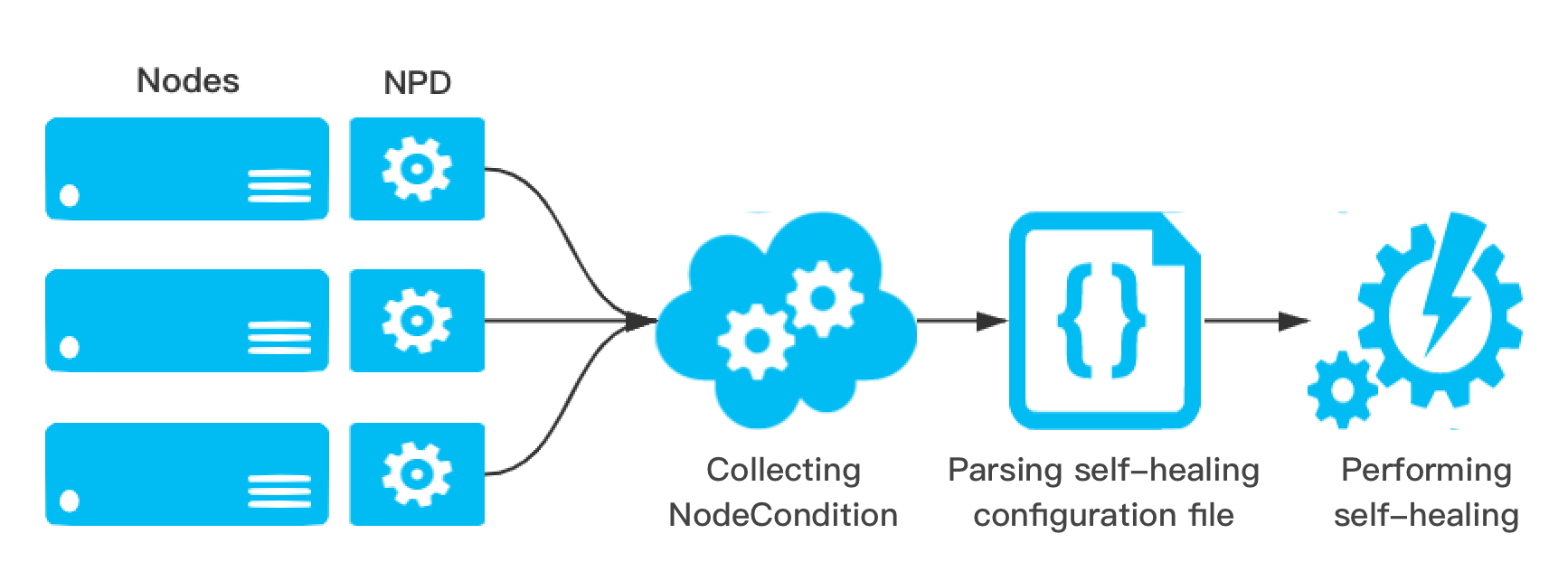
The health status information of nodes is collected to proactively detect node exceptions before business pods become unavailable. This way, OPS or development personnel can correct Docker, the kubelet, or nodes in a timely manner. To reduce the workload of OPS personnel, NPDPlus provides self-healing capabilities based on collected node status information. Cluster admins can configure self-healing capabilities, such as restarting Docker, restarting the kubelet, or restarting CVM nodes, based on different node states. Meanwhile, to prevent node avalanche in clusters, strict throttling must be performed before self-healing to prevent massive numbers of nodes from being restarted. The specific policies are as follows:
Only one node in the cluster can perform a self-healing action at a time, and the interval between self-healing actions must be no less than one minute.
When a new node is added to the cluster, the node will be given a 2-minute toleration period to prevent incorrect self-healing from being triggered by the initial instability of the node addition.
If a node remains abnormal after a CVM restart is triggered, the node will not perform any additional self-healing actions within 3 hours.
NPDPlus records all executed self-healing actions in Node Event, so that cluster admins can monitor the events that occur on nodes, as shown in the figure below: