Overview
Domain name redirection means when you access a URL in a browser, the web server is set to automatically redirect to another URL.
Use Cases
The website supports HTTP and HTTPS; for example, http://tencent.com and https://tencent.com need to point to the same web service.
The domain name of the website has changed, for example, from https://tengxun.com to https://tencent.com, and the two domain names point to the same web service.
The website content has been partially adjusted and is no longer accessible at the original URL; in this case, it can be redirected to a new URL that provides services.
Note:
After you use redirection, there will be an additional annotation, which indicates that the forwarding rule of the Ingress is managed by TKE and cannot be deleted or modified subsequently; otherwise, it will conflict with the redirection rule set in CLB.
ingress.cloud.tencent.com/rewrite-support: "true"
If a letter is used to represent the domain name address, and A has been redirected to B, then:
A cannot be redirected to C (unless you delete the old redirection relationship first and then create a new one).
B cannot be redirected to any other address.
A cannot be redirected to A.
There are two redirection methods:
Automatic redirection: you need to create an HTTPS:443 listener first and then create a forwarding rule under it. When you call this API, the system will automatically create an HTTP:80 listener (if it doesn't exist) and create a forwarding rule under it, which correspond to the various configurations under the HTTPS:443 listener, such as the domain name.
Manual redirection: you can manually configure the original access address and redirection address, and the system will automatically redirect requests made to the original access address to the destination address at the corresponding path. Multiple paths can be configured under the same domain name as a redirection policy to implement automatic redirection of requests between HTTP and HTTPS.
Notes
If you don't have the TKE Ingress redirection annotation declaration, the original logic that doesn't manage redirection rules will be compatible; that is, you can configure redirection rules in the CLB console, and TKE Ingress doesn't process such rules.
If you don't have the TKE Ingress redirection annotation declaration, due to the redirection protection restrictions of CLB, if the forwarding configuration A is redirected to the forwarding configuration B, you must delete the redirection rule first before you can delete the forwarding configuration B.
If you use the TKE Ingress redirection annotation declaration, all redirection rules under CLB are managed by TKE Ingress and take effect only in the relevant annotations in TKE Ingress. In this case, if you modify the redirection configuration in the CLB console, the configuration will eventually be overwritten by the forwarding rule configured in TKE Ingress.
Directions
An Ingress supports two redirection configuration ways: console and YAML, as detailed below:
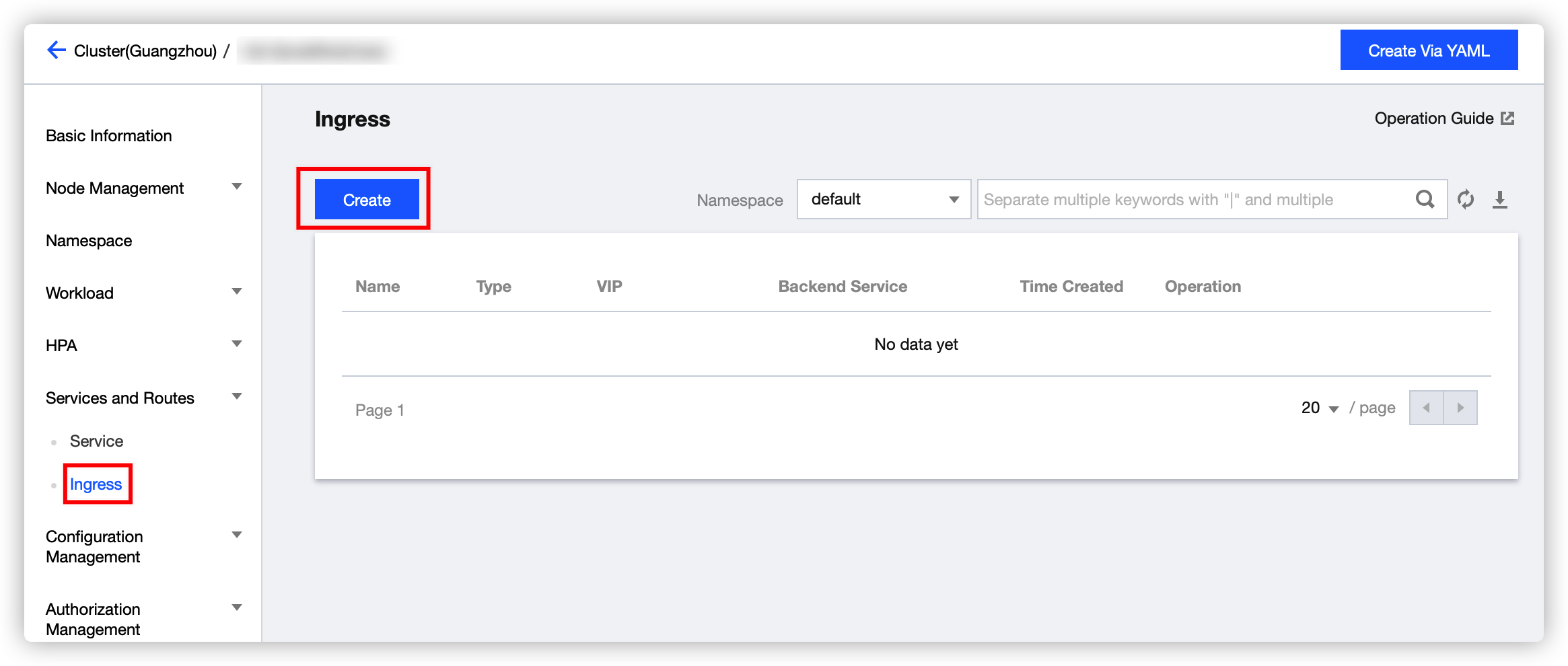
1. Log in to the TKE console and select Cluster on the left sidebar. 2. On the Cluster Management page, select the ID of the cluster for which to modify the Ingress.
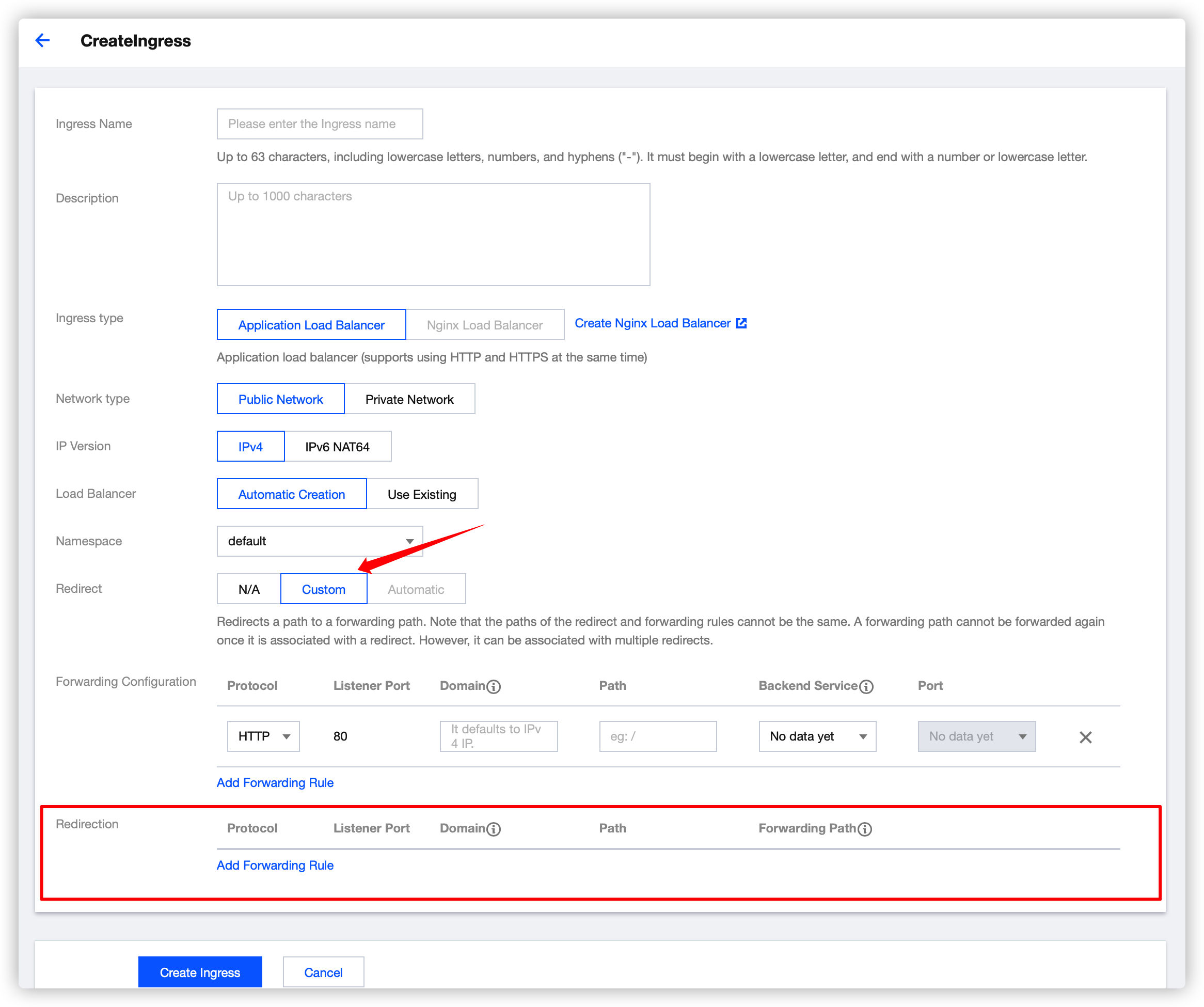
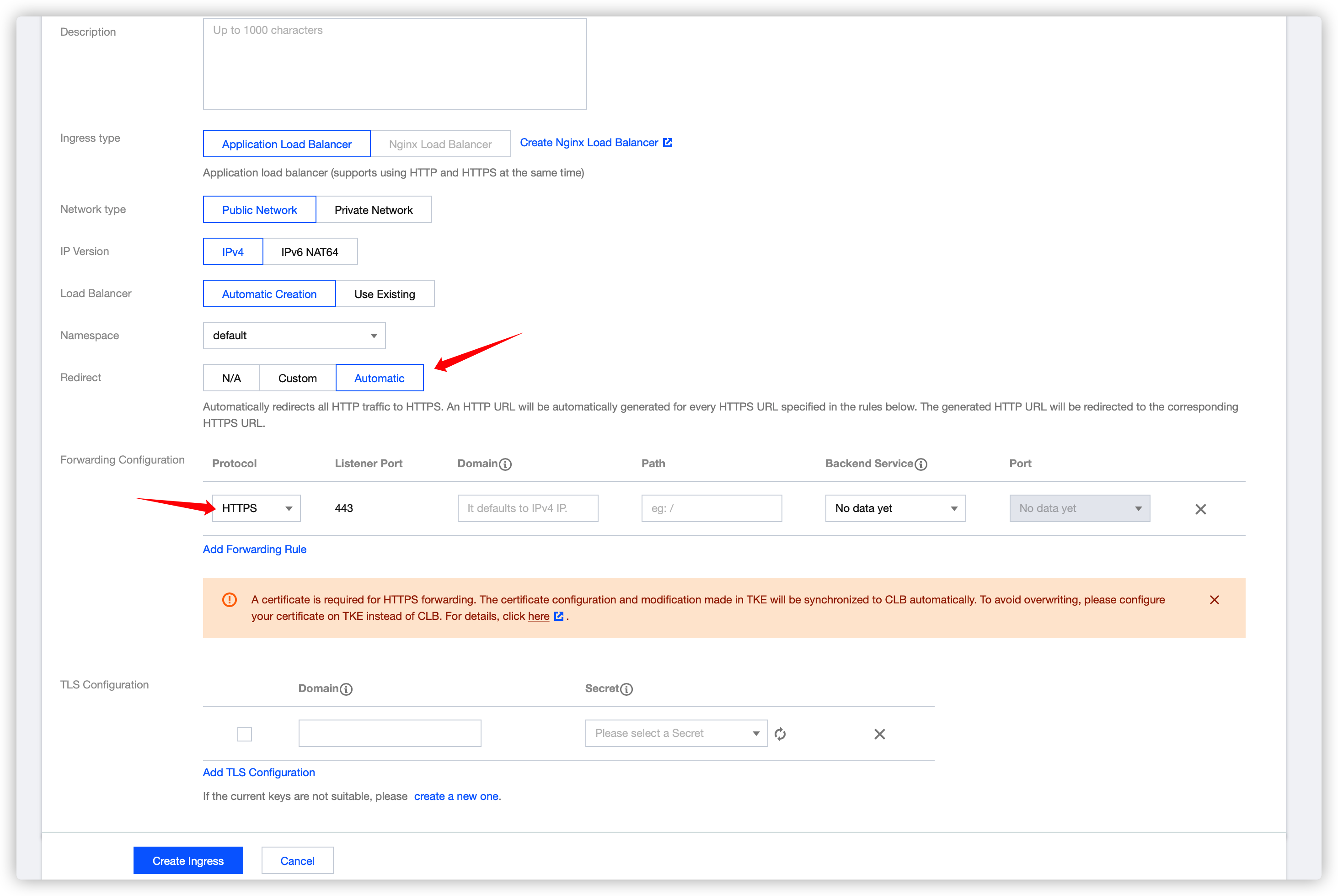
3. On the cluster details page, select Services and Routes > Ingress as shown below: 4. Click Create and configure the relevant redirection rule on the Create Ingress page as shown below:
None: no redirection rules are used.
Manual: the Redirection Forwarding Configuration section will appear under Forwarding Configuration.
You can enter information in Forwarding Configuration just like for a general Ingress, with the backend being a certain service.
You can also enter information in Redirection Forwarding Configuration just like for a general Ingress, but the backend is a certain path in a certain "forwarding configuration".
Auto: it only takes effect for the "HTTPS" path in Forwarding Configuration. The same path with the "HTTP" protocol will be generated automatically, and only the protocols are different. The forwarding rule for the "HTTP" path is automatically redirected to the "HTTPS" path.
Automatic redirection: HTTP redirection to HTTPS
Note:
It takes effect only for the forwarding rule of the HTTPS protocol.
Configure the following annotation in Ingress YAML:
ingress.cloud.tencent.com/auto-rewrite: "true"
After the annotation is configured, the layer-7 forwarding rules that exist in all HTTPS listeners at the forwarding path will be mapped to the HTTP listeners as redirection rules, with the domain name and the path intact.
Manual redirection
Manual redirection requires adding an annotation and modifying an annotation:
Added annotation:
ingress.cloud.tencent.com/rewrite-support: "true"
Modified annotation:
{
"host": "<domain>",
"path": "<path>",
"backend": {
"serviceName": "<service name>",
"servicePort": "<service port>"
}
}
{
"host": "<domain>",
"path": "<path>",
"backend": {
"serviceName": "<service name>",
"servicePort": "<service port>"
},
"rewrite": {
"port": "<rewrite-port>",
"host": "<rewrite-domain>",
"path": "<rewrite-path>"
}
}
Samples
A service was previously accessed at 121.4.25.44/path2, and after a new version is released, it is expected to be accessed at 121.4.25.44/v2/path2. To do this, you can make the following modification:
Add an annotation:
ingress.cloud.tencent.com/rewrite-support: "true"
Modify the original annotation:
kubernetes.io/ingress.http-rules: '
[{
"path": "/path1",
"backend": {
"serviceName": "path1",
"servicePort": "80"
}
},
{
"path": "/path2",
"backend": {
"serviceName": "path2",
"servicePort": "80"
}
},
{
"path": "/v1/path1",
"rewrite": {
"port": 80,
"path": "/path1"
}
},
{
"path": "/v2/path2",
"rewrite": {
"port": 80,
"path": "/path2"
}
}
]'
Modified YAML:
apiVersion: extensions/v1beta1
kind: Ingress
metadata:
annotations:
description: test
ingress.cloud.tencent.com/rewrite-support: "true"
kubernetes.io/ingress.class: qcloud
kubernetes.io/ingress.http-rules: '[{"path":"/path1","backend":{"serviceName":"path1","servicePort":"80"}},{"path":"/path2","backend":{"serviceName":"path2","servicePort":"80"}},{"path":"/v1/path1","rewrite":{"port":80,"path":"/path1"}},{"path":"/v2/path2","rewrite":{"port":80,"path":"/path2"}}]'
kubernetes.io/ingress.https-rules: "null"
kubernetes.io/ingress.rule-mix: "true"
name: test
namespace: default
spec:
rules:
- http:
paths:
- backend:
serviceName: path1
servicePort: 80
path: /path1
pathType: ImplementationSpecific
- http:
paths:
- backend:
serviceName: path2
servicePort: 80
path: /path2
pathType: ImplementationSpecific
status:
loadBalancer:
ingress:
- ip: 121.4.25.44