tke-karpenter
Download
Mode fokus
Ukuran font
Component Introduction
Karpenter is an open-source dynamic management component for the lifecycle of Kubernetes worker nodes. It can automatically scale out nodes based on unscheduled Pods in a cluster. When a Pod is created in Kubernetes, the Kubernetes scheduler is responsible for scheduling the Pod to a node in the cluster. If no available node can accommodate it, the Pod will remain in the Pending state. This component can monitor Pending Pods in the cluster and scale out cluster resources by creating nodes to meet the Pod scheduling requirements. Compared to Cluster Autoscaler, Karpenter has the advantages of faster and more flexible scheduling, and higher resource utilization. This component mainly serves users utilizing Karpenter-related features in TKE clusters.
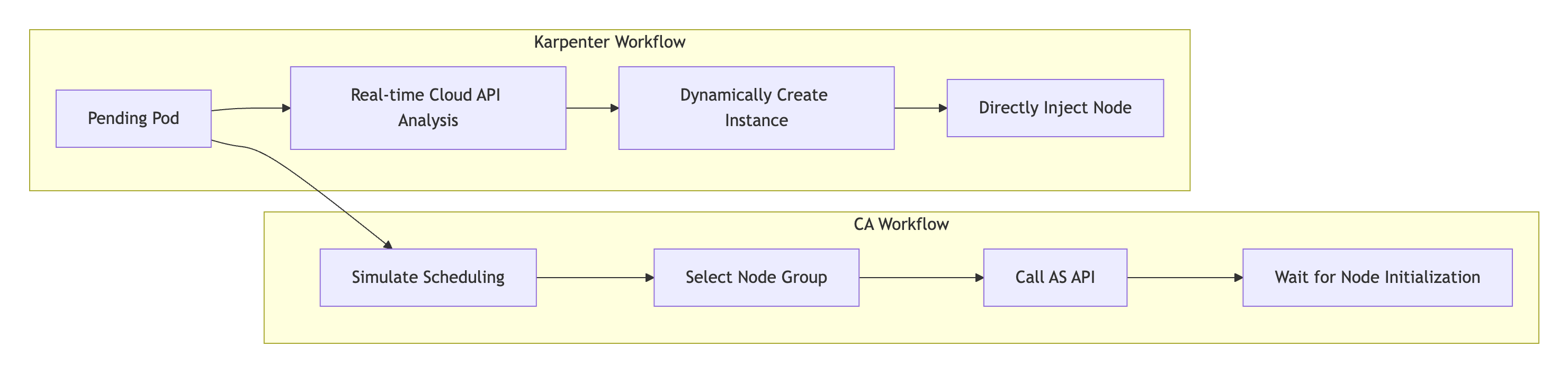
Compared with traditional Cluster Autoscaler (CA), Karpenter addresses three long-standing core pain points faced by businesses in cloud native environments through its revolutionary dynamic resource-aware architecture:
1. High response delay: The complex node group matching, auto scaling group API calls, and node initialization processes of CA result in a prolonged scaling duration, which can easily cause service interruptions in burst traffic scenarios.
2. Low scheduling accuracy: Since CA relies on static node group presets, it is unable to dynamically perceive the topology constraint requirements of Pods, resulting in high randomness in scaling, insufficient resource usage rate, and frequent multi-AZ scheduling issues.
3. High Ops burden: Originated from CA's need to separately maintain node pools for different models/AZs, thousands of nodes clusters often require managing multiple node pools, and manually maintaining multiple specification node pools. Issues such as model sold out and template inconsistency lead to high Ops costs.
Karpenter, as Tencent Cloud TKE's next-generation elastic engine, achieves breakthrough innovation through dynamic resource awareness + declarative API architecture:
1. Slow resolution speed: Karpenter bypasses node groups and auto scaling groups, directly creates customized nodes by in real-time calling TencentCloud API, significantly simplifies the scaling workflow, and completes resource supply in seconds.
2. Low accuracy resolution: Based on the dynamic resource awareness engine, it performs real-time analysis of inventory/cost/topology data, automatically selects the best model and availability zone, and achieves significantly reduced cross-AZ scheduling deviation and significantly improved resource usage rate.
3. Simplify operations and maintenance: A single NodePool declaration covers all models/AZs, eliminating the need to predefine node groups. The operation and maintenance target is reduced from "number of node pools" to "number of resource policies".
Use Limits
This component requires the Kubernetes version of clusters to be 1.22 or later.
This component currently only supports managing on-demand native nodes..
This component currently does not support GPU-related resources.
If the auto scaling feature of Cluster Autoscaler (CA) is already enabled for node pools in your cluster, you should disable CA before using this component; otherwise, there will be a feature conflict.
Note:
Auxiliary ENI IP addresses are dynamically allocated to TKE cluster nodes and correspond to the
status.allocatable.tke.cloud.tencent.com/eni-ip value of the nodes. When a Pod is in the Pending state due to insufficient ENI IP addresses, the network component will dynamically adjust this value. However, this process has a certain delay, causing the component to quickly start new nodes when it detects Pod Pending. It is strongly recommended to enable the static IP network mode when you create a cluster (in Terraform, you should configure is_non_static_ip_mode = false). In this way, the status.allocatable.tke.cloud.tencent.com/eni-ip value of the node will remain fixed, preventing unnecessary node creation.Usage
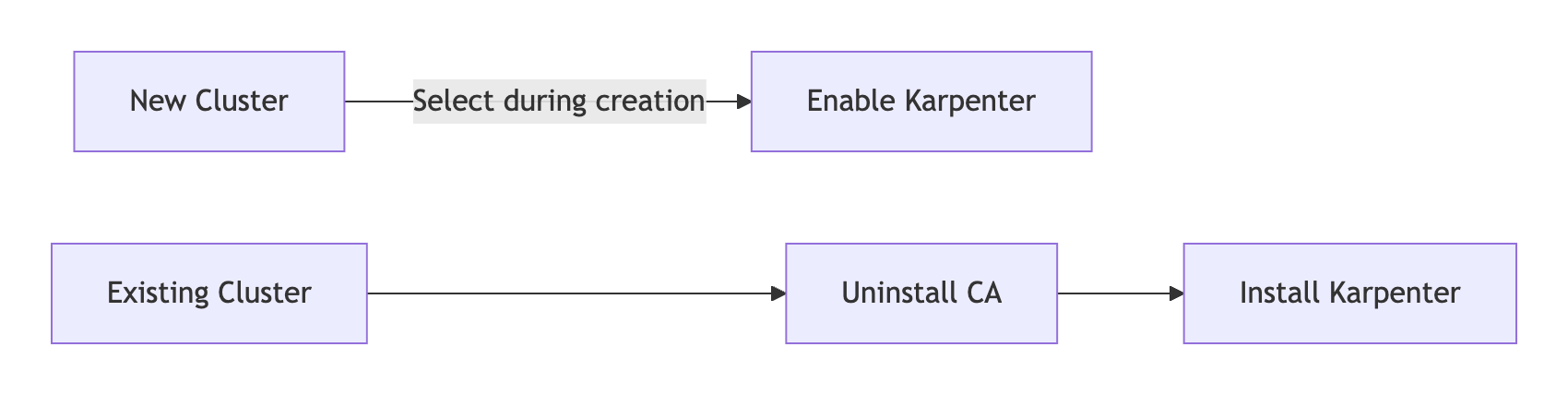
Existing Cluster Migration Solution
Step 1: Uninstall the CA Component
1. Log in to the TKE console , select Cluster.
2. In the cluster list, select a target cluster and enter the cluster details page.
3. Select Component Management , click Delete on the right of cluster-autoscaler.
4. In the delete resource pop-up window, click Confirm . After deleting the component, the system automatically freezes the scaling ability of all node pools.
Step 2: Install Karpenter
1. In Component Management, click Create.
2. In Create Component Management, check Karpenter.
3. Click Finish.
Notes:
After Karpenter installation is completed, the system automatically releases the CA association to ensure mutual exclusion takes effect.
Step 3: Deploying the NodePool Resource
The custom NodePool resource can be used to set constraints for created nodes and the Pods running on these nodes, for example:
1. Define taints to restrict which Pods can run on scaled-up nodes.
2. Define the availability zone, instance type, instance specifications, and billing mode of nodes.
3. Define resource limits for managed nodes.
apiVersion: karpenter.sh/v1kind: NodePoolmetadata:name: testannotations:kubernetes.io/description: "NodePool to restrict the number of cpus provisioned to 10"spec:# Disruption section which describes the ways in which Karpenter can disrupt and replace Nodes# Configuration in this section constrains how aggressive Karpenter can be with performing operations# like rolling Nodes due to them hitting their maximum lifetime (expiry) or scaling down nodes to reduce cluster costdisruption:consolidationPolicy: WhenEmptyOrUnderutilizedconsolidateAfter: 5mbudgets:- nodes: 10%template:metadata:annotations:# node.tke.cloud.tencent.com/automation-service Node automation service (TAT logon capacity)# node.tke.cloud.tencent.com/security-agent Node security reinforcement# node.tke.cloud.tencent.com/monitor-service Cloud Monitorbeta.karpenter.k8s.tke.machine.meta/annotations: node.tke.cloud.tencent.com/automation-service=true,node.tke.cloud.tencent.com/security-agent=true,node.tke.cloud.tencent.com/monitor-service=true# node.tke.cloud.tencent.com/beta-image specifies the node mirror, where ts4-public corresponds to tencentos server 4beta.karpenter.k8s.tke.machine.spec/annotations: node.tke.cloud.tencent.com/beta-image=ts4-publicspec:# Requirements that constrain the parameters of provisioned nodes.# These requirements are combined with pod.spec.topologySpreadConstraints, pod.spec.affinity.nodeAffinity, pod.spec.affinity.podAffinity, and pod.spec.nodeSelector rules.# Operators { In, NotIn, Exists, DoesNotExist, Gt, and Lt } are supported.# https://kubernetes.io/docs/concepts/scheduling-eviction/assign-pod-node/#operatorsrequirements:- key: kubernetes.io/archoperator: Invalues: ["amd64"]- key: kubernetes.io/osoperator: Invalues: ["linux"]- key: karpenter.k8s.tke/instance-familyoperator: Invalues: ["S5","SA2"]- key: karpenter.sh/capacity-typeoperator: Invalues: ["on-demand"]# - key: node.kubernetes.io/instance-type# operator: In# values: ["S5.MEDIUM2", "S5.MEDIUM4"]- key: "karpenter.k8s.tke/instance-cpu"operator: Gtvalues: ["1"]# - key: "karpenter.k8s.tke/instance-memory-gb"# operator: Gt# values: ["3"]# References the Cloud Provider's NodeClass resourcenodeClassRef:group: karpenter.k8s.tkekind: TKEMachineNodeClassname: default# Resource limits constrain the total size of the pool.# Limits prevent Karpenter from creating new instances once the limit is exceeded.limits:cpu: 10
Note:
1. Common tag selectors.
Selector | Description |
topology.kubernetes.io/zone | Availability zone of the instance, such as 900001. |
kubernetes.io/arch | Instance architecture. Currently only amd64 is supported. |
kubernetes.io/os | Operating system. Currently only linux is supported. |
karpenter.k8s.tke/instance-family | Model instance family, such as S5 and SA2. |
karpenter.sh/capacity-type | Instance billing mode, such as on-demand. |
node.kubernetes.io/instance-type | Instance specifications, such as S5.MEDIUM2. |
karpenter.k8s.tke/instance-cpu | Number of CPUs for an instance, such as 4. |
karpenter.k8s.tke/instance-memory-gb | Memory size of an instance, such as 8. |
2. How do I set the Topology Label?
tke-karpenter sets the Topology Label by ID, such as
topology.kubernetes.io/zone: "900001", and establishes correspondence between the tag value (such as topology.com.tencent.cloud.csi.cbs/zone: ap-singapore-1) of topology.com.tencent.cloud.csi.cbs/zone and the actual availability zone description. You can view the zone and zone ID of your subnet using the command describe tmnc Namexxx.3. Disable the Drift feature.
This feature is considered dangerous, so it has not been implemented by tke-karpenter. If you modify TKEMachineNodeClass, the existing old node (nodeclaim) will not be replaced and your modifications will only affect the creation of new nodes. If you modify nodepool and the tag of the existing nodeclaim does not meet the nodepool requirements, the old node will be replaced. For example, the tag of the old node claim is
karpenter.k8s.tke/instance-cpu: 2, but the nodepool requirements have been modified as follows:template: spec: requirements: - key: "karpenter.k8s.tke/instance-cpu" operator: Gt values: ["2"]
Since
karpenter.k8s.tke/instance-cpu: 2 is not Gt 2, the nodeclaim will be replaced. If you want to ignore Drifted disruption, you should add the following disruption settings to the node pool:disruption:consolidationPolicy: WhenEmptyOrUnderutilizedconsolidateAfter: 5mbudgets:- nodes: "0"reasons: [Drifted]- nodes: 10%
4. It is recommended to set expireAfter to Never.
expireAfter: 720h | Never
The
spec.template.spec.expireAfter field defines the duration for a node to survive in a cluster before the node is removed, reducing problems caused by nodes running for a long time, such as file fragmentation or memory leaks in system processes. Since this parameter will lead to regular termination and reconstruction of nodes, you can completely disable expiration by setting this field to the string value Never, to avoid business impact during the reconstruction process.Step 4: Deploying the TKEMachineNodeClass Resource
NodeClass supports configuring relevant parameters of TKE nodes, such as subnet, system disk, security groups, and SSH key for node login. Each NodePool should reference TKEMachineNodeClass via
spec.template.spec.nodeClassRef. Multiple NodePools may point to the same TKEMachineNodeClass.apiVersion: karpenter.k8s.tke/v1beta1kind: TKEMachineNodeClassmetadata:name: defaultannotations:kubernetes.io/description: "General purpose TKEMachineNodeClass"spec:## using kubectl explain tmnc.spec.internetAccessible to check how to use internetAccessible filed.# internetAccessible:# chargeType: TrafficPostpaidByHour# maxBandwidthOut: 2## using kubectl explain tmnc.spec.systemDisk to check how to use systemDisk filed.# systemDisk:# size: 60# type: CloudSSD## using kubectl explain tmnc.spec.dataDisks to check how to use systemDisk filed.# dataDisks:# - mountTarget: /var/lib/container# size: 100# type: CloudPremium# fileSystem: ext4subnetSelectorTerms:# repalce your tag which is already existed in https://console.tencentcloud.com/tag/taglist- tags:karpenter.sh/discovery: cls-xxx# - id: subnet-xxxsecurityGroupSelectorTerms:- tags:karpenter.sh/discovery: cls-xxx# - id: sg-xxxsshKeySelectorTerms:- tags:karpenter.sh/discovery: cls-xxx# - id: skey-xxx
Step 5: Deploying Workloads
You can scale out the number of application Pods and observe how Karpenter creates nodes when the Pods are in the Pending state. Common commands are as follows:
# Get nodepoolkubectl get nodepool# Get nodeclaimkubectl get nodeclaim# Get TKEMachineNodeClass
kubectl get tmnc# Check your cloud resources has been synced to nodeclasskubectl describe tmnc default
Here is an output example of the
kubectl describe tmnc default command:Status:Conditions:Last Transition Time: 2024-08-21T09:17:26ZMessage:Reason: ReadyStatus: TrueType: ReadySecurity Groups:Id: sg-xxxSsh Keys:Id: skey-xxxId: skey-xxxId: skey-xxxSubnets:Id: subnet-xxxZone: ap-singapore-1Zone ID: 900001Id: subnet-xxxZone: ap-singapore-4Zone ID: 900004
Incremental Cluster Installation Solution
1. Log in to the TKE console , select Cluster.
2. Click Create . For the procedure to create a cluster, please see Create Cluster .
3. In Cluster Creation > Component Configuration, check Karpenter.
Note:
If Karpenter is selected for deployment, CA will not be deployed.
4. After the cluster is created, refer to steps 3-5 in the Existing Cluster Migration Solution to deploy NodePool resources, TKEMachineNodeClass resources, and workloads.
Bantuan dan Dukungan
Apakah halaman ini membantu?
Anda juga dapat Menghubungi Penjualan atau Mengirimkan Tiket untuk meminta bantuan.
masukan