Cluster Deletion
Download
Focus Mode
Font Size
Cloud Service for etcd clusters do not support cascade deletion. Before you delete a cluster, make sure that all stored data in the cluster has been removed. Cluster deletion cannot be restored. Operate with caution.
Note:
Before you delete a cluster, it is recommended that you check the instance monitoring data to confirm if client businesses are still using the cluster.
For clusters with password authentication enabled, you cannot check the data storage status. Therefore, they are not subject to the cascade deletion restriction. Operate with caution.
Directions
Clearing the Stored Data
To clear all key-value data in an etcd cluster, you can use the etcdctl command-line tool to perform the following operations:
1. Ensure that etcdctl is installed. If not, download and install the latest version from the GitHub release page of etcd.
2. Set environment variables for etcdctl, typically including ETCDCTL_API, ETCDCTL_ENDPOINTS, ETCDCTL_CACERT, ETCDCTL_CERT, and ETCDCTL_KEY.
3. Before you delete the data, you are suggested to use the etcdctl tool to create a snapshot of the etcd cluster and save it as a file for backup and recovery. Execute the following command:
etcdctl --command-timeout=30s snapshot save $etcdID-final.db
--command-timeout=30s is an optional parameter that sets the command timeout to 30 seconds. If the command is not executed successfully within this time, it will be terminated.snapshot save $etcdID-final.db is the actually executed command. It creates a snapshot of the etcd cluster and saves it as a file. $etcdID is a variable. You need to replace it with the actual etcd node ID or any other name you want to use.4. Use etcdctl to delete all key-value data. The following command will delete all key-value pairs under the root directory:
etcdctl del "" --prefix
Deleting the Cluster
1. Log in to the console of Cloud Service for etcd.
2. Choose More > Terminate/Return on the right of the cluster on the Cloud native etcd page, as shown in the figure below:
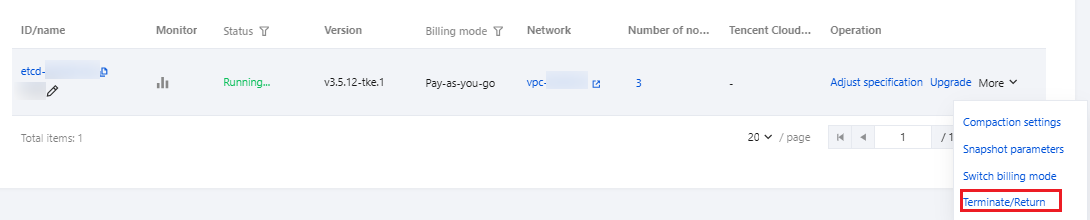
3. Select other cloud resources to be terminated on the Terminate/return instances page.
Snapshot data stored in the COS bucket will be retained by default. If the option of COS snapshot data deletion is selected, the snapshot data of the cluster in the bucket will be deleted, but the bucket will be retained.
CLB resources generated after public network access is enabled will be deleted along with the Cloud Service for etcd cluster.
4. Click Confirm.
Help and Support
Was this page helpful?
You can also Contact sales or Submit a Ticket for help.
Help us improve! Rate your documentation experience in 5 mins.
Feedback