Release Notes
Announcements
Protobuf definition file. In the file, three key structures are defined as follows: Envelope is the final Kafka message structure; Entry is the structure of a single subscription event; Entries is the collection of Entry. Their relationship is shown below: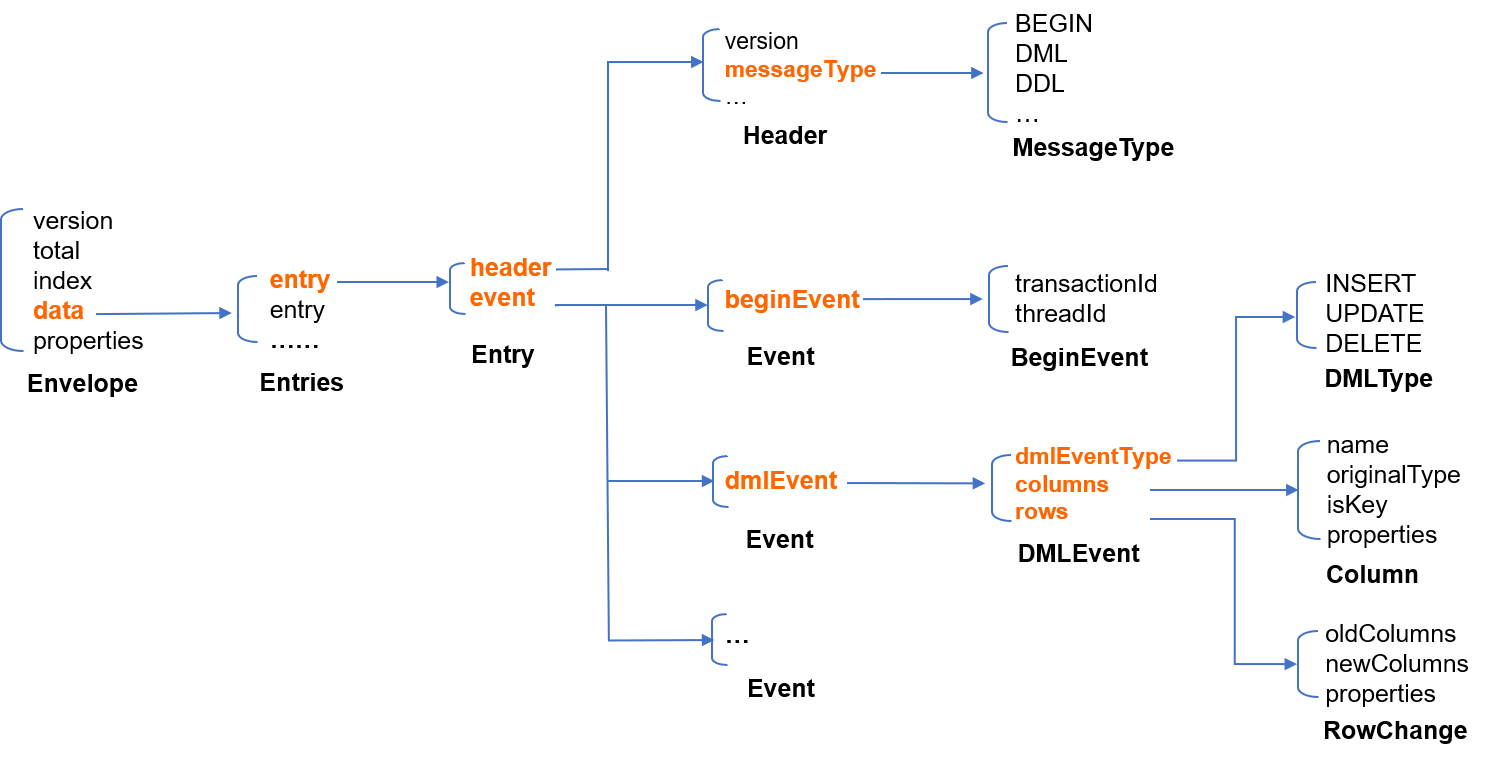
Entry.message Entry { // An `Entry` is the structure of an individual subscription event. An event is similar to a binlog event in MySQL.Header header = 1; // The event headerEvent event = 2; // The event body}message Header {int32 version = 1; // The protocol version of the `Entry`SourceType sourceType = 2; // The source database type, such as MySQL and OracleMessageType messageType = 3; // The message type, i.e., event type, such as BEGIN, COMMIT, and DMLuint32 timestamp = 4; // The event timestamp in the source binlogint64 serverId = 5; // The `serverId` of the source databasestring fileName = 6; // The filename of the source binloguint64 position = 7; // The event offset in the source binlog filestring gtid = 8; // The GTID of the current transactionstring schemaName = 9; // The modified schemastring tableName = 10; // The modified tableuint64 seqId = 11; // The globally incremental serial numberuint64 eventIndex = 12; // If a large event is sharded, the shard number starts from 0. This parameter is meaningless on the current version and is reserved for future use.bool isLast = 13; // Whether the current shard is the last shard of a sharded event; if so, the value is `true`. This parameter is meaningless on the current version and is reserved for future use.repeated KVPair properties = 15;}message Event {BeginEvent beginEvent = 1; // The BIGIN event in the binlogDMLEvent dmlEvent = 2; // The DML event in the binlogCommitEvent commitEvent = 3; // The COMMIT event in the binlogDDLEvent ddlEvent = 4; // The DDL event in the binlogRollbackEvent rollbackEvent = 5; // The rollback event. This parameter is meaningless on the current version.HeartbeatEvent heartbeatEvent = 6; // The heartbeat event regularly sent by the source databaseCheckpointEvent checkpointEvent = 7; // The checkpoint event added to the subscription backend, which is generated automatically once every 10 seconds and is used for Kafka production and consumption offset management.repeated KVPair properties = 15;}
Entry structures are merged to reduce the number of messages, and the structure of binlog events becomes Entries after the merge. The Entries.items field refers to the Entry sequence list. The reasonable number of merged Entry structures should be smaller than that of a single Kafka message. If a single binlog event has exceeded the size limit, Entry structures will not be merged anymore, so there will be only one Entry in the Entries structure.message Entries {repeated Entry items = 1; // `Entry` list}
Entries with Protobuf to generate a binary sequence.data field of an Envelope. If a single binlog event is oversize, the binary sequence may exceed the size limit of a single Kafka message. In this case, you can separate the binary sequence into multiple segments and put each segment in an Envelope.message Envelope {int32 version = 1; // The protocol version, which determines how the data content is decoded.uint32 total = 2;uint32 index = 3;bytes data = 4; // Here, `version` is 1, indicating that the data is `Entries` serialized in the Protobuf format.repeated KVPair properties = 15;}
Envelope structures generated in the previous step in sequence and deliver the Envelope structures to Kafka partitions. Multiple Envelope structures in the same Entries are delivered to the same partition in sequence.// Create a FlinkKafkaConsumerFlinkKafkaConsumer<RecordMsgObject> consumer =new FlinkKafkaConsumer<>(topic, new DeserializeProtobufToRecordMsgObject(), props);
DeserializeProtobufToRecordMsgObject to deserialize the original message to a RecordMsgObject object.// Customize a message deserializer to deserialize the original message to a `RecordMsgObject` object@Overridepublic RecordMsgObject deserialize(ConsumerRecord<byte[], byte[]> record) throws Exception {RecordMsgObject obj = new RecordMsgObject();obj.topic = record.topic();obj.partition = record.partition();obj.offset = record.offset();obj.partitionSeq = getPartitionSeq(record);obj.key = new String(record.key());obj.headers = record.headers();// Here the binary value of `Envelope` will be receivedobj.value = record.value();return obj;}
SubscribeMsgProcess//Put the received messages in different partitionsstream.keyBy(RecordMsgObject::getPartition).process(new SubscribeMsgProcess(trans2sql)).setParallelism(1);
SubscribeMsgProcess into Envelope.// Obtain an `Envlope` by deserialization. In this demo, only one `Envlope` can store the data of the whole binlog event by default.SubscribeProtobufData.Envelope envelope = SubscribeProtobufData.Envelope.parseFrom(record.value);if (1 != envelope.getVersion()) {throw new IllegalStateException(String.format("unsupported version: %d", envelope.getVersion()));}
Envelope must be concatenated with the Flink's advanced feature "state processor API" so that the message body is complete. You need to handle this based on your business scenario. For more information, see Flink Documentation.data field of the received Envelope into Entries.// Deserialize `Entries`ByteString envelopeData = envelope.getData();SubscribeProtobufData.Entries entries;if (1 == envelope.getTotal()) {entries = SubscribeProtobufData.Entries.parseFrom(envelopeData.toByteArray());} else {entries = SubscribeProtobufData.Entries.parseFrom(shardMsgMap.get(shardId).toByteArray());shardMsgMap.remove(shardId);}
Entries.items in sequence, and print the original Entry structure or convert it into a SQL statement.// Traverse each `Entry` and print the SQL statement based on the type of `Entry`for (SubscribeProtobufData.Entry entry : entries.getItemsList()) {onEntry(record.partition, record.offset, ps, entry, trans2sql);}
message Data {DataType dataType = 1;string charset = 2; // The encoding (string) type of DataType_STRING, with the value stored in `bv`string sv = 3; // The string value of DataType_INT8/16/32/64/UINT8/16/32/64/Float32/64/DataType_DECIMALbytes bv = 4; // The value of DataType_STRING/DataType_BYTES}
DataType refers to the type of stored fields. The values are as enumerated below:enum DataType {NIL = 0; // The value is `NULL`INT8 = 1;INT16 = 2;INT32 = 3;INT64 = 4;UINT8 = 5;UINT16 = 6;UINT32 = 7;UINT64 = 8;FLOAT32 = 9;FLOAT64 = 10;BYTES = 11;DECIMAL = 12;STRING = 13;NA = 14; // The value does not exist (N/A).}
bv field stores the binary representation of STRING and BYTES; the sv field stores the string representation of INT8/16/32/64/UINT8/16/32/64/DECIMAL; the charset field stores the encoding type of STRING.DataType is as shown below (the MYSQL_TYPE_INT8/16/24/32/64 modified by UNSIGNED is respectively mapped to UINT8/16/32/32/64):DATE, TIME, and DATETIME types don't support time zone.TIMESTAMP type supports time zone. Fields of this type will have their current time zone converted to Universal Time Coordinated (UTC) for storage, and vice versa for query.MYSQL_TYPE_TIMESTAMP and MYSQL_TYPE_TIMESTAMP_NEW fields carry the time zone information, which you can convert on your own when consuming data. For example, the format of the time data output by DTS is a string with time zone, such as 2021-05-17 07:22:42 +00:00, where +00:00 indicates the UTC time. You need to take into account the time zone information when parsing and converting the data.TDSQL for MySQL Field Type | Protobuf DataType Value |
MYSQL_TYPE_NULL | NIL |
MYSQL_TYPE_INT8 | INT8 |
MYSQL_TYPE_INT16 | INT16 |
MYSQL_TYPE_INT24 | INT32 |
MYSQL_TYPE_INT32 | INT32 |
MYSQL_TYPE_INT64 | INT64 |
MYSQL_TYPE_BIT | INT64 |
MYSQL_TYPE_YEAR | INT64 |
MYSQL_TYPE_FLOAT | FLOAT32 |
MYSQL_TYPE_DOUBLE | FLOAT64 |
MYSQL_TYPE_VARCHAR | STRING |
MYSQL_TYPE_STRING | STRING |
MYSQL_TYPE_VAR_STRING | STRING |
MYSQL_TYPE_TIMESTAMP | STRING |
MYSQL_TYPE_DATE | STRING |
MYSQL_TYPE_TIME | STRING |
MYSQL_TYPE_DATETIME | STRING |
MYSQL_TYPE_TIMESTAMP_NEW | STRING |
MYSQL_TYPE_DATE_NEW | STRING |
MYSQL_TYPE_TIME_NEW | STRING |
MYSQL_TYPE_DATETIME_NEW | STRING |
MYSQL_TYPE_ENUM | STRING |
MYSQL_TYPE_SET | STRING |
MYSQL_TYPE_DECIMAL | DECIMAL |
MYSQL_TYPE_DECIMAL_NEW | DECIMAL |
MYSQL_TYPE_JSON | BYTES |
MYSQL_TYPE_BLOB | BYTES |
MYSQL_TYPE_TINY_BLOB | BYTES |
MYSQL_TYPE_MEDIUM_BLOB | BYTES |
MYSQL_TYPE_LONG_BLOB | BYTES |
MYSQL_TYPE_GEOMETRY | BYTES |
Apakah halaman ini membantu?
Anda juga dapat Menghubungi Penjualan atau Mengirimkan Tiket untuk meminta bantuan.
masukan