Vulnerability Management
Download
フォーカスモード
フォントサイズ
Vulnerability governance is designed to help customers scan for security vulnerabilities in their systems and provide vulnerability information and fixing suggestions. For some vulnerabilities, you can enable precise defense, and they can be fixed automatically. This document describes how to perform vulnerability governance.
Restrictions
To unlock the vulnerability governance feature, at least one Professional/Flagship Edition host must exist.
The scope of vulnerability governance is described as follows: ('✓' indicates supported, and '-' indicates not currently supported).
Vulnerability Management Feature | Vulnerability type | Linux System | Windows System |
Vulnerability scans. Applicable to hosts of the Pro or Ultimate Edition | Linux software vulnerabilities | ✓ | - |
| Windows system patches | - | ✓ |
| Web-CMS vulnerabilities | ✓ | ✓ |
| Application vulnerabilities | ✓ | ✓ |
Vulnerability Defense Applicable to servers of the Ultimate Edition | Linux software vulnerabilities | - | - |
| Windows system patches | - | - |
| Web-CMS vulnerabilities | ✓ (Only some vulnerabilities are supported) | - |
| Application vulnerabilities | ✓ (Only some vulnerabilities are supported) | - |
Automatic Vulnerability Fixing Applicable to hosts of the Pro or Ultimate Edition | Linux software vulnerabilities | ✓ (Only some vulnerabilities are supported) | - |
| Windows system patches | - | ✓ |
| Web-CMS vulnerabilities | ✓ (Only some vulnerabilities are supported) | ✓ (Only some vulnerabilities are supported) |
| Application vulnerabilities | - | - |
The operating systems supported for vulnerability scanning and automatic fixing are listed as follows:
Operating system | System Version | System Vulnerability | Application Vulnerability/Web-CMS Vulnerability |
CentOS | CentOS 5 | ✓ | ✓ |
| CentOS 6 | ✓ | ✓ |
| CentOS 7 | ✓ | ✓ |
| CentOS 8 | ✓ | ✓ |
Debian Note: Only vulnerability scanning is supported. Automatic vulnerability fixing is not supported. | Debian 8 | - | ✓ |
| Debian 9 | - | ✓ |
| Debian 10 | - | ✓ |
| Debian 11 | - | ✓ |
| Debian 12 | - | ✓ |
Windows Note: Only vulnerability scanning is supported. Automatic vulnerability fixing is not supported. | Windows Server 2008 | ✓ | ✓ |
| Windows Server 2012 | ✓ | ✓ |
| Windows Server 2016 | ✓ | ✓ |
| Windows Server 2019 | ✓ | ✓ |
| Windows Server 2022 | ✓ | ✓ |
Ubuntu | Ubuntu 16.04 | ✓ | ✓ |
| Ubuntu 18.04 | ✓ | ✓ |
| Ubuntu 20.04 | ✓ | ✓ |
| Ubuntu 21.04 | ✓ | ✓ |
| Ubuntu 22.04 | ✓ | ✓ |
| Ubuntu 24.04 | ✓ | ✓ |
Tlinux/TencentOS | Tlinux | - | ✓ |
RockyLinux | RockyLinux | - | ✓ |
OpenCloudOS | OpenCloudOS | - | ✓ |
To avoid affecting user business, vulnerability fixing is not automatically executed immediately after vulnerabilities are detected. You must assess the risks and then proactively click Fix and complete data backup to initiate the automated fixing process. For detailed operations, see Vulnerability Automatic Fixing Documentation.
Operating System Lifecycle Limitation. For operating systems that have entered the end-of-support state (that is, versions for which the vendor has stopped providing updates), CSC will no longer provide scanning and fixing support for vulnerabilities that emerge after the end-of-support date. Vulnerabilities that emerged before the end-of-support date are still supported, and the scope of already supported vulnerabilities is also unaffected. The list of end-of-support systems is as follows:
Operating System Version | Official End of Support Date |
Windows Server 2003 | July 14, 2015 |
Windows Server 2008 | January 14, 2020 |
Windows Server 2008 R2 | January 14, 2020 |
Windows Server 2008 SP2 | January 14, 2020 |
Windows Server 2012 | October 10, 2023 |
Windows Server 2012 R2 | October 10, 2023 |
Ubuntu 12.04 LTS | April 28, 2017 |
Ubuntu 14.04 LTS | Apr-19 |
Ubuntu 16.04 LTS | 21-Apr |
Ubuntu 18.04 LTS | April 2023 |
CentOS 5 | March 31, 2017 |
CentOS 6 | November 30, 2020 |
CentOS 7 | June 30, 2024 |
CentOS 8 | December 31, 2021 |
Vulnerability Scan
1. Log in to the CSC console. In the left-side navigation, click Vulnerability Governance.
2. In the Vulnerability Scan module, one-click scan and scheduled scan are supported.
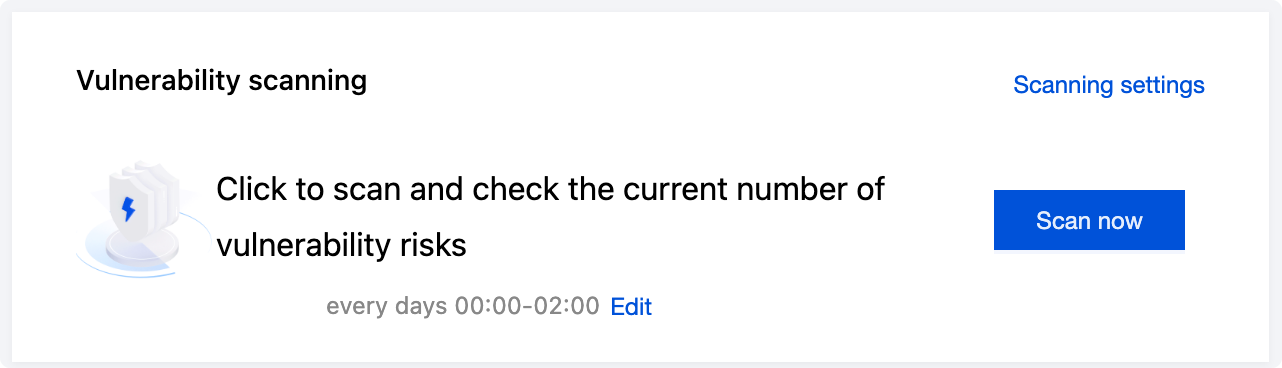
Click Scan now. This opens the one-click scan settings dialog box, where you can configure the vulnerability categories, threat levels, timeout settings, and host scope for this scan.
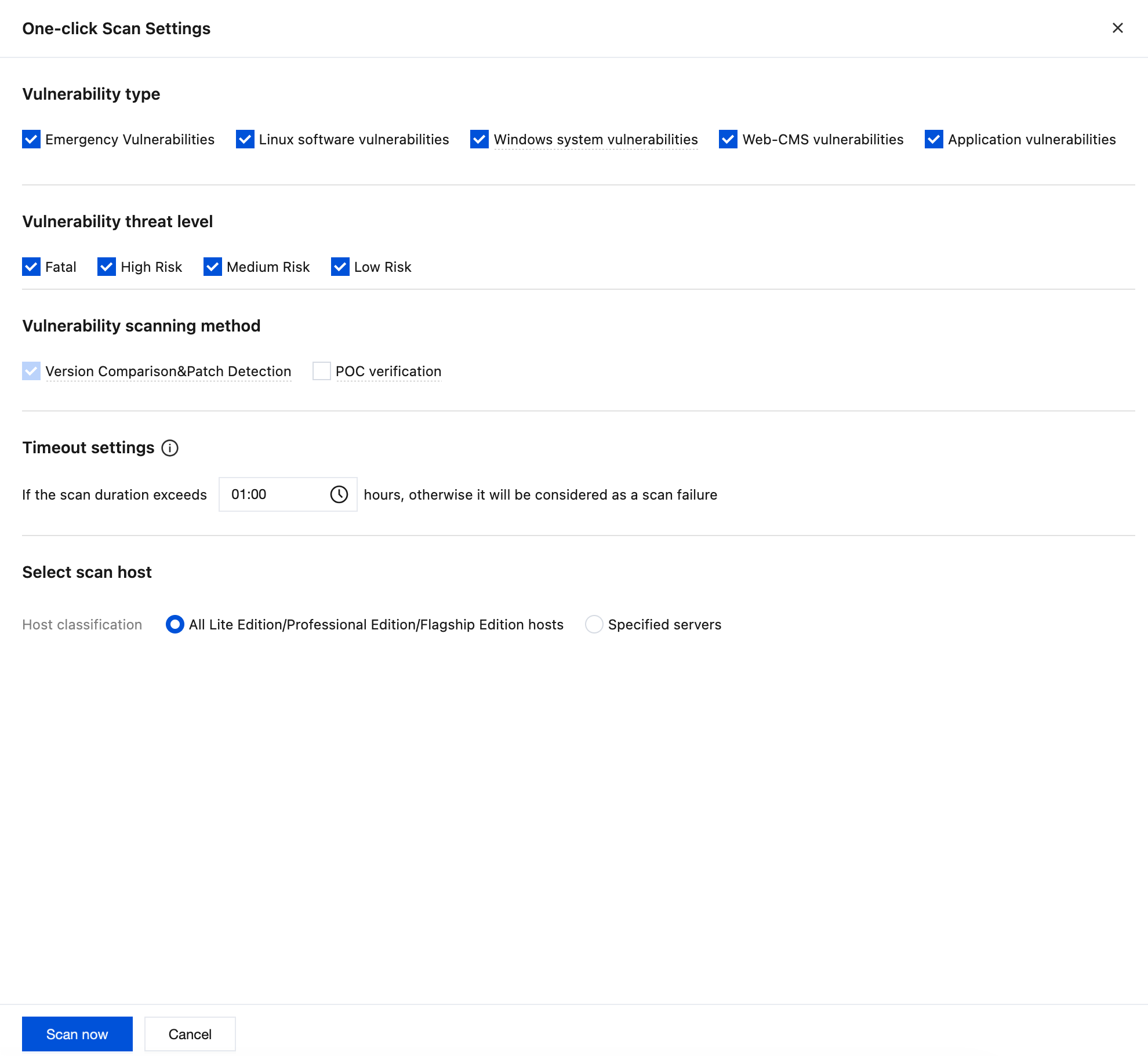
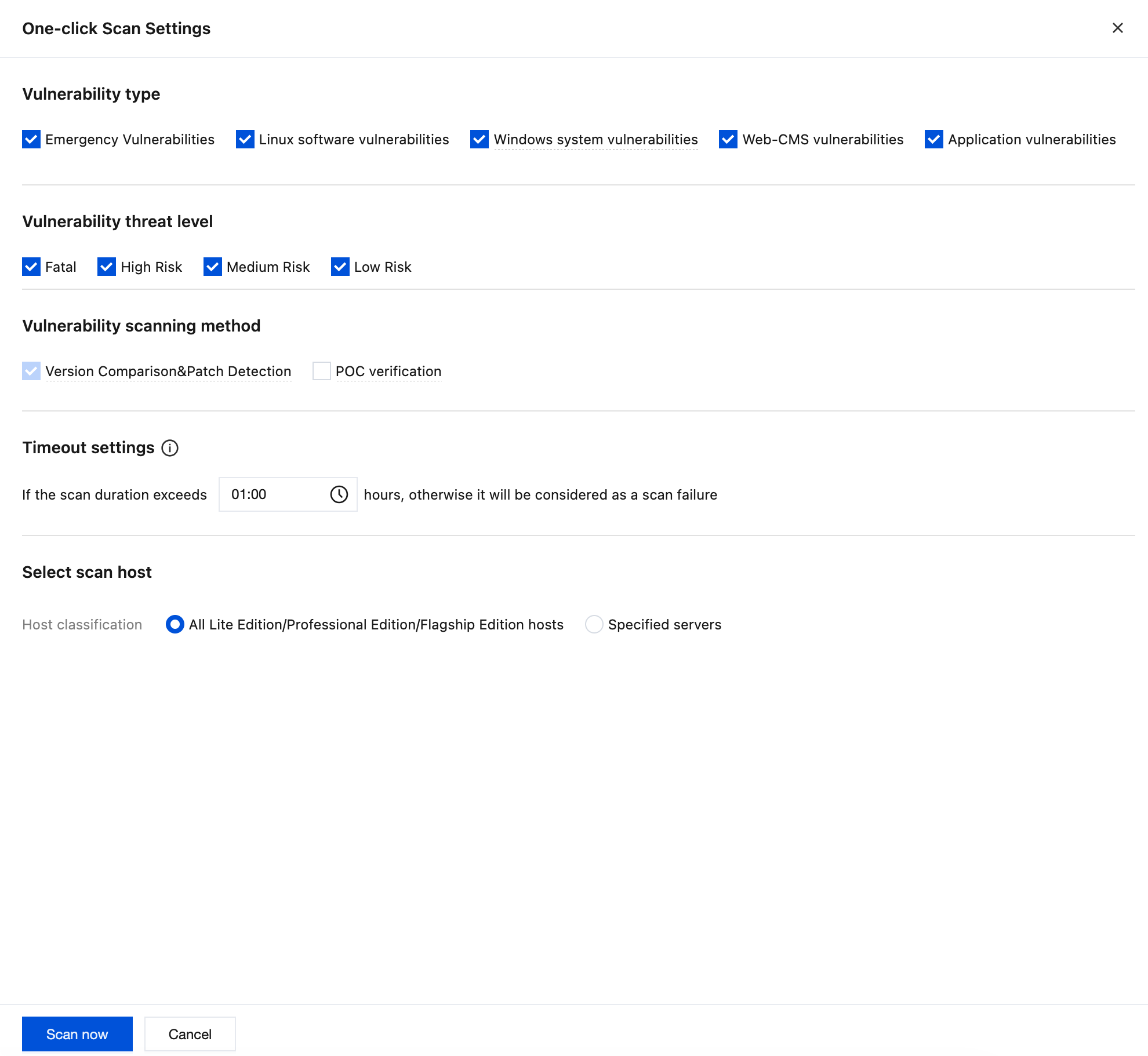
Click Scanning settings This opens the vulnerability settings dialog box and anchors to the scheduled scan section. You can configure the scheduled scan switch, vulnerability categories, threat levels, scanning methods, scheduled scan cycle, and host scope.
Click Details to view the details of the last scan. You can also download the PDF scan report and Excel scan results.
Application Protection
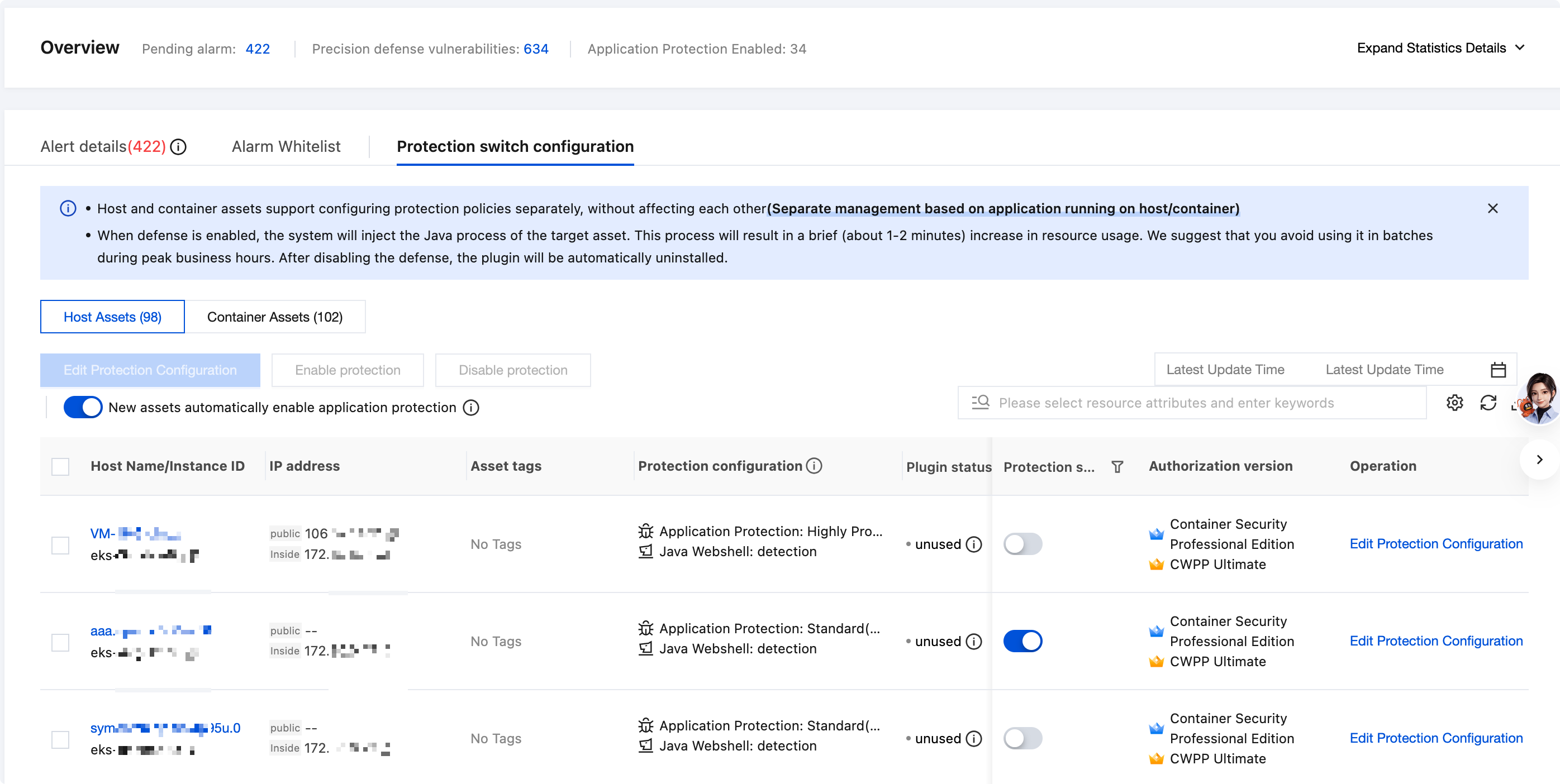
1. In the Application Protection module, you can view assets with protection enabled, successful defense counts, and defense trends.
Note:
Application Protection provides 0-day application vulnerability defense and memory shell defense capabilities for Linux hosts (JDK version ≥ 1.6.0). It supports precise and generic vulnerability attack detection and defense, offering broader coverage and more accurate rules. No application code modification or redeployment is required. It is recommended for use in important period guarantee scenarios and popular application vulnerability defense scenarios.
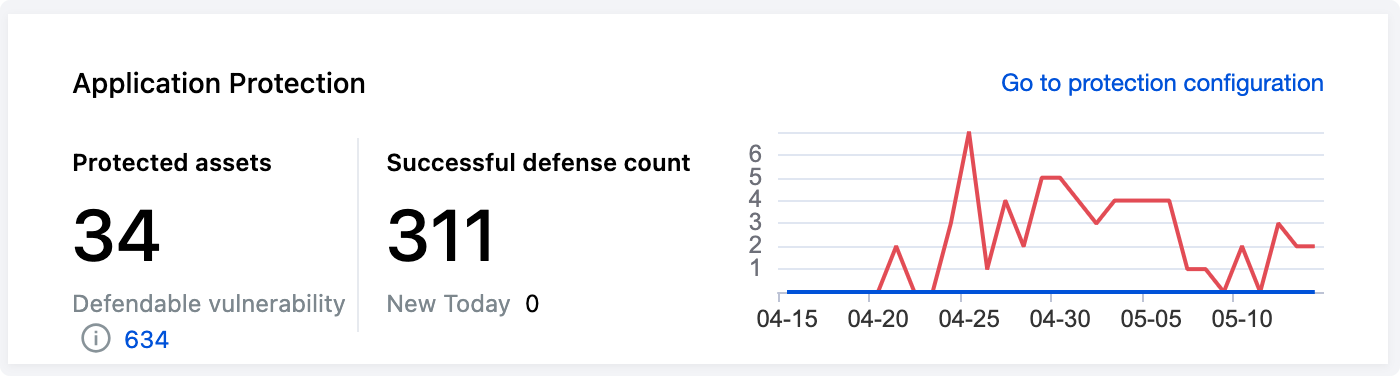
2. Choose Go to Application Protection. This opens Application Protection > Protection Switch Configuration. You can enable or disable application protection, view defendable vulnerabilities, select the host scope for defense, and view defense plugin details.
Note:
When you enable application protection, a brief resource usage increase occurs (averaging 1 to 2 minutes). We recommend that you avoid peak business hours and enable it in batches.
Vulnerability Handling
1. On the Vulnerability Governance page, you can view the statistics and detailed list of currently detected vulnerabilities.
2. In the Vulnerability Overview module, the vulnerability detection status, number of network attack events, and today's new additions are displayed. The total number of vulnerabilities in the CSC vulnerability database is also shown.

Field Name | Field Description |
High-priority vulnerability fixes | This category displays popular attack vulnerabilities and critical/high-risk vulnerabilities, which need to be preferentially fixed. By default, it counts the number of vulnerabilities pending fixing. Click Custom Rule to perform custom rule judgment on high-priority vulnerabilities. |
All vulnerabilities | Total number of detected Linux software vulnerabilities, Windows system vulnerabilities, Web-CMS vulnerabilities, and application vulnerabilities. |
Affected Servers | Number of hosts with detected vulnerabilities. |
Network attack events (last 1 month) | Counts the number of network attack events in the last 1 month. |
Supported vulnerabilities | You can view the vulnerability database supported by CSC. You can search it up to 25 times per day, and a single search can display up to 100 results. |
3. In the Vulnerability List module, the currently detected specific vulnerabilities are displayed. They are categorized into two types: emergency vulnerabilities and all vulnerabilities. There is little functional difference between the two. Using all vulnerabilities as an example, this section introduces vulnerability remediation.
Note:
Emergency Vulnerabilities: This category is designed for newly discovered, widespread, and high-severity critical vulnerabilities. It serves as a prioritized vulnerability checklist. Users can initiate manual scans or configure scheduled scans for these vulnerabilities to ensure timely responses to high-risk threats.
All Vulnerabilities: Aggregates and displays all detected server vulnerabilities, covering the full range of threat levels from low to critical, and includes the detected emergency vulnerabilities.
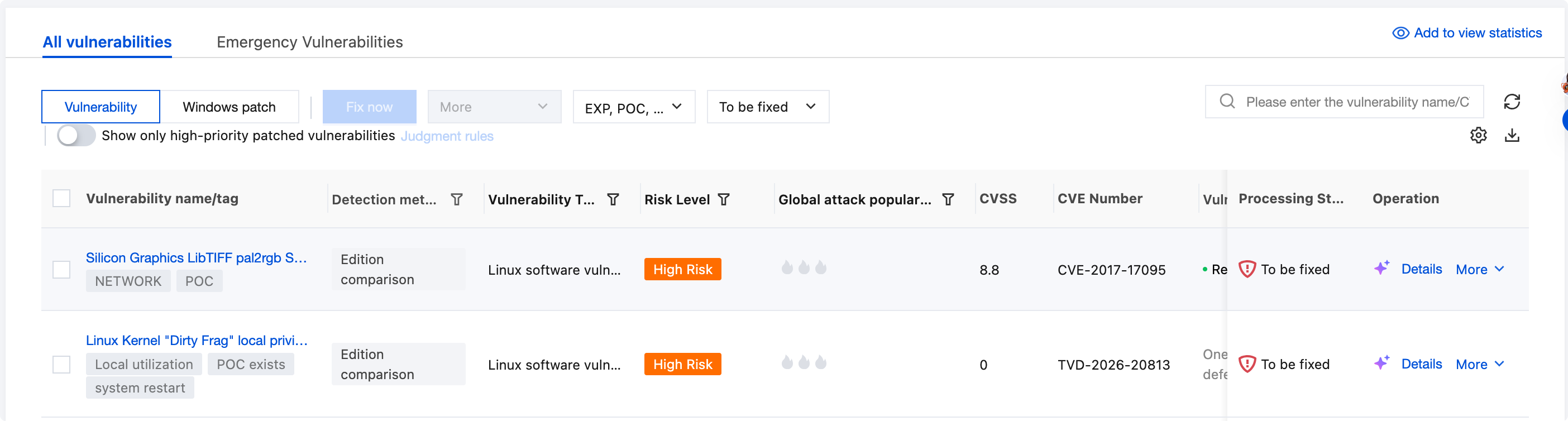
Field Name | Field Description |
Vulnerability name/tag | Vulnerability name refers to the currently detected vulnerability, and Tag refers to the tag of the vulnerability (such as remote exploitation, service restart, existing EXP, and so on). |
Detection method | Version comparison, POC verification. |
Vulnerability Type | Linux software vulnerabilities, Windows system vulnerabilities, Web-CMS vulnerabilities, application vulnerabilities. |
Risk Level | Critical, High, Medium, Low. |
Global attack popularity | High, Medium, Low, No activity. |
CVSS | Refers to the score of the Common Vulnerability Scoring System, ranging from 0 to 10, where 0 represents the least severe and 10 represents the most severe. |
CVE Number | The unique identifier for the vulnerability in the Common Vulnerabilities and Exposures (CVE) database. |
Last scanned | The time when the vulnerability was last detected by scanning. |
Affected Servers | Number of hosts with the vulnerability. |
Processing Status | Pending, In Progress, Scanning, Fixed, Ignored, Fix Failed. |
Fix status | Not supported, Can be fixed automatically (no restart required), Can be fixed automatically (restart required). |
Operation | One-Click Fix: Some Linux software vulnerabilities and Web-CMS vulnerabilities can be fixed automatically. Click One-Click Fix to open the vulnerability details pop-up window. Then, select the hosts that require fixing. For details, see Vulnerability Automatic Fixing. More: Rescan (rescan the vulnerability); Ignore Vulnerability (ignore the vulnerability, and the host will no longer be scanned for this vulnerability in the future). |
フィードバック