Overview
A configuration group is used for group-based configuration management of nodes that have different specifications or purposes but are deployed with the same component. This document describes how to use a configuration group to manage service configuration.
A configuration item modified at the cluster level will overwrite that at the configuration group and node levels if you have not separately modified it at the configuration group and node levels.
A configuration item modified at the configuration group level will overwrite that at the node level within the configuration group if you have not separately modified it at the node level. After the modification, the configuration at the cluster level will not overwrite the configuration at the configuration group level.
A configuration item modified at the node level will be updated only for the node. After the modification, the configuration delivered from the cluster and configuration group levels will not overwrite the configuration at the node level.
Note
A node can belong to only one configuration group, and nodes in different groups are different.
Directions
1. Log in to the EMR console and click ID/Name of the target cluster in the cluster list to go to the cluster details page. 2. On the cluster details page, click Cluster services and select Operation > Configurations in the top-right corner of the target component block. The following uses HDFS as an example:
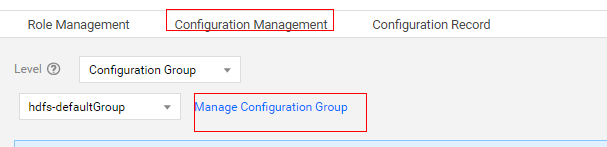
3. Click Configurations, set Level to Configuration group, select the target configuration group, and click Manage configuration groups.
Note
After a cluster is created, several default configuration groups based on node type will be generated for each component, which can only be modified but not deleted and will inherit the cluster configuration upon initialization. You can add configuration groups as needed, with a maximum of 15 configuration groups allowed for each component.
4. On the Manage configuration groups page, you can view, add, modify, and delete configuration groups for the current component.
Note
You can select an inherited configuration group for a new configuration group. If no inherited configuration group is selected, the cluster-level configuration is inherited by default.
After a custom configuration group is deleted, nodes in it will be transferred to the default configuration group for the same node type.
5. If the configuration of a configuration group is different from that of the cluster, click Save at the cluster level to overwrite the configuration group configuration. Similarly, if the configuration of a node is different from that of the configuration group to which the node belongs, click Save at the configuration group level to overwrite the node configuration.