Release Notes
Announcements
Security Announcements
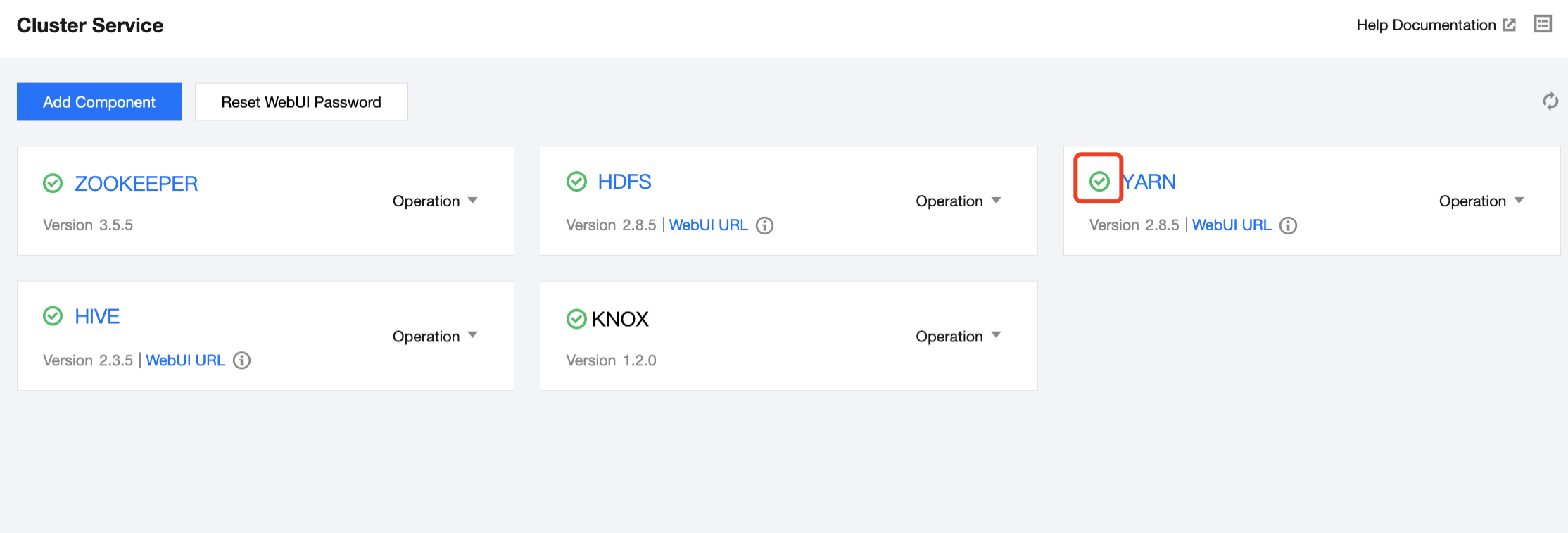
Service Health Status | Status Description | Status Aggregation Rule |
Green: good. | The service is running normally. | All role instances have a health status of Good. |
Orange: At risk. | The service is available, but some role instances are unavailable or at risk and need attention. | Some instances of a specific role within this component are either unavailable or at risk. For example, HDFS has one NameNode role instance and two DataNode role instances. Among them, one DataNode instance is unavailable, while the other DataNode instance and the NameNode instance are healthy, resulting in an At Risk health status for HDFS. |
Red: unavailable. | The service is unavailable. All instances of a certain role are in an unhealthy status and require immediate handling. | All instances of a particular role in this component are in an unhealthy status. For example, HDFS has one NameNode role instance and two DataNode role instances. Among them, both DataNode instances are unavailable, while the NameNode instance is healthy, resulting in Unavailable health status for HDFS. |
Gray: unknown or undetected. | The service health status is unknown or has not been detected. Components without processes are marked as Undetected for health status. For components with processes, if they enter maintenance mode or their operation status has stopped, they are also marked as Undetected. If the health status information of a role instance cannot be correctly obtained, it is marked as Unknown. If there are no issues found with the business, no further attention is needed. | 1. All role instances of this component are neither at risk nor unavailable, and at least one role instance has an unknown health status. For example, HDFS has one NameNode role instance and two DataNode role instances, with one DataNode role instance having an unknown health status, while the other DataNode role instance and the NameNode role instance have a good health status. Therefore, the health status of HDFS is unknown. 2. And all role instances of this service have an undetected health status. When all role instances of the service enter maintenance mode or have stopped operation, their health status will not be detected. 3. If the component has no processes, its health status will not be detected, such as Iceberg, Hudi, and Flink. |
Service Operation | Description |
HDFS NameNode primary/secondary switch | Abbreviated as NN primary/secondary switch, it switches the current Active NameNode to StandBy status and the previously StandBy NameNode to Active status. |
HDFS data balancing | Usually executed when new DataNodes are added. This operation distributes data evenly, avoiding hotspot issues and ensuring a more balanced read/write load across the cluster. |
HDFS management status switch | Only supports switching the DataNode to Maintenance Status (IN_MAINTENANCE). This feature is typically used when a DataNode needs to be temporarily taken offline without migrating data. Currently, this feature is supported in Hadoop 3.x and later versions. For detailed directions, see Best Practices for HDFS DataNode Maintenance Status Switching. |
YARN ResourceManager primary/secondary switch | Abbreviated as RM primary/secondary switch, it switches the current Active ResourceManager to StandBy status and the previously StandBy ResourceManager to Active status. RM primary/secondary switch is only allowed when yarn.resourcemanager.ha.automatic-failover.enabled is disabled. If the RM primary/secondary switch option is not displayed in the YARN card operations dropdown list, locate yarn.resourcemanager.ha.automatic-failover.enabled in YARN Configuration Management - yarn-site.xml and disable it. |
YARN queue refresh | When new content is added or existing content is updated in capacity-scheduler.xml or fair-scheduler.xml, this operation allows the changes to take effect in ResourceManager. Note: Do not delete active queues defined in capacity-scheduler.xml or fair-scheduler.xml. |
Using Ranger for modifying metabase | When changing the underlying database of Ranger, you need to modify the conf/install.properties file and execute the setup.sh script locally. This operation provides a one-click metabase configuration feature, preventing service issues due to incomplete configuration changes when modifying the Ranger metabase address. This operation currently only supports MySQL databases, and the Test Connection feature is only for testing the connection of the administrator user. This operation synchronizes the database information to the local ranger-admin-site.xml configuration file, but it will not update the content of ranger-admin-site.xml in the configuration management. If the user modifies and publishes ranger-admin-site.xml through the configuration management page due to additional requirements, it may result in the database information being overwritten, causing exceptions. |
Component | Service | Pause Method | Description | Remarks |
HDFS | NameNode | Quick pause | Directly stops service | - |
| DataNode | Quick pause | Directly stops service | - |
| JournalNode | Quick pause | Directly stops service | - |
| zkfc | Quick pause | Directly stops service | - |
YARN | ResourceManager | Quick pause | Directly stops service | - |
| NodeManager | Quick pause | Directly stops service | - |
| JobHistoryServer | Quick pause | Directly stops service | - |
| TimeLineServer | Quick pause | Directly stops service | - |
HBASE | HbaseThrift | Quick pause | Directly stops service | - |
| HMaster | Quick pause | Directly stops service | - |
| RegionServer | Quick pause | Directly stops service | - |
| RegionServer | Safe pause | Before RegionServer is stopped, the regions on it will be migrated. | Supports setting thread concurrency. |
HIVE | HiveMetaStore | Quick pause | Directly stops service | - |
| HiveServer2 | Quick pause | Directly stops service | - |
| HiveWebHcat | Quick pause | Directly stops service | - |
PRESTO | PrestoCoordinator | Quick pause | Directly stops service | - |
| PrestoWorker | Quick pause | Directly stops service | - |
ZOOKEEPER | QuorumPeerMain | Quick pause | Directly stops service | - |
SPARK | SparkJobHistoryServer | Quick pause | Directly stops service | - |
HUE | Hue | Quick pause | Directly stops service | - |
OOZIE | Oozie | Quick pause | Directly stops service | - |
STORM | Nimbus | Quick pause | Directly stops service | - |
| Supervisor | Quick pause | Directly stops service | - |
| Logviewer | Quick pause | Directly stops service | - |
| Ui | Quick pause | Directly stops service | - |
RANGER | Ranger | Quick pause | Directly stops service | - |
ALLUXIO | AlluxioMaster | Quick pause | Directly stops service | - |
| AlluxioWorker | Quick pause | Directly stops service | - |
GANGLIA | Httpd | Quick pause | Directly stops service | - |
| Gmetad | Quick pause | Directly stops service | - |
| Gmond | Quick pause | Directly stops service | - |
フィードバック