tencent cloud

Elastic MapReduce

Release Notes and Announcements
Release Notes
Announcements
Security Announcements
Product Introduction
Overview
Strengths
Architecture
Features
Use Cases
Constraints and Limits
Technical Support Scope
Product release
Purchase Guide
EMR on CVM Billing Instructions
EMR on TKE Billing Instructions
EMR Serverless HBase Billing Instructions
Getting Started
EMR on CVM Quick Start
EMR on TKE Quick Start
EMR on CVM Operation Guide
Planning Cluster
Administrative rights
Configuring Cluster
Managing Cluster
Managing Service
Monitoring and Alarms
TCInsight
EMR on TKE Operation Guide
Introduction to EMR on TKE
Configuring Cluster
Cluster Management
Service Management
Monitoring and Ops
Application Analysis
EMR Serverless HBase Operation Guide
EMR Serverless HBase Product Introduction
Quotas and Limits
Planning an Instance
Managing an Instance
Monitoring and Alarms
Development Guide
EMR Development Guide
Hadoop Development Guide
Spark Development Guide
Hbase Development Guide
Phoenix on Hbase Development Guide
Hive Development Guide
Presto Development Guide
Sqoop Development Guide
Hue Development Guide
Oozie Development Guide
Flume Development Guide
Kerberos Development Guide
Knox Development Guide
Alluxio Development Guide
Kylin Development Guide
Livy Development Guide
Kyuubi Development Guide
Zeppelin Development Guide
Hudi Development Guide
Superset Development Guide
Impala Development Guide
Druid Development Guide
TensorFlow Development Guide
Kudu Development Guide
Ranger Development Guide
Kafka Development Guide
Iceberg Development Guide
StarRocks Development Guide
Flink Development Guide
JupyterLab Development Guide
MLflow Development Guide
Practical Tutorial
Practice of EMR on CVM Ops
Data Migration
Practical Tutorial on Custom Scaling
API Documentation
History
Introduction
API Category
Cluster Resource Management APIs
Cluster Services APIs
User Management APIs
Data Inquiry APIs
Scaling APIs
Configuration APIs
Other APIs
Serverless HBase APIs
YARN Resource Scheduling APIs
Making API Requests
Data Types
Error Codes
FAQs
EMR on CVM
Service Level Agreement
Contact Us

Setting Tags

PDF
フォーカスモード
フォントサイズ
最終更新日: 2023-12-27 10:01:45

Overview

Tags are key-value pairs provided by Tencent Cloud EMR to identify cluster types or node resources.
You can manage clusters or node resources in a categorized manner by using tags in various dimensions such as business, purpose, and responsible person, or use tags to easily identify them. Tag key-value pairs have no semantic meaning for EMR and are parsed and matched strictly based on strings.

Limits

A tag is a key-value pair. You can set tags for EMR clusters or node resources to manage them in a categorized manner. Then, you can easily view and identify clusters and node resources under the corresponding tags. You can edit tags in the EMR console.
There are several limits on tags:
Quantity limit: Each cluster or node can have up to 50 tags. (Up to five tags can be added at a time.)
Tag key limits:
You cannot use "qcloud", "tencent", or "project" at the beginning of a tag key because they are reserved by the system.
A tag key can contain up to 255 characters. Only digits, letters, and the + = . @ - symbols are supported.
Tag value limit: A tag value can contain up to 127 characters. Only digits, letters, symbols + = . @ -, and a null string are supported.

Directions

Editing cluster tags

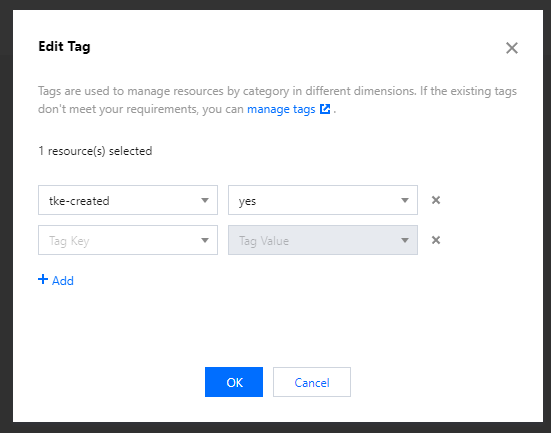
1. Log in to the EMR console, select the target cluster on the Cluster list page and click More > Edit tag.

2. Add, modify or delete tags as needed in the pop-up dialog box.
Note
You can edit tags for up to 20 clusters at a time.

Editing node tags

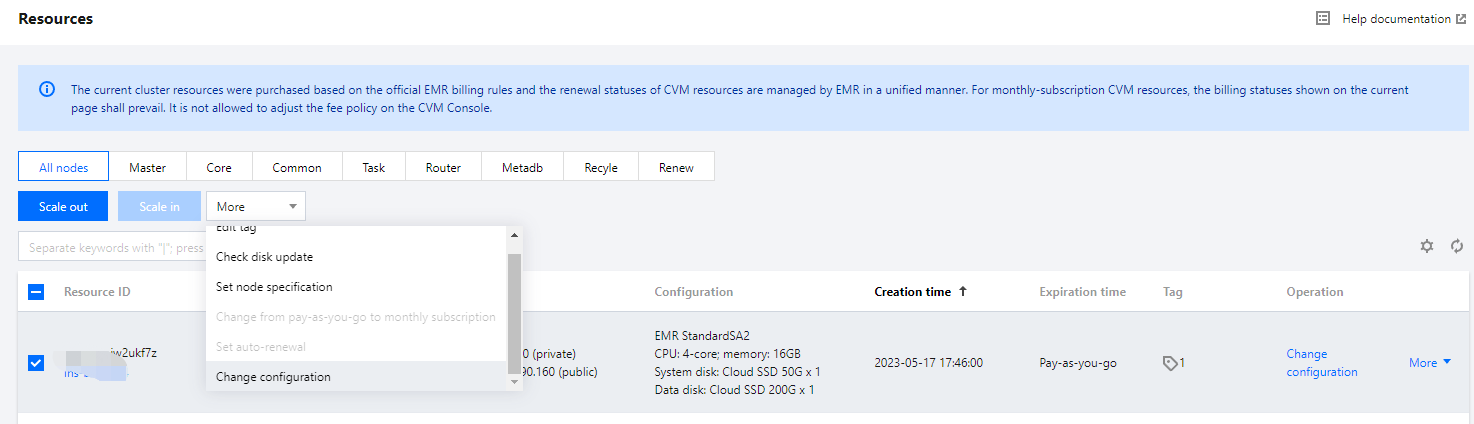
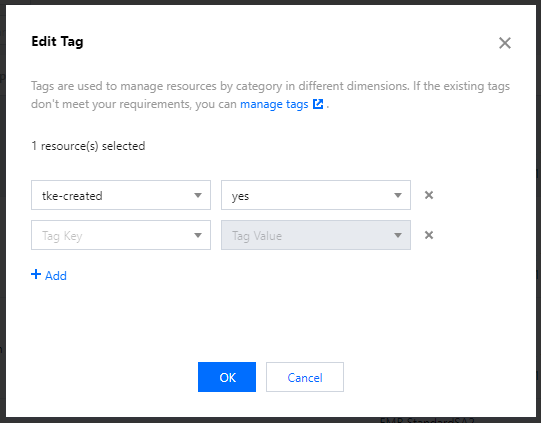
1. Log in to the EMR console and click a cluster ID/name to go to the cluster details page. Select Cluster resources > Resources, select the target node, and click More > Edit tag.

2. Add, modify or delete tags as needed in the pop-up dialog box.
Note
You can edit tags for up to 20 clusters at a time.

ヘルプとサポート

この記事はお役に立ちましたか?

フィードバック