DLC Spark Streaming
Download
フォーカスモード
フォントサイズ
Spark Streaming, as the core component of the Spark ecosystem focusing on real-time data processing, becomes an important tool in the big data field with its flexible processing mode, deep integration with the Spark core engine, and support for rich data sources. The WeData platform integrates the DLC Spark Streaming node, providing users with convenient task development features. This guide explains in detail the configuration method of the DLC Spark Streaming node.
Use Limits
1. DLC Spark Streaming task node only supports using Standard Spark Engine.
2. DLC Spark Streaming task node requires a standalone scheduling resource group and must not share with other tasks, otherwise it will interfere with normal scheduling of other tasks.
Prerequisites
1. Bind the DLC engine in the project. For the engine kernel, see DLC Engine Kernel Version.
2. The database tables used by task nodes already in DLC.
3. The current user needs to be granted corresponding DLC computational resource and table privileges. For permission granting, refer to DLC Documentation.
4. Users need to upload required resources, including py/jar packages and dependency resources. For details, see Resource Management.
Operation Steps
Task Node Parameter Configuration
The user needs to select the program package to run, fill in the configuration parameters, and select the execution engine. Related configuration instructions are as follows:
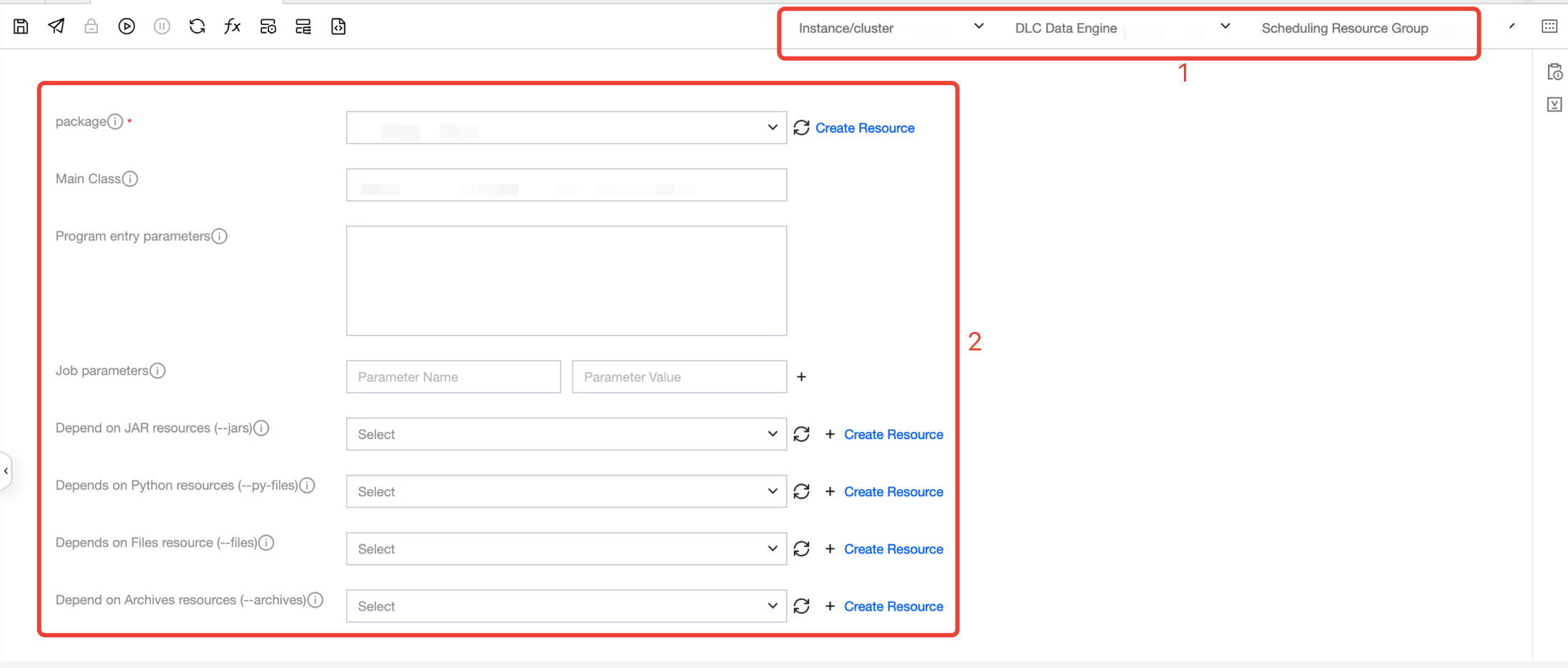
Number | Configuration item name. | Configuration Item Description |
1 | instance/cluster | Select the executed instance/cluster. For configuration reference, see storage and computing engine configuration. |
| DLC Data Engine | Select the required DLC Data Engine. For configuration details, refer to storage and computing engine configuration. |
| Scheduling resource group | Select the required resource group. For configuration details, refer to execute resource group configuration. |
2 | package | Required JAR or Python resource files used to perform tasks. |
| Main class | Required if the program package is a jar file |
| Program Entry Parameter | Based on need to add parameters, multiple parameters separated by spaces. |
| Job Parameter | Add parameters as needed, with multiple parameters separated by spaces. |
| Dependency JAR Resource | The jar files required for task execution can be configured with multiple. |
| Dependency Python Resource | The python, zip, and egg format files required for task execution can be configured with multiple. |
| Dependency Files Resource | The files required for task execution support jar, zip, txt, and conf formats and can be configured with multiple. |
| Dependency Archives Resource | The compression packages required for task execution support tar.gz, tgz, and tar formats and can be configured with multiple. |
Task Node Property Configuration
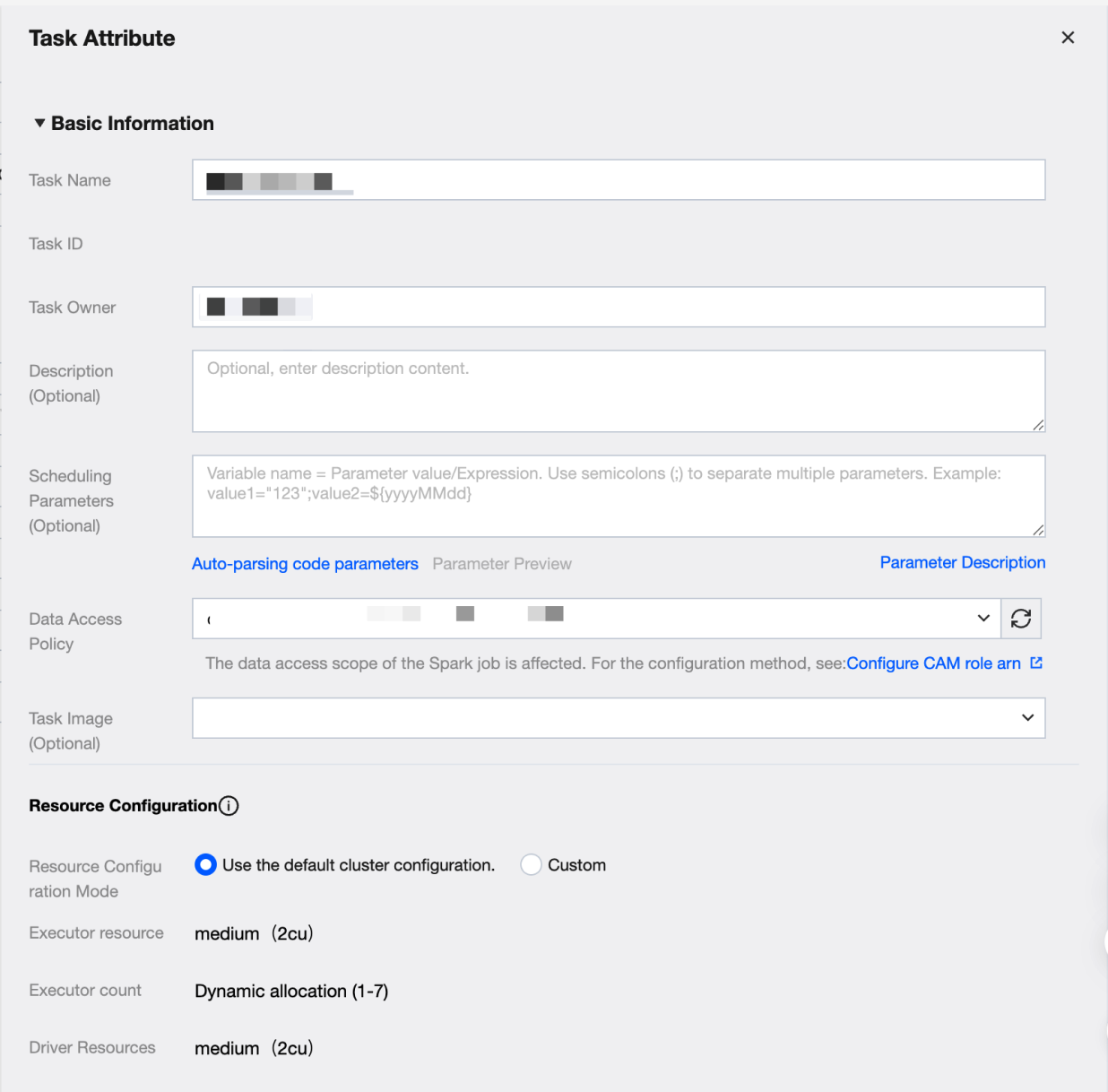
Key configuration items:
Key configuration items. | Key Configuration Item Description |
Task Image | The image for task execution. If the task requires a specific image, you can choose between DLC built-in images and Custom Images. |
Resource Configuration | Resource Configuration Mode Cluster default configuration and custom configuration are divided into two methods. 1. Use default cluster configuration Use the current task computing resource cluster configuration 2. Custom User-defined Executor and Driver configuration Executor resources Fill in the number of required resources. 1 cu is roughly equivalent to 1-core CPU and 4 GB memory. 1. Small: one calculation unit (1cu) 2. Medium: two calculation units (2cu) 3. Large: four calculation units (4cu) 4. Xlarge: eight calculation units (8cu) 5. 4Xlarge: sixteen calculation units (16cu) Number of Executors Executors are compute nodes or compute instances responsible for executing tasks and handling computation. Each Executor uses the configured number of resources, supporting dynamic allocation and fixed allocation. Driver resources Fill in the required number of Driver resources. 1 cu is roughly equivalent to 1-core CPU and 4 GB memory. 1. Small: one calculation unit (1cu) 2. Medium: two calculation units (2cu) 3. Large: four calculation units (4cu) 4. Xlarge: eight calculation units (8cu) 5. 4Xlarge: sixteen calculation units (16cu) |
Task Node Configuration Limit
1. DLC Spark Streaming node does not support establishing upstream and downstream dependencies, does not support offline and real-time hybrid orchestration. It is recommended to maintain DLC Spark Streaming node in a separate workflow.
2. DLC Spark Streaming node supports only creation and configuration in periodic workflows, and does not support creation and configuration in manual workflows.
Following Steps
Scheduling execution: Task node editing is completed. Run according to the scheduling configuration. For detailed steps, see real-time task ops and real-time instance ops.
フィードバック