tencent cloud

Gateway Load Balancer

Release Notes and Announcements
Release Notes
Product Introduction
Overview
Use Cases
Strengths
Technical Principles
Product Feature Comparison
Use Limits
Purchase Guide
Billing Overview
Billable Items
Purchase Methods
Payment Overdue
Quick Start
Operation Guide
GWLB Instance
GWLB Listener
Target Group
Health Check
Monitoring and Alarms
Practical Tutorial
Easily Implementing Adaptation of a Third-Party Virtual Device with GWLB
Implementing HA Across Multiple AZs
Ops Guide
Stress Testing FAQ
API Documentation
History
Introduction
API Category
Making API Requests
Target Group APIs
GWLB APIs
Other APIs
Data Types
Error Codes
FAQs
Billing
GWLB Configuration
Troubleshooting Health Check Issues
Service Level Agreement
GWLB Policy
Privacy Policy
Data Processing and Security Agreement
Contact Us
Glossary

Exporting a GWLB Instance

PDF
フォーカスモード
フォントサイズ
最終更新日: 2024-12-16 16:50:08
You can export a list of GWLB instances of a certain region from the console and customize the fields to export for analyzing the resource configuration and usage of instances.

Directions

1. Log in to the GWLB console and select a region in the upper left corner of the Instance Management page.
2. Select the target instance in the instance list and click the

icon in the upper right corner.
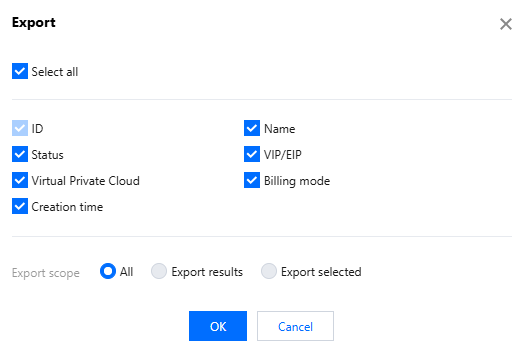
3. In the pop-up Export dialog box, select the fields and range for export and click Confirm to download the instance list locally.

Parameters
Description
Exported field
The fields that can be exported include ID, name, status, VIP/EIP, VPC, billing mode, and creation time.
Exported range
The exported range includes the following options:
All instances
Only search results
Only selected instances
The option "Only selected instances" will be grayed out and unavailable if no instance is selected.

ヘルプとサポート

この記事はお役に立ちましたか?

フィードバック