Node Function
The Parameter Extractor Node can automatically identify and collect key information from user dialogue within the Intelligent Agent application, and bind it to structured parameters for subsequent node usage. When user information is incomplete, the node will actively initiate follow-up questions until all necessary parameters are collected.
Enable the Intelligent Agent to automatically request information (name, phone, date, order ID) from users like a business front desk/customer service, organize it into structured data, and allow subsequent nodes to call it directly.
Directions
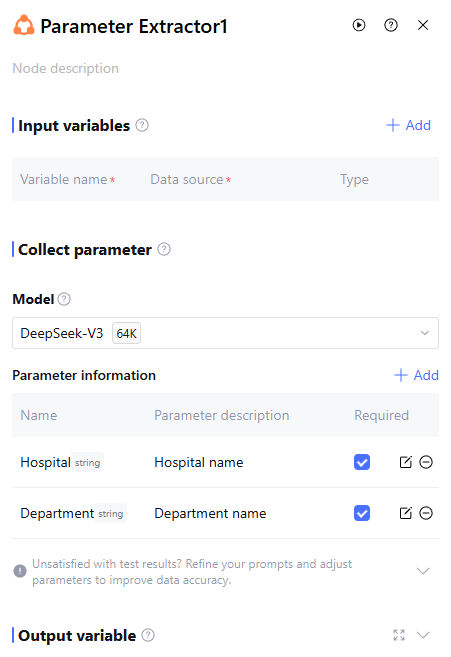
Input Variables
Input variables take effect only within the same node and cannot be used cross-node. Support up to 50 input variables to meet scene requirements. Click "Add" to configure input variables as follows.
|
Variable Name | The variable name can only contain letters, digits, or underscores, must start with a letter or underscore. Required |
Description | Description of this variable. Optional |
Data source | The data source of this variable supports two options: "refer" and "input". "Refer" allows selecting output variables from all preceding nodes, while "input" supports manually filling in a fixed value. |
Type | The data type of this variable cannot be selected and defaults to the variable type "refer" or the string type "input". |
Note:
The parameter extraction node uses three system variables—"SYS.UserQuery", "SYS.ChatHistory", and "SYS.CurrentTime"—to perform parameter extraction. Therefore, the system defaults to importing these three variables with no need for manual addition.
Collect Parameter
Model.
Select an LLM for parameter extraction. The model is responsible for the following:
Identify and extract parameter values from user dialogue.
Judge whether parameters are collected completely.
Generate follow-up questions to guide users in providing additional information.
Parameter Information
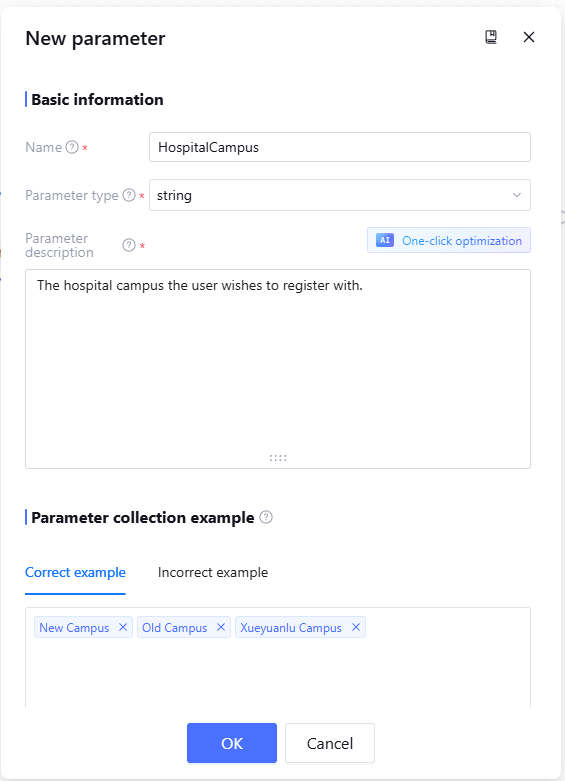
Click "Add" and configure as follows to extract the required parameter information.
|
Name | The parameter name, recommend using a specific name, making it easy for model recognition and understanding. Mandatory. |
Parameter Type | The data type of the parameter. Mandatory. |
Parameter Description | The description of the parameter helps the model accurately identify and understand it. It is advisable to fill in as "concept definition + value requirement". You can use AI for one-click optimization to adjust the content. Mandatory. |
Parameter collection example | The correct and incorrect examples for this parameter. The correct example will be used to prompt the LLM on which parameter values will be extracted, while the incorrect example indicates which parameter values must not be extracted. Optional. |
Required | Is the parameter required or optional. If the parameter is required, the system will automatically generate a counter-question to ask the user when the parameter information is not provided in the dialogue. If the parameter is optional, the system will not ask a counter-question when the user does not provide the parameter information. |
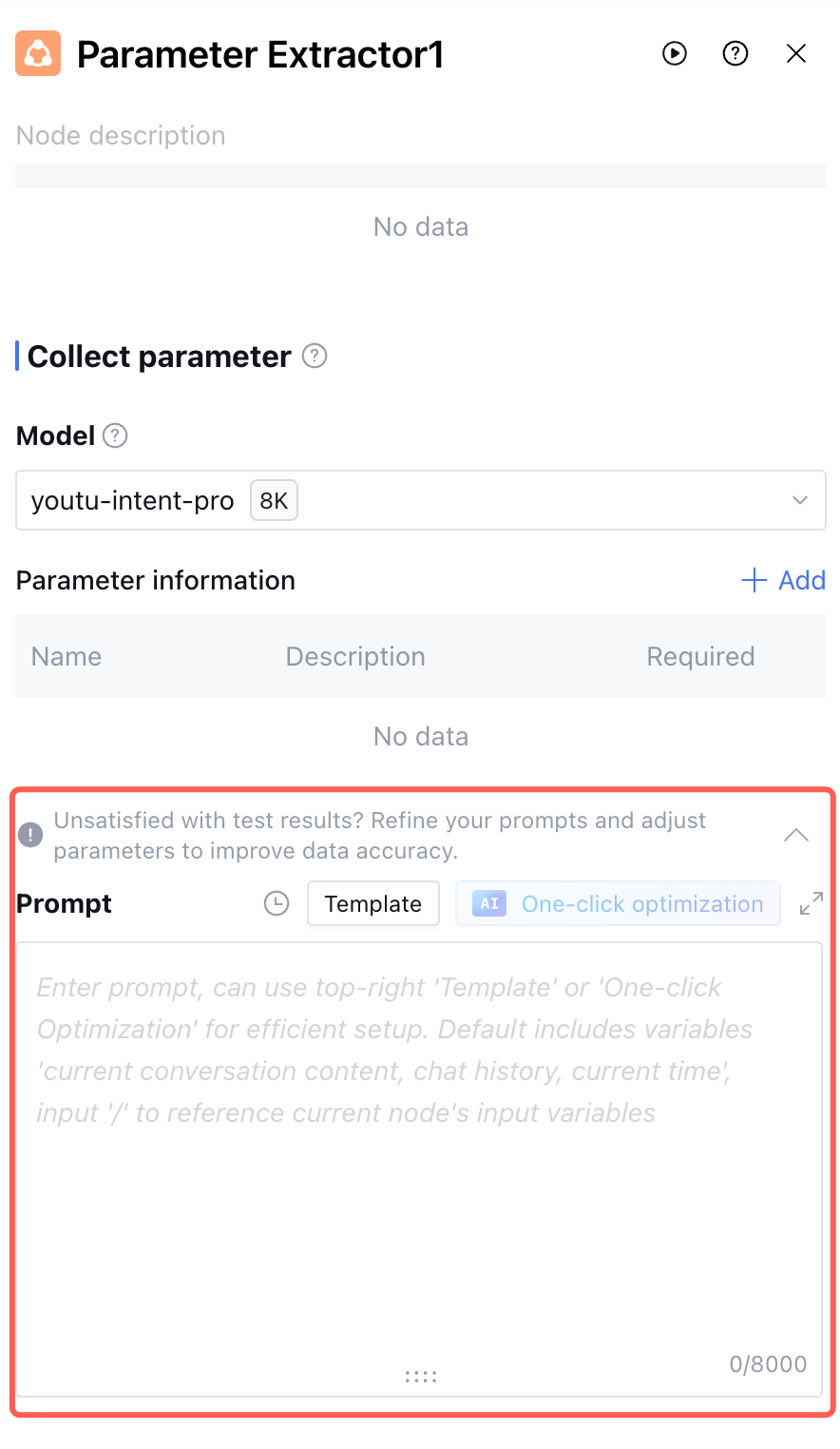
Prompt
If you have special requirements for the parameter extraction process, you can configure the prompt in "collect parameter" to guide the LLM to generate appropriate counter-question clarification responses. Typical scenarios include:
1. No parameter is extracted from the dialogue. Inform the model how to counter-question the user.
Prompt example: Follow-up question response when the "registration ID" parameter is missing:
If extraction of the "registration ID" parameter value is not supported, please answer the following content to perform a parameter value follow-up question: "What is your registration ID? You can find the registration ID on the registration slip. Please provide the information accurately, otherwise unable to complete the registration process".
2. Reply content has specific format requirements or preferences
Prompt example: Response for the "reservation user's name" parameter:
If the "reservation user's name" parameter value is extracted and the value is a single surname, please reply to the user in the following format: "Mr./Ms. xx". For example, if the value is "Li" or "Surname Li", politely address the recipient as "Mr./Ms. Li".
Supported features: Prompt
Version: Support saving the current prompt draft as a version and filling in the version description. Saved versions can be viewed and copied in the release log, which only shows versions created under the current prompt box. Support selecting two versions in content comparison to view their prompt content differences.
Template: A preset role directive format template. It is recommended to fill in according to the template for better effect. After writing the directive, you can also click Template > Save as Template to save the written directive as a template.
AI One-click optimization feature: After initially filling in the prompt content, click AI One-click optimization to optimize the content. The model will optimize the prompt based on the input content, enabling it to better complete the requirements.
Note:
The AI One-click optimization function will consume the user's token resources.
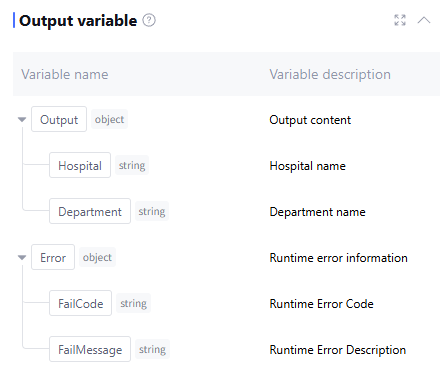
Output Variable
The output variable processed by this node defaults to the configured parameters for user, as well as runtime error info Error (data type is object, this field is empty when running normally). Manual addition is not supported.
Application Example
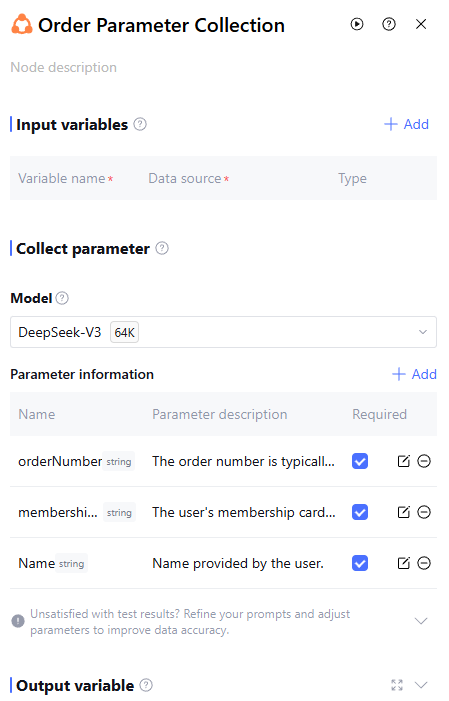
When users need to issue an invoice, use the Parameter Extractor Node to collect required order number, membership card ID and username parameter information.
Parameter Extractor Node configuration as follows:
FAQs
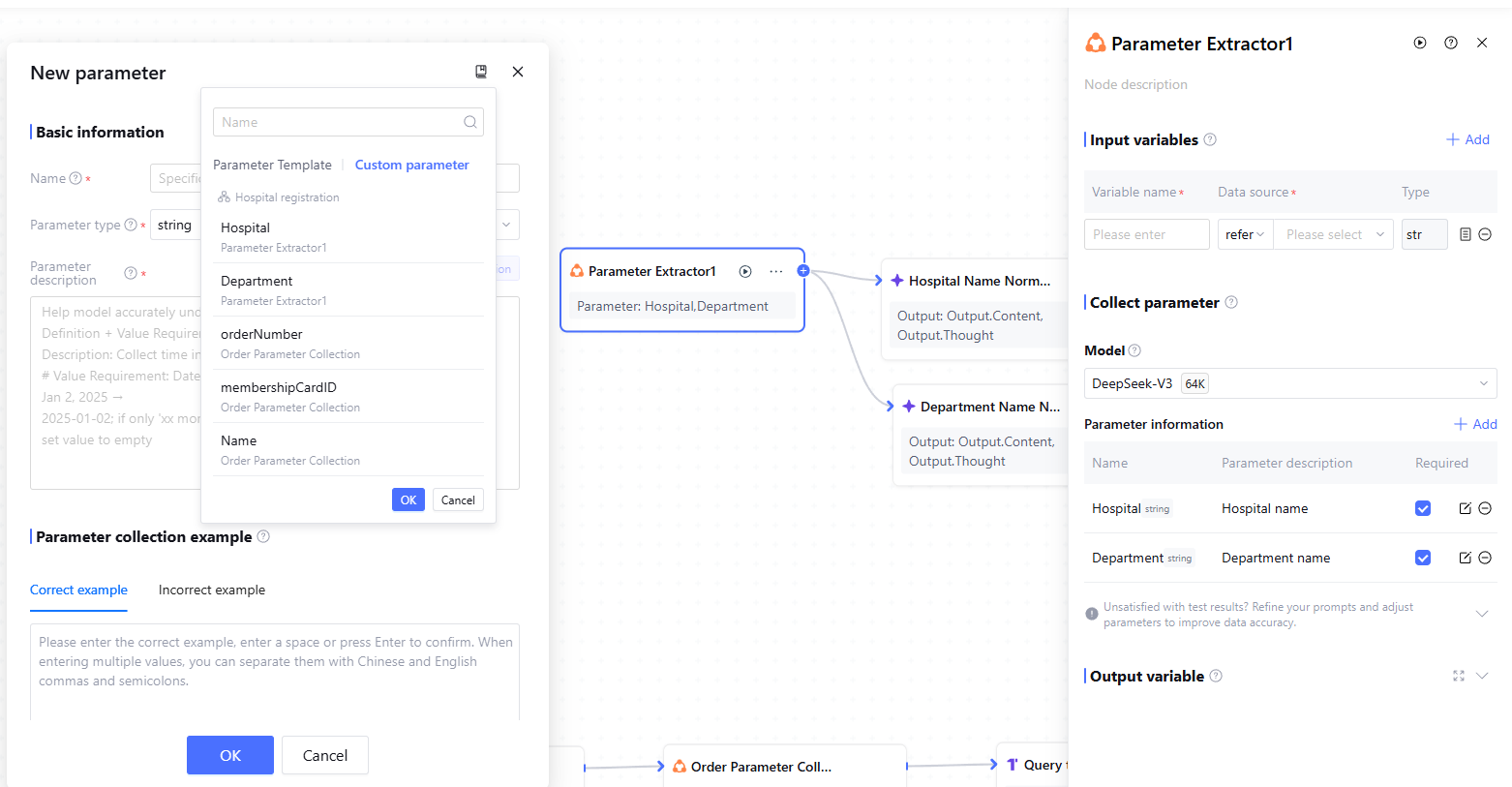
Whether copying is supported for the node?
If you wish to copy other parameter configurations, you can click the "Copy" icon in the upper-right corner of the new configuration parameters box and select the parameters you need to copy.