Viewing Default Logs
Scenarios
Cloud Native API Gateway provides real-time logging and simple search capabilities free of charge by default.
Default logs are mainly classified into user access logs and gateway error logs. You can view Cloud Native API Gateway access logs to understand information related to users' requests and facilitate data analysis, audit, business troubleshooting, or viewing logs. You can also view Cloud Native API Gateway error logs to troubleshoot problems.
Access logs (accessLog) record information related to users' requests and can be used for data analysis, audit, and business troubleshooting.
Error logs (errorLog) are error logs of the gateway, which are used for gateway troubleshooting.
This document describes how to use the default logging feature of Cloud Native Gateway.
Prerequisite
The cloud-native gateway instance has been created. For specific operations, see Create Cloud-Native Gateway.
Viewing Default Logs
1. Log in to the Tencent Service Framework (TSF) console.
2. In the left sidebar, choose Cloud Native Gateway > Data Observation. At the top of the page, select a gateway instance, and then click the Default Logs page.
3. Set the logs you want to view. Related log content is displayed on the page. You can query related logs by keywords. For example, enter "info" to query related logs. Note that log search is case-sensitive.
Edit Default Log Rule
On the Default Log page, click Edit Logging Rule in the upper right corner to modify the default log rules. You can choose to continue to use the default rules or customize log rules based on your business requirements.
When editing the default log rules, you can enable or disable HTTP and TCP log output.
Note:
After the default log rules are modified, the log rules of logs shipped to Cloud Log Service (CLS) are also modified. Proceed with caution.
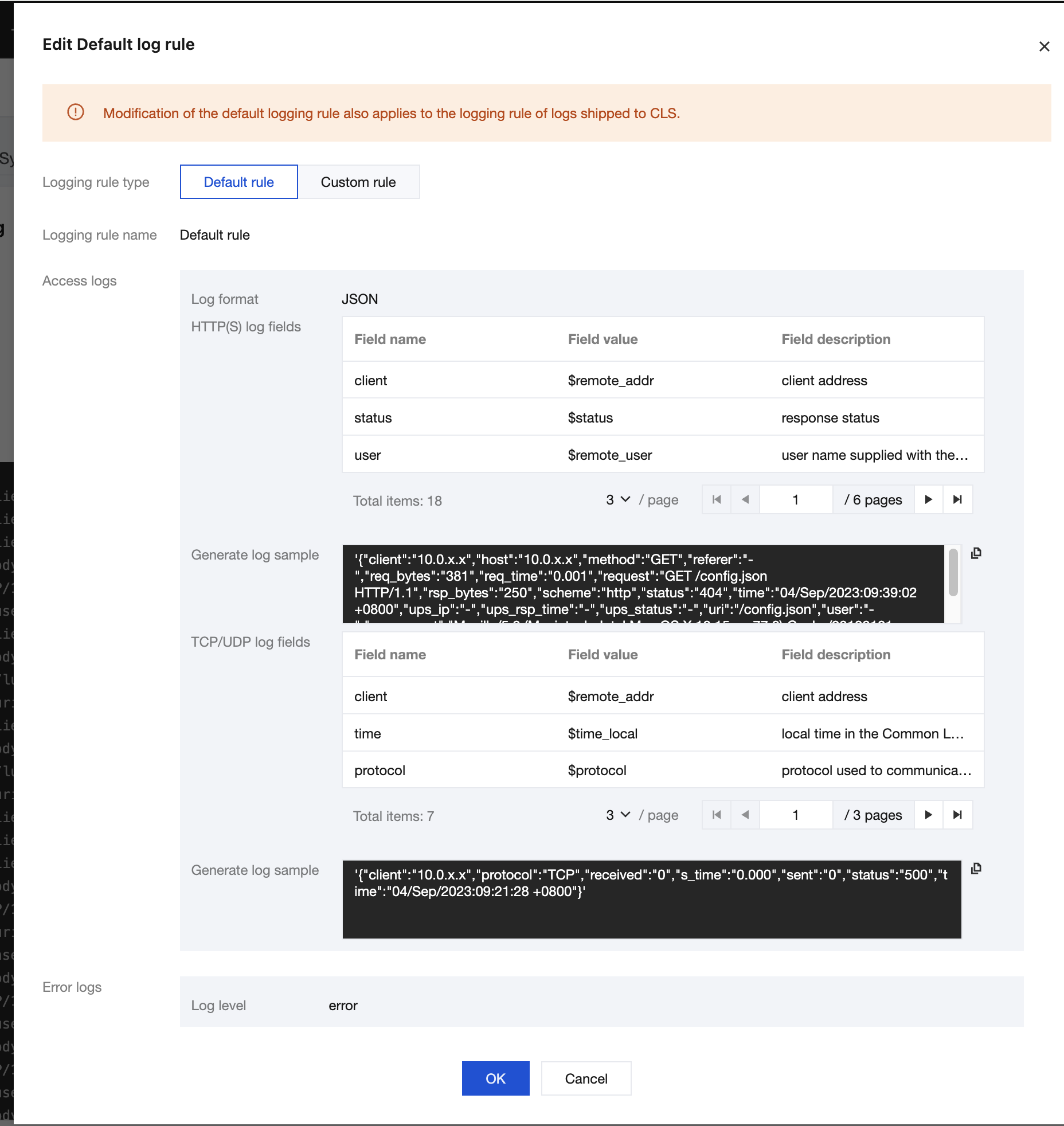
log field
The following table lists the access log fields supported by Cloud Native Gateway. You can configure them as needed:
HTTP/HTTPS Log Fields
Field | Description |
$remote_addr | Client address. |
$status | HTTP status code. |
$remote_user | Username provided in basic authentication. |
$time_local | Request time. |
$request | Complete request line. |
$body_bytes_sent | Body size of the file sent to the client. |
$request_method | Request method. |
$host | Value of the Host field when a request carries the Host request header or the virtual domain name of the host when the request does not carry the Host request header. |
$upstream_addr | IP address of the backend service. |
$upstream_status | HTTP response code in the response returned by the upstream service. |
$upstream_response_time | Upstream service response duration (in milliseconds), from when the gateway establishes a connection to the backend service and receives data to when it disconnects the connection. |
$scheme | HTTP or HTTPS protocol. |
$url | Request URL. |
$request_length | Request data size, in bytes, including the request line, request header, and request body. |
$bytes_sent | Number of bytes of the response. |
$http_referer | Page source, that is, the URL of the page referenced by the header Referer. |
$http_user_agent | Client agent information. |
$request_time | Request duration, from when a request is received to when response data is sent, including receiving request data, processing the request, and returning response data. |
TCP/UDP Log Fields
Field | Description |
$remote_addr | Client IP address. |
$time_local | Request time, that is, the time required for processing the request and printing logs. |
$protocol | Layer-4 TCP or UDP protocol. |
$status | Connection status. Options: 200, 400, 403, 500, 502, and 503. |
$bytes_sent | Number of bytes of the response from the gateway to the client. |
$bytes_received | Number of bytes received by the gateway from the client, including the response header and response body. |
$session_time | Session duration (in milliseconds). |
Nginx Variables
Unsupported Nginx variables:
1. The following variables:
$connection_time
$http3
$jwt_claim_
$jwt_header_
$jwt_payload
$memcached_key
$mqtt_preread_clientid
$mqtt_preread_username
$otel_parent_id
$otel_parent_sampled
$otel_span_id
$otel_trace_id
$proxy_protocol_tlv_
$proxy_protocol_tlv_aws_vpce_id
$proxy_protocol_tlv_azure_pel_id
$proxy_protocol_tlv_gcp_conn_id
$secure_link
$secure_link_expires
$session_log_binary_id
$session_log_id
$slice_range
$ssl_alpn_protocol
$ssl_curve
$upstream_queue_time
2. Variables starting with geo
フィードバック