Session Management
Download
フォーカスモード
フォントサイズ
Scenarios
Session management involves viewing and controlling the current connections established with the database instance and the operations being executed. Its core use cases focus on real-time Ops, performance assurance, and security control.
Performance monitoring: It is required when the database experiences slow response times or abnormal increases in CPU or memory utilization. The database administrators (DBAs) go to the session management page immediately.
Viewing active sessions: Check whether there are a large number of concurrent connections currently.
Identifying slow operations: By viewing the session execution time, DBAs can quickly locate slow queries or long-running operations that are being executed.
Locating resource consumption sources: Identify which sessions are consuming the most database resources (such as CPU time or lock waits) to determine the direct causes of performance bottlenecks.
Fault location: It is required when applications experience connection timeouts, transaction commit failures, or suspected deadlocks.
Viewing operation statements: Obtain the specific commands or transactions being executed by sessions to analyze resource contention relationships among statements.
Terminating blocking sessions: When identifying a session as the cause of a deadlock or severe blocking, DBAs can forcefully terminate (kill) the session to promptly recover the normal database service.
Security control: It is required when databases experience suspected abnormal access or malicious attacks.
Auditing connection sources: Check the client IP addresses and ports of all sessions to identify unknown or unauthorized source IP addresses.
Monitoring user behaviors: View the operations being executed by each database account to monitor risky operations beyond their permission scopes (such as full table scans and large-scale deletions).
Immediately interrupting threats: Upon detecting malicious operations from unknown source IP addresses (such as password brute-force attacks or data dragging), DBAs can immediately terminate the sessions and take further blocking measures.
Prerequisites
The status of the replica set instance or sharded cluster instance of TencentDB for MongoDB is Running.
Managing Session Requests
1. Log in to the TencentDB for MongoDB console.
2. In the left sidebar, expand the MongoDB dropdown list and select either Replica Set Instance or Shard Instance. The operations for replica set instances and sharded instances are similar.
3. Select a region at the top of the instance list page on the right.
4. Locate the target instance in the instance list.
5. Click the target instance ID to go to the Instance Details page.
6. Select the Database Management tab to go to the Session Management page. The system records session requests currently running on the instance, as shown below.
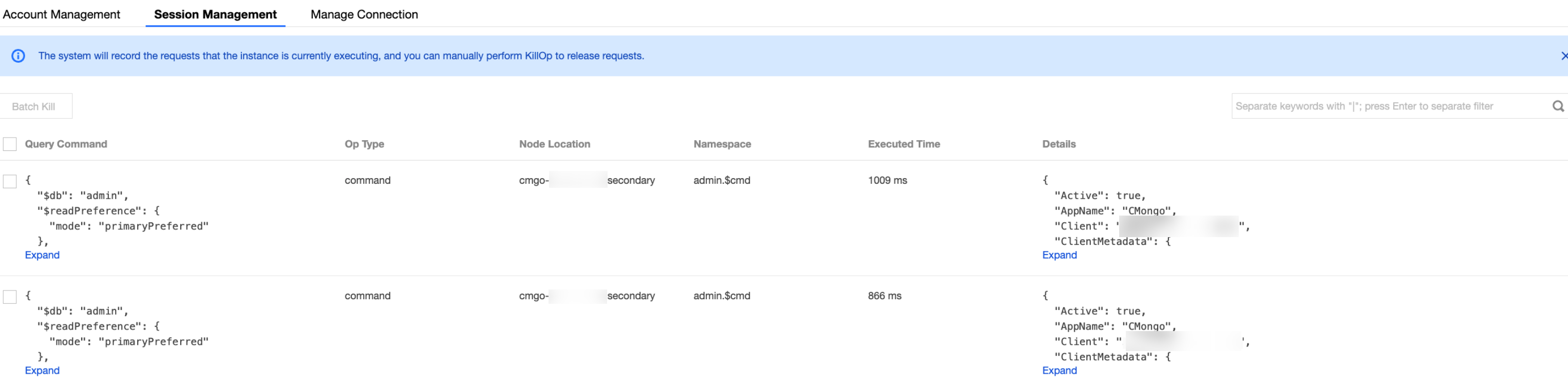
Parameter Name | Parameter Description |
Query Command | Query Statement |
Op Type | Operation Type |
Node Location | Node where the operation is executed. |
Namespace | Namespace of the database and table. |
Executed Time | Execution duration. |
Details | Details of the execution statement. |
7. (Optional) Select the session records you want to clear and click Batch Kill at the top of the list to automatically execute the killOp command, terminating the session requests and releasing resources.
Note:
Manually executing killOp may interrupt critical operations and is recommended only after confirming it is safe to proceed.
8. In the Note dialog box, read the prompt message. To confirm the termination request, click OK to complete the operation.
フィードバック