Introduction
Download
フォーカスモード
フォントサイズ
This document guides you on how to connect to TencentDB for MongoDB instances through MongoDB Shell or drivers for multiple programming languages.
Introduction to Connection Methods
TencentDB for MongoDB provides two main connection methods:
MongoDB Shell: an official interactive command-line tool, suitable for database management, querying, and data operations
URI connection string: a standard resource identifier supported by all official drivers, suitable for establishing connections in application code
Connection Preparations
Key Elements of a Connection String
1. The database access address and port
In the TencentDB for MongoDB console, you can obtain the Private Network Address for database access from the instance list.

In the TencentDB for MongoDB console, you can obtain the Access Address of the database instance from the Network Configuration section on the instance details page.
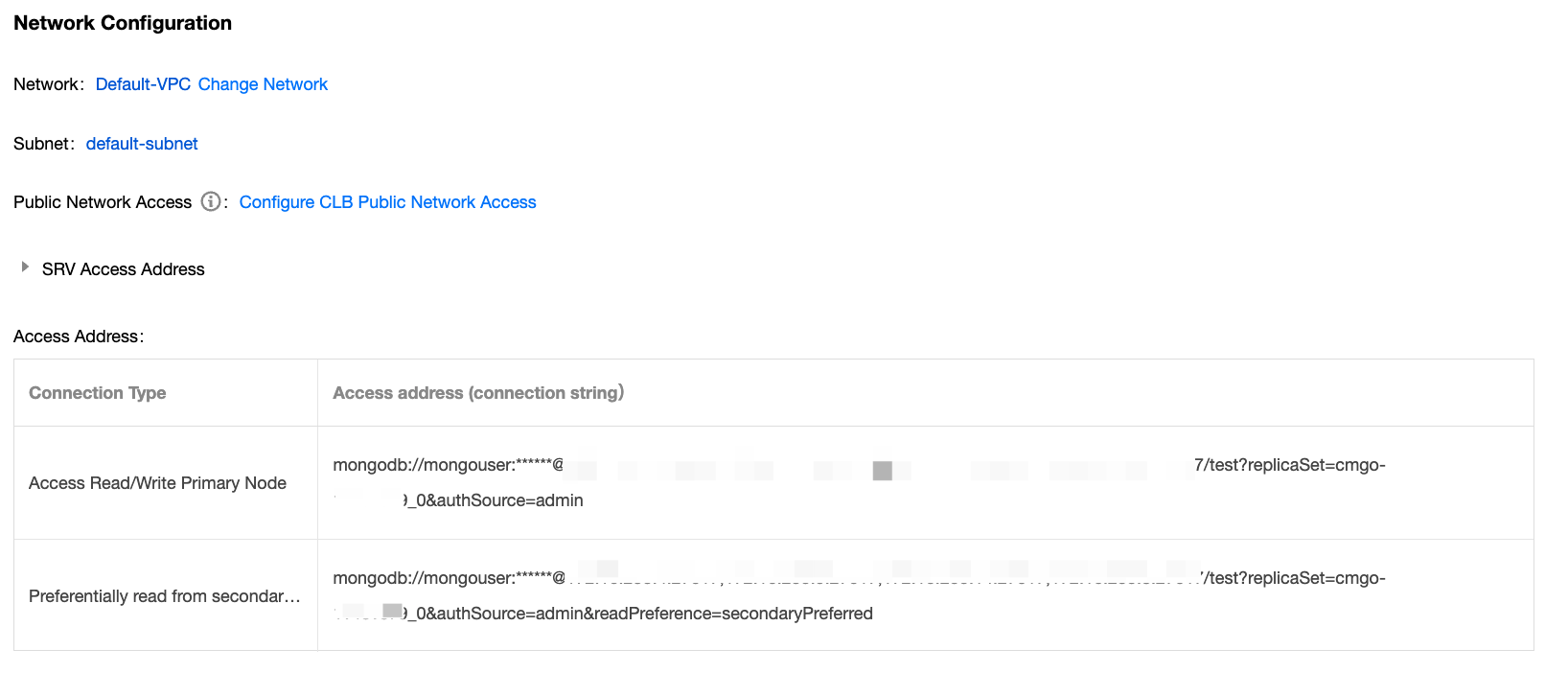
2. The account and password for connecting to the database
Default user: TencentDB for MongoDB has a built-in default user mongouser.
Custom users: On the Database Management page in the TencentDB for MongoDB console, you can create users. For detailed operations, see Account Management.

3. Specifying the authentication database
TencentDB for MongoDB uniformly uses the admin database as the authentication database for login. You must add /admin after the port in the URI to specify the authentication database. After authentication, switch to the specific business database for read and write operations.
Note:
Users created in the console: The authentication database is uniformly set to admin, and the authSource=admin setting should be specified during connection to the database.
Users created using the command line: The authentication database is the database where the user was created. (For example, if the user is created in the test database, the authentication database is the test database.)
Authentication mechanisms: SCRAM-SHA-1 and SCRAM-SHA-256
Examples of the authentication database in the URI connection string are as follows. You can also directly specify the target database for read-write operations and the additional authentication database parameter (authSource=admin) to directly access the target database.
mongodb://username:password@IP:27017/adminmongodb://username:password@IP:27017/somedb?authSource=admin
4. Primary-secondary priority for read operations
In the connection string, you can control the routing node for read operations using the readPreference parameter. An example is as follows:
mongodb://username:password@IP:27017/admin?readPreference=secondaryPreferred
Note:
When the business requires read-write separation, it is recommended to use secondaryPreferred for higher availability.
If your business only needs to access read-only nodes, it is recommended to configure two or more read-only nodes to achieve read request load balancing and ensure high availability. The connection string for read-only nodes can be directly obtained from the network configuration section on the instance details page.
Value | Description |
primary | Read-only primary node. |
primaryPreferred | Read requests are sent to the primary node first; if the primary node is unavailable, read requests will be routed to secondary or read-only nodes. |
secondary | Read requests are routed to secondary or read-only nodes. If secondary nodes are unavailable, read requests will return an error. |
secondaryPreferred | Read requests are sent to secondary or read-only nodes first; if secondary or read-only nodes are unavailable, read requests will be routed to the primary node. |
Other Preparations
1. Prepare the client environment. It is recommended to apply for a Linux Cloud Virtual Machine (CVM) instance in the same region and the same Virtual Private Cloud (VPC) as the TencentDB for MongoDB instance.
2. Have created a TencentDB for MongoDB instance. The instance is in the running status.
3. Ensure that the client environment can connect to the database instance. If the connection fails, see Troubleshooting MongoDB Connection Failures to resolve the issue step by step. For more issues, see Connection.
フィードバック