tencent cloud

Tencent Kubernetes Engine

お知らせ・リリースノート
製品アップデート情報
製品リリース記録
製品の説明
製品の優位性
製品アーキテクチャ
ユースケース
製品機能
リージョンとアベイラビリティーゾーン
クイックスタート
初心者ガイド
標準クラスターのクイック作成
ビギナー向け事例
コンテナアプリケーションのクラウドへのデプロイ Check List
TKE標準クラスターガイド
テンセントクバネティスエンジン
クラスター管理
ネットワーク管理
ストレージ管理
Worker ノードの概要
Kubernetes Object Management
ワークロード
クラウドネイティブサービスガイド
Prometheus監視サービス
TKE Serverlessクラスターガイド
TKE登録クラスターガイド
実践チュートリアル
Serverlessクラスター
ネットワーク
ログ
監視
運用・保守
DevOps
オートスケーリング
よくあるご質問
クラスター類
TKE Serverlessクラスター
運用保守系
サービス類
イメージリポジトリ類
リモート端末類

Managementパラメータの紹介

PDF
フォーカスモード
フォントサイズ
最終更新日: 2023-05-08 18:28:50

機能概要

Managementパラメータは、ノードの共通カスタマイズ設定として統一されたポータルを提供します。このポータルからネイティブノードの基盤であるカーネルパラメータKernelArgsにチューニングをすることができます。また、Nameservers\\Hostsの設定をサポートすることで、業務をデプロイするための環境要件を満たすことができます。

Managementパラメータ項目

パラメータ項目
説明
Nameservers
業務のデプロイ環境の設定には、DNSサーバーアドレスが必要になります。
Hosts
業務のデプロイ環境の設定に必要なHostsです。
カーネルパラメータを設定し、業務にパフォーマンスのチューニングを行います(現在、この機能はホワイトリストにリリースされており、チケットを提出して申請することができます)。
説明
システムコンポーネントの正常なインストールを確実にするため、ネイティブノードは、デフォルトではTencent Cloudの公式データライブラリのアドレスnameserver = 183.60.83.19nameserver = 183.60.82.98に注入されます。

KernelArgsパラメータ

下記に調整がサポートされているOSパラメータおよび受け入れられている値を一覧で表示します。

ソケットとネットワークの最適化

大量かつ同時に処理することが予想されるセッションのプロキシノードに対しては、下記のTCPおよびネットワークオプションを使用して調整することができます。
番号
パラメータ
デフォルト値
許可される値 / 範囲
パラメータタイプ
範囲
1
"net.core.somaxconn"
32768
4096 - 3240000
int
The maximum length of the listening queue for each port in the system.
2
"net.ipv4.tcp_max_syn_backlog"
8096
1000 - 3240000
int
The maximum length of tcp SYN queue length.
3
"net.core.rps_sock_flow_entries"
8192
1024 - 536870912
int
The maximum size of hash table for RPS.
4
"net.core.rmem_max"
16777216
212992 - 134217728
int
The maximum size, in bytes, of the receive socket buffer.
5
"net.core.wmem_max"
16777216
212992 - 134217728
int
The maximum size, in bytes, of the send socket buffer.
6
"net.ipv4.tcp_rmem"
"4096 12582912 16777216"
1024 - 2147483647
string
The min/default/max size of tcp socket receive buffer.
7
"net.ipv4.tcp_wmem"
"4096 12582912 16777216"
1024 - 2147483647
string
The min/default/max size of tcp socket send buffer.
8
"net.ipv4.neigh.default.gc_thresh1"
2048
128 - 80000
int
The minimum number of entries that can be retained. If the number of entries is less than this value, the entries will not be recycled.
9
"net.ipv4.neigh.default.gc_thresh2"
4096
512 - 90000
int
When the number of entries exceeds this value, the GC will clear the entries longer than 5 seconds.
10
"net.ipv4.neigh.default.gc_thresh3"
8192
1024 - 100000
int
Maximum allowable number of non-permanent entries.
11
"net.ipv4.tcp_max_orphans"
32768
4096 - 2147483647
int
Maximal number of TCP sockets not attached to any user file handle, held by system. Increase this parameter properly to avoid the 'Out of socket memory' error when the load is high.
12
"net.ipv4.tcp_max_tw_buckets"
32768
4096 - 2147483647
int
Maximal number of timewait sockets held by system simultaneously. Increase this parameter properly to avoid "TCP: time wait bucket table overflow" error.

ファイルハンドラの制限:

大量のトラフィックによるサービスを提供する場合、サービスのトラフィックは、一般的に多数のローカルファイルからのものになります。占有部分のシステムメモリのみでより多くの量を処理させるために、以下のカーネル設定および内蔵の制限に若干の調整をすることができます。
番号
パラメータ
デフォルト値
許可される値 / 範囲
パラメータタイプ
範囲
1
"fs.file-max"
3237991
8192 - 12000500
int
Limit on the total number of fd, including socket, in the entire system.
2
"fs.inotify.max_user_instances"
8192
1024 - 2147483647
int
Limit on the total number of inotify instances.
3
"fs.inotify.max_user_watches"
524288
781250 - 2097152
int
The total number of inotify watches is limited. Increase this parameter to avoid "Too many open files" errors.

バーチャルメモリ:

以下の設定は、Linuxカーネルのバーチャルメモリ(VM)のサブシステムの操作およびディスクに対するダーティデータのwriteoutを行う際の調整に用いることができます。
番号
パラメータ
デフォルト値
許可される値 / 範囲
パラメータタイプ
範囲
1
"vm.max_map_count"
262144
65530 - 262144
int
The maximum number of memory map areas a process may have.

ワークスレッドの制限:

番号
パラメータ
デフォルト値
許可される値 / 範囲
パラメータタイプ
範囲
1
"kernel.threads-max"
4194304
4096 - 4194304
int
The system-wide limit on the number of threads (tasks) that can be created on the system.
2
"kernel.pid_max"
4194304
4096 - 4194304
int
PIDs greater than this value are not allocated; thus, the value in this file also acts as a system-wide limit on the total number of processes and threads.
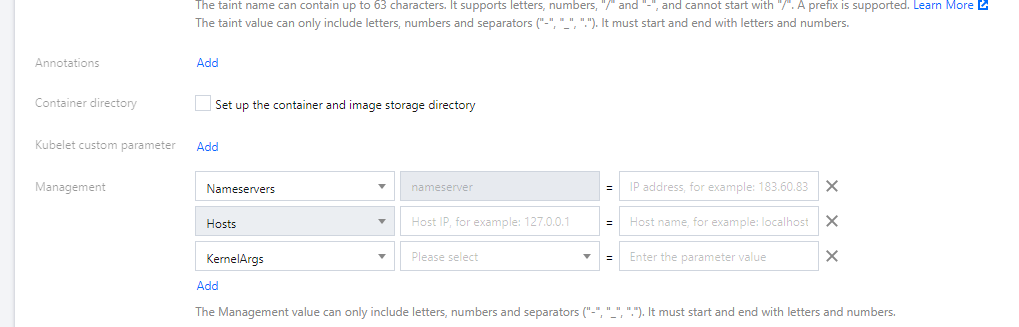
ノードにManagementパラメータを設定

コンソールを介して

方法1:ノードを新規追加してManagementパラメータを設定する場合

1. TKEコンソールにログインし、ネイティブノードの新規作成ドキュメントを参考にして、ネイティブノードを作成します。
2. 「ノードプールの新規作成」ページで、その他の設定をクリックし、下図に示すとおり、ノードにManagementパラメータを設定します。

3. ノードプールの作成をクリックすれば完了です。

方法2:既存のノードにManagementパラメータを設定する場合

1. TKEコンソールにログインし、左側ナビゲーションバーからクラスターを選択します。
2. クラスターリストページで、クラスターIDをクリックし、このクラスターの詳細ページに進みます。
3. 左側メニューバーのノード管理 > ノードプールを選択し、「ノードプールリスト」ページに進みます。
4. ノードプールIDをクリックし、「ノードリスト」ページに進みます。
5. 「詳細」タブで、パラメータ設定 > 編集をクリックし、Managementパラメータを変更します。

YAMLで操作します

apiVersion: node.tke.cloud.tencent.com/v1beta1
kind: MachineSet
spec:
type: Native
displayName: mstest
replicas: 2
autoRepair: true
deletePolicy: Random
instanceTypes:
- C3.LARGE8
subnetIDs:
- subnet-xxxxxxxx
template:
spec:
displayName: mtest
providerSpec:
type: Native
value:
instanceChargeType: PostpaidByHour
# ここでmanagementパラメータ情報を入力します
management:
hosts:
- Hostnames:
- static.fake.com
IP: 192.168.2.42
- Hostnames:
- common.fake.com
IP: 192.168.2.45
nameservers:
- 183.60.83.19
- 183.60.82.98
- 8.8.8.8
kernelArgs:
- kernel.pid_max=65535
- fs.file-max=400000
- net.ipv4.tcp_rmem="4096 12582912 16777216"
- vm.max_map_count="65535"


ヘルプとサポート

この記事はお役に立ちましたか?

フィードバック