Check for Migration from Standard Architecture to Cluster Architecture
ダウンロード
フォーカスモード
フォントサイズ
Standard Edition can be your self-created Redis Standalone Edition, master/replica mode, or Tencent Cloud Distributed Cache Memory Edition (Standard Architecture). This document describes the compatibility issues in migrating data from Redis Standard Edition to Tencent Cloud Distributed Cache Memory Edition (Cluster Architecture).
Compatibility Description
Tencent Cloud Distributed Cache Memory Edition (Cluster Architecture) adopts the cluster architecture consisting of Tencent Cloud's proprietary proxy and Redis Community Cluster Edition, which is 100% compatible with Redis Community Cluster Edition commands.
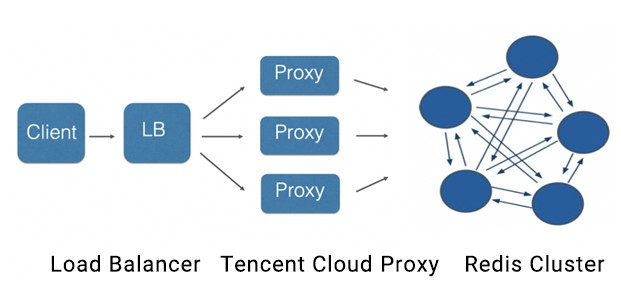
The most challenging problem in migrating data from Standard Edition to Memory Edition (Cluster Architecture) is the command compatibility with usage specifications of Memory Edition (Cluster Architecture). You need to pay attention to the following usage specification issues:
Multikey operation
TencentDB for Redis Memory Edition (Cluster Architecture) uses the hash algorithm to distribute keys to 16,384 slots. For more information on the principle, please see Redis Cluster Specification.
Redis Community Cluster Edition: it does not support any cross-slot multi-key access commands.
Tencent Cloud Distributed Cache Memory Edition (Cluster Architecture): it supports cross-slot multikey access of the
MGET, MSET, and DEL commands. This mainly works by using Tencent Cloud's proprietary proxy to implement aggregated command computing among multiple nodes.Hash tag: in your business, keys that need to engage in multi-key computing can be aggregated into the same slot through a hash tag. For more information on how to use hash tags, see Redis Cluster Specification.
Cross-slot command list:
Command Group | Command | Cross-slot support in Memory Edition (Cluster Architecture) |
Keys Group | del | ✓ |
| exists | ✓ |
| rename | x |
| renamenx | x |
| unlink | x |
List Group | rpoplpush | x |
| blpop | x |
| brpop | x |
| brpoplpush | x |
Sets Group | sdiff | x |
| sdiffstore | x |
| sinter | x |
| sinterstore | x |
| smove | x |
| sunion | x |
| sunionstore | x |
Sorted Sets Group | zinterstore | x |
| zunionstore | x |
Strings Group | bitop | x |
| mget | ✓ |
| mset | ✓ |
| msetnx | x |
Hyperloglog Group | pfcount | x |
| pfmerge | x |
Scripting Group | eval | x |
| evalsha | x |
| script exists | x |
Stream Group | xread | x |
| xreadgroup | x |
Support for Lua
Memory Edition (Cluster Architecture) supports Lua commands, but cross-slot access to keys in Lua scripts is not supported.
The
Key parameter must be passed in for the EVAL and EVALSHA commands; otherwise, they cannot be executed.The subcommands
LOAD, FLUSH, KILL, and EXIST of SCRIPT will be distributed to all master nodes in the cluster through the proxy.> eval "return {KEYS[1],KEYS[2],ARGV[1],ARGV[2]}" 2 key1 key2 first second1) "key1"2) "key2"3) "first"4) "second"
Note:
The
key1 and key2 parameters must be passed in when you use Lua.Transaction support
Memory Edition (Cluster Architecture) supports transactions, but cross-slot access to keys in transactions is not supported.
You need to first run the
watch key command and then the multi and exec commands in the current version. This operation will be optimized in future versions to eliminate need to run watch key first.Custom commands
Through VIP encapsulation, TencentDB for Redis Memory Edition (cluster architecture) provides a user experience in cluster mode comparable to the standard edition, making it much easier for use in different scenarios. To increase the transparency to OPS, custom commands can be used. Access to each node in the cluster is supported by adding a parameter "node ID" on the right of the original command parameter list, such as
COMMAND arg1 arg2 ... [node ID]. The node ID can be obtained through the cluster nodes command or in the console.10.1.1.1:2000> cluster nodes25b21f1836026bd49c52b2d10e09fbf8c6aa1fdc 10.0.0.15:6379@11896 slave 36034e645951464098f40d339386e9d51a9d7e77 0 1531471918205 1 connectedda6041781b5d7fe21404811d430cdffea2bf84de 10.0.0.15:6379@11170 master - 0 1531471916000 2 connected 10923-1638336034e645951464098f40d339386e9d51a9d7e77 10.0.0.15:6379@11541 myself,master - 0 1531471915000 1 connected 0-546053f552fd8e43112ae68b10dada69d3af77c33649 10.0.0.15:6379@11681 slave da6041781b5d7fe21404811d430cdffea2bf84de 0 1531471917204 3 connected18090a0e57cf359f9f8c8c516aa62a811c0f0f0a 10.0.0.15:6379@11428 slave ef3cf5e20e1a7cf5f9cc259ed488c82c4aa17171 0 1531471917000 2 connectedef3cf5e20e1a7cf5f9cc259ed488c82c4aa17171 10.0.0.15:6379@11324 master - 0 1531471916204 0 connected 5461-10922Native command: `info server`Custom command:info server ef3cf5e20e1a7cf5f9cc259ed488c82c4aa17171SCANSample:scan 0 238b45926a528c85f40ae89d6779c802eaa394a2scan 0 match a* 238b45926a528c85f40ae89d6779c802eaa394a2KEYSSample:keys a* 238b45926a528c85f40ae89d6779c802eaa394a2
Client access method
We recommend you use a Standard Edition (e.g., Jedis but not JedisCluster) client to access Tencent Cloud Distributed Cache Memory Edition (Cluster Architecture), as this access method is more efficient and simpler. You can also access through cluster clients, such as JedisCluster.
Codis compatibility
Tencent Cloud Distributed Cache Memory Edition (Cluster Architecture) is 100% compatible with Codis Server commands with no modification to your business required. You can use DTS to quickly migrate data to Tencent Cloud Distributed Cache, which has the following advantages over Codis:
Compatibility with more versions. Codis supports only Redis 3.2 or below, while Tencent Cloud Distributed Cache Memory Edition (Cluster Architecture) supports Redis 4.0 and 5.0 and will be continuously updated in sync with the Redis Community.
TencentDB for Redis Cluster Edition is compatible with more commands. Codis does not support blocking commands such as
BLPOP and SUBSCRIBE.If a big key occurs in data migration with Codis, the service may become unavailable. In contrast, Tencent Cloud Distributed Cache supports lossless expansion with no fear for big keys.
Compatibility Check
Currently, no tools can be used to exactly determine whether there will be compatibility problems in data migration from Standard Edition to Cluster Edition. You can use the following two tools to evaluate the compatibility before migration. We recommend you perform static evaluation, dynamic evaluation, and business verification before migration to ensure that data can be smoothly migrated.
Static evaluation
1. Download the cluster_migrate_online_check.py static verification tool and use it to run the
info commandstats command to check whether Standard Edition has ever executed cross-slot commands in order to determine whether there is compatibility problem.Usage:./cluster_migrate_check.py host port password
Note:
Enter the corresponding Redis Standard Edition information for
host, port, and password.2. Check whether each item can pass as instructed in Compatibility Description above.
Dynamic evaluation
Download the cluster_migrate_online_check dynamic verification tool and use it to simulate the execution of the
psync command on the client so as to sync incremental data from Standard Edition to the Tencent Cloud Distributed Cache Memory Edition (Cluster Architecture) in real time. By performing real-time sync, you can check whether there is compatibility problem in write commands. This tool cannot test the compatibility of read commands.Note:
The psync command for TencentDB for Redis requires submission of a submitting a ticket for application.
The proxy version of Tencent Cloud Distributed Cache needs to be later than or equal to 5.6.5 to be compatible with the Redis config set command. For versions earlier than 5.6.5, the proxy should be upgraded first.
The steps are as follows:
1. Activate TencentDB for Redis Memory Edition (Cluster Architecture) in the console.
2. Use the tool to sync data from Standard Edition to TencentDB for Redis Memory Edition (Cluster Architecture) in real time.
3. After a period of verification (such as 6 or 24 hours), if the tool does not report any errors, the write commands do not have compatibility problems; otherwise, you can get the information of incompatible commands in the error message.
Usage:./cluster_migrate_online_check srcip:srcport srcpasswd dstip:dstport dstpasswdEnvironment variable parameters:export logout=1 // It is used to print command in the console, which is disabled by defaultexport pipeline = 2000 // Number of concurrent pipelines, which is 1,000 by default
Note:
srcip:srcport: Redis Standard Edition address information, which is required.dstip:dstport: TencentDB for Redis Memory Edition (Cluster Architecture) address information, which is optional. If it is left empty, the tool can be used as a monitor.4. Check whether each item can pass as instructed in Compatibility Description above.
Business verification
To ensure successful data migration, we recommend you test the business in the test environment. You can connect the business in the testing environment to the Tencent Cloud Distributed Cache Memory Edition (Cluster Architecture) and confirm whether all features can work properly before data migration.
Self-Created Instance Migration Failure
The
client-output-buffer-limit parameter value is too small. You are recommended to set it to 512 MB or 1,024 MB by running the following command:config set client-output-buffer-limit "slave 1073741824 1073741824 600"
Parameters have not been passed in for the
EVAL command.フィードバック