UserSig is the password for user login and also the signature for using RestAPI. It is essentially the ciphertext obtained by encrypting UserID and other information. This article will guide you on how to generate UserSig.
Note:
Live system and Instant Messaging (Chat) system share the same usersig generation method.
Obtaining a Key
2. Click the target app card to go to its basic configuration page.
3. In the Basic Information section, click Display key to the right of Key.
4. Click Copy to copy and save the key information.
Note:
Store the key information properly to prevent disclosure.
Calculating UserSig on the Client
The GenerateTestUserSig open-source module provided in the sample code of the Chat SDK can help you quickly generate a UserSig. You only need to configure three member variables, including SDKAPPID (SDKAppID of the app), EXPIRETIME (UserSig expiration time), and SECRETKEY (key information), and then call the genTestUserSig() function to quickly obtain a UserSig.
To simplify this process, we provide the source code for computing a UserSig for the following languages and platforms. You can directly download and integrate the source code into your client.
|
Java | Android | |
Objective-C | iOS | |
Objective-C | Mac | |
C++ | Windows | |
Javascript | Web | |
Dart | Flutter | |
Note:
In this method, the SECRETKEY is vulnerable to decompilation and reverse engineering. Once your SECRETKEY is disclosed, attackers can steal your Tencent Cloud traffic. Therefore, this method is only suitable for locally running a demo project and feature debugging.
The correct way to issue a UserSig is to integrate the UserSig computing code into your server and provide app-oriented APIs. When UserSig is needed, your app will send a request to the business server to obtain a dynamic UserSig. For more information, see How to Calculate UserSig. Calculating UserSig on the Server
Generating a UserSig
on the server provides maximum protection against the disclosure of the key used for calculating the UserSig. You only need to deploy the code for calculating the UserSig on your server and provide an app-oriented API. When a UserSig is needed, your app will send a request to the business server to obtain a dynamic UserSig. To simplify this process, we provide the source code for calculating a UserSig for the following languages and platforms. You can directly download and integrate the source code into your server.
|
Java | HMAC-SHA256 | |
GO | HMAC-SHA256 | |
PHP | HMAC-SHA256 | |
Nodejs | HMAC-SHA256 | |
Python | HMAC-SHA256 | |
C# | HMAC-SHA256 | |
C++ | HMAC-SHA256 | |
Key fields in a UserSig calculation function include the SDKAppID, UserID, and UserSig validity period, as described in the following table.
Note:
The following table uses the field names in the Java source code as an example. The field names may be different in other languages.
|
sdkappid | SDKAppID of the app. You can obtain the SDKAppID on the app card in the Chat console. |
userId | User ID (former name: Identifier). |
expire | UserSig validity period, in seconds. It is recommended that the UserSig validity period be no less than 24 hours and no more than 50 years. For the security of your account, it is recommended that the UserSig validity period be set to two months. |
userbuf | This field is set to null by default because APIs without UserBuf are used in Chat by default. |
key | Key. You can obtain a key on the app details page in the Chat console. |
Old Version of Algorithm
To simplify signature computing so that customers can conveniently and quickly use Tencent Cloud services, the signature algorithm of the Chat service has been upgraded from ECDSA-SHA256 to HMAC-SHA256 since July 19, 2019. This means that all SDKAppIDs created after July 19, 2019 will use the new HMAC-SHA256 algorithm.
If your SDKAppID was created before July 19, 2019, we recommend that you upgrade the signature algorithm to HMAC-SHA256. The upgrade will not affect your business. Alternatively, you can still use the signature algorithm of an earlier version. The URLs for downloading the source code for the ECDSA-SHA256 algorithm are as follows: |
Java | ECDSA-SHA256 | |
GO | ECDSA-SHA256 | |
PHP | ECDSA-SHA256 | |
Nodejs | ECDSA-SHA256 | |
Python | ECDSA-SHA256 | |
C# | ECDSA-SHA256 | |
C++ | ECDSA-SHA256 | |
Get UserSig from the console
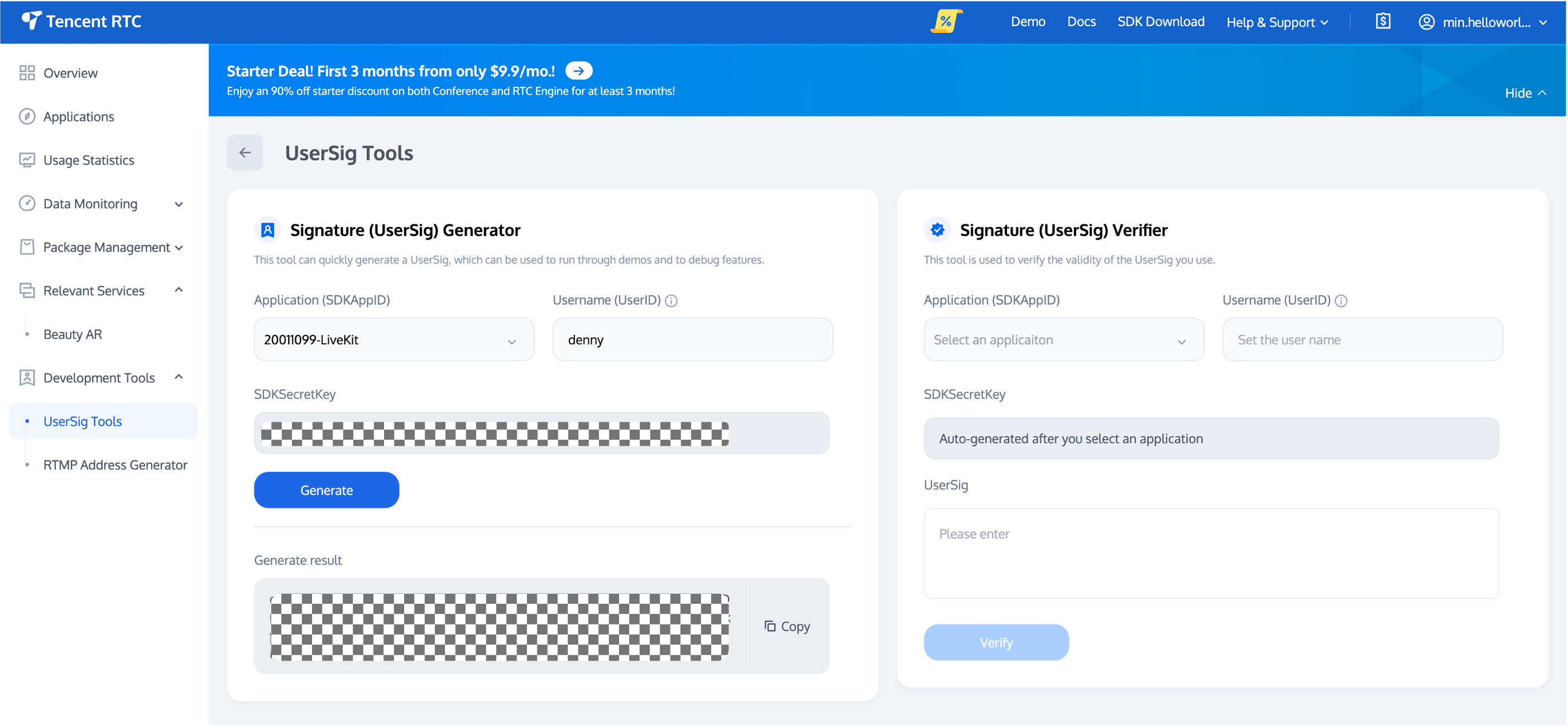
Log in to Tencent-RTC Console, navigate to Development Tools > UserSig Tools. Under the UserSig Generation Tool, select the corresponding SDKAppID and UserID.
Click the Generate button to compute the corresponding UserSig.