tencent cloud

APIs

Cloud Virtual Machine
History
Introduction
API Category
Making API Requests
Region APIs
Instance APIs
Cloud Hosting Cluster APIs
Image APIs
Instance Launch Template APIs
Placement Group APIs
Key APIs
Security Group APIs
Network APIs
Data Types
Error Codes
Tencent Cloud Lighthouse
History
Introduction
API Category
Making API Requests
Image APIs
Firewall APIs
Key APIs
Instance APIs
CCN APIs
Snapshot APIs
Other APIs
Cloud Disk APIs
Scene APIs
Package APIs
Quota APIs
Region APIs
Data Types
Error Codes
Auto Scaling
History
Introduction
API Category
Making API Requests
Scaling Group APIs
Scaling Group Instances APIs
Launch Configuration APIs
Scheduled Action APIs
Alarm Trigger Policy APIs
Notification APIs
Lifecycle Hook APIs
Instance Refresh APIs
Other APIs
Data Types
Error Codes
Batch Compute
History
Introduction
API Category
Making API Requests
Compute Environment APIs
Configuration Viewing-related APIs
Task Template-related APIs
Job-related APIs
Data Types
Error Codes
Tencent Cloud Automation Tools
History
Introduction
API Category
Making API Requests
Remote Command APIs
Scheduled Execution APIs
Managed Instance APIs
Scenario APIs
Statistics APIs
Data Types
Error Codes
Edge Computing Machine
History
API Category
Making API Requests
Region APIs
Module APIs
Instance APIs
Image APIs
VPC APIs
Subnet APIs
Route Table APIs
CLB APIs
ENI APIs
EIP APIs
HAVIP APIs
Other API
Key APIs
Security Group APIs
Data Types
Error Codes
Tencent Kubernetes Engine
History
Introduction
API Category
Making API Requests
Elastic Cluster APIs
Resource Reserved Coupon APIs
Cluster APIs
Third-party Node APIs
Relevant APIs for Addon
Network APIs
Node APIs
Node Pool APIs
TKE Edge Cluster APIs
Cloud Native Monitoring APIs
Scaling group APIs
Super Node APIs
Other APIs
Data Types
Error Codes
TKE API 2022-05-01
Tencent Container Registry
History
Introduction
API Category
Making API Requests
Instance Management APIs
Namespace APIs
Access Control APIs
Instance Synchronization APIs
Tag Retention APIs
Trigger APIs
Helm Chart APIs
Image Repository APIs
Custom Account APIs
Data Types
Error Codes
Tencent Cloud Elastic Microservice
History
Introduction
API Category
Making API Requests
Environment APIs
ModifyIngress
Resource APIs
Application APIs
Service APIs
Application Deployment APIs
Access Policy APIs
Configuration file APIs
Log collecting APIs
Scaling Rule APIs
Application Version APIs
Other APIs
Workload APIs
Data Types
Error Codes
Serverless Cloud Function
History
Introduction
API Category
Making API Requests
Other APIs
Namespace APIs
Layer Management APIs
Async Event Management APIs
Trigger APIs
Function APIs
Function and Layer Status Description
Data Types
Error Codes
Event Bridge
History
Introduction
API Category
Making API Requests
Delivery Target APIs
Event Bus APIs
Event Rule APIs
Event Connector APIs
Data Transformer APIs
Event Storage APIs
Data Types
Error Codes
Cloud Object Storage
Introduction
Common Request Headers
Common Response Headers
Error Codes
Request Signature
Action List
Service APIs
Bucket APIs
Object APIs
Batch Operation APIs
Data Processing APIs
Job and Workflow
Content Moderation APIs
Cloud Antivirus API
Cloud File Storage
History
Introduction
API Category
Snapshot APIs
File system APIs
Lifecycle APIs
Other APIs
Data Flow APIs
Making API Requests
Permission Group APIs
Service APIs
Scaling APIs
Data Migration APIs
Data Types
Error Codes
Cloud Block Storage
History
Introduction
API Category
Making API Requests
Snapshot APIs
Cloud Disk APIs
Data Types
Error Codes
Cloud HDFS
History
Introduction
API Category
Making API Requests
Other APIs
Permission group APIs
Permission rule APIs
Mount point APIs
Lifecycle rule APIs
File system APIs
Restoration task APIs
Data Types
Error Codes
Cloud Log Service
History
Introduction
API Category
Making API Requests
Topic Management APIs
Log Set Management APIs
Index APIs
Topic Partition APIs
Machine Group APIs
Collection Configuration APIs
Log APIs
Metric APIs
Alarm Policy APIs
Data Processing APIs
Kafka Protocol Consumption APIs
Kafka Task APIs
Kafka Data Subscription APIs
COS Task APIs
SCF Delivery Task APIs
Scheduled SQL Analysis APIs
COS Data Import Task APIs
Data Types
Error Codes
TDSQL-C for MySQL
History
Introduction
API Category
Making API Requests
Instance APIs
Multi-Availability Zone APIs
Other APIs
Audit APIs
Database Proxy APIs
Backup and Recovery APIs
Parameter Management APIs
Billing APIs
serverless APIs
Resource Package APIs
Account APIs
Performance Analysis APIs
Data Types
Error Codes
TencentDB for MySQL
History
Introduction
API Category
Instance APIs
Making API Requests
Data Import APIs
Database Proxy APIs
Database Audit APIs
Security APIs
Task APIs
Backup APIs
Account APIs
Rollback APIs
Parameter APIs
Database APIs
Monitoring APIs
Log-related API
Data Types
Error Codes
TencentDB for MariaDB
History
Introduction
API Category
Making API Requests
Security Group APIs
Other APIs
Account APIs
Parameter Management APIs
Monitoring Management APIs
Instance Management APIs
Backup and Restoration APIs
Data Types
Error Codes
TencentDB for PostgreSQL
History
Introduction
API Category
Making API Requests
Instance APIs
Read-only Replica APIs
Backup and Recovery APIs
Parameter Management APIs
Security Group APIs
Performance Optimization APIs
Account APIs
Specification APIs
Network APIs
Data Types
Error Codes
TencentDB for SQL Server
History
Introduction
API Category
Making API Requests
Sales and fee related APIs
Instance Management related APIs
Operation and maintenance management related APIs
Network management related APIs
Account management related APIs
Database management related APIs
Security group management related APIs
Data security encryption related APIs
Parameter configuration related APIs
Extended Event related APIs
Log management related APIs
Read only instance management related APIs
Publish and subscribe related APIs
Backup related APIs
Data migration (cold standby migration) related APIs
Rollback related APIs
Data migration (DTS old version) related APIs
SQL Server Integration Services (SSIS) related APIs
Data Types
Error Codes
TDSQL for MySQL
History
Introduction
API Category
Security Group APIs
Other APIs
Making API Requests
TDSQL APIs
Data Types
Error Codes
Tencent Cloud Distributed Cache (Redis OSS-Compatible)
History
Introduction
API Category
Making API Requests
Instance APIs
Parameter Management APIs
Other APIs
Backup and Restoration APIs
Region APIs
Monitoring and Management APIs
Log APIs
Data Types
Error Codes
TencentDB for MongoDB
History
Introduction
API Category
Making API Requests
Instance APIs
Backup APIs
Account APIs
Other APIs
Task APIs
Introduction
Data Types
Error Codes
TencentDB for TcaplusDB
History
Introduction
API Category
Making API Requests
Table Group APIs
Other APIs
Table APIs
Cluster APIs
Data Types
Error Codes
Data Transfer Service
History
Introduction
API Category
Making API Requests
(NewDTS) Data Migration APIs
Data Sync APIs
Data Consistency Check APIs
(NewDTS) Data Subscription APIs
Data Types
Error Codes
DTS API 2018-03-30
TencentDB for DBbrain
History
Introduction
Introduction
API Category
Making API Requests
Session Killing APIs
Exception Detection APIs
Other APIs
Redis related APIs
Health Report Email Sending APIs
Space Analysis APIs
Security Audit APIs
Slow Log Analysis APIs
Database Audit APIs
Data Types
Error Codes
DBbrain APIs 2019-10-16
Virtual Private Cloud
History
Introduction
API Category
Making API Requests
VPC APIs
Route Table APIs
Elastic Public IP APIs
Elastic IPv6 APIs
Highly Available Virtual IP APIs
ENI APIs
Bandwidth Package APIs
NAT Gateway APIs
Direct Connect Gateway APIs
Cloud Connect Network APIs
Network ACL APIs
Network Parameter Template APIs
Network Detection-Related APIs
Flow Log APIs
Gateway Traffic Monitor APIs
Private Link APIs
Traffic Mirroring APIs
Other APIs
Subnet APIs
VPN Gateway APIs
Security Group APIs
Snapshot Policy APIs
Error Codes
Data Types
Cloud Load Balancer
History
Introduction
API Category
Instance APIs
Listener APIs
Backend Service APIs
Target Group APIs
Redirection APIs
Other APIs
Classic CLB APIs
Load Balancing APIs
Making API Requests
Data Types
Error Codes
CLB API 2017
Direct Connect
History
Introduction
API Category
Making API Requests
Direct Connect APIs
Data Types
Error Codes
Content Delivery Network
History
Introduction
API Category
Content Management APIs
Real-time Log APIs
Service Query APIs
Data Query APIs
Making API Requests
Log Query APIs
Domain Name Management APIs
Configuration Management APIs
Obsoleted APIs
Other APIs
Data Types
Error Codes
Global Application Acceleration Platform
History
Introduction
API Category
Rule APIs
Connection Group APIs
Making API Requests
Origin Server APIs
Listener APIs
Connection APIs
Certificate APIs
Other APIs
Data Types
Error Codes
Tencent Cloud Firewall
History
Introduction
API Category
Making API Requests
Intrusion Defense APIs
Access Control APIs
Other APIs
Enterprise Security Group APIs
Firewall Status APIs
Data Types
Error Codes
Tencent Cloud EdgeOne
History
Introduction
API Category
Making API Requests
Site APIs
Acceleration Domain Management APIs
Site Acceleration Configuration APIs
Edge Function APIs
Alias Domain APIs
Security Configuration APIs
Layer 4 Application Proxy APIs
Content Management APIs
Data Analysis APIs
Log Service APIs
Billing APIs
Certificate APIs
Origin Protection APIs
Load Balancing APIs
Diagnostic Tool APIs
Custom Response Page APIs
API Security APIs
DNS Record APIs
Content Identifier APIs
Legacy APIs
Ownership APIs
Image and Video Processing APIs
Multi-Channel Security Gateway APIs
Version Management APIs
Data Types
Error Codes
Cloud Workload Protection Platform
History
Introduction
API Category
Asset Management APIs
Virus Scanning APIs
Abnormal Log-in APIs
Password Cracking APIs
Malicious Request APIs
High-Risk Command APIs
Local Privilege Escalation APIs
Reverse Shell APIs
Vulnerability Management APIs
New Baseline Management APIs
Baseline Management APIs
Advanced Defense APIs
Security Operation APIs
Expert Service APIs
Other APIs
Overview Statistics APIs
Settings Center APIs
Making API Requests
Intrusion Detection APIs
Data Types
Error Codes
Key Management Service
History
Introduction
API Category
Key APIs
Making API Requests
Asymmetric Key APIs
Data Types
Error Codes
Secrets Manager
History
Introduction
API Category
Making API Requests
Data Security APIs
Other APIs
Data Types
Error Codes
Captcha
History
Introduction
API Category
Making API Requests
Server APIs
Error Codes
Customer Identity and Access Management
History
Introduction
API Category
Making API Requests
User Management APIs
Data Sync APIs
Audit Management APIs
Data Types
Error Codes
Security Token Service
History
Introduction
API Category
Making API Requests
STS APIs
Data Types
Error Codes
SSL Certificates
History
Introduction
API Category
Making API Requests
Certificate APIs
Certificate Renewal (Certificate ID Unchanged) APIs
CSR APIs
Data Types
Error Codes
Private DNS
History
Introduction
API Category
Making API Requests
Private DNS APIs
Data Types
Error Codes
DNSPod
History
Introduction
API Category
Making API Requests
Line APIs
Package and Value-Added Service APIs
Batch Operation APIs
Group APIs
Record APIs
DNS Query Volume APIs
Alias APIs
Domain APIs
Data Types
Error Codes
Elastic MapReduce
History
Introduction
API Category
Cluster Resource Management APIs
Cluster Services APIs
User Management APIs
Data Inquiry APIs
Scaling APIs
Configuration APIs
Other APIs
Serverless HBase APIs
YARN Resource Scheduling APIs
Making API Requests
Data Types
Error Codes
Elasticsearch Service
History
Introduction
API Category
Instance APIs
Making API Requests
Data Types
Error Codes
Data Lake Compute
History
Introduction
API Category
Making API Requests
Data Table APIs
Task APIs
Metadata APIs
Service Configuration APIs
Permission Management APIs
Database APIs
Data Source Connection APIs
Data Optimization APIs
Data Engine APIs
Resource Group for the Standard Engine APIs
Data Types
Error Codes
Face Recognition
History
Introduction
API Category
Making API Requests
Face Detection and Analysis APIs
Facial Feature Localization APIs
Face Comparison APIs
Group Management APIs
Face Search APIs
Face Verification APIs
Image-based Liveness Detection (High Precision) APIs
Data Types
Error Codes
eKYC
History
Introduction
API Category
Making API Requests
Selfie Verification (Pure API) APIs
Selfie Verification (App SDK) APIs
Identity Verification (App SDK) APIs
Identity Verification(Mobile HTML5) APIs
AI Face Shield (Pure API) APIs
Other APIs
Data Types
Error Codes
Text To Speech
History
Introduction
API Category
Making API Requests
General Text-to-Speech APIs
Data Types
Error Codes
Tencent Machine Translation
History
Introduction
API Category
Making API Requests
APIs
Error Codes
Optical Character Recognition
History
Introduction
API Category
Making API Requests
Document Intelligent APIs
Card and Document OCR APIs
General Text OCR APIs
Vehicle Scene OCR APIs
Data Types
Error Codes
IoT Hub
History
Introduction
API Category
Making API Requests
Device Shadow APIs
Device APIs
CA Certificate APIs
Product APIs
Data Types
Error Codes
TDMQ for CKafka
History
Introduction
API Category
Making API Requests
Other APIs
ACL APIs
Instance APIs
Routing APIs
DataHub APIs
Topic APIs
Data Types
Error Codes
Cloud Message Queue
History
API Category
Making API Requests
Topic APIs
Queue APIs
Introduction
Data Types
Error Codes
Chat
JavaScript
Android
iOS & macOS
Swift
Flutter
Electron
Unity
React Native
C APIs
C++
Short Message Service
History
Introduction
API Category
Making API Requests
SMS Mobile Number APIs
SMS Conversion Rate APIs
Status Pull APIs
SMS Statistics APIs
SMS Signature APIs
SMS Delivery APIs
SMS Template APIs
Data Types
Error Codes
SMS Callback APIs
Tencent Push Notification Service
Overview
API Overview
Call Method
Push APIs
Tag APIs
Account APIs
Statistics APIs
User Attribute APIs
Server-Side Error Codes
Server SDKs
API (Java)
Simple Email Service
History
Introduction
API Category
Making API Requests
Domain Verification APIs
Mail APIs
Template APIs
Statistics APIs
Sender Address APIs
Blocklist APIs
Sending Status Query APIs
Batch Task APIs
Custom Blocklist APIs
Data Types
Error Codes
Tencent Real-Time Communication
History
Introduction
API Category
Room Management APIs
Stream mixing and relay APIs
On-cloud recording APIs
Data Monitoring APIs
Pull stream Relay Related interface
Web Record APIs
AI Service APIs
Cloud Slicing APIs
Cloud Moderation APIs
Making API Requests
Call Quality Monitoring APIs
Usage Statistics APIs
Data Types
Appendix
Error Codes
StreamLive
History
Introduction
API Category
Making API Requests
Input Management APIs
Input Security Group Management APIs
Channel Management APIs
Plan APIs
Watermark Management APIs
Statistics APIs
Data Types
Error Codes
StreamPackage
History
Introduction
API Category
Making API Requests
Channel Management APIs
Advertising Insertion Configuration Management APIs
Channel linear assembly management APIs
VOD remux task APIs
Usage Query APIs
HarvestJob Management APIs
Data Types
Error Codes
StreamLink
History
API Category
Making API Requests
Flow APIs
Data Types
Error Codes
Cloud Streaming Services
History
Introduction
API Category
Making API Requests
Live Pad APIs
Live Stream Mix APIs
Time Shifting APIs
Monitoring Data Query APIs
Billing Data Query APIs
Live Transcoding APIs
Delayed Playback Management APIs
Domain Name Management APIs
Watermark Management APIs
Certificate Management APIs
Stream Pulling APIs
Recording Management APIs
Live Callback APIs
Screencapturing and Porn Detection APIs
Authentication Management APIs
Live Stream Management APIs
Data Types
Error Codes
Video on Demand
History
Introduction
API Category
Other APIs
Media Processing APIs
Parameter Template APIs
Task Management APIs
Media Upload APIs
Media Management APIs
Event Notification Relevant API
Media Categorization APIs
Domain Name Management APIs
Distribution APIs
AI-based Sample Management APIs
Region Management APIs
Data Statistics APIs
Carousel-Related APIs
Just In Time Transcode APIs
No longer recommended APIs
Making API Requests
AI-based image processing APIs
Task Flow APIs
Data Types
Error Codes
Video on Demand API 2024-07-18
Media Processing Service
History
Introduction
API Category
Making API Requests
Processing Task Initiation APIs
Task Management APIs
Transcoding and Enhancement Template APIs
Watermark Template APIs
Screenshot Template APIs
Media AI Template APIs
Media AI—Hotword Lexicon APIs
Media AI—Sample Management APIs
Media Quality Inspection Template APIs
Live Streaming Recording Template APIs
Orchestration Management APIs
Data Statistics APIs
StreamLink—Security Group Management APIs
Other APIs
Image Processing Template APIs
AI Generation APIs
Other APIs
Data Types
Error Codes
Cloud Application Rendering
History
Introduction
API Category
Making API Requests
User APIs
Application Management APIs
Project Management APIs
Concurrency Management APIs
Stream Push Service APIs
Data Types
Error Codes
Game Multimedia Engine
History
Introduction
API Category
Usage APIs
Recording APIs
Making API Requests
Voice Chat APIs
Application APIs
Data Types
Error Codes
Tag
History
Introduction
API Category
Making API Requests
Write APIs
Read APIs
Project APIs
Data Types
Error Codes
Cloud Access Management
History
Introduction
API Category
Making API Requests
User APIs
Policy APIs
Role APIs
Identity Provider APIs
Data Types
Error Codes
CloudAudit
History
Introduction
API Category
Calling Method
CloudAudit APIs
Data Types
Error Codes
Tencent Cloud Organization
History
Introduction
API Category
Making API Requests
Organization Settings APIs
Department and Member Management APIs
Unified Member Login APIs
Member Access Management APIs
Organization Service Management APIs
Organization Management Policy APIs
Resource Sharing APIs
Identity Center Management APIs
Identity Center User Management APIs
Identity Center User Group Management APIs
Identity Center Management SCIM Synchronization APIs
Identity Center Single Sign-On Management APIs
Identity Center Permission Configuration Management APIs
Identity Center Multi-Account Authorization Management APIs
Identity Center Sub-User Synchronization Management APIs
Data Types
Error Codes
TCO API 2018-12-25
Tencent Cloud Observability Platform
History
Introduction
API Category
Making API Requests
Monitoring Data Query APIs
Alarm APIs
Legacy Alert APIs
Notification Template APIs
TMP APIs
Grafana Service APIs
Event Center APIs
TencentCloud Managed Service for Prometheus APIs
Monitoring APIs
Data Types
Error Codes
Real User Monitoring
History
Introduction
API Category
Making API Requests
Console APIs
Business System and Project Information APIs
Custom Speed Test APIs
Custom Event APIs
API Monitoring APIs
Exception Analysis APIs
Page View APIs
Static Resource Monitoring APIs
Log APIs
Page Performance APIs
Data Types
Error Codes
International Partners
History
Introduction
API Category
Making API Requests
Customer Management APIs
Credit Management APIs
Agent APIs
Bill Management APIs
Voucher Management APIs
Commission Management APIs
Data Types
Error Codes
Billing Center
API Category
Funds Management APIs
Order Management APIs
Resource Management APIs
Bill Management APIs
Cost Allocation Management APIs
Cost Management APIs
Making API Requests
Organization Account APIs
Data Types
Error Codes
TDSQL Boundless
History
Introduction
API Category
Making API Requests
Instance APIs
Security Group APIs
Task APIs
Backup APIs
Rollback APIs
Parameter APIs
Database APIs
Data Types
Error Codes
TDMQ for MQTT
History
Introduction
API Category
Making API Requests
Cluster APIs
Topic APIs
Authorization Policy APIs
User APIs
Client APIs
Message APIs
Message Enhancement Rule APIs
Data Types
Error Codes
Tencent HY
History
Introduction
API Category
Making API Requests
Hunyuan Text APIs
Hunyuan 3D APIs
Data Types
Error Codes
Smart Media Hosting
History
Introduction
API Category
Making API Requests
PaaS Service APIs
Official Cloud Disk APIs
Data Types
Error Codes
Quota Center
History
Introduction
API Category
Making API Requests
Alarm APIs
Data Types
Error Codes
Message Center
History
Introduction
API Category
Making API Requests
Message Subscription APIs
Data Types
Error Codes
Business Intelligence
History
Introduction
API Category
Making API Requests
Project Management APIs
Role APIs
Database Table APIs
Report Embedding APIs
Page Management APIs
Data Types
Error Codes
LLM Knowledge Engine Basic API
History
Introduction
API Category
Making API Requests
Atomic Capability APIs
Data Types
Error Codes
Tencent Cloud Agent Development Platform
History
API Category
Making API Requests
Atomic Capability APIs
Operation Optimization APIs
Document Library APIs
Q&A Database APIs
Knowledge Tag APIs
Application Management APIs
Enterprise Management APIs
Billing APIs
Release Management APIs
Dialogue Endpoint APIs
Data Statistics APIs
Data Types
Error Codes
Tencent Cloud Blockchain as a Service
History
Introduction
API Category
Making API Requests
Hyperledger Fabric 2.3 APIs
Data Types
Error Codes
Performance Testing Service
History
Introduction
API Category
Making API Requests
PTS-related APIs
Data Types
Error Codes
Real-time Teleoperation
History
Introduction
API Category
Making API Requests
Project APIs
Device APIs
Session APIs
Authorization APIs
Other APIs
Data Types
Error Codes
Gateway Load Balancer
History
Introduction
API Category
Making API Requests
Target Group APIs
GWLB APIs
Other APIs
Data Types
Error Codes
Identity Aware Platform
History
Introduction
API Category
Making API Requests
IAP APIs
Error Codes
Cloud Dedicated Cluster
History
Introduction
API Category
Making API Requests
Cloud Dedicated Cluster (CDC) APIs
Data Types
Error Codes
Image Creation Large Model
History
Introduction
API Category
Making API Requests
Image Style Transfer APIs
Data Types
Error Codes
Face Fusion
API Category
Making API Requests
Image Face Fusion (Basic) APIs
Video Face Fusion (Single Face) APIs
Data Types
Error Codes
Tencent Smart Advisor-Chaotic Fault Generator
History
Introduction
API Category
Making API Requests
Task APIs
Template Library APIs
Data Types
Error Codes
Tencent HealthCare Omics Platform
History
Introduction
API Category
Making API Requests
Environment Management APIs
Tencent Healthcare Omics Platform APIs
Data Types
Error Codes
Tencent Cloud TCHouse-D
History
Introduction
API Category
Making API Requests
Cluster Operation APIs
Database and Table APIs
Cluster Information Viewing APIs
Hot-Cold Data Layering APIs
Database and Operation Audit APIs
User and Permission APIs
Resource Group Management APIs
Data Types
Error Codes
Tencent Cloud WeData
History
Introduction
API Category
Making API Requests
Project Management APIs
Smart Ops Related Interfaces
Resource Group APIs
Data Development APIs
Data Asset - Data Dictionary APIs
Data Development APIs
Ops Center APIs
Data Exploration APIs
Data Operations Related Interfaces
Asset APIs
Metadata Related Interfaces
Task Operations APIs
Data Security APIs
Instance Operation and Maintenance Related Interfaces
Data Map and Data Dictionary APIs
Data Quality Related Interfaces
DataInLong APIs
Platform Management APIs
Data Source Management APIs
Data Quality APIs
Platform Management APIs
Asset Data APIs
Data Source Management APIs
Data Types
Error Codes
WeData API 2025-08-06
Anti-DDoS
History
Introduction
API Category
Making API Requests
Anti-DDoS Advanced Instance APIs
Resource List APIs
Protection Configuration APIs
Other APIs
Alarm Notification APIs
Connection Configuration APIs
Intelligent Scheduling APIs
Black hole unblocking APIs
Statistical Report APIs
Data Types
Error Codes
Cloud Contact Center
History
Introduction
API Category
Making API Requests
Agent APIs
Skill Group APIs
Number APIs
Dual Call APIs
Predictive Outbound Call APIs
SIP Phone APIs
Call Service Record APIs
Billing APIs
Other APIs
Outbound Call APIs
Speech Intelligent Agent APIs
Data Types
Error Codes
Tencent Cloud Super App as a Service
History
Introduction
API Category
Making API Requests
Operation Management APIs
Platform Management APIs
Sensitive API-Related APIs
Role Management APIs
Team Management APIs
Other Console APIs
Mini Program or Mini Game APIs
Management-Sensitive APIs
Global Domain Management APIs
Superapp APIs
User Management APIs
Data Types
Tencent Cloud Smart Advisor
History
Introduction
API Category
Making API Requests
Other APIs
Task APIs
Cloud Architecture Console APIs
Data Types
Error Codes
TDMQ for RabbitMQ
History
Introduction
API Category
Making API Requests
Relevant APIs for RabbitMQ Serverless PAAS Capacity
RabbitMQ Serverless Instance Management APIs
Data Types
Error Codes
Control Center
History
Introduction
API Category
Making API Requests
Account Factory APIs
Data Types
Error Codes
TDMQ for CMQ
API Documentation
API 2.0 to 3.0 Switch Guide
Tencent Cloud TCHouse-P
History
Introduction
API Category
Making API Requests
Information Query APIs
Instance APIs
Query APIs
Cluster Management APIs
Cluster Operation APIs
Data Types
Error Codes
TDMQ for RocketMQ
History
API Category
Making API Requests
Topic APIs
Consumer Group APIs
Message APIs
Role Authentication APIs
Hitless Migration APIs
Cloud Migration APIs
Cluster APIs
Data Types
Error Codes
Cloud Dedicated Zone
History
Introduction
API Category
Making API Requests
Availability Zone APIs
Data Types
Error Codes
Tencent Cloud Health Dashboard
History
Introduction
API Category
Making API Requests
Event APIs
Data Types
Error Codes
Application Performance Management
History
Introduction
API Category
Making API Requests
Application APIs
Business System APIs
General Query APIs
Unavailable APIs
Performance Analysis APIs
Data Types
Error Codes
Config
History
Introduction
API Category
Making API Requests
Rule APIs
Resource APIs
Data Types
Error Codes
Automatic Speech Recognition
History
Introduction
API Category
Making API Requests
Recording Recognition APIs
Real-Time Speech Recognition APIs
Data Types
Error Codes
Tencent Cloud TI Platform
History
Introduction
API Category
Making API Requests
Online Service APIs
Data Types
Error Codes
Web Application Firewall
History
Introduction
API Category
Making API Requests
Asset Management APIs
Billing APIs
Protection Settings APIs
Other APIs
IP Management APIs
Integration APIs
Log Service APIs
Security Overview APIs
Rule Engine APIs
Data Types
Error Codes
Cloud Security Center
History
Introduction
API Category
Making API Requests
Multi-account management related APIs
Scan Task APIs
Risk Center APIs
Asset Center APIs
Cloud Boundary Analysis APIs
Cloud API Anomaly Detection APIs
Report Download APIs
Solid Protection APIs
Cloud Security Center Overview APIs
Data Types
Error Codes
Risk Control Engine
History
Introduction
API Category
Making API Requests
TencentCloud API APIs
Data Types
Error Codes
TencentDB for CTSDB
History
Introduction
API Category
Making API Requests
Instance APIs
Database APIs
Data Types
Error Codes
Tencent Interactive Whiteboard
History
Introduction
API Category
Making API Requests
Whiteboard Push APIs
Other APIs
Document Transcoding APIs
Real-Time Recording APIs
Statistics Query APIs
Whiteboard Snapshot APIs
Recording Video Generation APIs
Data Types
Error Codes
Tencent Container Security Service
History
Introduction
API Category
Making API Requests
Network Security APIs
Cluster Security APIs
Security Compliance APIs
Runtime security - High-risk syscalls
Runtime Security - Reverse Shell APIs
Runtime Security APIs
Alert Settings APIs
Advanced prevention - K8s API abnormal requests
Asset Management APIs
Security Operations - Log Analysis APIs
Runtime Security - Trojan Call APIs
Runtime Security - Container Escape APIs
Image Security APIs
Billing APIs
Data Types
Error Codes
Domains
History
Introduction
API Category
Making API Requests
Domain Management APIs
Domain Query APIs
Bulk Operation APIs
Registrant Profile APIs
Other APIs
Data Types
Error Codes
Low-code Interactive Classroom
History
Introduction
API Category
Making API Requests
User Login APIs
Room Management APIs
Group Management APIs
Application Configuration APIs
Recording Management APIs
Courseware Management APIs
User Management APIs
Developer APIs
Data Types
Error Codes

SELECT Object Content

포커스 모드
폰트 크기
마지막 업데이트 시간: 2025-11-24 16:33:48

Overview

This API is used to extract content from a CSV/JSON/Parquet object with Structured Query Language (SQL) statements. During the extraction process, you need to specify the content delimiter and use an appropriate SQL function. COS Select will return the matching extraction result, and you can specify a format to save the result.
For more information about COS Select, please see COS Select Overview. You can also see SELECT Command in Developer Guide to learn about the SQL expressions for COS Select.
Note:
Currently, this API (Select Object Content) supports only virtual-hosted-style requests, but not path-style requests.

Permission restrictions

To use COS Select, you must have the cos:GetObject permission.
The root account has this permission by default.
Sub-accounts need to contact the root account for permission. For more information about permission settings, please see Granting Sub-accounts Access to COS.

Object formats

COS Select supports extracting content from objects in the following formats:
CSV: The object’s data records are separated by a specific delimiter.
JSON: either a JSON file or a JSON list
Parquet: It can contain nested structures.
Note:
To use COS Select, the object must be UTF-8 encoded.
COS Select supports extracting CSV or JSON objects that are compressed with GZIP or bzip2, and Parquet objects that are compressed with GZIP or Snappy.
COS Select supports extracting data from objects encrypted with SSE-COS.

Requests

Sample request

POST /<ObjectKey>?select&select-type=2 HTTP/1.1
Host: <BucketName-APPID>.cos.<Region>.myqcloud.com
Date: date
Authorization: Auth String

Request body
Note:
In Host: <BucketName-APPID>.cos.<Region>.myqcloud.com,<BucketName-APPID> is the bucket name followed by the APPID, such as examplebucket-1250000000 (see Bucket Overview > Basic Information and Bucket Overview > Bucket Naming Conventions), and <Region> is a COS region (see Regions and Access Endpoints).
Authorization: Auth String (See Request Signature for details.)
The request parameters select and select-type=2 are required, where the former represents a select request and the latter represents the version of this API.

Request headers

This API only uses Common Request Headers.

Request body

The following COS Select request extracts all content of a CSV object and saves the result in CSV format:
<?xml version="1.0" encoding="UTF-8"?>
<SelectRequest>
<Expression>Select * from COSObject</Expression>
<ExpressionType>SQL</ExpressionType>
<InputSerialization>
<CompressionType>GZIP</CompressionType>
<CSV>
<FileHeaderInfo>IGNORE</FileHeaderInfo>
<RecordDelimiter>\\n</RecordDelimiter>
<FieldDelimiter>,</FieldDelimiter>
<QuoteCharacter>"</QuoteCharacter>
<QuoteEscapeCharacter>"</QuoteEscapeCharacter>
<Comments>#</Comments>
<AllowQuotedRecordDelimiter>FALSE</AllowQuotedRecordDelimiter>
</CSV>
</InputSerialization>
<OutputSerialization>
<CSV>
<QuoteFields>ASNEEDED</QuoteFields>
<RecordDelimiter>\\n</RecordDelimiter>
<FieldDelimiter>,</FieldDelimiter>
<QuoteCharacter>"</QuoteCharacter>
<QuoteEscapeCharacter>"</QuoteEscapeCharacter>
</CSV>
</OutputSerialization>
<RequestProgress>
<Enabled>FALSE</Enabled>
</RequestProgress>
</SelectRequest>
The following COS Select request extracts all content of a JSON object and saves the result in JSON format:
<?xml version="1.0" encoding="UTF-8"?>
<SelectRequest>
<Expression>Select * from COSObject</Expression>
<ExpressionType>SQL</ExpressionType>
<InputSerialization>
<CompressionType>GZIP</CompressionType>
<JSON>
<Type>DOCUMENT</Type>
</JSON>
</InputSerialization>
<OutputSerialization>
<JSON>
<RecordDelimiter>\\n</RecordDelimiter>
</JSON>
</OutputSerialization>
<RequestProgress>
<Enabled>FALSE</Enabled>
</RequestProgress>
</SelectRequest>
The following COS Select request extracts all content of a Parquet object and saves the result in JSON format:
<?xml version="1.0" encoding="UTF-8"?>
<SelectRequest>
<Expression>Select * from COSObject</Expression>
<ExpressionType>SQL</ExpressionType>
<InputSerialization>
<CompressionType>GZIP</CompressionType>
<Parquet>
</Parquet>
</InputSerialization>
<OutputSerialization>
<JSON>
<RecordDelimiter>\\n</RecordDelimiter>
</JSON>
</OutputSerialization>
<RequestProgress>
<Enabled>FALSE</Enabled>
</RequestProgress>
</SelectRequest>
Note:
InputSerialization (required) specifies the format of the object to extract. It can be set to CSV, JSON, or Parquet.
OutputSerialization specifies the format to save the extraction result. It can be set to CSV or JSON.
The formats of the object to extract and the extraction result do not need to be the same. For example, you may extract data from a JSON object and save the extraction result in CSV format.
The following table describes all nodes in the request body:
Node Name
Parent Node
Description
Type
Required
Expression
SelectRequest
An SQL expression for the extraction. For example, SELECT s._1 FROM COSObject s extracts the first column of data from a CSV object. For more information about SQL expressions, please see SELECT Command.
String
Yes
ExpressionType
SelectRequest
Expression type. This parameter is an extension. Currently, only SQL expressions and parameters are supported.
String
Yes
InputSerialization
SelectRequest
Format of the object to extract
Container
Yes
OutputSerialization
SelectRequest
Format to save the extraction result
Container
Yes
RequestProgress
SelectRequest
Whether to return the query progress (QueryProgress). If this feature is enabled, COS Select will return the query progress periodically.
Container
No
Content of InputSerialization
Node Name
Parent Node
Description
Type
Required
CompressionType
InputSerialization
Compression type of the object to extract. If the object is not compressed, set this parameter to NONE (default). Otherwise, set it to GZIP or BZIP2, which are the only two compression types supported by COS Select.
String
No
CSV/JSON/PARQUET
InputSerialization
Parameters required for each object format. For example, if the object format is CSV, the delimiter needs to be specified.
Container
Yes
Content of CSV (a subnode of InputSerialization)
Node Name
Parent Node
Description
Type
Required
RecordDelimiter
CSV
A delimiter that separates data records of the CSV object into multiple rows. You can set this parameter to any octal character such as a comma (,), semicolon (:), or tab. The delimiter can be up to 2 bytes, which means that delimiters such as \\r\\n are supported. Default value: \\n
String
No
FieldDelimiter
CSV
A delimiter that separates data records into multiple columns for each row. You can set this parameter to any octal character. This parameter can be up to 1 byte. Default value: ,
String
No
QuoteCharacter
CSV
If a string in the CSV object to extract contains delimiters, you can use this parameter as the escape so that the string will not be interpreted as several parts. The default value is ". For example, if the object contains the string "a, b", the double quotation marks can prevent the string from being interpreted as two separate characters a and b.
String
No
QuoteEscapeCharacter
CSV
If the string to extract contains ", use another " as the escape so that the string can be interpreted. For example, the string """ a , b """ will be parsed as " a , b ". Default value: "
String
No
AllowQuotedRecordDelimiter
CSV
Whether the object contains characters that are identical with the delimiter and need to be escaped with "TRUE: yes (compromises extraction performance) FALSE (default): no
Boolean
No
FileHeaderInfo
CSV
Whether the object to extract contains a column header. Valid values:
NONE: no
USE: yes, and you want to use it for extraction (example: SELECT "name" FROM COSObject)
IGNORE: yes, but you don’t want to use it for extraction (You can still use the column index for extraction, for example, SELECT s._1 FROM COSObject s).
Enum
No
Comments
CSV
Sets a comment column. This character will be added to the first character of the column. If a column is specified as the comment column, COS Select will not analyze it. Default value: #
String
No
Content of JSON (a subnode of InputSerialization)
Node Name
Parent Node
Description
Type
Required
Type
JSON
JSON type. Valid values:
DOCUMENT: The JSON file contains only an independent JSON object that is divided into multiple rows
LINES: Each row in the JSON file contains an independent JSON object.
Enum
Yes
Content of OutputSerialization
Node Name
Parent Node
Description
Type
Required
CSV /JSON
OutputSerialization
Format of the extraction result. Valid values: CSV, JSON
Container
Yes (either CSV or JSON)
Content of CSV (a subnode of OutputSerialization)
Node Name
Parent Node
Description
Type
Required
QuoteFields
CSV
Whether to use " as the escape for the extraction result. Valid values:
ALWAYS: yes
ASNEEDED (default): as needed
String
Yes
RecordDelimiter
CSV
A delimiter that separates data records of the extraction result into multiple rows. You can set this parameter to any octal character such as a comma (,), semicolon (:), or tab. The delimiter can be up to 2 bytes, which means that delimiters such as \\r\\n are supported. Default value: \\n
String
No
FieldDelimiter
CSV
A delimiter that separates data records of the extraction result into multiple columns for each row. You can set this parameter to any octal character. This parameter can be up to 1 byte. Default value: ,
String
No
QuoteCharacter
CSV
If a string in the extraction result contains delimiters, you can use this parameter as the escape so that the string will not be interpreted as several parts in subsequent analysis. The default value is ". For example, if the extraction result contains the string a, b, the double quotation marks can prevent the string from being interpreted as two separate characters a and b. Instead, COS Select will save the string as "a, b".
String
No
QuoteEscapeCharacter
CSV
If a string in the extraction result contains ", use another " as the escape so that the string can be interpreted. For example, the string " a , b" will be saved as """ a , b """. Default value: "
String
No
Content of JSON (a subnode of OutputSerialization)
Node Name
Parent Node
Description
Type
Required
RecordDelimiter
JSON
A delimiter that separates data records of the extraction result into multiple rows. You can set this parameter to any octal character such as a comma (,), semicolon (:), or tab. The delimiter can be up to 2 bytes, which means that delimiters such as \\r\\n are supported. Default value: \\n
String
No
Content of RequestProgress
Node Name
Parent Node
Description
Type
Required
Enabled
RequestProgress
Whether COS Select should return the query progress periodically. Default value: FALSE
Boolean
No

Response

If the extraction is successful, “200 OK” will be returned.

Response headers

This API only returns Common Response Headers.

Response body

As the size of the response body is unpredictable, COS presents the response body in serialized form, i.e., dividing the response body into multiple parts. The following shows an overview of the returned response body:
<Message 1>
<Message 2>
<Message 3>
......
<Message n>

Pre-response (prelude) and response result (data)

COS cuts the extraction result into multiple parts, each of which is a message. Each message consists of the pre-response (prelude) and response result (data).
The prelude consists of two parts:
Total length of the message
Total length of all headers
The data consists of two parts:
Response header
Response body (payload)
Both the prelude and data end with a 4-byte CRC code encoded in Big Endian. COS Select uses CRC32 to calculate the CRC code. For more information on CRC32, see the RFC documentation. In addition to data, COS Select additionally spends a total of 16 bytes in transferring the prelude and code.
Note:
The integer values in all the messages are transferred in network byte order (i.e., encoded in Big Endian).
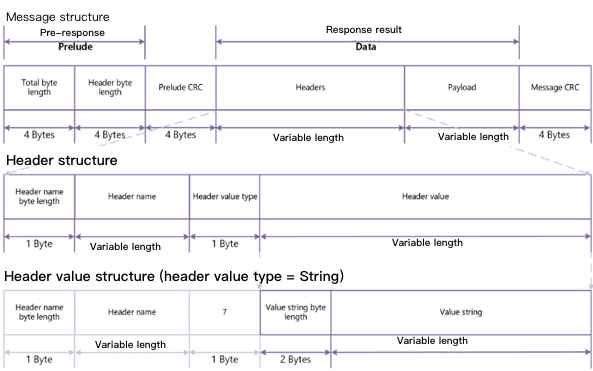
The figure below shows what a message and a header consist of. One message may contain multiple headers.
Message construction


As shown above, each message consists of a prelude, a prelude CRC code (composed of two pieces of information that record the number of bytes), header(s), a payload, and a message CRC code. As can be seen from the above figure, the length of the entire response body is calculated as follows:
Total length of a response body = Length of the prelude + length of the prelude CRC code + length of the payload + length of the header(s) + length of the message CRC code
As the total length of the prelude, the prelude CRC code and the message CRC code is always 16 bytes, the total length of the response body can also be quickly calculated as follows:
Total length of a response body = Length of the payload + length of the header(s) + 16
The following describes the components of the response body in detail:
Component
Description
prelude
Records the total length of each message and the total length of all headers separately. Each record is of 4 bytes, and the total length is 8 bytes:
total byte-length: the total length of the message, which is encoded in Big Endian and of 4 bytes in total with the capacity of the record itself included.
headers byte-length: the total length of all headers, which is encoded in Big Endian and of 4 bytes in total with the capacity occupied by the record excluded.
prelude CRC
A prelude CRC is encoded in Big Endian and contains a total of 4 bytes. It helps the program quickly determine whether the prelude information is correct so as to reduce blocking during buffering.
header
Metadata of the extraction result recorded by the message, such as data type and body format. The length of this part in bytes varies by data type. A header is stored as a key-value (KV) pair and encoded in UTF-8. The metadata recorded in a header can be displayed in any order, but each metadata entry is recorded only once. Depending on the data type, the following headers may appear in the result returned by COS Select:
MessageType Header: This header represents the response type, where the key is ":message-type" and the value can be "error" or "event". "error" indicates that this record is an error message, and "event" indicates that this record is a specific event.
EventType Header: This header records the event type, where the key is ":event-type" and the value can be "Records", "Cont", "Progress", "Stats", or "End". "Records" indicates that the event is the returned extraction record, "Cont" the TCP connection hold, "Progress" the periodically returned extraction result, "Stats" the statistics of the query, and "End" the end of the query.
ErrorCode Header: This header records the error code, where the key is ":error-code" and the value can be an error code listed in Special Error Codes.
ErrorMessage Header: This header records the error message, where the key is ":error-message" and the value can be an error message returned by the server, which can be used to locate the error.
Payload
Records the extraction result or official information related to the request.
Message CRC
CRC code encoded in Big Endian containing a total of 4 bytes.
A message may record multiple headers, and each header consists of the following parts:
Component
Description
Header Name Byte-Length
Records the length of the header name in bytes
Header Name
Header type. Value range: ":message-type", ":event-type", ":error-code", ":error-message"
":message-type" indicates that the header records the response type
":event-type" indicates that the header records the event type
":error-code" indicates that the header records the error code
" :error-message" indicates that the header records the error message.
Header Value Type
Type of the header value, which is always 7 for COS Select, indicating that the type is String
Value String Byte-Length
Length of the header value in bytes, which is always 2 bytes
Header Value String
Body of the header, i.e., the metadata of the payload, where the length of the header value in bytes depends on the response type
COS Select supports the following response types:
Response Type
Description
Records message
An extraction record message, which can contain a single record, a partial record, or multiple records, depending on the number of extraction results. A response body may contain multiple records messages
Continuation message
A connection continuation message that is sent by COS Select periodically to maintain the TCP connection and appears randomly in the response body. It is recommended to make your client able to automatically identify this type of messages and filter them out so as to avoid smudging the extraction results
Progress message
A progress message returned by COS Select periodically to indicate the current query progress
Stats message
A statistics message about the query returned by COS Select after the query ends
End message
An end message indicating that the query has ended and there is no subsequent response data. The query can be considered to have ended only when a message of this type is received
RequestLevelError message
Error message including the error causes. This parameter is returned when a COS Select error occurs during the query. If COS Select returns this message, it will not return an end message.
These response types are as detailed below.

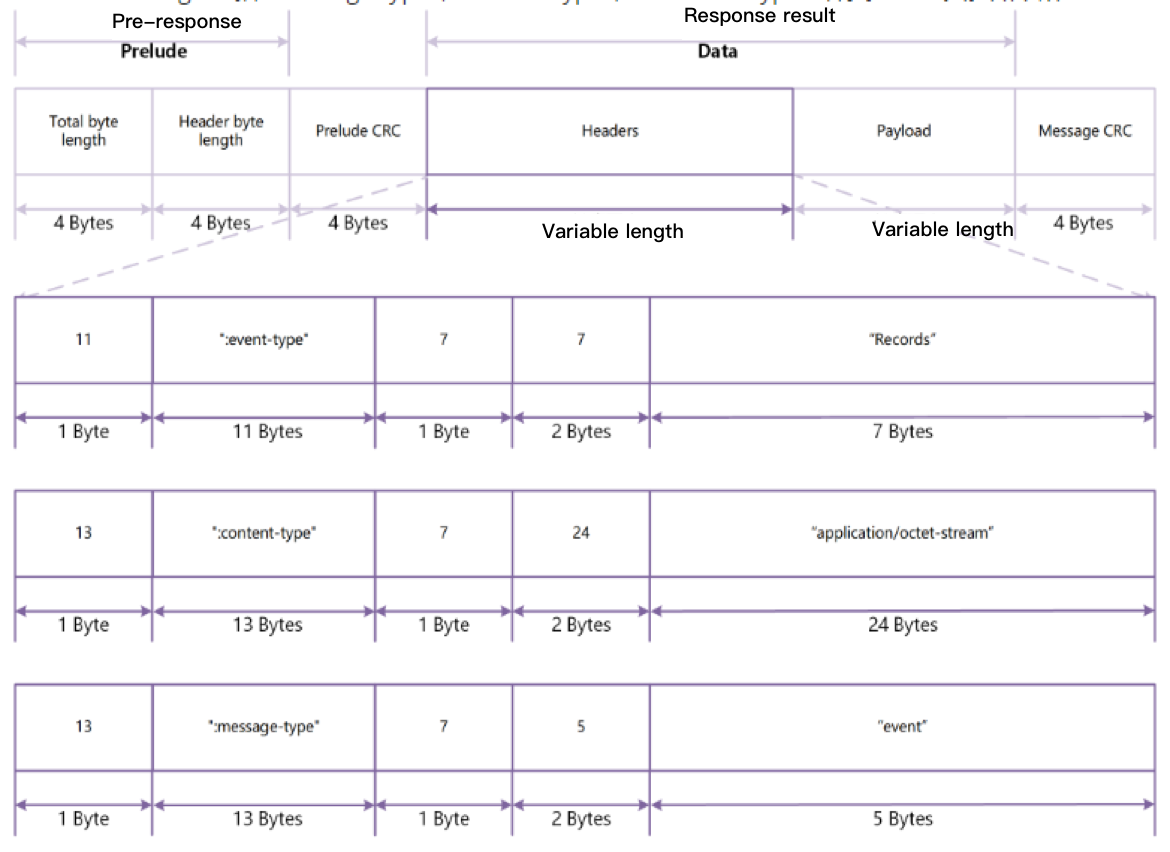
Records message

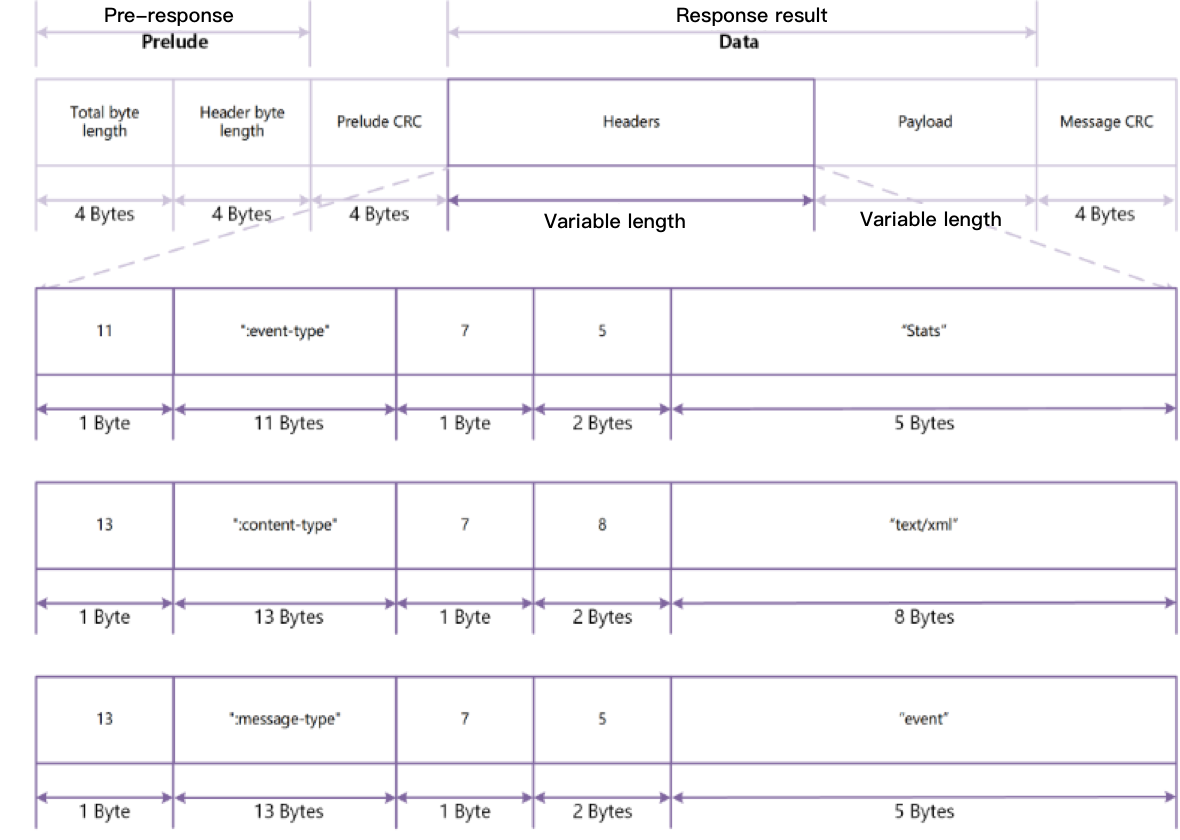
Header format A records message contains three types of headers: ":message-type", ":event-type", and ":content-type", as shown below:
Records message


Body format The body of a records message may contain a single record, a partial record, or multiple records, depending on the number of extraction results.

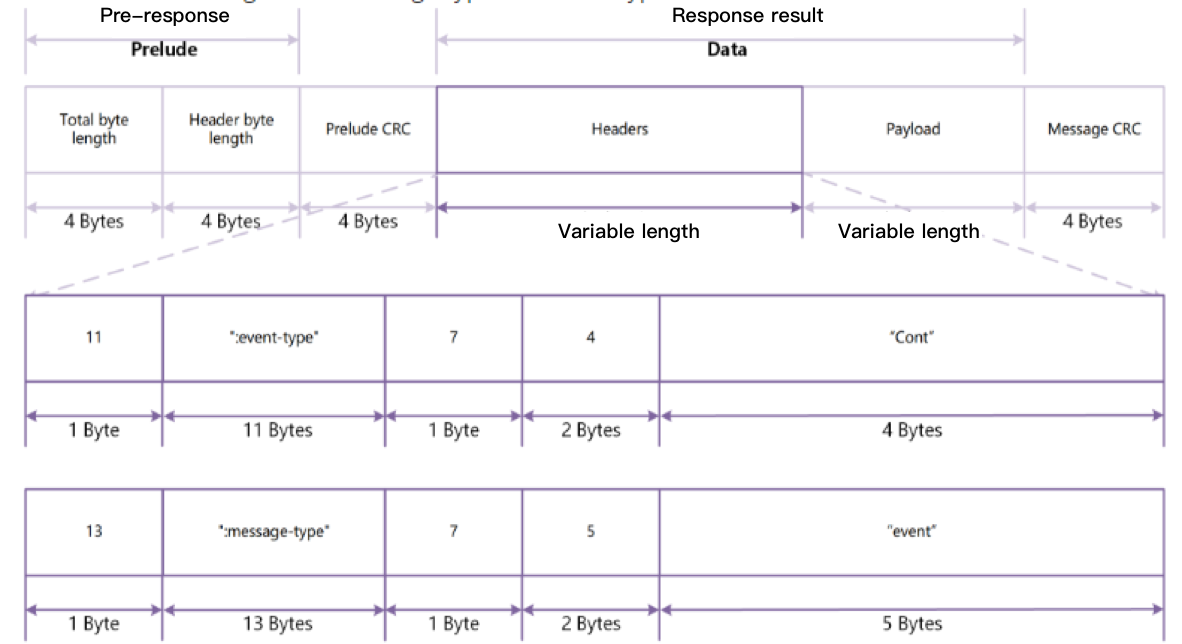
Continuation Message

Header format A continuation message contains two types of headers: ":message-type" and ":event-type", as shown below:
 Continuation Message


Body format A continuation message contains no body content.

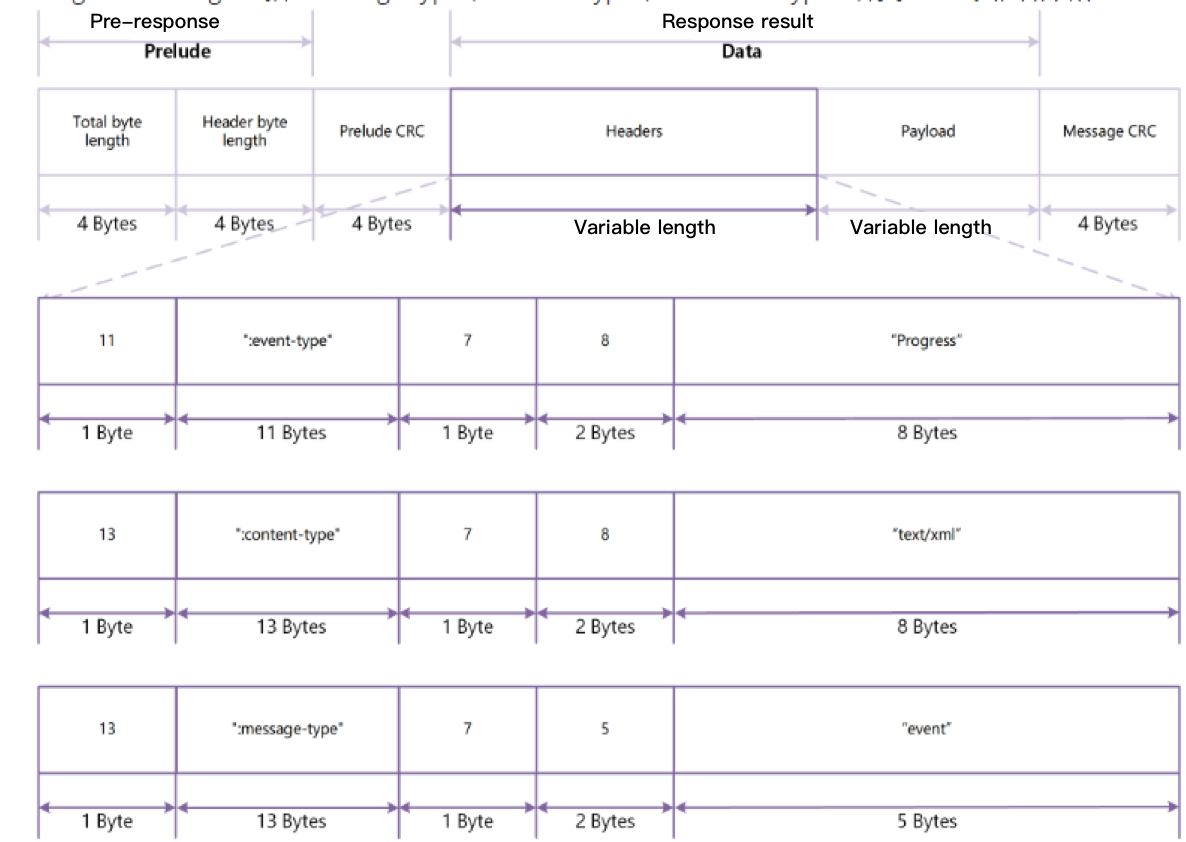
Progress message

Header format A progress message contains three types of headers: ":message-type", ":event-type", and ":content-type", as shown below:
Progress Message


Body format The body of a progress message is XML text which contains the current query progress, mainly including:
BytesScanned: If the file is compressed, this value represents the size of the file in bytes before it is decompressed; otherwise, this value represents the size of the file in bytes.
BytesProcessed: If the file is compressed, this value represents the size of the file in bytes after it is decompressed; otherwise, this value represents the size of the file in bytes.
BytesReturned: Size of the extraction result currently returned by COS Select in bytes.
Below is a sample:
<?xml version="1.0" encoding="UTF-8"?>
<Progress>
<BytesScanned>512</BytesScanned>
<BytesProcessed>1024</BytesProcessed>
<BytesReturned>1024</BytesReturned>
</Progress>

Stats Message

Header format A stats message contains three types of headers: ":message-type", ":event-type", and ":content-type", as shown below:
 Stats Message


Body format The body of a stats message is XML text which contains the statistics of the current query, mainly including:
BytesScanned: If the file is compressed, this value represents the size of the file in bytes before it is decompressed; otherwise, this value represents the size of the file in bytes.
BytesProcessed: If the file is compressed, this value represents the size of the file in bytes after it is decompressed; otherwise, this value represents the size of the file in bytes.
BytesReturned: Size of the extraction result returned by COS Select in the query in bytes.
Example:
<?xml version="1.0" encoding="UTF-8"?>
<Stats>
<BytesScanned>512</BytesScanned>
<BytesProcessed>1024</BytesProcessed>
<BytesReturned>1024</BytesReturned>
</Stats>

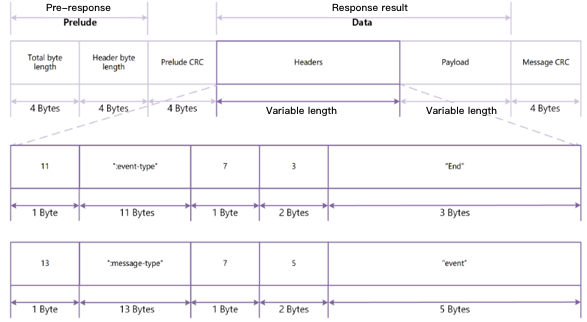
End Message

Header format An end message contains two types of headers: ":message-type" and ":event-type", as shown below:
 End messages


Body format An end message contains no body content.

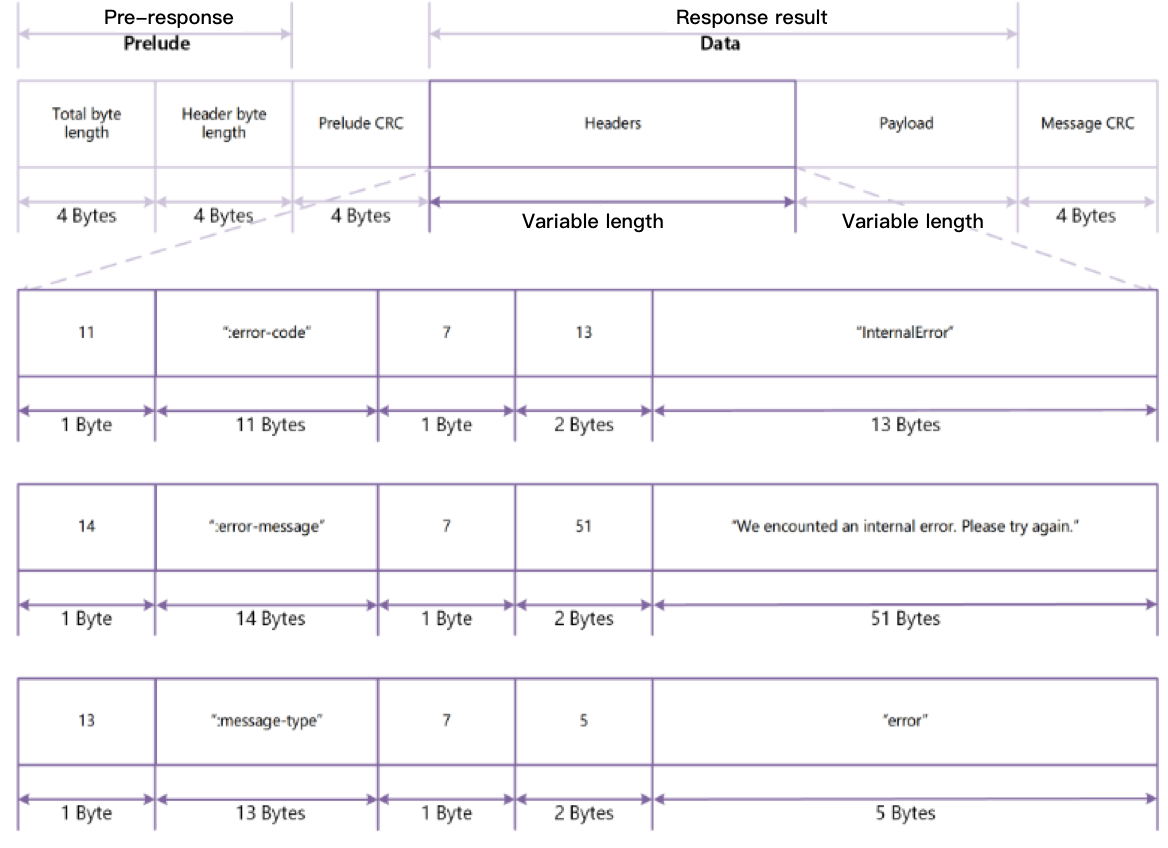
Request Level Error Message

Header format A request level error message contains three types of headers: ":error-code", ":error-message", and ":message-type", as shown below:
 Request Level Error Message


For more information on the error code in a request level error message, see Special Error Codes.
Body format A request level error message contains no body content.

Special error codes

For common errors related to this request, see Error Codes. The following describes special error codes:
Error Code
Error Message
HTTP Status Code
InvalidXML
The XML is invalid
400 Bad Request
MissingRequiredParameter
The SelectRequest entity is missing a required parameter
400 Bad Request
MissingExpectedExpression
The SQL expression is missing
400 Bad Request
MissingInputSerialization
The input serialization is missing
400 Bad Request
InvalidCompressionFormat
The file is not in a supported compression format. Only GZIP and BZIP2 are supported
400 Bad Request
MissingInputFormat
The input format is missing
400 Bad Request
InvalidFileHeaderInfo
The input FileHeaderInfo is invalid. Only NONE, USE, and IGNORE are supported
400 Bad Request
InvalidRequestParameter
The input RecordDelimiter of CSV is invalid
400 Bad Request
InvalidRequestParameter
The input FieldDelimiter of CSV is invalid
400 Bad Request
InvalidRequestParameter
The input QuoteCharacter of CSV is invalid
400 Bad Request
InvalidRequestParameter
The input AllowQuoteRecordDelimiter of CSV is invalid. Only TRUE and FALSE are supported
400 Bad Request
InvalidJsonType
The JsonType is invalid. Only DOCUMENT and LINES are supported
400 Bad Request
MissingOutputSerialization
The output serialization is missing
400 Bad Request
MissingOutputFormat
The output format is missing
400 Bad Request
InvalidQuoteFields
The QuoteFields is invalid. Only ALWAYS and ASNEEDED are supported
400 Bad Request
InvalidRequestParameter
The output RecordDelimiter of CSV is invalid
400 Bad Request
InvalidRequestParameter
The output FieldDelimiter of CSV is invalid
400 Bad Request
InvalidRequestParameter
The output QuoteCharacter of CSV is invalid
400 Bad Request
InvalidRequestParameter
The output QuoteEscapeCharacter of CSV is invalid
400 Bad Request
InvalidRequestParameter
The output RecordDelimiter of JSON is invalid
400 Bad Request
SQLParsingError
Encountered an error parsing the SQL expression
400 Bad Request
SQLParsingError
Other expressions are not allowed in the SELECT list when '*' is used without dot notation.
400 Bad Request
SQLParsingError
The SQL expression contains an empty SELECT
400 Bad Request
SQLParsingError
GROUP is not supported in the SQL expression
400 Bad Request
SQLParsingError
UNION is not supported in the SQL expression
400 Bad Request
SQLParsingError
FROM is missing in the SQL expression
400 Bad Request
SQLParsingError
ORDER is not supported in the SQL expression
400 Bad Request
SQLParsingError
The column index is invalid in the SQL expression
400 Bad Request
SQLParsingError
The table alias is invalid in WHERE
400 Bad Request
Bzip2DecompressError
Encountered an error decompressing the bzip2 file
400 Bad Request
Bzip2DecompressError
bzip2 is not applicable to the queried object
400 Bad Request
GzipDecompressError
Encountered an error decompressing the GZIP file
400 Bad Request
GzipDecompressError
GZIP is not applicable to the queried object
400 Bad Request
Busy
The service is busy. Please retry later
400 Bad Request
Overload
The service is overload. Please retry later
400 Bad Request
AmbiguousFieldName
Field name matches to multiple fields in the file
400 Bad Request
ComparisonFailed
Attempt to compare failed
400 Bad Request
CastFailed
Attempt to convert from one data type to another using CAST failed in the SQL expression.
400 Bad Request
OverMaxRecordSize
The length of a record in the input or result is greater than maxCharsPerRecord of 1 MB
400 Bad Request
LastRecordParseFail
Please check the last record in the input
400 Bad Request
CSVParsingError
Encountered an error parsing the CSV file
400 Bad Request
JSONParsingError
Encountered an error parsing the JSON file
400 Bad Request
ErrorWritingRow
Encountered an error parsing the SELECT result. Please try again
400 Bad Request
InvalidRequestParameter
The input Comment of CSV is invalid
400 Bad Request
InvalidTextEncoding
UTF-8 encoding is required. Please check the file and try again.
400 Bad Request
NoSuchKey
The specified key does not exist
404 Not Found
AccessDenied
Access Denied
403 Forbidden
MethodNotAllowed
The specified method is not allowed against this resource
405 Method Not Allowed
InternalError
We encountered an internal error. Please try again
500 Internal Server

Samples

Sample 1: extracting content from a CSV object

The following sample extracts all content from a CSV object and saves the extraction result in CSV format. The object to extract is named exampleobject.csv and stored in the examplebucket-1250000000 bucket that resides in the Beijing (ap-beijing) region.
POST /exampleobject.csv?select&select-type=2 HTTP/1.1
Host: examplebucket-1250000000.cos.ap-beijing.myqcloud.com
Date: Tue, 12 Jan 2019 11:49:52 GMT
Authorization: authorization string
Content-Length: content length

<?xml version="1.0" encoding="UTF-8"?>
<SelectRequest>
<Expression>Select * from COSObject</Expression>
<ExpressionType>SQL</ExpressionType>
<InputSerialization>
<CompressionType>None</CompressionType>
<CSV>
<FileHeaderInfo>IGNORE</FileHeaderInfo>
<RecordDelimiter>\\n</RecordDelimiter>
<FieldDelimiter>,</FieldDelimiter>
<QuoteCharacter>"</QuoteCharacter>
<QuoteEscapeCharacter>"</QuoteEscapeCharacter>
<Comments>#</Comments>
</CSV>
</InputSerialization>
<OutputSerialization>
<CSV>
<QuoteFields>ASNEEDED</QuoteFields>
<RecordDelimiter>\\n</RecordDelimiter>
<FieldDelimiter>,</FieldDelimiter>
<QuoteCharacter>"</QuoteCharacter>
<QuoteEscapeCharacter>"</QuoteEscapeCharacter>
</CSV>
</OutputSerialization>
</SelectRequest>
To run different extraction commands, modify the SQL command in the Expression node. For more information about commands, please see SELECT Command. Some common extraction scenarios are described below.
Suppose that you use a column index to filter the content from an object. You can use s._n to filter data records in the n column (the minimum value of n is 1). The following command filters data records that are greater than 100 in column 3 and returns columns 1 and 2 of these matching records:
SELECT s._1, s._2 FROM COSObject s WHERE s._3 > 100
If your CSV object has a column header and you want to filter the content of the object using the name of the header (you need to set FileHeaderInfo to Use), you can use s.name for indexing. The following command filters records using a header named Id and FirstName:
SELECT s.Id, s.FirstName FROM COSObject s
You can also specify a function in the SQL expression. The following command counts the number of records whose values are smaller than 1 in column 1:
SELECT count(*) FROM COSObject s WHERE s._1 < 1
The following is a sample response:
HTTP/1.1 200 OK
x-cos-id-2: cos_id_demo
x-cos-request-id: cos_request_id_demo
Date: Tue, 12 Jan 2019 11:50:29 GMT

A series of messages

Sample 2: extracting content from an object in JSON format

The following sample extracts all content from a JSON object and saves the extraction result in CSV format. The object to extract is named exampleobject.json and stored in the examplebucket-1250000000 bucket that resides in the Beijing (ap-beijing) region.
POST /exampleobject.json?select&select-type=2 HTTP/1.1
Host: examplebucket-1250000000.cos.ap-beijing.myqcloud.com
Date: Tue, 12 Jan 2019 11:52:29 GMT
Authorization: authorization string
Content-Length: content length

<?xml version="1.0" encoding="UTF-8"?>
<SelectRequest>
<Expression>Select * from COSObject</Expression>
<ExpressionType>SQL</ExpressionType>
<InputSerialization>
<CompressionType>NONE</CompressionType>
<JSON>
<Type>DOCUMENT</Type>
</JSON>
</InputSerialization>
<OutputSerialization>
<CSV>
<QuoteFields>ASNEEDED</QuoteFields>
<RecordDelimiter>\\n</RecordDelimiter>
<FieldDelimiter>,</FieldDelimiter>
<QuoteCharacter>"</QuoteCharacter>
<QuoteEscapeCharacter>"</QuoteEscapeCharacter>
</CSV>
</OutputSerialization>
</SelectRequest>
Similarly, you can also perform different extraction commands on JSON objects by modifying the SQL command in the Expression node. For more information about commands, please see SELECT Command. Some common extraction scenarios are described below.
You can use a JSON attribute name to extract content. The following command filters records whose city value is Seattle from the object and returns the country and city information of these records:
SELECT s.country, s.city from COSObject s where s.city = 'Seattle'
You can also specify a function in the SQL expression. The following command counts the total number of records in the JSON object:
SELECT count(*) FROM COSObject s

Notes

Unlike the GET Object API, SELECT Object Content does not support:
Returning a part of an object. You cannot use parameters such as Range to specify a part of an object to return.
Extracting content from ARCHIVE or DEEP ARCHIVE objects. You need to restore them first.

도움말 및 지원

문제 해결에 도움이 되었나요?

피드백