Tencent Push Notification Service always keeps up with the update progress of each vendor channel's push service. It provides plugin dependency packages integrated with the HMS Core Push SDK of Huawei Push for your choice.
Caution:
For Huawei Push, you can successfully register with the Huawei channel and push messages through it only in a signed release package environment.
The Huawei channel supports click callback but not arrival callback.
2. Register a developer account and log in to the platform. For more information, see Account Registration and Verification. If you are registering a new account, identity verification is required.
3. Create an application on the Huawei Push platform. For more information, see Creating an App. The application package name must be the same as that entered in the Tencent Push Notification Service console.
4. Enter the application in My Projects > Project Settings > General to get and copy the APPID and Client Secret, and then paste them into Tencent Push Notification Service console > Configuration Management > Basic Configuration > Huawei Official Push Channel.
Configuring the SHA-256 certificate fingerprint
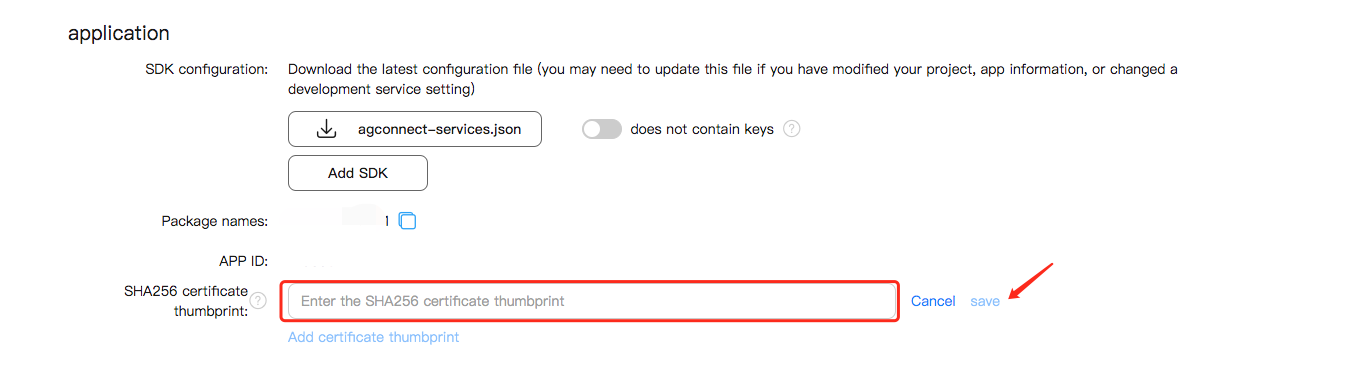
Get the SHA-256 certificate fingerprint as instructed in Generating a Signing Certificate Fingerprint. Then configure the fingerprint on the Huawei Push platform, and remember to click
to save the configuration.
Getting the Huawei Push configuration file
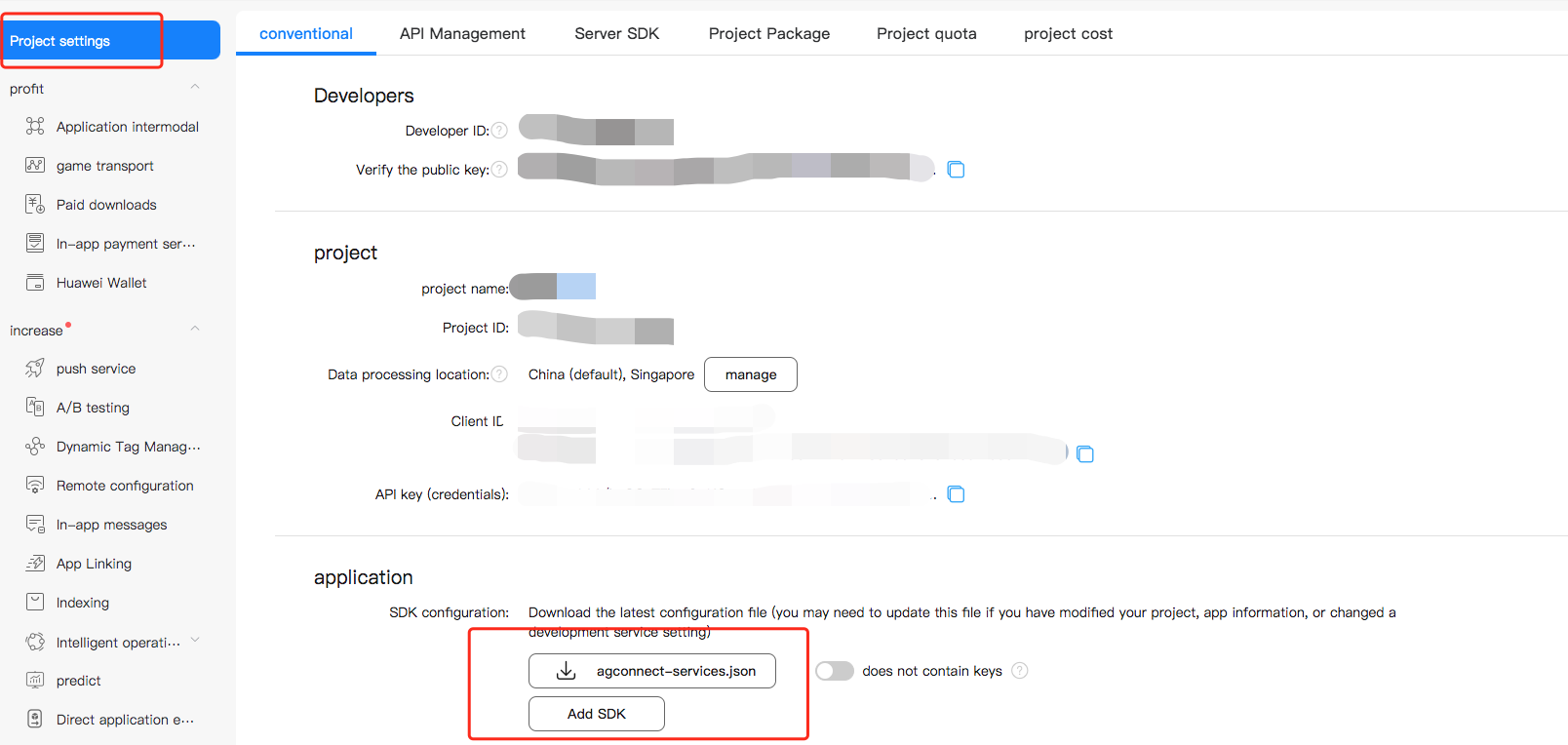
Log in to the Huawei Developer platform, go to My Projects > select a project > Project Settings, and download the latest configuration file agconnect-services.json of your Huawei application.
Enabling the push service
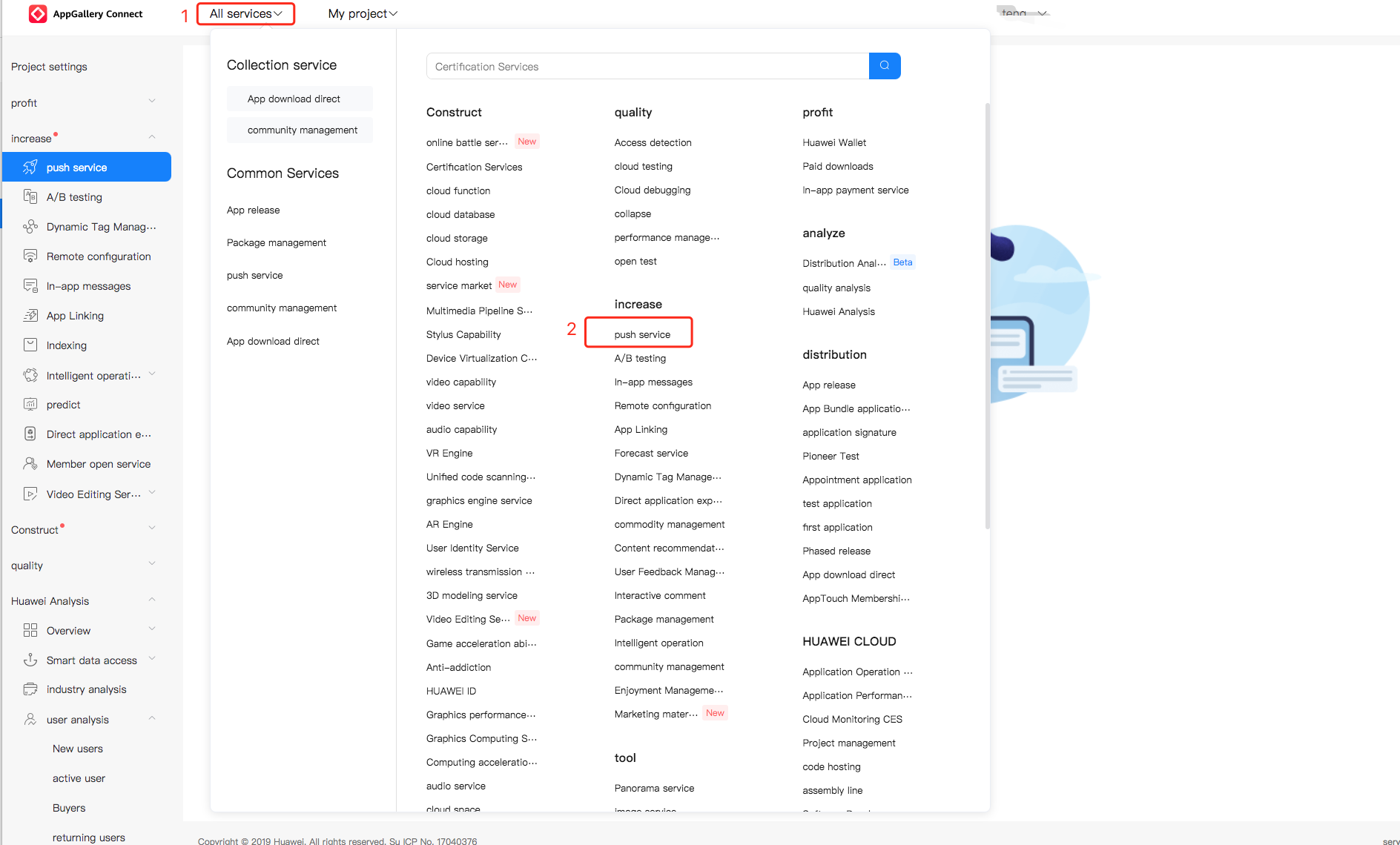
1. On the Huawei Push platform, choose All services > Push Kit to go to the Push Kit page.
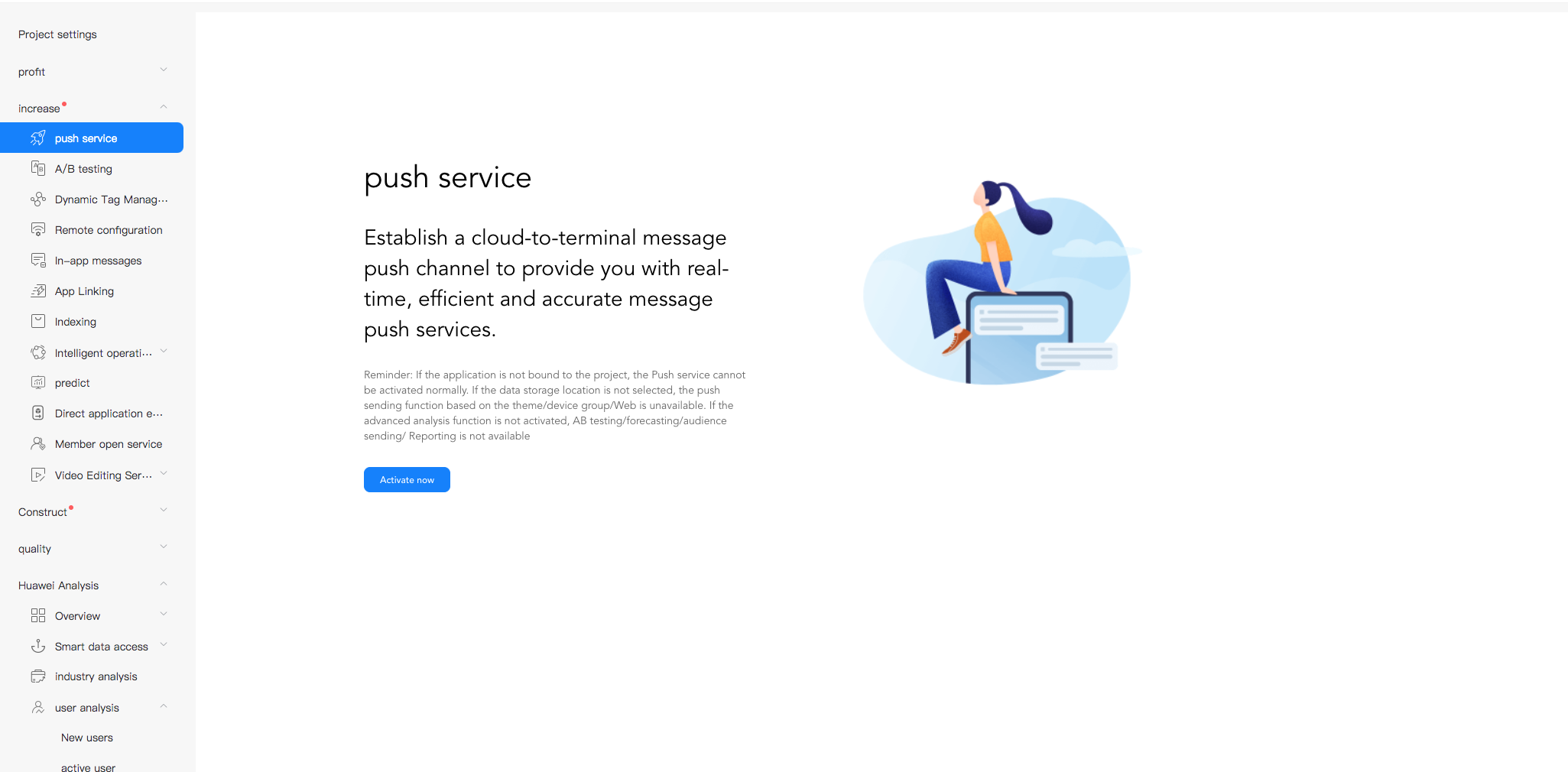
2. On the Push Kit page, click Enable now. For more information, see Enabling Services.
SDK Integration (Two Methods)
Using Android Studio Gradle for automatic integration
1. In the build.gradle file in the Android project-level directory, add the Huawei repository address and HMS Gradle plugin dependencies under repositories and dependencies in buildscript, respectively:
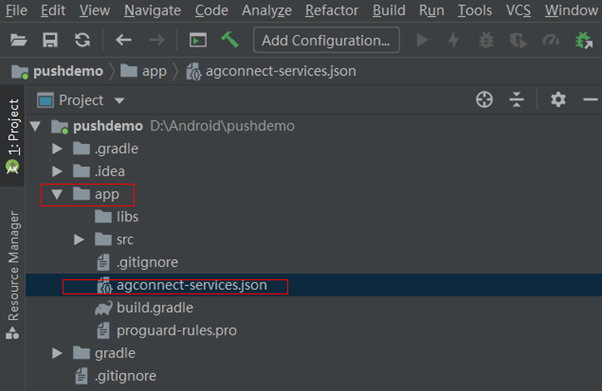
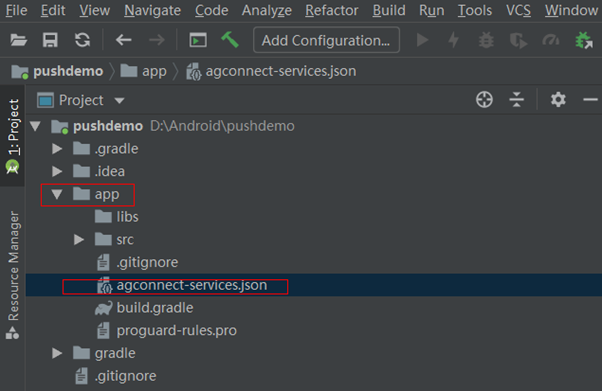
3. Copy the application configuration file agconnect-services.json obtained from the Huawei Push platform to the app module directory (not the submodule).
4. Add the following configuration to the build.gradle file at its beginning in the app module (not the submodule build.gradle):
// Other Gradle plugins of application
apply plugin: 'com.huawei.agconnect' // HMS Push SDK Gradle plugin
android {
// Application configuration content
}
5. Import the dependencies related to Huawei Push into the build.gradle file under the app module:
dependencies {
// ...Other dependencies of the program
implementation 'com.tencent.tpns:huawei:[VERSION]-release' // For Huawei pushes, [VERSION] is the SDK's latest version number, which can be obtained from the release notes of SDK for Android.
implementation 'com.huawei.hms:push:6.5.0.300' // HMS Core Push module dependency package
}
Note:
For Huawei Push, hms:push depends on the preset <queries> tag compatible with Android 11 since v6.1.300. Upgrade Android Studio to v3.6.1 or later and the Android Gradle plugin to v3.5.4 or later. Otherwise, errors may occur during project builds.
For Huawei pushes, [VERSION] is the SDK's latest version number, which can be obtained from the release notes of SDK for Android.
Starting from v1.2.1.3, Tencent Push Notification Service SDK for Android officially supports Huawei Push v5. Use Tencent Push Notification Service Huawei dependency v1.2.1.3 or later to avoid integration conflicts.
Manual integration with Android Studio
If you cannot access Huawei Maven repository in your internal development environment, you can try the following manual integration method:
2. The log of successful registration is as follows:
V/TPush:[XGPushConfig] isUsedOtherPush:true
E/xg.vip: get otherpush errcode: errCode :0, errMsg : success
V/TPush:[XGPushConfig] isUsedOtherPush:true
I/TPush:[OtherPushClient] handleUpdateToken other push token is :IQAAAACy0PsqAADxfCrWG3kupbOraeAiYoo9n2B-bAfb2d--kctc8E_UnY_mrIdg9ionukZvC******dVD8GlJi_5-0rpskunnNMcat35HA other push type: huawei
Code Obfuscation
1. Add the following obfuscation rules in the proguard-rules.pro file at the application project level.
-ignorewarnings
-keepattributes *Annotation*
-keepattributes Exceptions
-keepattributes InnerClasses
-keepattributes Signature
-keepattributes SourceFile,LineNumberTable
-keep class com.hianalytics.android.**{*;}
-keep class com.huawei.updatesdk.**{*;}
-keep class com.huawei.hms.**{*;}
-keep class com.huawei.agconnect.**{*;}
2. If the application uses the plug-in AndResGuard, add the following in the configuration allowlist of AndResGuard. Skip this step if AndResGuard is not used.
The arrival receipt for the Huawei channel should be configured by yourself. After configuring this feature as instructed in Acquisition of Vendor Channel Arrival Receipt, you can view the arrival data for the Huawei push channel in the push records.
Badge adaptation for Huawei devices
You can set the application badge on Huawei devices after applying for the application badge setting permission and setting the application start class. For more information, see Badge Adaption Guide.
Troubleshooting
Querying Huawei Push registration error codes
The Huawei Push service has strict requirements on integration configuration. If you observe logs similar to the following, it indicates that registration with the Huawei channel fails. In that case, you can use the following method to get the Huawei Push registration error code.
[OtherPushClient] handleUpdateToken other push token is : other push type: huawei
In debugging mode of the push service, filter logs by the keyword OtherPush or HMSSDK to view the return code logs, for example, [OtherPushHuaWeiImpl] other push huawei onConnect code:907135702. Then locate the error cause and rectify the error by referring to Troubleshooting Vendor Channel Registration Failures.
Why are there no alerts for notifications delivered through the Huawei channel?
Starting from EMUI 10.0, Huawei Push intelligently categorizes notification messages into two levels: general and important. Versions earlier than EMUI 10.0 don't categorize notifications but have only one level, so all notifications are displayed through the "default notification" channel, which is equivalent to the important level on EMUI 10.0. If a notification is categorized as "general", there will be no vibration, ringtone, or status bar icon alerts for it. Currently, the notification level can be set to "important" through the custom notification channel; however, according to the applicable Huawei Push rules, the final display effect will still be determined jointly by the set level and the level calculated by Huawei Push's intelligent categorization, and the lower level will prevail; for example, if the two levels are "important" and "general", "general" will prevail. For more information, see Huawei Message Classification User Guide here.