Identity Center provides unified identity and permission management for multiple accounts based on the organizational structure of organization accounts. Using the Identity Center feature of Tencent Cloud Organization (TCO), you can centrally manage the users who use Tencent Cloud in your enterprise, configure the enterprise identity management system with Tencent Cloud's single sign-on (SSO) in one go, and centrally configure user access permissions to multiple accounts.
Features
Centrally managing users who use Tencent Cloud
Identity Center offers you a user management module where you can maintain all users who need to access Tencent Cloud. You can manage users and user groups manually or use the System for Cross-domain Identity Management (SCIM) protocol to synchronize users and user groups from your enterprise identity management system to Identity Center.
Centrally configuring SSO with your enterprise identity management system
Identity Center supports enterprise-level SSO based on the Security Assertion Markup Language (SAML) 2.0 protocol. Only a one-time configuration in both Identity Center and the enterprise identity management system is needed to set up SSO.
Centrally configuring user access permissions for multiple accounts
By leveraging the organizational structure of organization accounts, you can centrally configure user or user group access permissions to any member account within the enterprise in Identity Center. These permissions can be modified or deleted at any time.
Unified login portal
Identity Center provides a unified login portal where enterprise employees can access all accounts they are authorized to use with a single login. They can then log in to the Tencent Cloud console and easily switch between multiple accounts.
Product Architecture
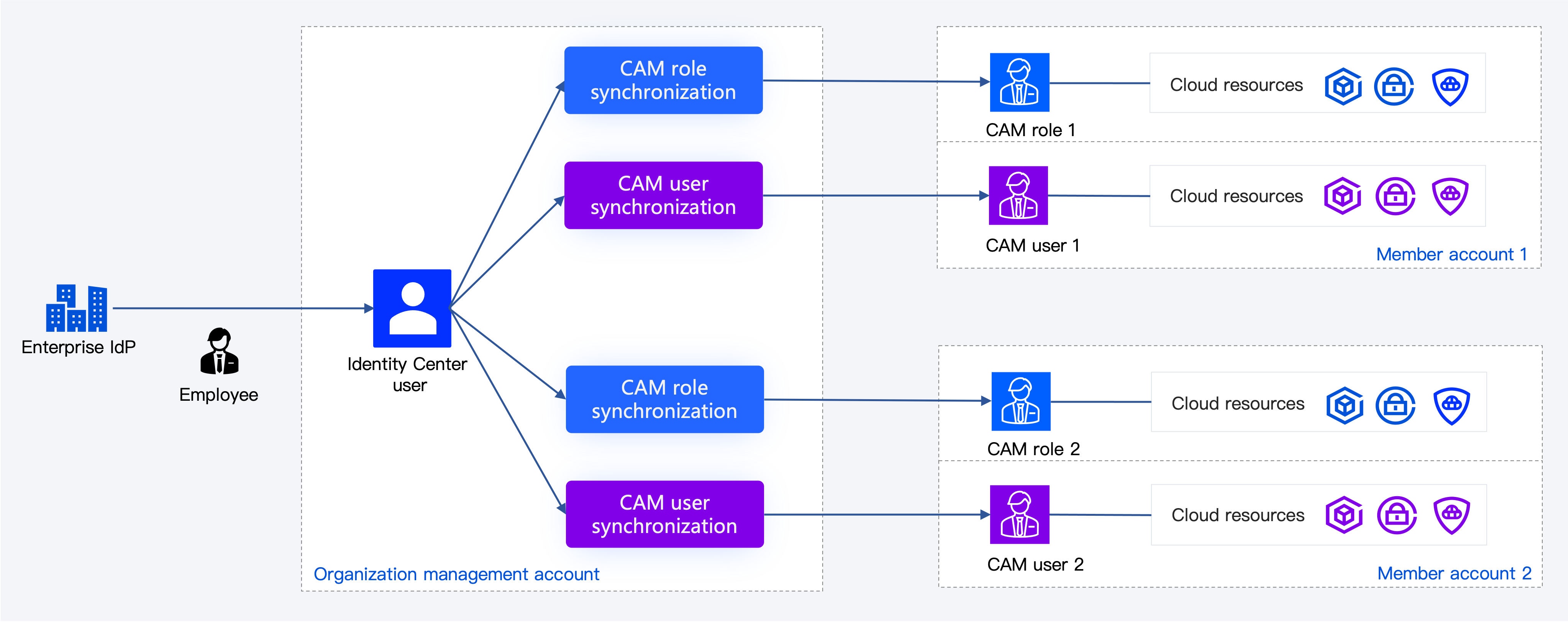
Identity Center users can access cloud resources of an account through Cloud Access Management (CAM) roles or CAM users.
Note:
If the same Identity Center user is configured with both CAM role synchronization and CAM user synchronization through permission configuration on the account, the Identity Center user can access the account's cloud resources through both CAM roles and CAM users.
Relationship Between Identity Center and CAM
CAM provides identity and permission management within a single Tencent Cloud account. CAM offers user management (including users, user groups, and roles), SSO, and permission configuration, but these are only effective within one Tencent Cloud account. When your enterprise has multiple Tencent Cloud accounts, you need to use CAM in each account to manage users separately and to configure SSO and permissions separately, which poses significant management challenges.
Identity Center provides unified identity and permission management across multiple accounts within an organization. With Identity Center, you can perform unified configuration once, achieving user management, SSO, and permission configuration for multiple Tencent Cloud accounts. To achieve this, Identity Center offers identity management independent of CAM, but its permission configuration reuses the permission policies in CAM. Additionally, the access of Identity Center users to accounts is essentially another SSO performed by Identity Center users assuming the CAM role in each account.
When you start using Identity Center for unified identity and permission management across organization accounts, you will no longer need to use CAM to manage individual accounts. However, in certain cases, such as when you have existing CAM users and CAM roles, or need to use access keys for programmatic access to Tencent Cloud resources, you can still use CAM within individual accounts. Using Identity Center does not restrict the original features of CAM; both services can be used simultaneously.