tencent cloud

Tencent Cloud TCHouse-P

Release Notes
Product Introduction
Overview
Use Cases
Node Specification
Cluster Architecture
Purchase Guide
Billing Overview
Purchase Methods
Payment Overdue
Getting Started
Operation Guide
Managing Cluster
Accessing Data Warehouse
Monitoring and Alarming
Access Management
Performance Metrics
TPC-B
Tools and Downloads
Data Ingestion
Importing TencentDB Data Offline with DataX
Syncing Incremental Data from MySQL with DataX
Importing and Exporting COS Data at High Speed with External Table
Syncing EMR Data with External Table
Implementing CDWPG UPSERT with Rule
Data Warehouse Development
Creating Airflow in Cloud
API Documentation
History
Introduction
API Category
Making API Requests
Information Query APIs
Instance APIs
Query APIs
Cluster Management APIs
Cluster Operation APIs
Data Types
Error Codes
Practical Tutorial
Data Warehouse Table Development
Table Distribution Key Selection
Table Storage Format Selection
Table Partition Usage
Extension Usage
Cold Data Backup
Statistics and Space Maintenance
FAQs
Tencent Cloud TCHouse-P Policy
Service Level Agreement
Privacy Policy
Data Processing And Security Agreement
Contact Us

Scaling Cluster

PDF
포커스 모드
폰트 크기
마지막 업데이트 시간: 2024-11-27 15:29:17

Overview

When computing or storage resources of a cluster reach a bottleneck, you can increase system resources by scaling.

Directions

1. Click Manage in the Operations column in the cluster list to enter the cluster details page.
2. Click Scale in the top-right corner to enter the scaling page and select the scaling information as needed.
Note:
The number of nodes entered is that after scaling, which must be greater than the current quantity by two or more. The value of the total capacity changes as the number of nodes changes.
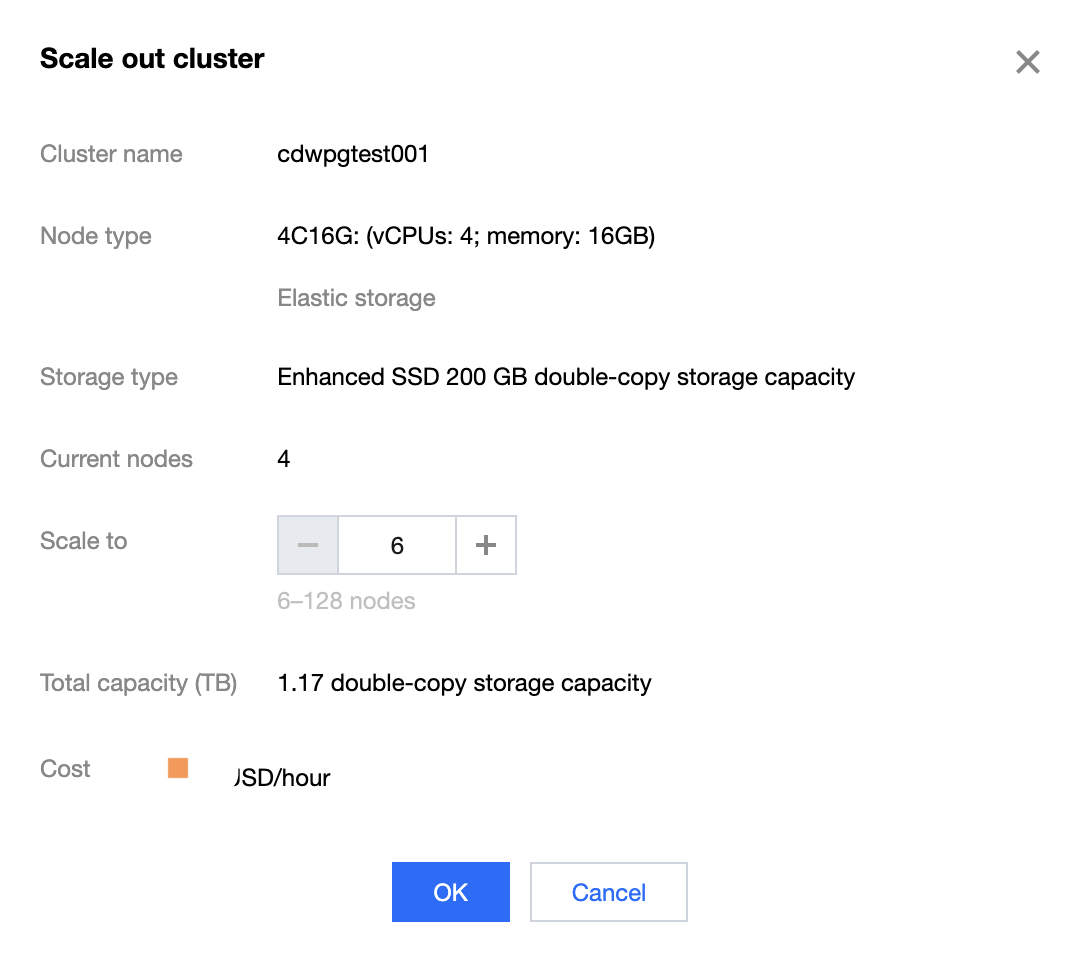
3. After selecting the quantity for scaling, click Confirm Change to start the scaling process.
4. Return to the cluster list, where the cluster during scaling is in the Scaling status. The time it takes to scale is subject to the existing data volume in the cluster. After successful scaling, the cluster will return to the Running status.

도움말 및 지원

문제 해결에 도움이 되었나요?

피드백