iOS
Download
포커스 모드
폰트 크기
리소스 동적 다운로드
패키지 크기를 줄이기 위해 SDK에 필요한 모델 리소스 및 애니메이션 리소스 MotionRes(일부 기본 버전 SDK 애니메이션 리소스 없음)를 인터넷으로 변경하여 다운로드할 수 있습니다. 다운로드가 완료 후 위 파일의 경로를 SDK로 설정합니다.
1. 뷰티 필터 리소스 ZIP 패키지를 클라우드에 업로드하여 다운로드 URL을 생성합니다. 예시:
https://서버 주소/LightCore.bundle.zip.2. 프로젝트에서 생성된 URL을 사용하여 파일을 다운로드하고 샌드박스에 압축을 해제합니다(예시: 샌드박스 경로
Document/Xmagic). 이 시점에서 Document/Xmagic 폴더에는 SDK에 필요한 리소스가 들어 있습니다.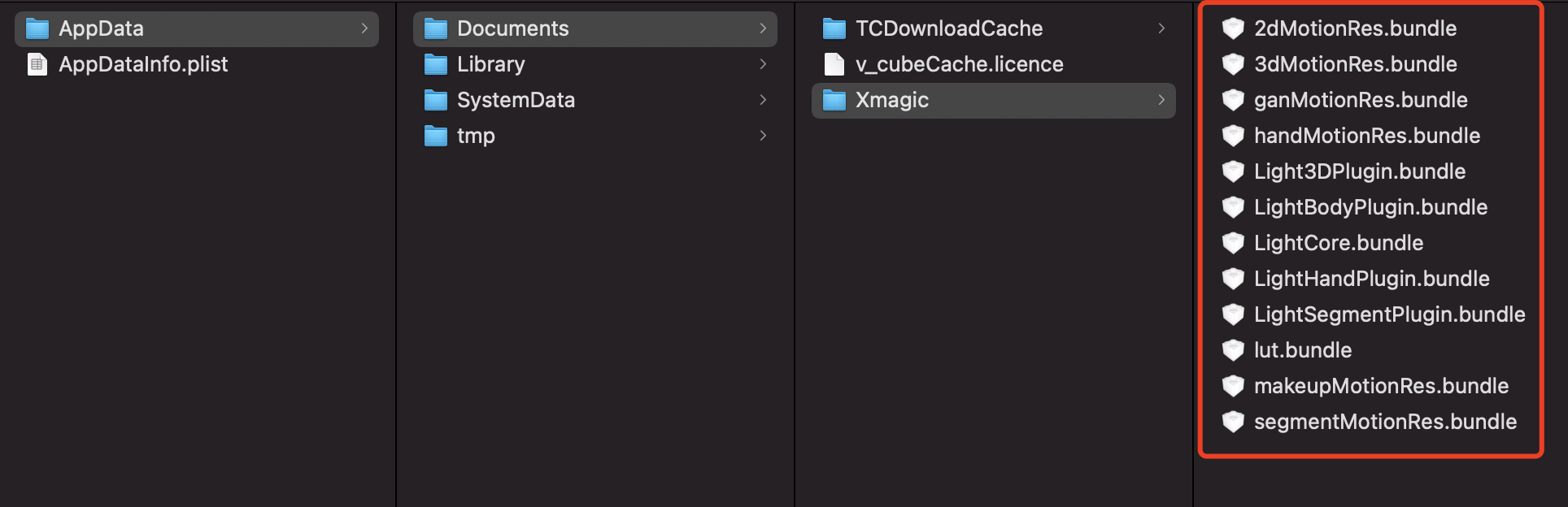
3. SDK가 초기화되면 root_path 필드에 이전 단계의 샌드박스 경로를 입력합니다.
NSDictionary *assetsDict = @{@"core_name":@"LightCore.bundle",@"root_path":_filePath ,//_filePath는 뷰티 필터 리소스가 로컬 Ducument/Xmagic에 다운로드된 후의 상위 디렉터리입니다.@"tnn_"@"beauty_config":beautyConfigJson};// Init beauty kit @"root_path":Ducument/Xmagic,self.beautyKit = [[XMagic alloc] initWithRenderSize:_inputSize assetsDict:assetsDict];
4. 뷰티 필터 패널에서 각 뷰티 필터 효과의 icon을 설정하고, 다운로드한 리소스 파일에서 해당 이미지를 가져옵니다.
NSMutableArray *arrayModels = [NSMutableArray array];for (NSDictionary* dict in motionArray) {BeautyCellModel* model = [BeautyCellModel beautyWithDict:dict];// Load default mainbundle path of motionresif ([model.title isEqualToString:NSLocalizedString(@"item_none_label",nil)]) {model.icon = [NSString stringWithFormat:@"%@/%@.png", [[NSBundle mainBundle] bundlePath], model.key];[arrayModels addObject:model];} else {if(_useNetResource && _filePath != nil){ //네트워크 리소스 사용 시NSString *DirPath = [_filePath stringByAppendingPathComponent:@"2dMotionRes.bundle/"]; //뷰티 필터 리소스의 절대 경로model.icon = [NSString stringWithFormat:@"%@/%@/template.png", DirPath, model.key];}else{model.icon = [NSString stringWithFormat:@"%@/%@/template.png", [[NSBundle mainBundle] pathForResource:@"2dMotionRes" ofType:@"bundle"], model.key];}if ([fileManager fileExistsAtPath:model.icon]) {[arrayModels addObject:model];}}}
5. 뷰티 필터 효과의 매개변수 전달 설정(매개변수의 구체적인 설정은 API 문서 참고):
/// @brief 다양한 뷰티 필터 효과 설정/// @param propertyType 효과 유형 문자열: beauty, lut, motion/// @param propertyName 효과 이름/// @param propertyValue 효과 값/// @param extraInfo 예약 확장, 추가 별도 구성 Dict/// @return 성공 반환 0, 실패 반환 기타/// @note 설명/**| 효과 유형 | 효과 이름 | 효과 값 | 설명 | 비고 || :---- | :---- |:---- | :---- | :---- || beauty | 뷰티 필터 id 이름 | 뷰티 필터 효과 강도 값 |뷰티 필터 유형 설정 인터페이스 | 없음 || lut | 필터 경로+필터 이름 | 필터 강도 값 | 필터 유형 설정 인터페이스 | 없음 || motion | 애니메이션 경로 이름 | 애니메이션 경로 | 애니메이션 유형 설정 인터페이스| **참고**: 리소스에 zip이 있는 경우 입력한 애니메이션 경로가 쓰기 가능한 경로인지 확인하고, 그렇지 않으면 app 패키지를 수동으로 unzip해야 사용 가능 |**/- (int)configPropertyWithType:(NSString *_Nonnull)propertyType withName:(NSString *_Nonnull)propertyName withData:(NSString*_Nonnull)propertyValue withExtraInfo:(id _Nullable)extraInfo;
예시
뷰티 필터 효과 설정
‘뷰티 필터’와 ‘몸매 보정’의 특수 효과를 처리할 필요가 없으며 다운로드한 리소스 파일은 SDK 내에서 자동으로 사용됩니다. SDK 매개변수 전달 예시인 뷰티 필터의 미백 효과를 예로 들어 보겠습니다:
[self.beautyKitRef configPropertyWithType:@"beauty" withName:@"beauty.whiten" withData:@"30" withExtraInfo:nil];
이 때 SDK로 전달되는 각 매개변수의 값은 다음과 같습니다:
필드 | 값 |
propertyType | beauty |
propertyName | beauty.whiten |
propertyValue | 30 |
extraInfo | nil |
필터 효과 설정
key를 처리해야 하며 내장된 로컬 뷰티 필터 리소스 사용 또는 네트워크에서 로컬로 다운로드한 뷰티 필터 리소스 사용:
NSString *key = [_model.lutIDs[index] path];if (key != nil) {key = [@"lut.bundle/" stringByAppendingPathComponent:key];//필터 효과 이미지의 상대 경로}if(_useNetResource && _filePath != nil){ //다운로드한 뷰티 필터 리소스를 사용하는 경우key = [_filePath stringByAppendingPathComponent:key];//효과 이미지의 절대 경로 생성}[self.beautyKitRef configPropertyWithType:@"lut" withName:key withData:[NSStringstringWithFormat:@"%f",value] withExtraInfo:nil];
필터에 화이트 효과 설정
로컬 리소스 및 네트워크 리소스를 사용한 매개변수 전달 예시:
필드 | 로컬 리소스를 사용할 때 전달되는 매개변수 | 네트워크 리소스를 사용할 때 전달되는 매개변수 | 비고 |
propertyType | lut | lut | - |
propertyName | lut.bundle/n_baixi.png | /var/mobile/Containers/Data/Application/25C7D01A-73F6-4F1B-AEB6-5EE03A221D18/Documents/Xmagic/lut.bundle/n_baixi.png | 파일 경로 |
propertyValue | 60.000000 | 60.000000 | - |
extraInfo | null | null | - |
애니메이션 효과, 메이크업, 분할 효과 설정
propertyValue 필드를 처리해야 하며 내장된 로컬 뷰티 필터 리소스 사용 또는 네트워크에서 로컬로 다운로드한 뷰티 필터 리소스 사용:
NSString *key = [_model.motionIDs[index] key];NSString *path = [_model.motionIDs[index] path];NSString *motionRootPath = path==nil?[[NSBundle mainBundle] pathForResource:@"MotionRes" ofType:@"bundle"]:path;if(_useNetResource && _filePath != nil){//다운로드한 뷰티 필터 리소스를 사용하는 경우motionRootPath = [_filePath stringByAppendingPathComponent:@"2dMotionRes.bundle"];//2dMotionRes의 절대 경로 생성}[self.beautyKitRef configPropertyWithType:@"motion" withName:key withData:motionRootPath withExtraInfo:nil];
2D 애니메이션 설정-귀여운 낙서 효과
로컬 리소스 및 네트워크 리소스를 사용한 매개변수 전달 예시:
필드 | 로컬 리소스를 사용할 때 전달되는 매개변수 | 네트워크 리소스를 사용할 때 전달되는 매개변수 | 비고 |
propertyType | motion | motion | - |
propertyName | video_keaituya | video_keaituya | - |
propertyValue | /private/var/containers/Bundle/Application/FD2D7912-E58E-4584-B7E4-8715B8D2338F/BeautyDemo.app/2dMotionRes.bundle | /var/mobile/Containers/Data/Application/25C7D01A-73F6-4F1B-AEB6-5EE03A221D18/Documents/Xmagic/2dMotionRes.bundle | 파일 경로 |
extraInfo | nil | nil | - |
피드백