tencent cloud

Tencent Effect SDK

제품 소개
기본 개념
제품 장점
시나리오
구매 가이드
가격 리스트
구매 안내
연체 및 환불
Demo 체험
무료 평가판 License
License 가이드
License 추가 및 연장(모바일)
FAQ
SDK 다운로드
기능 설명
SDK 다운로드
SDK 통합 가이드
Tencent Effect SDK 통합하기
원자 기능 통합 가이드
API 문서
iOS
Android
Flutter
기능 사례
SDK 패키지 축소
뷰티 필터 시나리오의 권장 매개변수
UGSV 엔터프라이즈 버전 마이그레이션 가이드
서드 파티 퍼블리셔 Tencent Effect 통합(Flutter)
FAQ
일반 질문
기술 관련 질문
License 관련
TE SDK 정책
개인 정보 보호 정책
데이터 처리 및 보안 계약

Android

PDF
포커스 모드
폰트 크기
마지막 업데이트 시간: 2025-09-16 17:39:19

기능 설명

이 기능을 사용하면 오디오를 Apple ARKit의 52개 blendshape로 변환할 수 있습니다. 자세한 내용은 ARFaceAnchor를 참고하십시오. blendshape 데이터를 기반으로 추가 개발을 수행할 수 있습니다. 예를 들어 Unity에 데이터를 전달하여 모델을 구동할 수 있습니다.

통합 방식

방법1: Tencent Effect SDK 통합

오디오를 표정으로 변환하는 기능은 Tencent Effect SDK에 내장되어 있습니다.
1. Tencent Effect SDK의 전체 버전을 다운로드합니다.
2. SDK를 통합합니다. 자세한 지침은 Tencent Effect SDK 통합하기를 참고하십시오.

방법2: Audio-to-Expression SDK 통합

다른 Tencent Effect 기능이 필요하지 않은 경우 aar 파일이 약 6MB인 Audio-to-Expression SDK를 통합할 수 있습니다. SDK를 얻으려면 저희에게 연락하십시오.

통합 단계

1. License를 설정합니다. 자세한 내용은 인증을 참고하십시오.
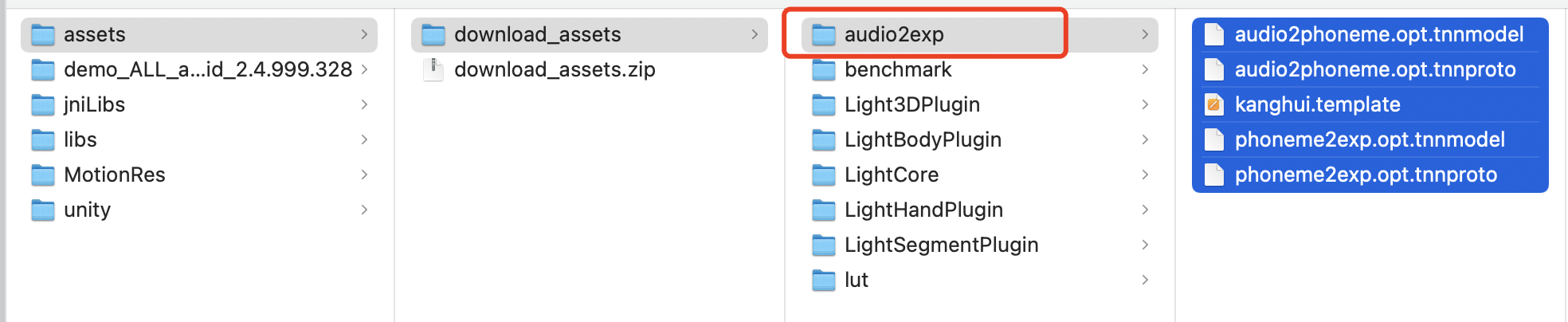
2. 모델 파일 구성: assets에서 context.getFilesDir() + "/my_models_dir/audio2exp"와 같은 app의 개인 디렉터리로 모델 파일을 복사합니다. 그 다음 Audio2ExpApi의 init(String modelPath) API를 호출하여 context.getFilesDir() + "/my_models_dir"을 전달합니다. SDK 패키지에서 모델 파일을 찾을 수 있습니다.


API 설명

API
설명
public int Audio2ExpApi.init(String modelPath);
SDK를 초기화합니다. 이 API를 호출할 때 모델 파일의 경로를 전달합니다. 0은 초기화에 성공했음을 나타냅니다.
public float[] Audio2ExpApi.parseAudio(float[] inputData);
입력은 오디오이며 1채널이어야 하며 샘플링 레이트는 16K여야 합니다. 배열 길이는 267(샘플링 포인트 267개)입니다. 출력은 52개의 blendshape에 해당하는 52개의 요소가 있는 float 배열입니다. 요소의 값 범위는 0에서 1까지이며 순서는 Apple에서 지정합니다. {"eyeBlinkLeft","eyeLookDownLeft","eyeLookInLeft","eyeLookOutLeft","eyeLookUpLeft","eyeSquintLeft","eyeWideLeft","eyeBlinkRight","eyeLookDownRight","eyeLookInRight","eyeLookOutRight","eyeLookUpRight","eyeSquintRight","eyeWideRight","jawForward","jawLeft","jawRight","jawOpen","mouthClose","mouthFunnel","mouthPucker","mouthRight","mouthLeft","mouthSmileLeft","mouthSmileRight","mouthFrownRight","mouthFrownLeft","mouthDimpleLeft","mouthDimpleRight","mouthStretchLeft","mouthStretchRight","mouthRollLower","mouthRollUpper","mouthShrugLower","mouthShrugUpper","mouthPressLeft","mouthPressRight","mouthLowerDownLeft","mouthLowerDownRight","mouthUpperUpLeft","mouthUpperUpRight","browDownLeft","browDownRight","browInnerUp","browOuterUpLeft","browOuterUpRight","cheekPuff","cheekSquintLeft","cheekSquintRight","noseSneerLeft","noseSneerRight","tongueOut"}
public int Audio2ExpApi.release();
리소스를 해제합니다. 더 이상 기능을 사용할 필요가 없을 때 이 API를 호출하십시오.

통합 코드 예시

@Override
protected void onCreate(Bundle savedInstanceState) {
super.onCreate(savedInstanceState);
setContentView(R.layout.activity_main);
findViewById(R.id.button).setOnClickListener(new OnClickListener() {
@Override
public void onClick(View view) {
TELicenseCheck.getInstance().setTELicense(MainActivity.this, licenseUrl, licenseKey, new TELicenseCheckListener() {
@Override
public void onLicenseCheckFinish(int errorCode, String s) {
Log.d(TAG, "onLicenseCheckFinish: errorCode = "+errorCode+",msg="+s);
if (errorCode == TELicenseCheck.ERROR_OK) {
//license check success
Audio2ExpApi audio2ExpApi = new Audio2ExpApi();
int err = audio2ExpApi.init(MainActivity.this.getFilesDir() +"/models");
Log.d(TAG, "onLicenseCheckFinish: err="+err);
//TODO start record and parse audio data
} else {
// license check failed
}
}
});
}
});
}
설명:
전체 코드 샘플은 Demo를 참고하십시오.
오디오 녹음은 com.tencent.demo.avatar.audio.AudioCapturer를 참고하십시오.
API 사용 방법에 대한 자세한 내용은 com.tencent.demo.avatar.activity.Audio2ExpActivity 및 관련 클래스를 참고하십시오.

도움말 및 지원

문제 해결에 도움이 되었나요?

피드백