3D assets must be created using third-party 3D software such as Maya, C4D, Blender, or similar tools, then exported in GLB format for use in Tencent Effect Studio. This document describes the workflow and specifications for 3D asset creation.
Workflow
The standard linear workflow is:
Model Creation
Creation Software: Maya, C4D, Blender, ZBrush. Any software capable of exporting to GLB format is acceptable.
Model dimensions must match the provided head model. Do not change the head model’s size or position.
For typical 3D props, keep the triangle count around 8,000; the maximum allowed is 20,000.
After modeling, center the pivot at the world origin, clear history, and freeze transformations.
Naming conventions: Do not use Chinese characters in file names, model names, or texture names.
Low-poly topology should be clean and evenly distributed.
Models may be built in multiple parts but must be exported as a single file.
Focus detail on areas visible to the camera, as props are primarily displayed from the front and at a 45° side angle. You can remove non-visible sections, such as the back of the head, to reduce polygon count and improve performance.
UV Unwrapping
Lay out UVs as flat and straight as possible.
Minimize seams; place them in inconspicuous locations and maximize texture space usage.
Texture Creation
Texture Requirements
Maximum size: 1024 × 1024 pixels. Both width and height must be multiples of 4 for optimal quality.
Texture memory usage must be under 1MB. Compress all textures (use TinyPNG for compression).
Use 8-bit PNG format.
PBR Materials
Required texture maps: basecolor, normal, occlusionRoughnessMetallic.
Emissive maps are optional. If not used, set the emissive color to black.
Unlit Materials
Only one baked texture is required. Prefer Arnold or Substance Painter (SP) baking for best results.
Rigging & Animation
If the model does not use bones (static model), skip this section.
Physical Rigging
You may add dynamic joints to enable physics-based movement.
Maximum bone count: 50.
Each vertex can be influenced by up to 4 bones (maximum influences per vertex when skinning).
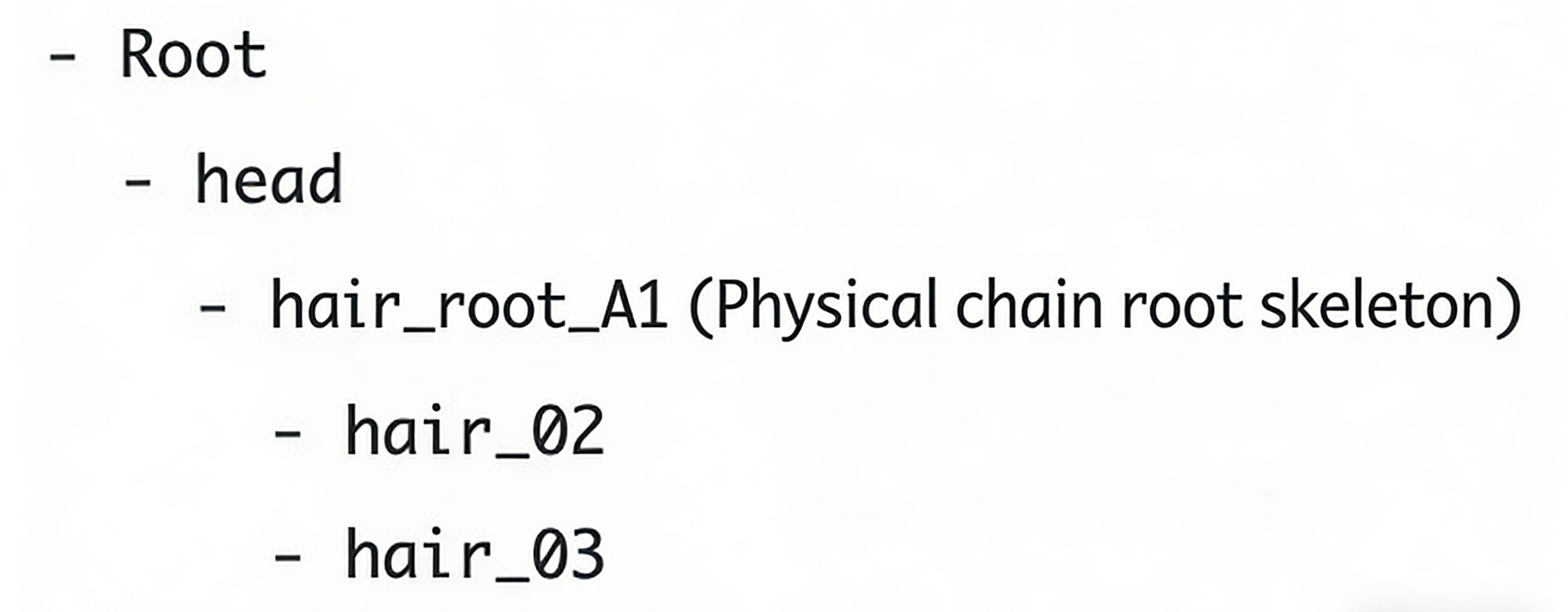
The bone hierarchy must be single-level. The root bone must be named Root.
Use only bone skinning; do not use other objects.
Bones that require physics calculations should be the starting bones in the physics chain (children of Root). Root bone names can include numbers or ABC+numbers for easier physics configuration.
Example bone hierarchy:
Animation Creation
Animation duration must not exceed 15 seconds and must be set to 30 frames per second.
Exported animations must have all keyframes baked to the bones.
Export Settings
After finishing the model in your 3D software, export it as a GLB file and import it into Tencent Effect Studio. GLB is the binary format of GLTF, a widely used and efficient 3D model file format for web and mobile rendering.
Below is an example of exporting GLB from Blender. The steps are similar in other software.
1. Select the model: Click to select the object you want to export in the scene.
2. Open the menu: Choose File > Export > glTF 2.0 (.glb/.gltf) from the top left.
3. Configure export settings on the right panel.
4. Format: Leave as the default glTF Binary (.glb).
5. Include: Ensure Selected Objects is checked to export only your selection. Otherwise, lights and cameras may be exported as well.
6. Click Export glTF 2.0.
Head Model Download