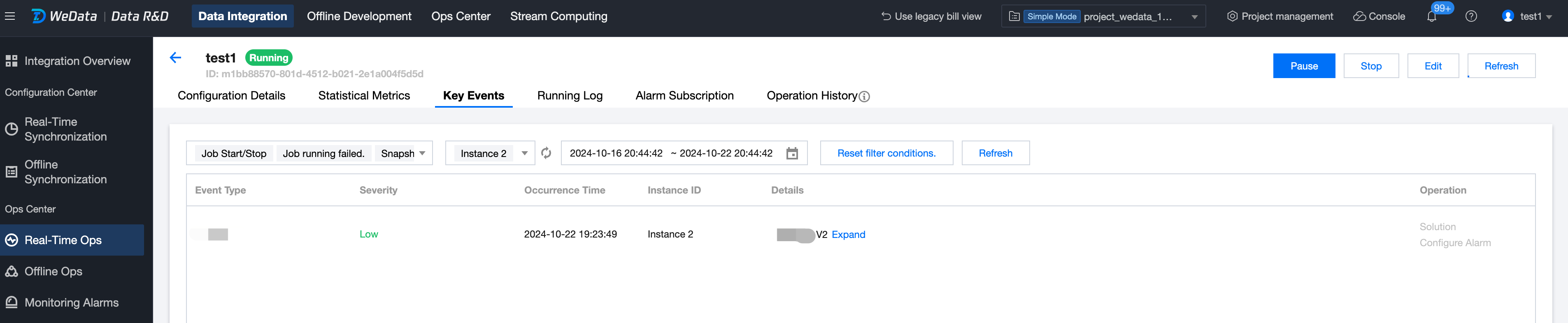
Key events support viewing job start/stop events, job running failure events, source table schema changes, etc.
The real-time operation and maintenance interface supports, after task recording, click Task Name > Key Events to enter the key event list.
Parameter
Description
Job Start/Stop
When the user selects Run in the job operation menu, the system will attempt to start the job and automatically create a new instance ID for this run. Then, a new start event can be seen in the event panel.
When the user stops, restarts the job, or the job crashes and exits, a stop event will be generated under the current instance ID. The event occurrence time refers to the time when the internal process is completed, not the time when the user clicks the operation on the interface.
Job Running Failed
When a job restarts during running (changing from RUNNING to RESTARTING or FAILED and other abnormal statuses), a "Job failure occurred" event will be generated. If the job subsequently enters the RUNNING state again, a "Job failure recovered" event will be generated. Additionally, you can view the corresponding solutions for the job running failure events.
Snapshot Failed
If the job enables periodic snapshots and fails during one of the snapshots, a "Snapshot failure occurred" event will be generated. If a subsequent snapshot completes successfully, a "Snapshot failure recovered" event will be generated. Additionally, you can view the corresponding solutions for snapshot failure events.
Job Abnormal
For various job anomaly events, the system will continuously monitor and analyze the running status of jobs. When a job encounters a severe anomaly (such as prolonged TaskManager Full GC, long-term high CPU occupancy rate, abnormal Pod exit, etc.), corresponding events will be pushed for users to view and subscribe to, enabling them to judge the health status of the job's running condition.
Additionally, you can view the corresponding solutions for job anomaly events.
Source End Schema Change
During the task synchronization process, if there is a Schema change on the source end, it is necessary to sense, judge, and respond quickly in business operations. When there is a Schema change on the source end, changes can be captured and displayed. Additionally, alerts can be configured for source end Schema change events.
Note:
To avoid returning too many events, we have limited the maximum continuous time period for filtering to 7 days, and the maximum viewable period to the last 90 days of events.