FTP Reader enables reading data from remote FTP files and converting it into the Data Synchronization Protocol. The remote FTP file itself is unstructured data storage. Currently, FTP Reader supports the following features:
Supported
Not supported.
Supports and only supports reading TXT files, which require a schema as a two-dimensional table.
Supports CSV-like format files with a custom delimiter.
Supports reading various types of data (represented as STRING), and supports column trimming and column constants.
Supports recursive reading and filename filtering.
Supports text compression. Currently supported compression formats are gzip, bzip2, zip, lzo, and lzo_deflate.
Multiple files can be read concurrently.
Single file multi-threaded concurrent reading, involving the splitting algorithm within a single file.
In compressed files, multi-threaded concurrent reading is technically unsupported.
FTP Writer enables converting the Data Integration protocol into FTP file features. The FTP file itself is unstructured data storage. Currently, FTP Writer supports the following features:
Supported
Not supported.
Supports and only supports writing text types (BLOBs such as video data are unsupported), requiring the schema in the text to be a two-dimensional table.
Supports CSV and TEXT format files with a custom delimiter.
Text compression is unsupported during writing.
Supports multi-threaded writing, with each thread writing to different subfiles.
Single files do not support concurrent writing.
FTP itself does not provide data types, FTP Writer writes all data as STRING type into FTP files.
FTP Offline Single Table Read Node Configuration
Parameters
Description
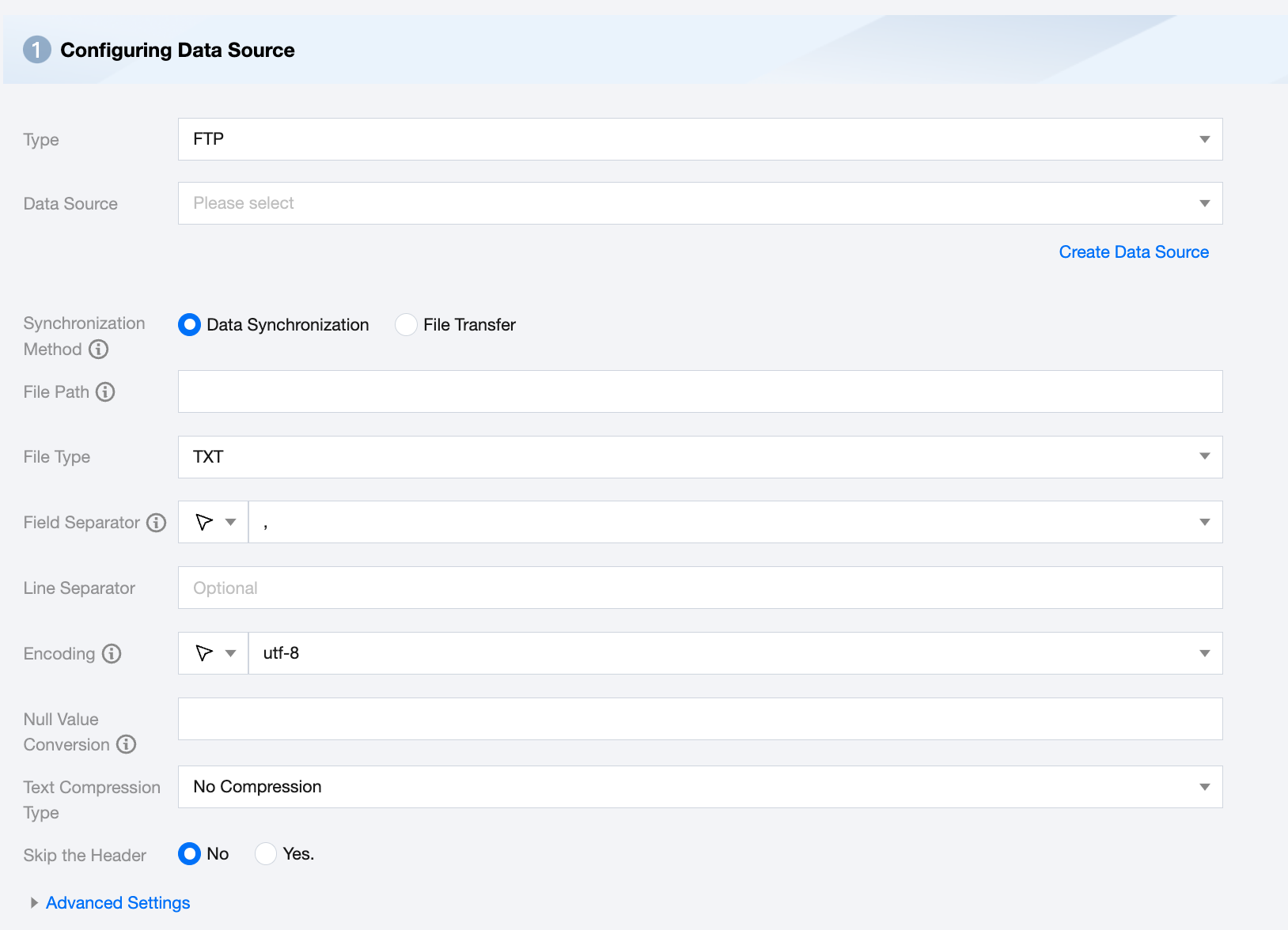
Data Source
Select the available FTP data source for the current project.
Synchronization Method
FTP supports two sync methods:
Data Synchronization: Parses structured data content and maps and synchronizes data content according to field relationships.
File Transfer: Transfers the entire file without content parsing. Applicable to unstructured data synchronization.
File Path
For Remote FTP file system path and file name information, you need to fill in the complete file path and file name including the path and file suffix. Multiple paths can be supported here.
When specifying a single remote FTP file, FTP can only use a single thread for data extraction temporarily. In the future, multi-thread concurrent reading will be supported for single files without compression.
When specifying multiple remote FTP files, FTP supports multi-threading for data extraction. The number of threads is specified by the number of channels.
When specifying a wildcard, FTP tries to traverse multiple file information. For example, specifying / means reading all files in the / directory, specifying /bazhen/ means reading all files in the bazhen directory. FTP currently only supports asterisk (*) as file wildcard and supports using scheduling parameters to flexibly configure file names and file paths.
File Type
FTP supports four file types: txt, orc, parquet, csv.
txt: represents TextFile file format.
orc: represents ORCFile file format.
parquet: represents standard Parquet file format.
csv: represents standard HDFS file format (logical two-dimensional table).
Field Separator
Field separator for reading: FTP requires specifying the field separator when reading data. If not specified, it defaults to (,) and the interface configuration will also default to (,).
Encoding
Configuration for reading file encoding. Supports UTF-8 and GBK encoding.
Null Value Conversion
During reading, convert specified strings to null.
Text Compression Type
Supports no compression, zip, gzip, bzip2
Skip the Header
No: Do not skip the header when reading.
Yes: Skip the header when reading.
Advanced Settings (Optional)
You can configure parameters according to business needs.
Explanation of file path:
It is usually not recommended to use an asterisk (*) as it can easily cause JVM memory overflow errors when running tasks.
Data synchronization will treat all Text Files under a job as the same data table. You must ensure that all files can adapt to the same set of Schema information.
You must ensure the read files are in CSV-like format and provide readable permissions for the data synchronization system.
If there are no matching files in the path specified by Path, the sync task will fail.
FTP Offline Single Table Write Node Configuration
Parameters
Description
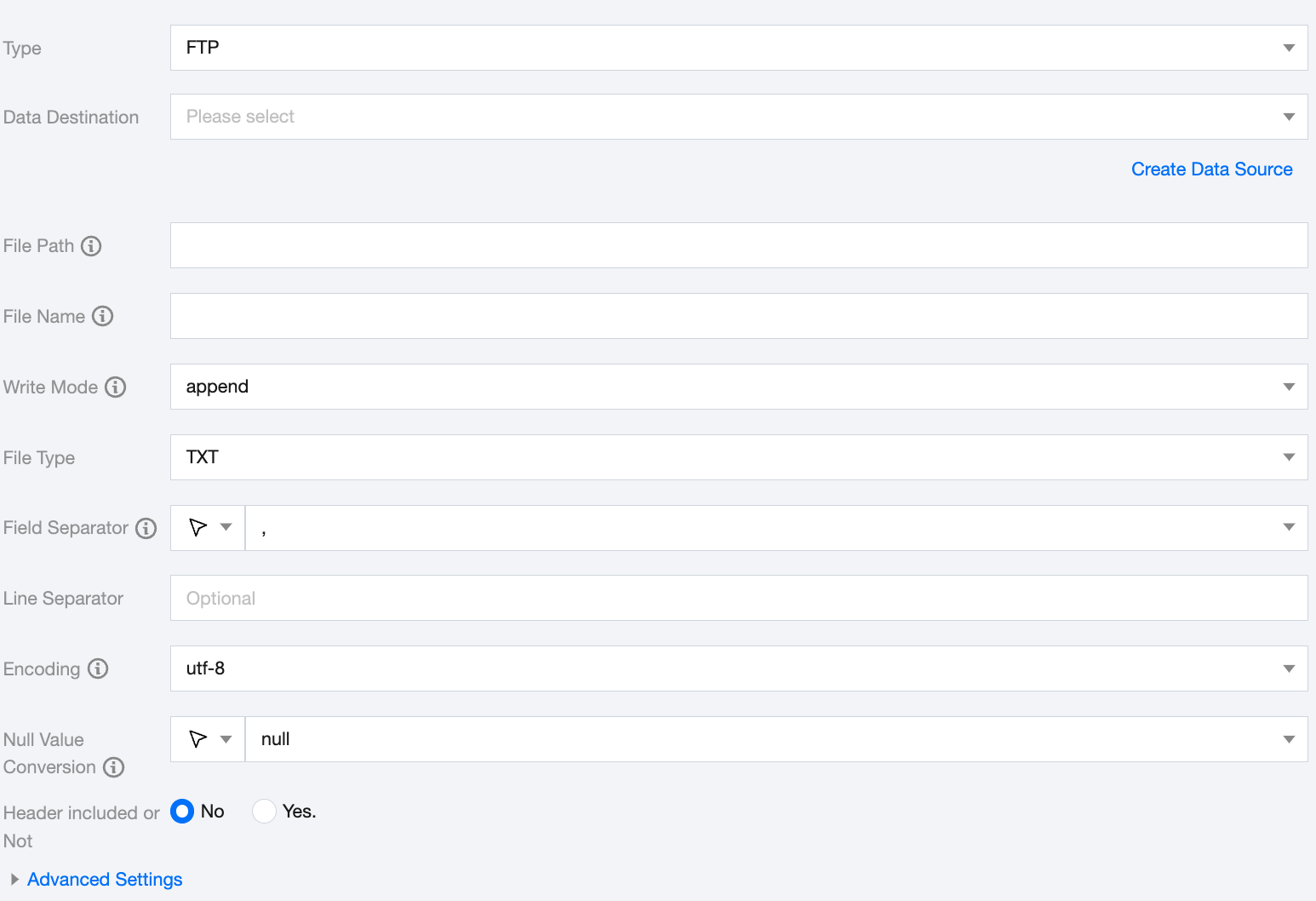
Data Destination
Select the available FTP data source for the current project.
File Path
Path information of the file system. The path supports using '*' as a wildcard. After specifying the wildcard, multiple file information will be traversed.
File Name
Name of the file to be written. A random suffix will be added to this filename as the actual write name.
Write Mode
FTP supports three write modes:
append: No processing before writing, directly use the filename to write, ensuring no file name conflicts.
nonConflict: Error when the filename is duplicated.
overwrite: Clean all files with the filename prefix before writing.
Field Separator
Field separator for writing. The field separator for FTP writing needs to be consistent with the field separator of the created FTP Table; otherwise, the data cannot be found in the FTP Table. Options: '\\t', '\\u001', '|', 'space', ';', ','.
Encoding
Configuration for file encoding during writing. Supports UTF-8 and GBK encoding.
Null Value Conversion
During writing, convert null to the specified string.
Header included or Not
No: Do not skip the header when writing.
Yes: Skip the header when writing.
Advanced Settings (Optional)
You can configure parameters according to business needs.
Data type conversion support
FTP implements the feature of reading and writing in FTP Bidirectional Channel. The remote FTP file itself is Unstructured Data Storage. The data processing engine automatically converts it to Bytes type during read and write operations.
FAQs
1. FTP write task error: Please confirm... have directory LS permissions, errorMessage: connect timed out
Cause:
Integrated FTP Connection currently only supports Passive Mode, it might be that the FTP Service Configuration has not enabled Passive Mode.
The client connects to the FTP server's port 21, sends username and password to log in, and after successful login, another port (above 1024) is used for listing or reading data. It might be that the Data Transfer Port is not open.
Solutions:
Confirm FTP Server Configuration:
1. Is Passive Mode enabled?
# Configuration file
pasv_enable=YES # Enable Passive Mode
pasv_min_port=${Number}# Minimum port for Passive Mode
pasv_max_port=${Number}# Maximum port for Passive Mode
2. Whether the server-side has opened the ports in the above range.