Elasticsearch/Tencent Cloud Elasticsearch Data Source
다운로드
포커스 모드
폰트 크기
마지막 업데이트 시간: 2024-11-01 17:56:18
Tencent Cloud Elasticsearch data source configuration is the same as Elasticsearch data source configuration. Here, we will explain using the Elasticsearch data source as an example.
Supported Editions
Supports Elasticsearch 6.x, 7.x versions.
Use Limits
1. Elasticsearch Reader will obtain shard information from the server side for data synchronization, ensuring that server-side shards are alive during task synchronization. Otherwise, there is a risk of data inconsistency.
2. Synchronization of fields with type scaled_float is not supported.
3. Synchronization of indexes with fields containing the keyword $ref is not supported.
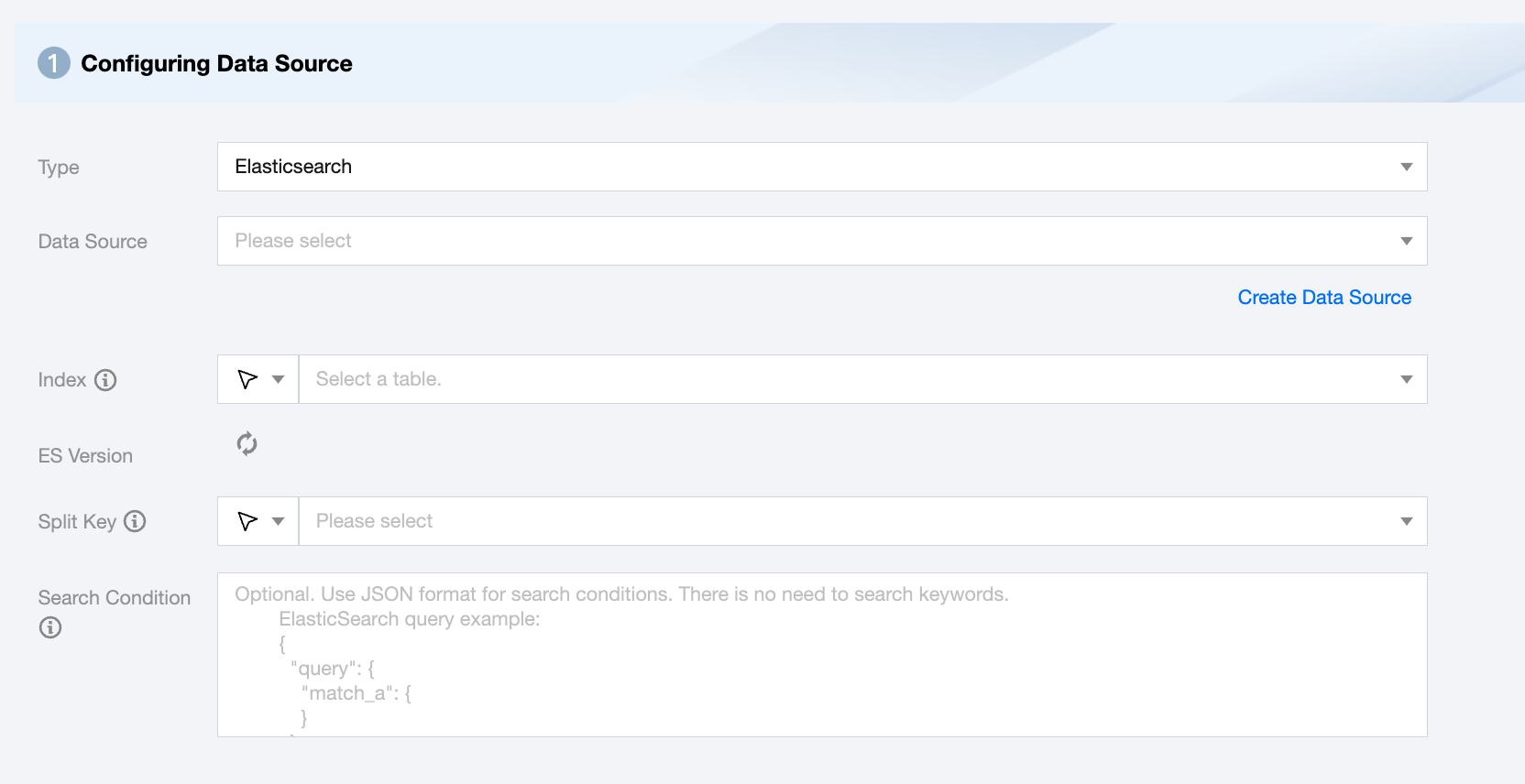
Elasticsearch Offline Single Table Read Node Configuration
Parameters
Description
Data Source
Select an available Elasticsearch data source from the current project.
Index
Supports multiple index names or regular expressions. Use wildcards (*) for index name regular expressions, e.g., index_*.
ES Version
Determine the ES version based on the data source and index.
Split Key
Specify the field for data sharding. After specifying, concurrent tasks will be launched for data synchronization. You can use a column in the source data table as the partition key. It is recommended to use the primary key or indexed column as the partition key.
Search Condition (Optional)
Use JSON format for search.
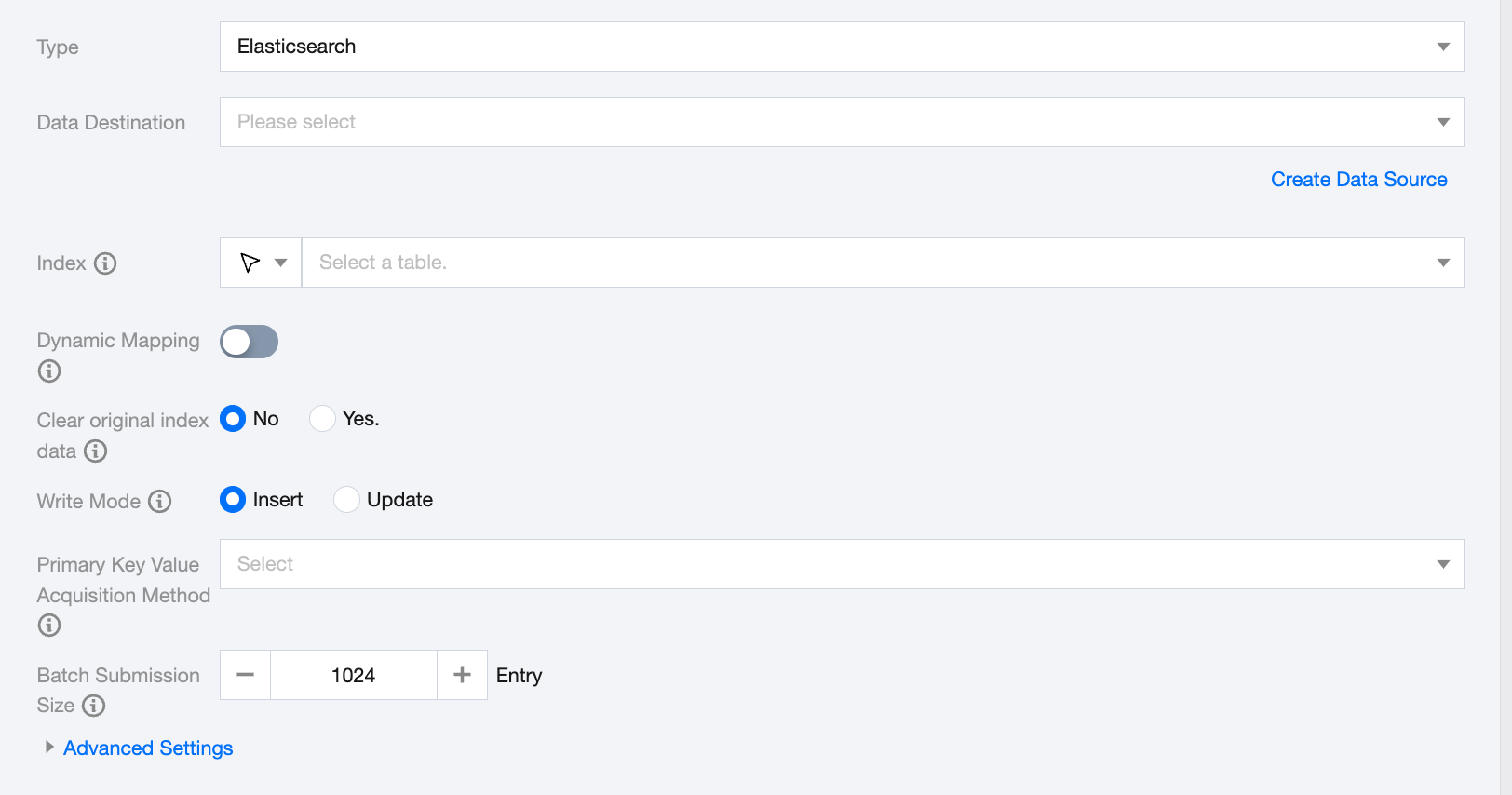
Elasticsearch Offline Single Table Write Node Configuration
Parameters
Description
Data Destination
Select an available Elasticsearch data source from the current project.
Index
Index Name in Elasticsearch.
Dynamic Mapping
Definition: When an unknown field is found in the document, decide whether the synchronization task should use Elasticsearch's dynamic mapping mechanism to add a mapping for the field.
Disable: Default is off. Generate and update Elasticsearch mappings according to the columns configured in the synchronization task.
In Elasticsearch 7.x, the default type is _doc. When using Elasticsearch auto mappings, please configure _doc and set esVersion to 7.
Clear original index data
Manually choose whether to clear the original index data:
No: Retain the existing data in the index before importing new data.
Yes: Delete the original index and rebuild a new index with the same name before importing new data. This action will remove the data under that index.
Write mode
Support two write modes: insert and update:
Insert: All data is directly inserted.
Update: Update data if the same primary key exists; otherwise, insert.
Primary Key Value Acquisition Method
Supports three value methods:
Source table primary key: Use the primary key of the source table as the document's id.
Composite primary key: Use multiple columns from the source table to determine the document's id.
No primary key: Generate a default _id value.
Batch Submission Size
Batch submission record size for one-time submissions: This value can significantly reduce the network interactions between the data synchronization system and Elasticsearch and improve overall throughput. If set too high, it may cause OOM exceptions in the data synchronization process.
Advanced Settings (Optional)
You can configure parameters according to business needs.
After ES writer clears the index, the automatically rebuilt index's field types do not meet expectations
Problem information:
When configuring the ES writer node to "Clean original index data" and choosing "Yes" for rerunning tasks, the ES writer will not actively create the index. When writing data directly, ES will auto-create the index based on data inference. The new index field types may differ from the old version.
Cause:
The ES writer clears the original index data by directly deleting the index. It does not have a syntax similar to MySQL's truncate table. After the index is deleted, ES server infers the index field types based on the new data, which may differ from the field types of the original index.
Solution:
Define index field types in advance through ES template.
Creation example: (merlion_suggest_words_* applies to all indexes starting with merlion_suggest_words_).