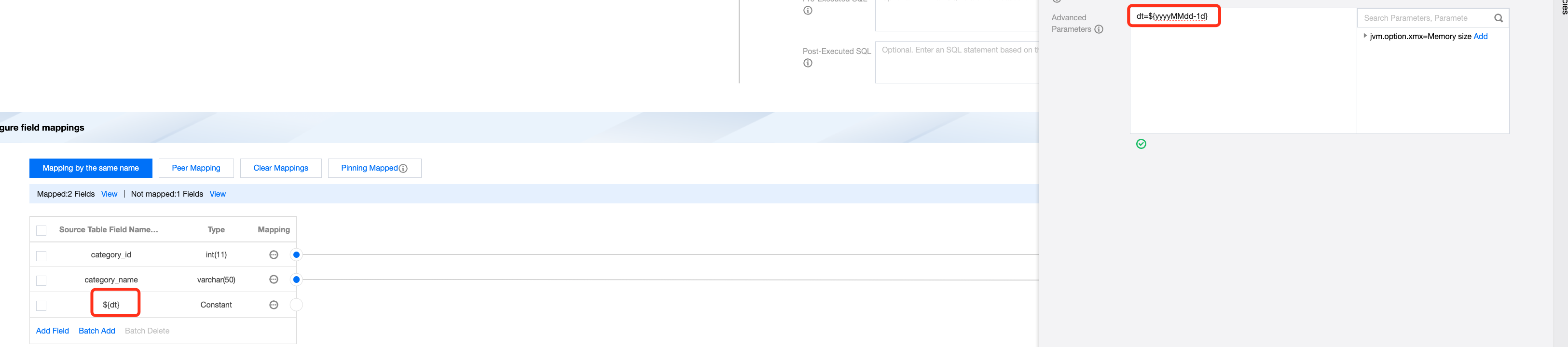
For periodically running offline tasks, the system supports automatically fetching the data timestamp of periodic task instances using time parameters.
Time parameters use ${...} for self definition, supporting formats like ${yyyyMMdd}, ${yyyy-MM-dd}, ${HH:mm:ss}, and ${yyyyMMddHHmmss}. Here, yyyy represents the 4-digit year, yy represents the 2-digit year, MM represents the month, dd represents the day, HH represents the hour, mm represents the minute, and ss represents the second. Flexible combinations are supported between parts.
The system's built-in parameter ${timestamp} corresponds to the 10-digit timestamp of the scheduling time, with precision to the second level.
Below is a sample:
Using 20210710080000 as the benchmark
Time
Time Parameter Formats
Remarks
N Years Later
${yyyyMMdd+Ny}
If dt=${yyyyMMdd-1M} is referenced, it will be replaced with: dt=20210610
If dt=${yyyyMMdd-1d} is referenced, it will be replaced with: dt=20210709
If time=${yyyyMMddHHmmss-3h} is referenced, it will be replaced with: time=20210710050000
If ti=${yyyyMMddHHmmss-25m} is referenced, it will be replaced with: ti=20210710073500
N Years Ago
${yyyyMMdd-Ny}
N Months Later
${yyyyMMdd+NM}
N Months Ago
${yyyyMMdd-NM}
N Weeks Later
${yyyyMMdd+Nw}
N Weeks Ago
${yyyyMMdd-Nw}
N Days Later
${yyyyMMdd+Nd}
N Days Ago
${yyyyMMdd-Nd}
N Hours Later
${yyyyMMddHHmmss+NH}
Previous N hours
${yyyyMMddHHmmss-NH}
Next N minutes
${yyyyMMddHHmmss+Nm}
Previous N minutes
${yyyyMMddHHmmss-Nm}
Dispatch Timestamp
${timestamp}
${timestamp}=1625875200
Supports using operators like "+","-" for processing
Dispatch Timestamp (13 digits)
${timestamp_ms}
${timestamp_ms}=1698508800000
Supports using operators like "+","-" for processing.
Provides quick conversion expressions for common dates as follows:
Serial number
Time Parameter Formats
Description
1
${yyyyMMdd+TE}
TENDAY END data date corresponds to the end of the ten-day period
2
${yyyyMMdd+ME}
MONTH END data date corresponds to the end of the month
3
${yyyyMMdd+QE}
QUARTER END data date corresponds to the end of the quarter
4
${yyyyMMdd+HYE}
HALF YEAR END data date corresponds to the end of the half year
5
${yyyyMMdd+YE}
YEAR END data date corresponds to the end of the year
6
${yyyyMMdd+TS}
TENDAY START data date corresponds to the start of the ten-day period
7
${yyyyMMdd+MS}
MONTH START data date corresponds to the start of the month
8
${yyyyMMdd+HYS}
HALFYEAR START data date corresponds to the start of the half year
9
${yyyyMMdd+YS}
YEAR START data date corresponds to the start of the year
10
${yyyyMMdd+PME}
PRI MONTH END data date corresponds to the end of the previous month
11
${yyyyMMdd+PYE}
PRI YEAR END data date corresponds to the end of the previous year
Note:
In wedata, the time parameter is automatically obtained from the periodic task's "Instance Data Time". Take care not to confuse it with "Planned Scheduling Time":
"Planned Scheduling Time" is the expected scheduling runtime for the periodic instance. It can be configured in the Development Page > Scheduling Settings. The "Instance Data Time" corresponds to the periodic instance scheduling cycle. Once the scheduling cycle is determined, the "Instance Data Time" is also fixed. For example, when configuring a daily periodic task, the Instance Data Time for 20240815 is: 2024-08-15 00:00:00. The Planned Scheduling Time can be set to any time between 2024-08-15 00:00:00 and 2024-08-15 23:59:00 (accurate to the minute). Refer to the image below.
Use placeholders to replace time parameters
Use the placeholder `$dt` to replace time parameters, for example dt=${yyyyMMdd-1d} represents the time parameter.