FileSystem Data Source
다운로드
포커스 모드
폰트 크기
Use Limits
Support SMB shared file system: A network file sharing mechanism based on SMB (Server Message Block, server message block protocol).
FileSystem Offline Single Table Read Node Configuration
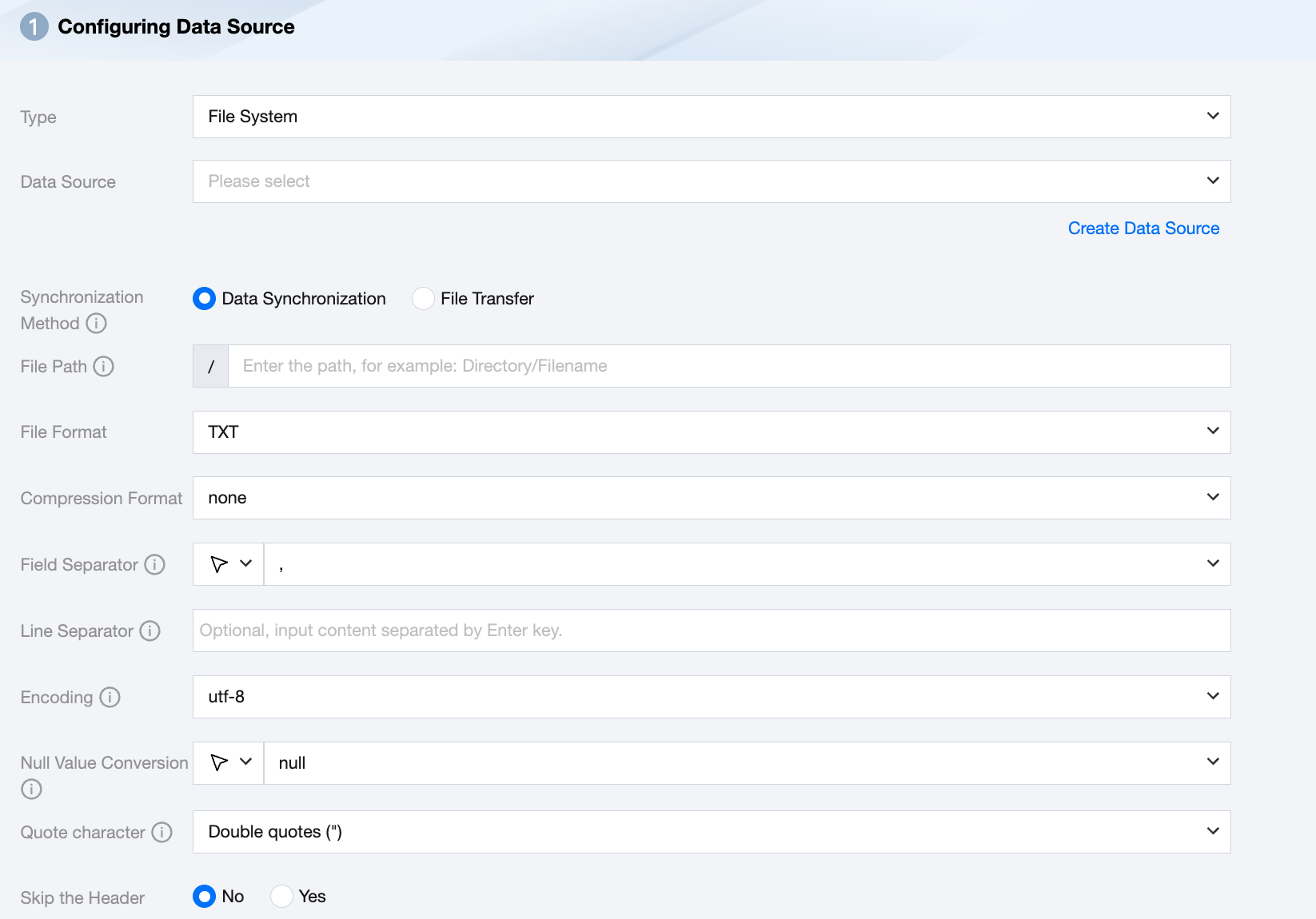
Parameter | Description |
Data Source | Select the available FileSystem data source in the current project. |
Synchronization Method | FileSystem supports two synchronization methods: Data synchronization: Parse structured data content, map and sync data content based on field relationships. File transfer: Transmit the entire file without content parsing, applicable to unstructured data synchronization. Note: File transfer only supports data sources where both the source and target are of file types (COS/HDFS/SFTP/FTP/Azure Blob/FileSystem/S3/Http), and the synchronization method for both the source and target must be file transfer. |
File Path | file system path, supports the use of * wildcard (wildcards only support appearing at the last level of the path, for example: /a/b/c/file*). |
File Type | FileSystem supports three file types: TXT, CSV, JSON. TXT: Refers to the TextFile file format. CSV: Refers to the ordinary HDFS file format (logical two-dimensional table). JSON: Refers to the JSON file format. |
Field Separator | Under TXT/CSV file types, when reading in synchronous data mode, the field separator is set by default to (,). Note: Unsupported ${} as a delimiter. ${a} will be recognized as a configured parameter a. |
Line Separator(Optional) | Under TXT/CSV file types, the line delimiter set when reading in synchronous data mode. A maximum of 3 values can be input, and all multiple input values are treated as line delimiters. If not specified, linux defaults to \\n, and windows defaults to \\r\\n. Note: 1. Set multiple line delimiters; this will impact read performance. 2. Does not support ${} as a delimiter; ${a} will be recognized as a configured parameter a. |
Encode | coding configuration for reading files. Support utf8 and gbk two kinds encoding. |
Null Value Conversion | When reading, convert the specified string to NULL. NULL represents an unknown or inapplicable value, different from 0, empty string, or other values. Note: Unsupported ${} as a specified string. ${a} will be recognized as a configured parameter a. |
Compression Format | Currently supports: none, deflate, gzip, bzip2, lz4, snappy. Since snappy currently does not have a unified stream format, Data Integration currently only supports the most widely used: hadoop-snappy (snappy stream format on Hadoop) framing-snappy (google-recommended snappy stream format) |
Quote character | No configuration: The source reads the data as its original content. The source end reads the value within double quotes (") as data content. Note: If the data format is not standardized, it may cause OOM when reading. The source reads the value within single quotation marks (' ) as data content. Note: If the data format is not standardized, it may cause OOM when reading. |
Skip the Header | No: When reading, do not skip the header. Yes: When reading, skip the header. |
Data Type Conversion Support
Read
Data types supported for FileSystem reading and their corresponding conversion relationships are as follows:
FileSystem Data Type | Internal Types |
INTEGER,LONG | LONG |
FLOAT,DOUBLE | DOUBLE |
STRING | STRING |
BOOL | BOOLEAN |
DATE,TIMESTAMP | DATE |
피드백