Data Model Fields Description
Download
포커스 모드
폰트 크기
Overview
Data model fields are the basis of the table structure of the data source. They can be understood as the headers (columns) of an Excel spreadsheet, while the data can be understood as the rows of an Excel spreadsheet.
Field Type
Developers can customize data model fields. Custom fields support the following types:
New Version Fields | Historic Fields | Type | Usage Instructions | Parameter Example |
Text - short text | String | string | The longest storable content is 4,000 bytes. If longer content needs to be stored, it is recommended to use the rich text type. | "this is a string" |
Text - long text | - | string | The longest storable content is 4,000 bytes. If longer content needs to be stored, it is recommended to use the rich text type. | "this is a long-text" |
Rich text | Rich text | string | The longest storable content is 262,144 bytes. | - |
Email | Email | string | Contains xx@yy.zz. | " email@qq.com" |
Phone - phone number | Phone number | string | A 2-digit or 3-digit area code starting with 0 or a 7-to-8-digit string with no area code. | "0271-1234567" or "027-1234567" or "1234567". |
Phone - mobile number | Mobile number | string | An 11-digit string compliant with mobile number specifications. | "13812341234" |
Figure | Figure | string | The image cloudId obtained from the front-end component by default. | cloud://xxx.xxx.xxx.png |
File | File | string | The file cloudId obtained from the front-end component by default. | cloud://xxx.xxx.xxx.png |
URL | URL | string | A string compliant with URL specifications. | https://xxx.xxx.xx |
Association relationship | Association relationship | string | None. | The _id value of associated data. |
Master-detail relationship | Master-detail relationship | string | None. | The _id value of associated data. |
Digits | Digits, age | number | Digits | 123456.78 |
Date and time - date and time | Add | number | The timestamp obtained from the front-end component, in ms. | 1645977600000 |
Date and time - date | Date | number | The timestamp obtained from the front-end component, in ms. | 1645977600000 |
Date and time - time | Time | number | The timestamp obtained from the front-end component, in ms. | 1645977600000 |
Boolean value | Boolean value | boolean | True or false | true |
Array | Array | array | Verify based on the element type of the array. | ["abc", "321"] |
Object | Object | object | - | - |
Enum - single selection | Whether it is an enum attribute. | string | The filled value should be one of the enum values set by the user and stored as a string. | "Milk" |
Enum - multiple selection | - | array | The filled value should be one or more enum values set by the user and stored as an array. | ["Milk", "Bread"] |
Geographic location | - | object | An object with a fixed format, where address is the text description of the location and coordinates is an array containing longitude and latitude. See the parameter example for details. | 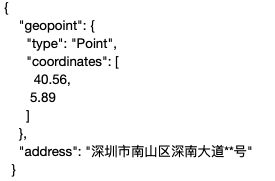 |
Region - province | - | string | None. | Shaanxi province |
Region - province and city | - | string | Geographic location separated by commas | Shaanxi Province, Xi'an City |
Region - province, city, and district | - | string | Geographic location separated by commas | Shaanxi province, Xi'an city, Yanta district |
Automatic numbering | - | string | For example, if the customer does not fill in the parameter, the backend will automatically complete it; if the customer passes a parameter, the customer-defined value will be used. | 1001 |
JSON | - | object | Complex data structures or dynamic attributes | {"title": "My First Blog Post","body": "<h1>Welcome to my blog!</h1><p>This is my first post.</p>","tags": ["blog", "first post", "introduction"]} |
Markdown | - | string | The content can be edited using a Markdown editor and real-time preview is supported. | # This is a Markdown example. |
Multimedia - audio | - | string | Supported types: opus, flac, webm, weba, wav, ogg, m4a, oga, mid, mp3, aiff, wma, and au. | cloud://xxx.xxx.xxx/xx.wav |
Multimedia - video | - | string | Supported types: ogm, wmv, mpg, webm, ogv, mov, asx, mpeg, mp4, m4v, and avi. | cloud://xxx.xxx.xxx/xx.mp4 |
Common Field Configuration
Concept Explanation
Field name: supports Chinese and English.
Field identifier: should not be empty or start with a digit, should only contain letters, digits, or underscores (_), and should not exceed 40 characters.
Data type: the field type that can be selected. See the field type settings for required field configurations.
Required or not: identifies whether this field is required.
Unique or not: identifies whether this field allows duplicate values. If it is set to unique, duplicate values are not allowed.
Primary display column or not: available when the data type is text. When users configure associations or master-detail fields in other data models, this field will be displayed as the primary display column value to facilitate user viewing. This configuration only affects the display effect and does not affect the actual stored content of associations or master-detail fields.
Primary Display Column Explanation
Users can set a field as the primary display column in the data model. This field affects the display name when other models associate with it. The following example uses the student and course data models to illustrate the usage of the primary display column.
Student model configuration: The course table data type is an association, and the associated data model is the course.
Course model configuration: The course name is set as the primary display column.
The query results of this data model through the API are as follows: The course table field actually stores the ID of the associated table, and
@kcb returns the entire content of this record from the associated table, indicating which field is the primary display column with "primaryColumn": "mc".{"records": [{"xm": "Tom","_id": "962d008f650404bc024c52f43a471189","kcb": "93e4b6a0640e9139042f27941b0ab7e6","@kcb": {"v1": {"primaryColumn": "mc","record": {"owner": "1446845068964986882","createdAt": 1678676281098,"createBy": "1446845068964986882","updateBy": "1443776918208724994","mc": "Literature","_id": "93e4b6a0640e9139042f27941b0ab7e6","updatedAt": 1690341673543}}}},{"xm": "Jerry","_id": "41d77edc650404c8024ad4636a1c0704","kcb": "987a4537640e9140042d5c5715fce0ce","@kcb": {"v1": {"primaryColumn": "mc","record": {"owner": "1446845068964986882","createdAt": 1678676288091,"createBy": "1446845068964986882","updateBy": "1443776918208724994","mc": "Math","_id": "987a4537640e9140042d5c5715fce0ce","updatedAt": 1690341680970}}}}],"total": 2}
In the table components, the course table field is automatically converted to the primary display column to facilitate user viewing.
Note that, as mentioned above, this field stores the record ID.
When filtering data, if you want to query records where the course table field is Literature, the corresponding ID value for Literature in the course model should be used as the filter criteria.
{"where": {"$and": [{"$and": [{"kcb": {"$eq": "93e4b6a0640e9139042f27941b0ab7e6"}}]}]}}
In form containers, when bound to the student model, the course table field is automatically generated as a single-selection dropdown component. The component's option name is the primary display column, and the option value is the ID.
From the submitted parameters, it can be seen that the course table field submits the option value and stores the associated record ID.
{"xm": "Harry","kcb": "93e4b6a0640e9145042f2e635ed8600f"}
Field Usage Instructions
Enumeration
The enum or not attribute of the field has been upgraded to the enum field. For enum field attribute settings, see:
Selection setting: supports single selection and multiple selection.
Single selection: only allows selecting one enum value.
Multiple selection: allows selecting multiple enum values.
Associated option set: the enum value of an enum field depends on a common option set. If there is no suitable option set, click Create Now.
Note:
Fields that have set the enum or not attribute can still be used normally. The official recommendation is to upgrade it to an enum field.
Automatic Numbering
Automatic numbering has the same nature as the string type, except that when creating a record, if the user does not input a value, a string value in the specified format is automatically generated. Developers can customize the format of these fields according to their preference and then rely on the system to generate matching values for automatic filling at runtime.
Automatic numbering fields support three numbering types: string prefix, date prefix, and custom.
Association Relationship
This field can be used to associate with other data models. It records the data ID of associated data models. For example, the course ID field can be set as an association relationship for the student table. When queried, course information can be obtained through the course ID.
Association type: You can choose a one-to-one association or a many-to-one association.
Deletion operation: You can choose to delete the data and the associated table data simultaneously or delete the data without deleting the associated table data.
Master-Detail Relationship
This field can be used to associate with other data models. It records the data ID of associated data models. For example, the course ID field can be set as an association relationship for the student table. When queried, course information can be obtained through the course ID.
Association type: You can choose a one-to-one association or a many-to-one association.
Deletion operation: Delete the associated data and the associated table data simultaneously.
String Prefix
For this type, automatic numbering includes auto-incremented numbers with an optional string constant prefix.
Rule: {prefix}-{SEQNUM:minimum digits + starting value}.
Minimum digits: the minimum number of digits to be included in the auto-generated numbering sequence. As the numbering sequence continues to increase, it may exceed this minimum length.
Starting value: the starting value for the serial number part of the auto-numbering column.
For example, the prefix is CAR, the minimum digit is 4, and the starting value is 1000.
Result: CAR-1000, CAR-1001, CAR-1002, CAR-1003.
Date Prefix
For this type, automatic numbering includes auto-incremented numbers with a date prefix in a determined format. The date part of the row will reflect the current date and time in UTC when the row is created. Built-in different date formats are available for selection, including:
yyyy-MM-dd
MM-dd-yyyy
MM-dd-yy
dd-MM-yy
Rule: {DATETIMEUTC:date format}-{SEQNUM:minimum digits + starting value}.
Example: Date Format: yyyy-MM-dd, Minimum Digits: 4, Starting Value: 1000.
Result: 2010-01-01-0001, 2010-01-01-0002, 2010-01-01-03.
Custom
For this type, string constants, auto-incremented numbers, date formats in a determined format, or random alphanumeric sequences may be included.
Click Add Format to insert the default format after the text in the Format field input box.
The supported format syntax is as follows:
Format Type | Syntax Example | Preview | Default Added Format |
Sequential numbers, SEQNUM | -CAR-{SEQNUM:3} | CAR-123 | {SEQNUM:4} |
Date and time, DATETIMEUTC | CAR-{DATETIMEUTC:yyyyMMddhhmmss} | CAR-20211223164721 | {DATETIMEUTC:yyyy-MM-dd} |
Random string, RANDSTRING | CAR-{SEQNUM:3}-{RANDSTRING:6} | CAR-123-AB7LSF | {RANDSTRING:4} |
Note:
Fields of automatic numbering type have the same feature as fields of other types. They can be used for form submission or user input. The only difference is that when the field is set as optional and the user does not input a value when creating a record, data will be filled according to the specified format.
When the user inputs a value, it does not occupy the auto-incremented sequence. For example, after 1000 and 1001 are created automatically if the user adds a value "aaa", the next auto-incremented value will be 1002, and the sequence is not interrupted.
Note:
Fields of automatic numbering type are treated the same as data identifiers (_id) in the model's methods. The input parameters for add and update methods do not include auto-numbering type fields, meaning they cannot be added or modified.
피드백