Creating VPC
Download
포커스 모드
폰트 크기
VPCs provide a basis for using Tencent Cloud services. This document describes how to create a VPC in the VPC console.
Operation Guide
1. Log in to the VPC console.
2. Select a region at the top of the VPC page, and click + New.
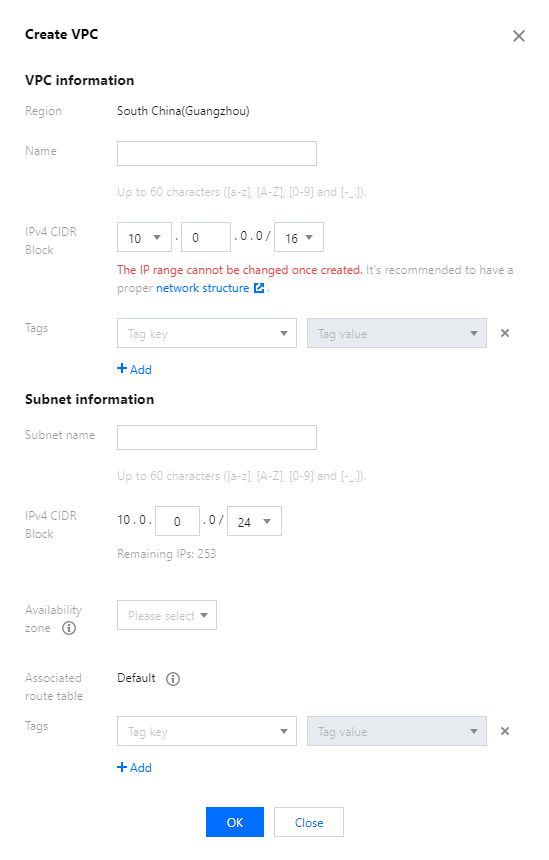
3. Enter the VPC information and subnet information in the Create VPC pop-up window.
Note:
The CIDR blocks of the VPC and subnet cannot be modified after creation.
The VPC CIDR block can be any of the following IP ranges. For VPCs to communicate with each other over a private network, their CIDR blocks should not overlap.
10.0.0.0 - 10.255.255.255 (mask range required to be between 12 and 28)172.16.0.0 - 172.31.255.255 (mask range between 12 and 28)192.168.0.0 - 192.168.255.255 (mask range between 16 and 28)The subnet CIDR block must fall within or be the same as the VPC CIDR block.
For example, if the VPC IP range is
10.0.0.0/16, then its subnet IP range can be 10.0.0.0/16, 10.0.0.0/24, etc.Availability zone: a subnet is specific to an availability zone. Select an availability zone in which the subnet resides. A VPC allows for subnets in different availability zone and by default these subnets can communicate with each other via a private network.
Associated route table: the subnet must be associated with a route table for traffic forwarding. A default route table will be associated to ensure private network interconnection in the VPC.
Tags: You can optionally add tags to help you better manage resource permissions of sub-users and collaborators.
4. After completing the configurations, click OK. A successfully created VPC will be displayed in the list, as shown below. A new VPC has a subnet and a default route table.

Related Operations
After the VPC and subnet have been created, you can deploy resources including CVM and CLB within the VPC.
Click the icon as shown below to directly purchase a CVM on the CVM purchase page. For more information, see Building Up an IPv4 VPC.

Related Content
There is a default VPC; that is:
When purchasing an instance such as CVM, CLB or TencentDB, you can choose to automatically create a default VPC and subnet without manual creation, as shown below:

The default VPC and subnet are created together with your instance, and do not count against your quota in the region. They work the same as the manually-created ones. There can only be a single default VPC in a given region and a single default subnet in a given availability zone. You can delete the default VPC and subnet if you no longer need them.


피드백