Rule Overview
Download
포커스 모드
폰트 크기
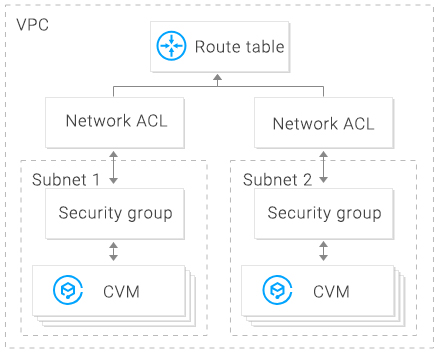
The network Access Control List (ACL) is an optional layer of security that throttles traffic to and from subnets accurate to protocol and port.
Overview
You can associate a network ACL with multiple subnets to maintain the same traffic and precisely control their inflow and outflow by setting inbound and outbound rules.
For example, when you host a multi-layer web application in a Tencent Cloud VPC instance and create different subnets for web-layer, logic-layer, and data-layer services, you can use a network ACL to ensure that the web-layer and data-layer subnets cannot access each other, but only the logic-layer subnet can access the web-layer and data-layer subnets.
ACL Rules
When a network ACL rule is added or deleted, the change will be applied to the associated subnets automatically.
You can configure inbound and outbound network ACL rules. Each rule consists of:
Source IP/destination IP: enter the source IP for an inbound rule or the destination IP for an outbound rule. Supported formats:
Single IP: such as “192.168.0.1” or “FF05::B5”
CIDR block: such as “192.168.1.0/24” or “FF05:B5::/60”
All IPv4 addresses: “0.0.0.0/0”
Protocol type: indicates protocol types that an ACL rule allows or denies, for example, TCP and UDP.
Port: indicates the source or destination port of traffic. Supported formats:
Single port: such as “22” or “80”
Port range: such as “1-65535” or “100-20000”
All ports: All
Policy: indicates whether to allow or deny the access request.
Default rules
Once created, every network ACL has two default rules that cannot be modified or deleted, with the lowest priority.
Default inbound rule
Protocol Type | Port | Source IP | Policy | Description |
All | All | 0.0.0.0/0 | Deny | Denies all inbound traffic. |
Default outbound rule
Protocol Type | Port | Destination IP | Policy | Description |
All | All | 0.0.0.0/0 | Deny | Denies all outbound traffic. |
Rule priorities
The rules of a network ACL are prioritized from top to bottom. The rule at the top of the list has the highest priority and will take effect first, while the rule at the bottom has the lowest priority and will take effect last.
If there is a rule conflict, the rule with the higher priority will prevail by default.
When traffic goes in or out of a subnet that is bound to a network ACL, the network ACL rules will be matched sequentially from top to bottom. If a rule is matched successfully and takes effect, the subsequent rules will not be matched.
Application example
To allow all source IP addresses to access all ports of CVMs in a subnet associated with a network ACL and deny HTTP source IP address of
192.168.200.11/24 to access port 80, add the following two network ACL rules for inbound traffic:Protocol Type | Port | Source IP | Policy | Description |
HTTP | 80 | 192.168.200.11/24 | Deny | Denies this IP address of HTTP services to access port 80. |
All | All | 0.0.0.0/0 | Allow | Allows all source IP addresses to access all ports. |
Security Groups vs. Network ACLs
Item | Security Group | Network ACL |
Traffic throttling | Traffic throttling at the instance level, such as CVM and database | Traffic throttling at the subnet level |
Rule | Allow and deny rules | Allow and deny rules |
Stateful or stateless | Stateful: returned traffic is automatically permitted without being subject to any rules. | Stateless: returned traffic must be explicitly permitted by rules. |
Effective time | Rules are applied to an instance, such as a CVM or TencentDB, only if you specify a security group when creating the instance or associate a security group with the instance after it is created. | The ACL rules are automatically applied to all instances, such as CVM and TencentDB instances in the associated subnet. |
Rule priority | If there is a rule conflict, the rule with the higher priority will prevail by default. | If there is a rule conflict, the rule with the higher priority will prevail by default. |
피드백