tencent cloud

Virtual Private Cloud

Release Notes and Announcements
Release Notes
Announcements
Tencent Cloud Network Overview
Product Introduction
Overview
Strengths
Use Cases
Concepts
Quota Limit
Service Regions and Service Providers
Purchase Guide
Billing Overview
Payment Overdue
Quick Start
Network Planning
VPC Connections
Building Up an IPv4 VPC
Operation Guide
Network Topology
Network performance dashboard
Virtual Private Cloud (VPC)
Subnets
Route Tables
Elastic IP
HAVIPs
Elastic Network Interface
Bandwidth Package
Network Connection
Security Management
Diagnostic Tools
Alarming and Monitoring
Practical Tutorial
View the Total Bandwidth for Single-Region Traffic-Based Billing
Migrating from the Classic Network to VPC
Best Practices of Security Group Change
Configuring CVM Instance as Public Gateway
Building HA Primary/Secondary Cluster with HAVIP + Keepalived
Hybrid Cloud Primary/Secondary Communication (DC and VPN)
Hybrid Cloud Primary/Secondary Communication (CCN and VPN)
CVM Access to Internet Through EIP
Troubleshooting
VPCs or Subnets Cannot Be Deleted
Network Disconnection After Connecting Two VPCs over CCN
Failed to Ping CVMs in the Same VPC
API Documentation
History
Introduction
API Category
Making API Requests
VPC APIs
Route Table APIs
Elastic Public IP APIs
Elastic IPv6 APIs
Highly Available Virtual IP APIs
ENI APIs
Bandwidth Package APIs
NAT Gateway APIs
Direct Connect Gateway APIs
Cloud Connect Network APIs
Network ACL APIs
Network Parameter Template APIs
Network Detection-Related APIs
Flow Log APIs
Gateway Traffic Monitor APIs
Private Link APIs
Traffic Mirroring APIs
Other APIs
Subnet APIs
VPN Gateway APIs
Security Group APIs
Snapshot Policy APIs
Error Codes
Data Types
FAQs
General
Connection
Security
Contact Us
Glossary
문서Virtual Private CloudOperation GuideRoute TablesAssociating or Disassociating Subnet

Associating or Disassociating Subnet

PDF
포커스 모드
폰트 크기
마지막 업데이트 시간: 2024-10-22 15:45:49
After the route table is created, it needs to be associated with the subnet in order to control the outbound traffic of the subnet. This document describes how to associate the route table with or disassociate it from the subnet.

Associating with Subnet

1. Log in to the VPC console.
2. Select Route Tables in the left sidebar to go to the management page.
3. There are two methods to associated with the subnet:
In the list, select the route table that needs to associate with the subnet, and click More > Associated Subnets in the Operation column.

Click the route table ID to go to the details page, select Associated Subnets tab, and click +Associate Subnet.
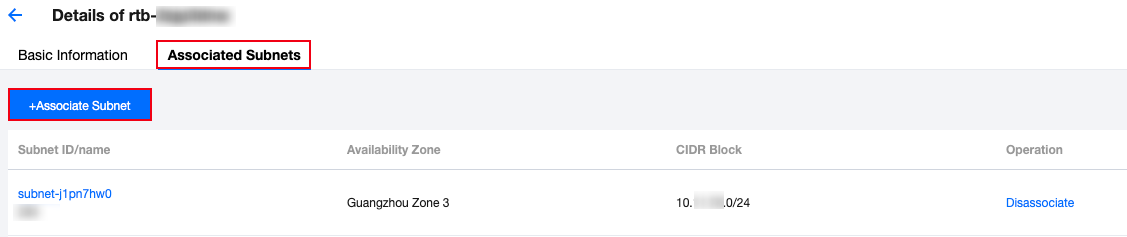
4. In the pop-up window, select the subnet to associate (a route table can be associated with multiple subnets at the same time, and you can quickly filter by subnet ID/name). Please evaluate the business impact of the association on the subnet. Confirm the impact, and click OK.
Note:
After the route table is associated with the subnet, the original route table associated with the subnet will be replaced with the new one, and the subnet outbound traffic will be executed according to the policies in the new route table. Please carefully evaluate the business impact.

Disassociating from Subnet

1. Log in to the VPC console.
2. Select Route Tables in the left sidebar to go to the management page.
3. Click the route table ID to go to the details page, switch to the Associated Subnets tab, and click Disassociate.
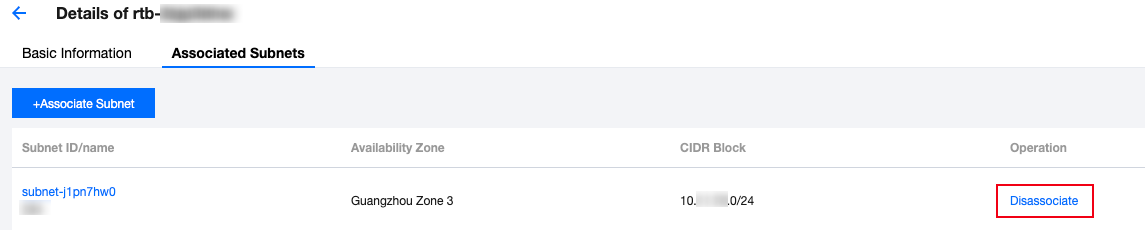
4. In the pop-up window, select a new route table for the subnet to be disassociated, and click OK to complete the disassociation of the current route table from the subnet. The subnet outbound traffic policy will be executed based on the new route table selected for it.

도움말 및 지원

문제 해결에 도움이 되었나요?

피드백