Line access to the hybrid cloud deployment
Download
포커스 모드
폰트 크기
According to your different connection needs, Tencent Cloud provides two services respectively to connect your enterprise IDC and VPC: VPN connection and Direct Connect. The main differences are as follows:
VPN Connection uses the public network and IPsec protocol to establish an encrypted network connection between your IDC and VPC. The purchase, enforcement and configuration of VPN gateway can be completed within minutes. But the VPN connection may be interrupted due to Internet jitter, block or other public network quality problems. If users' services have low requirement for the network connection quality, it is a highly cost-effective choice for fast deployment.
Direct Connect provides a dedicated Direct Connect network connection method. It has relatively long construction duration, but can provide high-quality, highly reliable network connection service. If your business requires high network quality and network security, you can choose to deploy this program.
The following describes how to deploy a hybrid cloud using Direct Connect.
Application Scenarios
Direct Connect provides a fast and secure approach to connecting Tencent Cloud with local IDCs. Users can access to Tencent Cloud computing resources in multiple regions in one go using a Connection, to achieve a flexible and reliable hybrid cloud deployment.
There are two ways to set up a slave for Direct Connect:
Dual Direct Connect slave: Tencent Cloud supports master/slave failover configuration.
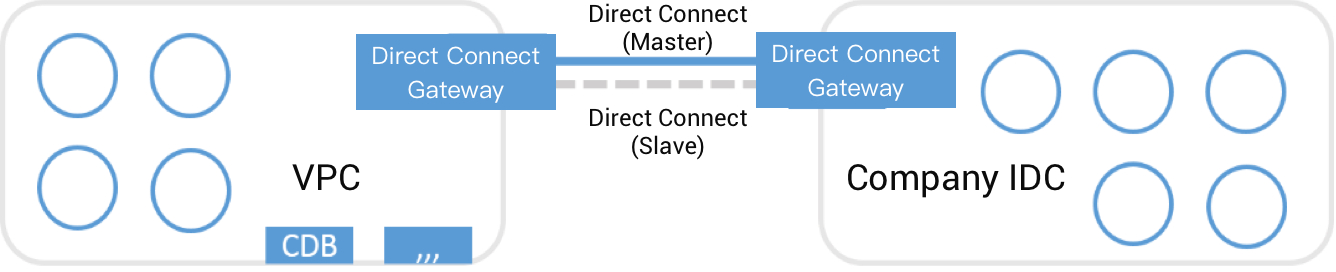
VPN connection serves as Direct Connect Linkage slave (master/slave).
Note:
Your IP address range overlap between VPC and IDC does not affect the communication, because Tencent Cloud Direct Connect gateway supports NAT. For more information, please see Direct Connect Features.
Solutions:
Cloud IDC: Use CVM and Cloud Database to deploy cloud IDC in a VPC created on Tencent Cloud.
Connection method: Integrate VPC IDC with your IDC private network via Connection.
Slave connection method: Dual Direct Connect/VPN connection.
Procedure
If Direct Connect is used to connect your IDC and the VPC IDC on Tencent Cloud, you need to complete the following steps:
1. Create the Connection.
2. Create the Dedicated Tunnel.
3. Create the Dedicated Tunnel for Direct Connect gateway, thus connecting your IDC to your VPC.
4. Configure the Direct Connect NAT (Optional).
5. Configure the routing table associated with the subnets requiring communication.
6. You can set up slaves for a Direct Connect by creating multiple Connection or VPN connections.
For more information, please see Getting Started.
피드백