TencentDB for SQL Server supports automatic backup (including non-archive backup and archive backup) and manual backup.
This document describes how to configure non-archive backup retention in the console.
Note:
The TencentDB for SQL Server instance only backs up data from the business databases rather than the system databases.
The backup is stored in the Beijing time zone (UTC+8) by default. If the default time zone is modified, it will be stored in the time zone of the instance server, but its storage time will still be in Beijing time in the console.
Notes for automatic backup
Backup files are stored in a separate backup space and do not occupy the local disk space of the instance.
Do not perform DDL operations during the backup process to avoid backup failure due to table locking.
Back up your data during off-peak hours.
Backup may take a long time if the data volume is large.
Description of automatic backup
Increasing the retention period of data and log backups may incur additional backup space fees.
Shortening the retention period of log backups may affect the data rollback cycle of the instance.
The free tier for backups is limited. Any excess will be billed on a pay-as-you-go basis.
Local backups are included in the free tier, while cross-region backups are not, that is, cross-region backups incur fees.
2. Select the region at the top, find the target instance, and click the target Instance ID or Manage in the Operation column to enter the instance management page.
3. On the instance management page, select Backup Management and click Auto-Backup Settings.
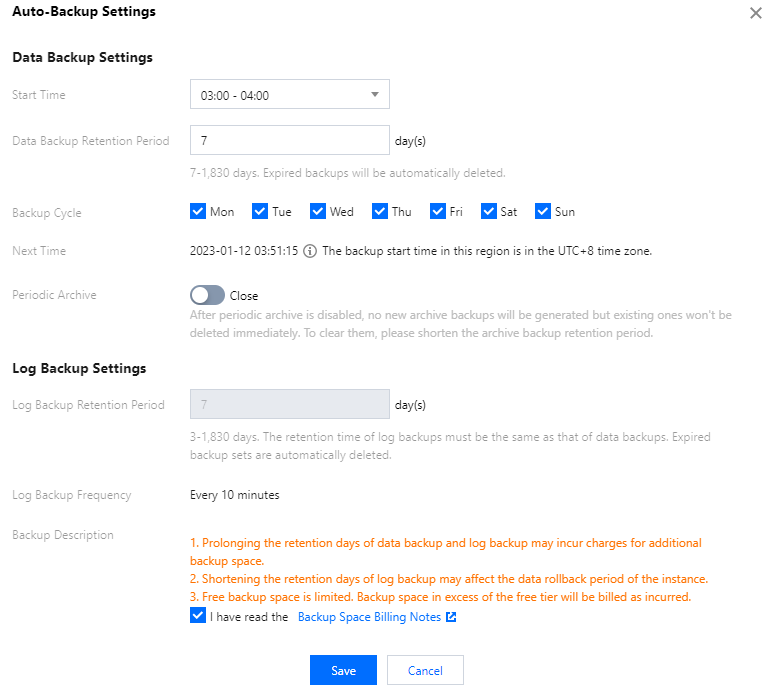
4. In the pop-up window, set the following configuration items, read and select Backup Space Billing Notes, and click Save.
Parameter
Description
Start Time
You can set a start time as needed. We recommend that you set it to a value during off-peak hours. This is just the start time of the backup process and does not indicate the end time.
For example, if the time range is set to 01:00–02:00 AM, the system will initiate a backup at a time point during 01:00–02:00 AM, which depends on the backend backup policy and backup system conditions.
Data Backup Retention Period
It is 7 days by default and can be any value between 7 and 1,830 days. Backup sets will be automatically deleted upon expiration.
Backup Cycle
You can select any time between Monday and Sunday for backup.
Note:
To ensure the continuity between the data backup retention period and backup cycle:
If the backup retention period is set to a value smaller than seven days, the backup cycle will be daily, with Monday through Sunday being selected by default.
If the backup retention period is set to a value equal to or greater than seven days, at least two backups will be required every week. If you select only one, you cannot click Save.
Next Time
Set the time when the configured backup cycle will start.
Periodic Archive
The Periodic Archive switch is toggled off when you set non-archive backup retention.
Log Backup Retention Period
It is the same as the data backup retention period by default and cannot be changed. That is, if the data backup retention period is set to 30 days, the log backup retention period will also be 30 days. Backup sets will be automatically deleted upon expiration.
Log Backup Frequency
Backup is performed once every 10 minutes by default.
This API is used to query the created backup details through the backup creation process ID. The process ID can be obtained through the CreateBackup API.