Backup node read-only
Download
포커스 모드
폰트 크기
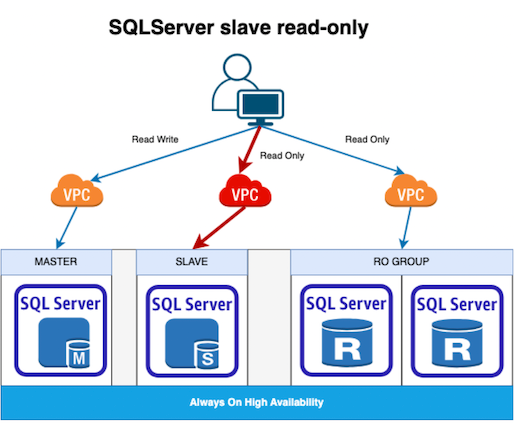
TencentDB for SQL Server 2017/2019/2022 Enterprise Always On instances with two-node cloud disk architecture and TencentDB for SQL Server 2017/2019/2022 Enterprise instances with multi-node cloud disk architecture support the replica node read-only feature. If replica node read-only is enabled, replica nodes can be accessed through the unique read-only address of replica nodes, which can reduce the read request load of the primary node and effectively save read-only instance costs. You can enable or disable the replica node read-only feature in the console and modify the network of replica nodes.
Prerequisites
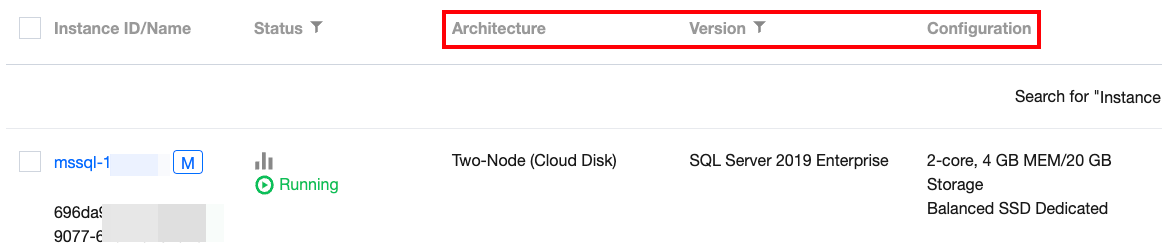
Architecture and version of the primary instance: TencentDB for SQL Server 2017/2019/2022 Enterprise Always On two-node instance or TencentDB for SQL Server 2017/2019/2022 Enterprise multi-node instance.
The storage type of the primary instance is: Enhanced SSD / Balanced SSD.
The primary instance is running.
Note:
You can view whether the above information meets the requirements in the instance list.
The primary and replica instances must be synchronized properly.
Note:
If the instance is newly created, you need to wait until the AG group is established and the synchronization between the primary and replica nodes is normal before enabling the replica node read-only feature.
Feature Limits
Enabling replica node read-only will be affected by the limit on the number of databases a single instance can support. If the limit is exceeded, this feature cannot be enabled. For the specific limit, please see Maximum number of databases created in a single instance.
The enabling of replica node read-only feature is affected by the data synchronization between the primary and replica instances. When the data is not synchronized, the feature cannot be enabled.
For two-node instances, replica node read-only is an independent instance status. After replica node read-only is enabled, replica nodes can only be accessed via the unique read-only address, which is irrelevant to the RO instance or the RO group of the RO instance. Therefore, replica nodes cannot be added to the RO group for weight settings.
For multi-node instances, when replica node read-only is enabled, multiple replica nodes share the same read-only address by default. You can set a weight for each replica node to distribute the traffic. You can also set different read-only addresses for different replica nodes to distribute the traffic. If you want to set different addresses, submit a ticket.
After replica node read-only is enabled, it supports access only via private network addresses, and enabling public network access on the replica node is not supported.
After replica node read-only is enabled, the replica node will not be removed if the replica node crashes or experiences a delay timeout. Accessing the replica node through the read-only address may result in data delays at this time. Once the node recovers, data synchronization will return to normal state.
After replica node read-only is enabled, if the instance undergoes a migration or switch across availability zones, the read-only replica node may experience a brief disconnection. Please ensure that your business has the reconnection mechanism.
After replica node read-only is enabled, if the instance undergoes a migration or configuration switch, the read-only replica node may experience a brief disconnection. Please ensure that your business has the reconnection mechanism.
After replica node read-only is enabled, if the instance undergoes HA switch, the read-only replica node may experience a brief disconnection or prolonged interrupts. Please ensure that your business has the reconnection mechanism.
Replica Node Read-Only Architecture Diagram
Enabling Replica Node Read-only
The complete operations for enabling replica node read-only for two-node instances and multi-node instances vary slightly. See the steps on
tabs below for corresponding operations.
Note:
Replica-node read-only for multi-node instances has two modes: multiple replica with one read-only and one replica with one read-only. By default, the mode is multiple replica with one read-only. If you want to set the mode to one replica with one read-only, submit a ticket. Descriptions of the two modes are as follows:
Mode 1 (multiple replica with one read-only): After replica node read-only is enabled, all replica nodes share the same read-only address. You can access all replica nodes of the instance through this read-only address.
Mode 2 (one replica with one read-only): After replica node read-only is enabled, each replica node is assigned a read-only address. You can access different replica nodes of the instance through the corresponding read-only address.
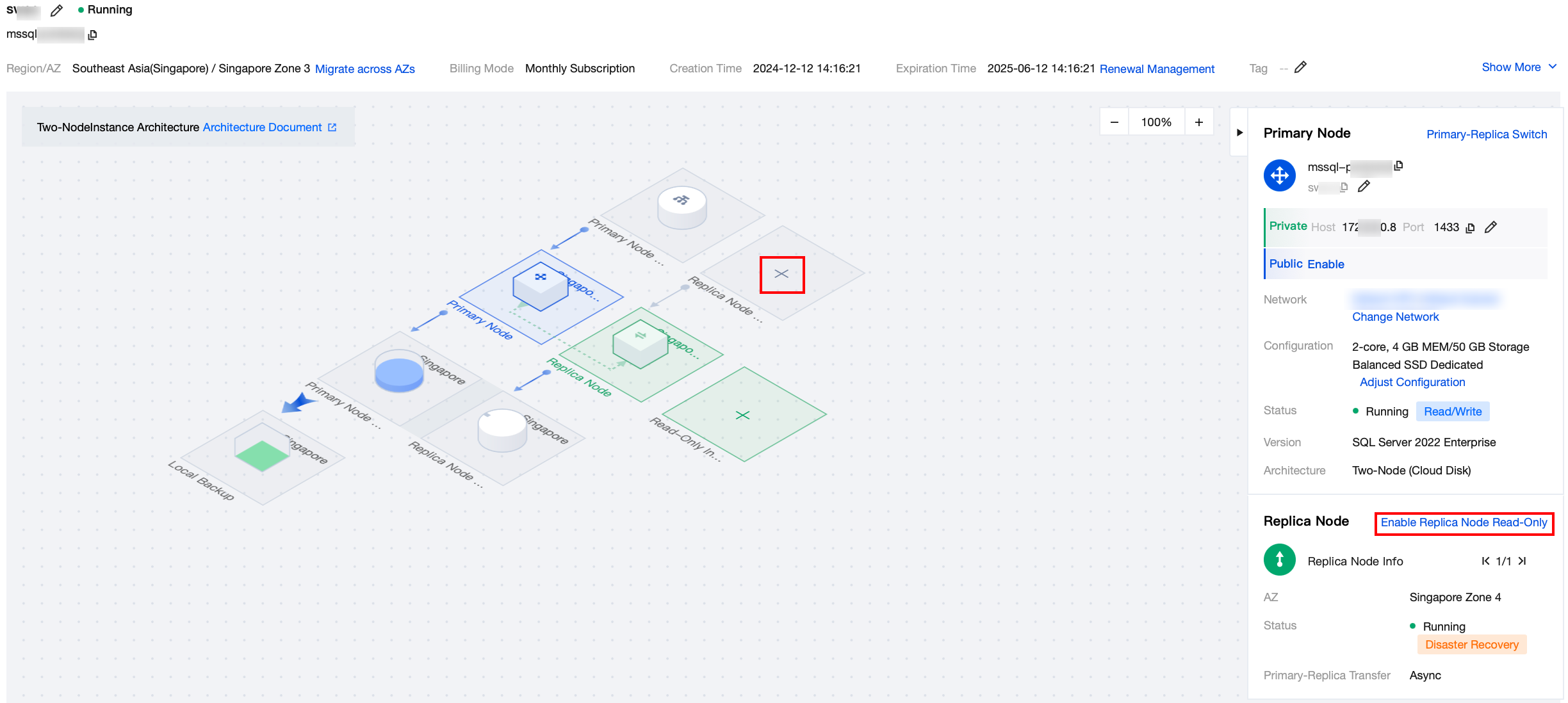
1. Log in to the SQL Server console and click Instance ID or Manage in the Operation column in the instance list to enter the instance details page.
2. Click Enable replica node read-only in the instance information area on the right side of the instance details page, or click "+" in the replica node read-only address area in the topology.
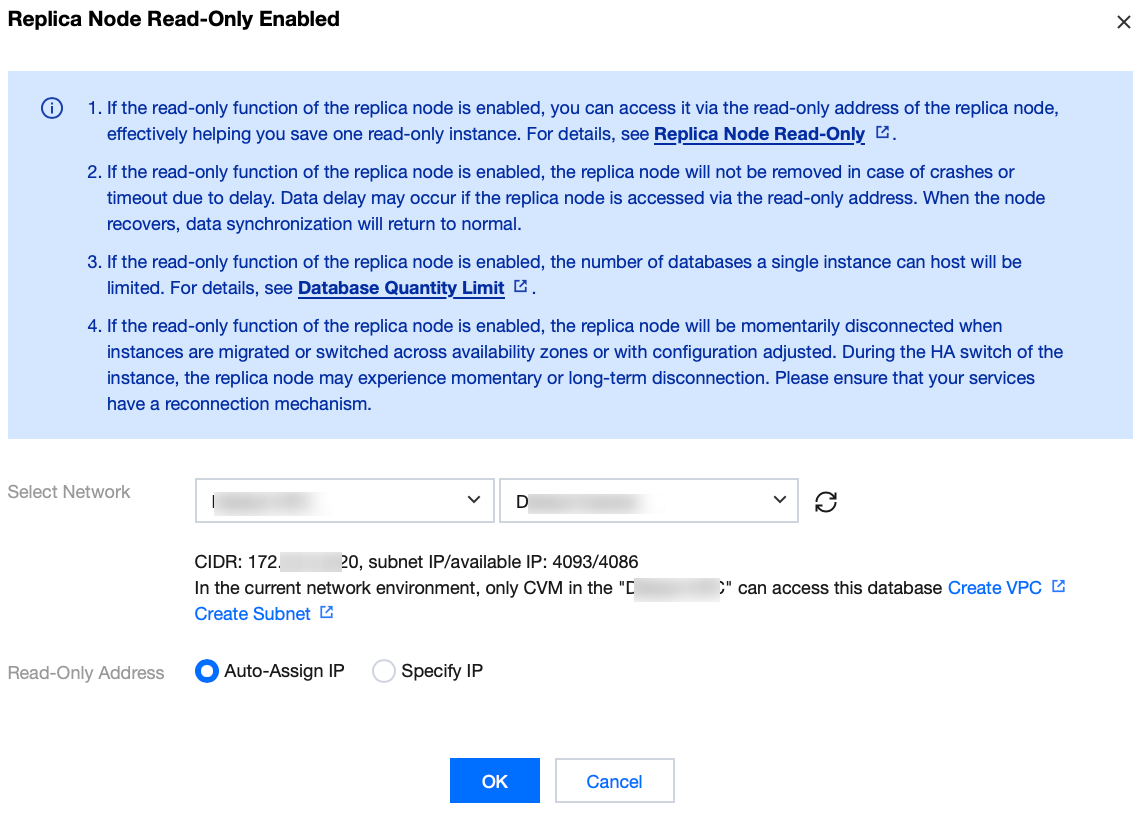
3. Complete the following configurations in the pop-up window for enabling replica node read-only, and click OK.
Parameter | Description |
Select Network | Select a VPC. The VPC and subnet are the same as those of the read-write address of the primary node by default. You can also select another VPC. After the VPC is confirmed, only hosts under the selected VPC can access the database. |
Read-Only Address | Auto assign IP: The IP address is automatically assigned by the system. Specify IP: You can specify the IP address. |
Note:
If replica node read-only is enabled for the primary node, the read-only address will be bound to the new replica node after a replica node switch.
4. Replica node read-only is enabled when the instance status changes to Running.
1. Log in to the SQL Server console and click Instance ID or Manage in the Operation column in the instance list to enter the instance details page.
2. Click Enable replica node read-only in the instance information area on the right side of the instance details page, or click "+" in the replica node read-only address area in the topology.
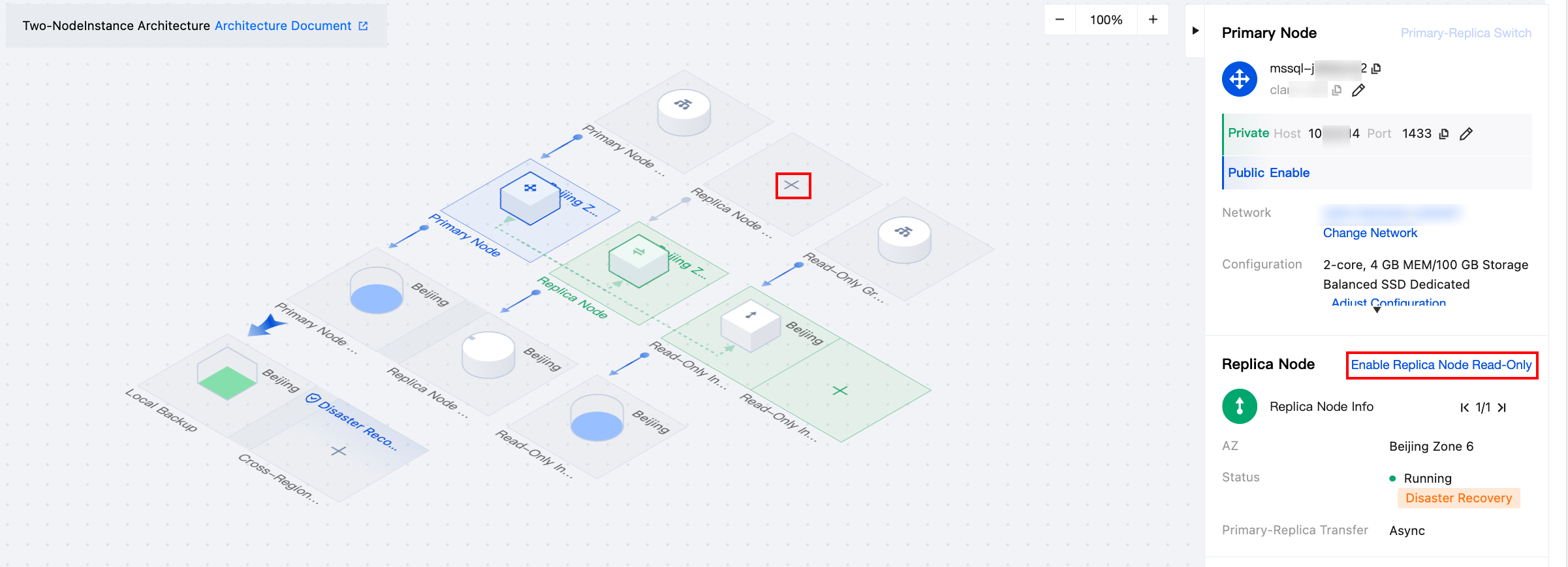
3. Complete the following configurations in the pop-up window for enabling replica node read-only, and click OK.
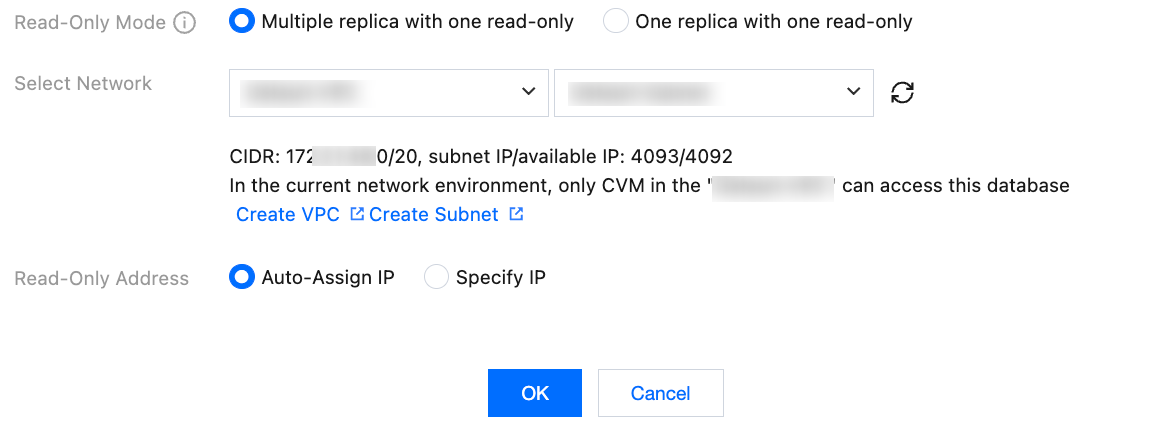
Parameter | Description |
Read-Only Mode | Select Multiple replica with one read-only. |
Select Network | Select a VPC. The VPC and subnet are the same as those of the read-write address of the primary node by default. You can also select another VPC. After the VPC is confirmed, only hosts under the selected VPC can access the database. |
Read-Only Address | Auto assign IP: The IP address is automatically assigned by the system. Specify IP: You can specify the IP address. |
4. Replica node read-only is enabled when the instance status changes to Running.
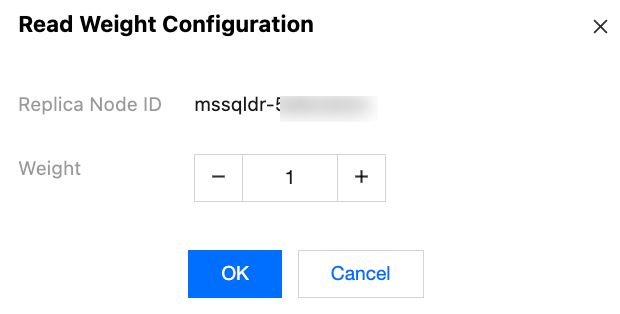
5. Find each replica node in the instance information area on the right side of the instance details page, and click Modify next to the weight field.
6. Set the read weight in the pop-up window (range: 0–100) and click OK.
1. Log in to the SQL Server console and click Instance ID or Manage in the Operation column in the instance list to enter the instance details page.
2. Click Enable replica node read-only in the instance information area on the right side of the instance details page, or click "+" in the replica node read-only address area in the topology.
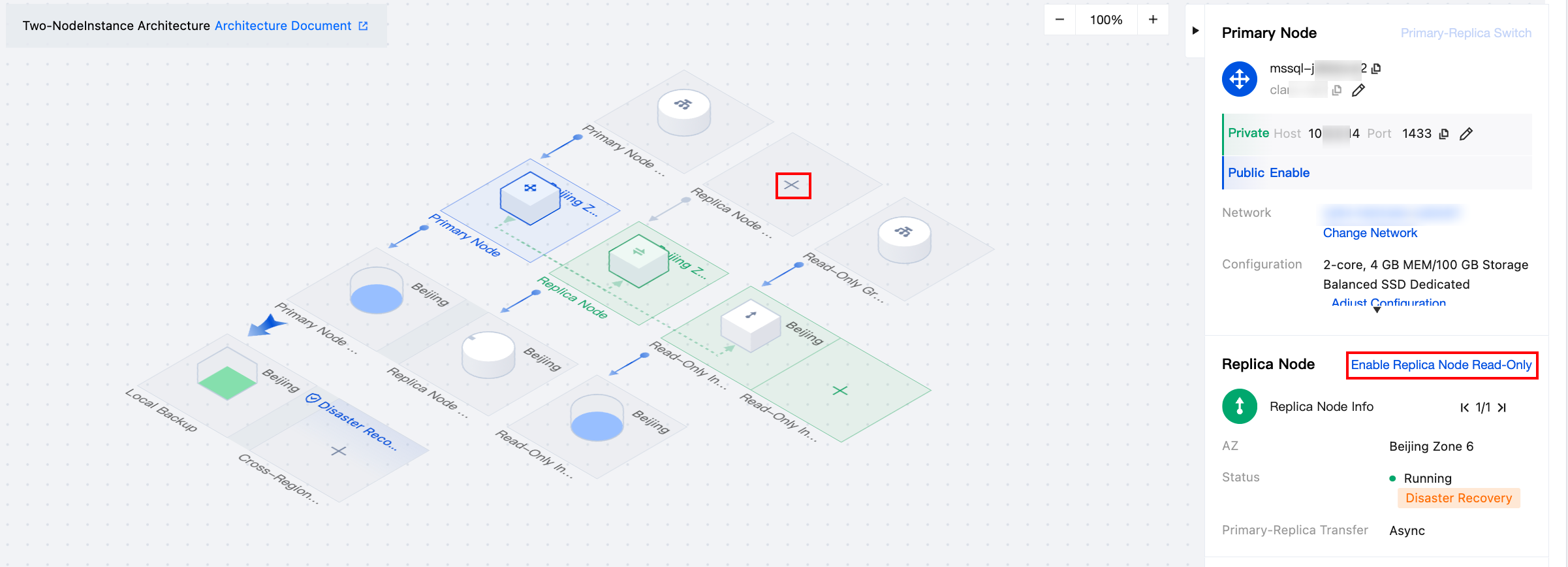
3. Complete the following configurations in the pop-up window for enabling replica node read-only, and click OK.
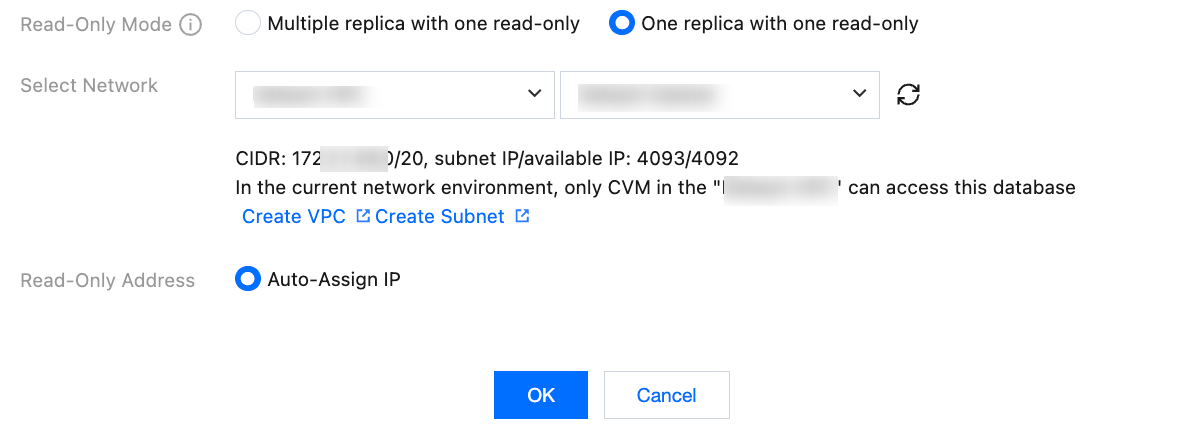
Parameter | Description |
Read-Only Mode | Select One replica with one read-only. |
Select Network | Select a VPC. The VPC and subnet are the same as those of the read-write address of the primary node by default. You can also select another VPC. After the VPC is confirmed, only hosts under the selected VPC can access the database. |
Read-Only Address | Auto assign IP: The IP address is automatically assigned by the system by default. |
4. Replica node read-only is enabled when the instance status changes to Running.
Changing the Replica Node Read-only Network
After the replica node read-only is enabled, if you want to change the network of the replica node read-only address, please see Changing Network.
Disabling Replica Node Read-only
Note:
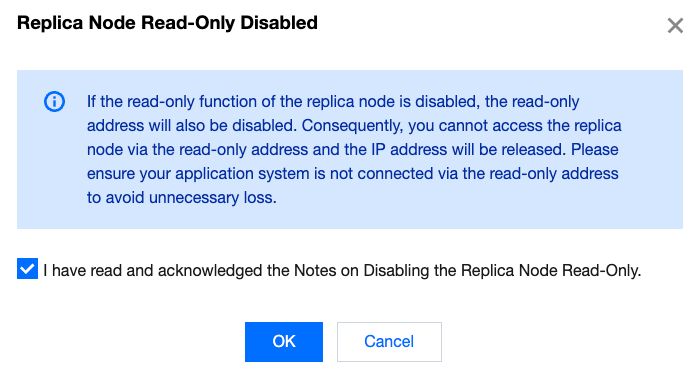
After the replica node read-only feature is disabled, the read-only address will be closed, and you will not be able to access the replica node via the read-only address. Additionally, the IP address will be released. If you want to disable the replica node read-only feature, please ensure your application system does not access the network through the read-only address to avoid losses.
1. Log in to the SQL Server console. In the instances list, click the Instance ID or the Manage option in the Operation column to enter the instance details page.
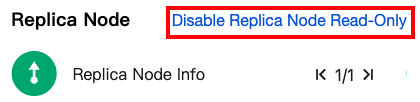
2. In the instance information on the right side of the Instance Details page, click Disable Replica Node Read-Only next to the replica node.
3. In the pop-up window, click OK.
FAQs
After the replica node read-only feature is enabled, what impact will be on the application system's access to the replica node read-only address if the primary node or the replica node fails?
After the replica node read-only feature is enabled, if the primary node fails and triggers a Primary-Replica Switch, access via the read-only address will not be provided until the original primary node recovers to prevent the original replica node from being overwhelmed by a sudden surge in traffic. Consequently, the corresponding application system temporarily cannot access the data of the replica node, until the original primary node is recovered and switched to the new replica node, read-only access to the replica node can be resumed;
After the replica node read-only feature is enabled, if the replica node fails, the replica node will not provide services temporarily, and the application system cannot access the instance through the replica node read-only address until the replica node is recovered.
Related APIs
API | Description |
This API is used to enable or disable the read-only feature of the secondary node. | |
This API is used to switch a running instance from a VPC to another. | |
This API is used to query the attributes of an instance. |
피드백