Multi-Node
Download
포커스 모드
폰트 크기
TencentDB for SQL Server supports three deployment architectures: single-node, two-node, and multi-node. This document introduces the multi-node architecture.
Background
The database is deployed with a one-primary-multiple-secondary method, which can significantly improve the disaster recovery capability of the database. This ensures the normal and continuous operation of the database. In case of an instance failure that requires HA switch, if the AZ where secondary databases are located encounters an IDC-level incident, it could lead to business interruptions due to the lack of other secondary databases for switching. This issue often results in prolonged recovery times. TencentDB for SQL Server offers a one-primary-multiple-secondary disaster recovery deployment method with high availability. According to the actual business situation and cost, you can choose configurations such as one primary and two secondary nodes, one primary and three secondary nodes, or up to one primary and five secondary nodes. These secondary databases can be deployed across different AZs. Such architecture not only ensures a more secure production environment but also guards against various unexpected situations, including overall data center failures.
In addition, TencentDB for SQL Server enables read-only capabilities for these secondary databases. This means that the secondary databases are not merely the standby for databases, they can also be accessed via the read-only address of the secondary node after the read-only feature on the secondary database is enabled. This helps to offload read requests from the primary node, effectively saving costs associated with read-only instances. Currently, the one-primary-multiple-secondary instance architecture of TencentDB for SQL Server supports enabling read-only access for all secondary databases.
Application Industry
Such as e-commerce/O2O, financial industry, gaming industry, mobile office, data warehouse, data analysis platform, and multi-tenancy SaaS.
Supported Versions
SQL Server 2017, 2019, and 2022 Enterprise.
Architecture
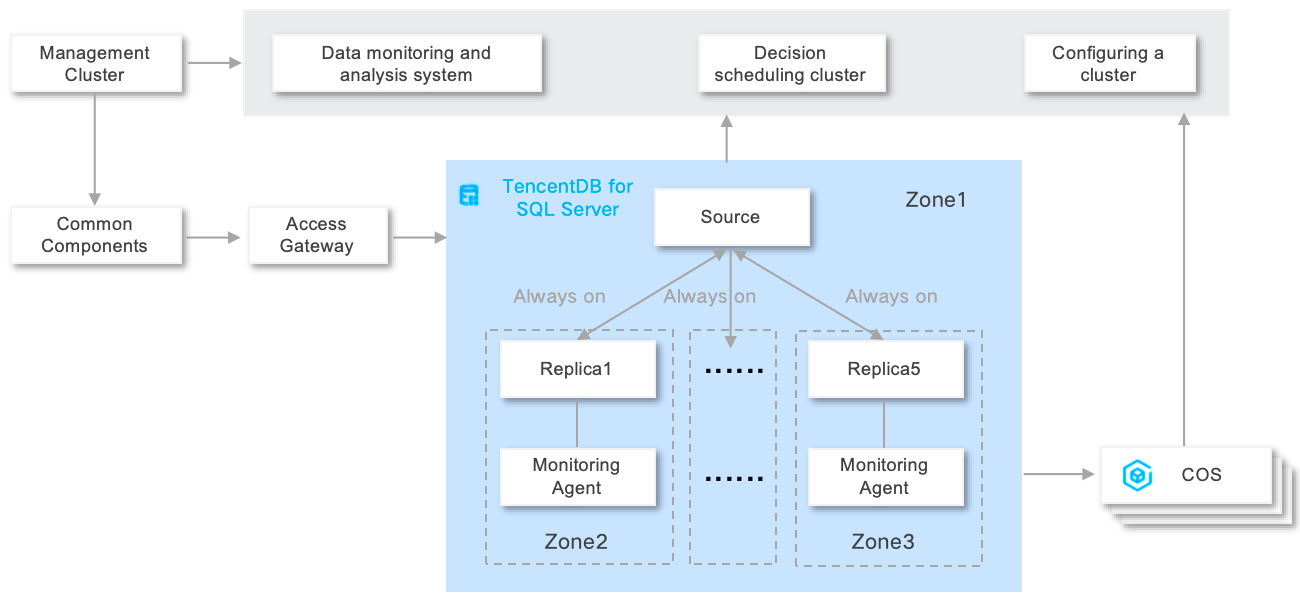
The multi-node architecture adopts the Always On cloud disk architecture design of one-primary-multiple-secondary + compute-storage separation. The primary node provides read/write services, while the secondary nodes provide read-only services and support switching to the primary node within seconds. This achieves multi-AZ disaster recovery and elastic scalability. By dynamically adding or removing nodes and adjusting resources on demand, this architecture can meet the high performance requirements of massive data reads, frequent scaling, and multi-active disaster recovery. In addition, it complies with the strict regulatory requirements of finance, government affairs, and other industries. It applies to complex businesses (such as real-time analysis and multi-tenancy systems) and high performance scenarios requiring read-write separation and can balance business flexibility and stability. Its architecture displayed in the console is shown in the following figure.

Architecture Strengths
Compute-storage separation: Resource decoupling can be achieved by using CVM instances and CBS disks. Configuration adjustments of computing are independent from those of storage, and the traditional fixed CPU/memory ratio and disk capacity limits are eliminated.
Second-level auto scaling: Node addition, node deletion, and node specification adjustment can be performed on demand, and resources can be allocated in minutes to cope with sudden load increases.
Multi-node redundancy: Two to five secondary nodes in cross-AZ deployment mode are supported. Any secondary node can be automatically switched to the primary node in seconds in case of a primary node failure.
Secondary node read-only: Secondary nodes directly provide read services. No additional read-only secondarys are required. In this way, the cost of read performance enhancement can be reduced.
Architecture Diagram
피드백