tencent cloud

Tencent Cloud Observability Platform

Release Notes and Announcements
Release Notes
Product Introduction
Overview
Strengths
Basic Features
Basic Concepts
Use Cases
Use Limits
Purchase Guide
Tencent Cloud Product Monitoring
Application Performance Management
Mobile App Performance Monitoring
Real User Monitoring
Cloud Automated Testing
Prometheus Monitoring
Grafana
EventBridge
PTS
Quick Start
Monitoring Overview
Instance Group
Tencent Cloud Product Monitoring
Application Performance Management
Real User Monitoring
Cloud Automated Testing
Performance Testing Service
Prometheus Getting Started
Grafana
Dashboard Creation
EventBridge
Alarm Service
Cloud Product Monitoring
Tencent Cloud Service Metrics
Operation Guide
CVM Agents
Cloud Product Monitoring Integration with Grafana
Troubleshooting
Practical Tutorial
Application Performance Management
Product Introduction
Access Guide
Operation Guide
Practical Tutorial
Parameter Information
FAQs
Mobile App Performance Monitoring
Overview
Operation Guide
Access Guide
Practical Tutorial
Tencent Cloud Real User Monitoring
Product Introduction
Operation Guide
Connection Guide
FAQs
Cloud Automated Testing
Product Introduction
Operation Guide
FAQs
Performance Testing Service
Overview
Operation Guide
Practice Tutorial
JavaScript API List
FAQs
Prometheus Monitoring
Product Introduction
Access Guide
Operation Guide
Practical Tutorial
Terraform
FAQs
Grafana
Product Introduction
Operation Guide
Guide on Grafana Common Features
FAQs
Dashboard
Overview
Operation Guide
Alarm Management
Console Operation Guide
Troubleshooting
FAQs
EventBridge
Product Introduction
Operation Guide
Practical Tutorial
FAQs
Report Management
FAQs
General
Alarm Service
Concepts
Monitoring Charts
CVM Agents
Dynamic Alarm Threshold
CM Connection to Grafana
Documentation Guide
Related Agreements
Application Performance Management Service Level Agreement
APM Privacy Policy
APM Data Processing And Security Agreement
RUM Service Level Agreement
Mobile Performance Monitoring Service Level Agreement
Cloud Automated Testing Service Level Agreement
Prometheus Service Level Agreement
TCMG Service Level Agreements
PTS Service Level Agreement
PTS Use Limits
Cloud Monitor Service Level Agreement
API Documentation
History
Introduction
API Category
Making API Requests
Monitoring Data Query APIs
Alarm APIs
Legacy Alert APIs
Notification Template APIs
TMP APIs
Grafana Service APIs
Event Center APIs
TencentCloud Managed Service for Prometheus APIs
Monitoring APIs
Data Types
Error Codes
Glossary

Cloud Audit Event

PDF
포커스 모드
폰트 크기
마지막 업데이트 시간: 2024-11-01 20:48:59

Overview

Tencent Cloud CloudAudit can be used to retrieve the historical records of API calls under your Tencent Cloud account, including API calls via the Tencent Cloud console, Tencent Cloud SDKs, command line tools, and other Tencent Cloud services. This means that any deployment behavior on Tencent Cloud is monitored, and you can find out the source IP address and time when a sub-user or collaborator calls a Tencent Cloud API.
Currently, Tencent Cloud CloudAudit has been fully integrated into EventBridge. You can use the default Tencent Cloud service event bus to receive write operations on the cloud for management and Ops. For the services and APIs that support CloudAudit, see CloudAudit-Enabled Services and APIs.

Event Format

{
"specversion":"1.0",
"id":"13a3f42d-7258-4ada-da6d-023a33******",
"source":"${ProductName}.cloud.tencent",
"type":"cvm:CloudEvent:ApiCall",
"subject":"${resource ID}",
"time": 1615430559146,
"region":"ap-guangzhou",
"resource":[
"qcs::eb:ap-guangzhou:uid1250000000:eventbusid/eventruleid"
],
"datacontenttype":"application/json;charset=utf-8",
"tags":{
"key1":"value1",
"key2":"value2"
},
"data":{
${Raw API operation log}
}
}
The event parameters are as detailed below:
Field
Description
Data Type
specversion
Event structure version (CloudEvents version. Currently, only CloudEvents - Version 1.0 is supported.)
String
id
ID returned by PUT Event.
String
type
Type of the event input through PUT Event. CloudAudit events are classified into three types based on the event source: ${Product name abbreviation}:CloudEvent:ApiCall, ${Product name abbreviation}:CloudEvent:ConsoleCall, ${Product name abbreviation}:CloudEvent:MiniProgramCall.
String
source
Event source (which is required for a Tencent Cloud service event and is the abbreviation of subject). The value is xxx.cloud.tencent by default for a Tencent Cloud service.
String
subject
Event source details, which can be customized. QCS description such as qcs::dts:ap-guangzhou:appid/uin:xxx is used for a Tencent Cloud service by default.
String
time
Event time, which is a GMT+0 timestamp in milliseconds such as 1615430559146.
Timestamp
datacontenttype
Data structure declaration.
String
region
Region information.
String
data
Details of the event input through PUT Event. For a CloudAudit event, pass in the complete CloudAudit log here.
Json

Call Method

Before receiving CloudAudit events, make sure that you have activated the CloudAudit service and created related service roles.
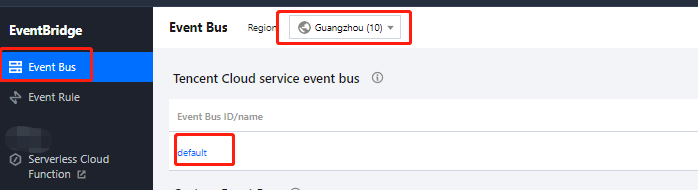
1. Log in to the EventBridge console and open the Tencent Cloud service event bus under the Guangzhou region.


2. On the event bus details page, select to enable CloudAudit.
3. On the Event Rule page, select an event bus, create an event rule, filter event types, and bind delivery targets. For detailed directions, see Creating Event Rule.
도움말 및 지원

문제 해결에 도움이 되었나요?

피드백