Release Notes
Create a Notification Content Template
Overview
With a custom notification content template, you can customize the content received through different Alarm notification channels. This article will guide you on how to create a custom notification content template.
Operation Steps
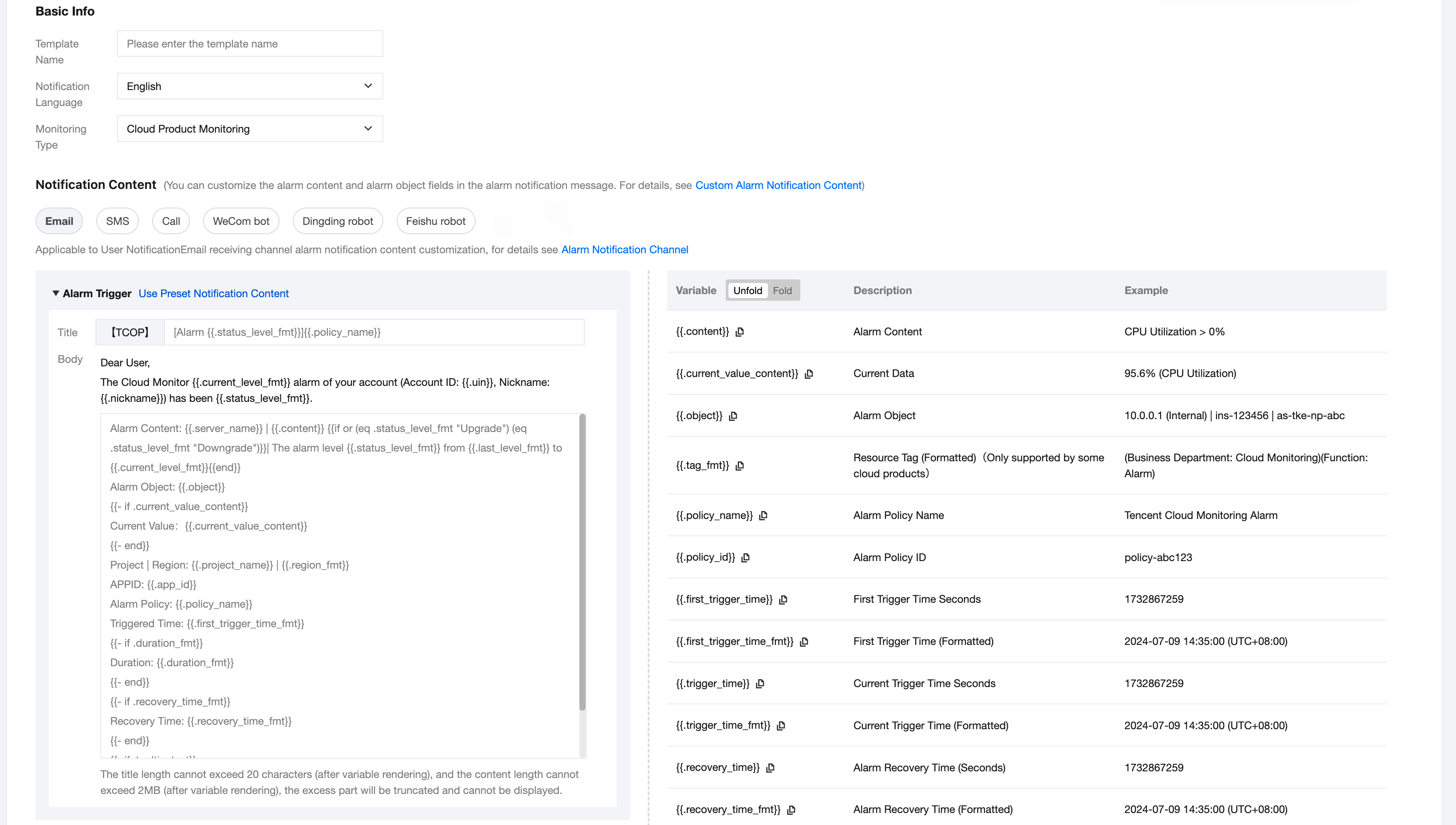
2. Click Create Notification Content Template to enter the page for creating a notification content template. The configuration instructions are as follows:
Configuration Type | Configuration Item | Description |
Basic Info | Template Name | Custom template name. |
| Notification Language | Select the notification language type, supporting Chinese and English. |
| Monitoring Type | Currently supports only Cloud Product Monitoring. |
Notification Content | Email | The title length cannot exceed 20 characters (after variable rendering), and the content length cannot exceed 2M (after variable rendering). The excess part will be truncated and cannot be displayed. |
| SMS | The content length cannot exceed 500 characters (after variable rendering). The excess part will be truncated and cannot be displayed. |
| Call | The content length cannot exceed 350 characters (after variable rendering). The excess part will be truncated and not broadcast. Note: The phone channel is only available to allowlist users. To use this channel, please submit a ticket. |
| WeCom robot | The content length cannot exceed 1000 characters (after variable rendering). The excess part will be truncated and cannot be displayed. |
| DingTalk robot | The title length cannot exceed 50 characters (after variable rendering), and the content length cannot exceed 1000 characters (after variable rendering). The excess part will be truncated and cannot be displayed. Note: The DingTalk robot requires two line breaks for newline. If the DingTalk robot selects a custom keyword as a security setting, the custom notification content must include the relevant keyword, otherwise, the user will not receive the Alarm notification through the DingTalk robot channel. |
| Feishu robot | The title length cannot exceed 50 characters (after variable rendering), and the content length cannot exceed 1000 characters (after variable rendering). The excess part will be truncated and cannot be displayed. |
Note:
Users can click Use Preset Notification Content. After clicking, the preset notification content will be automatically filled in, and users can customize it based on the preset notification content.
The list on the right side of the notification content shows the currently supported variable placeholders, which users can click to copy and use directly.
3. After editing the notification content, click OK to create it successfully.
Note:
Users need to configure at least one notification channel's content, otherwise, the notification content template cannot be saved.
There is a length limit for notification content in different channels. If the notification content configured by the user (unrendered) exceeds the length limit, the notification content template cannot be saved.
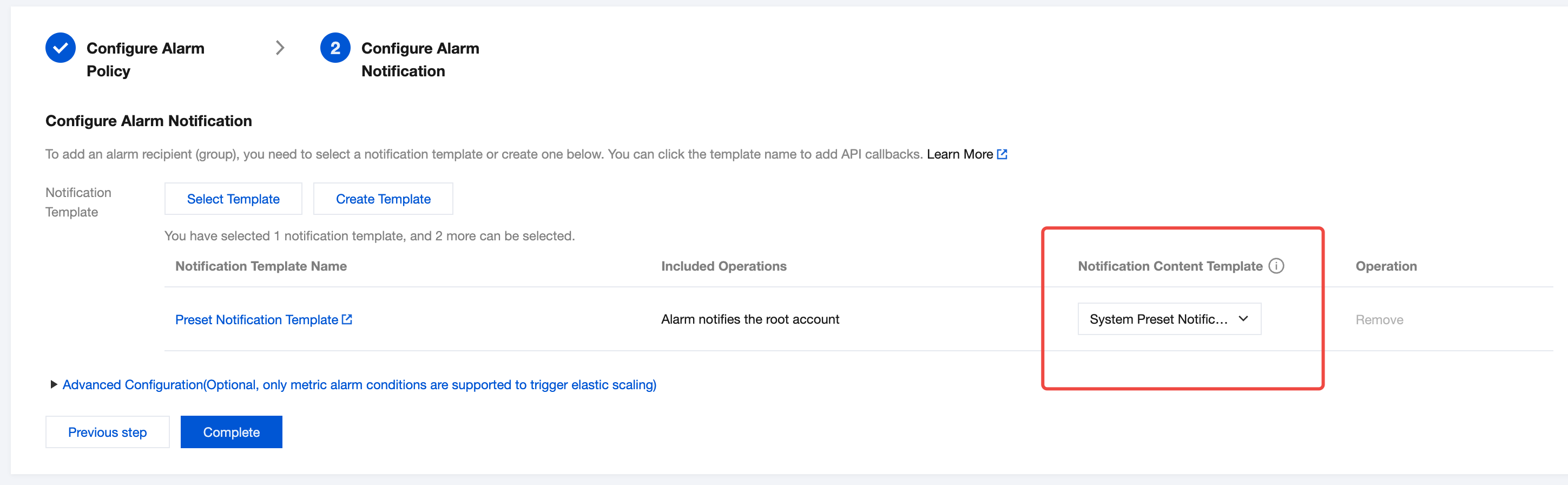
4. After creating a custom notification content template, users can select the custom notification content template when configuring alarm notifications in Create Alarm Policy > Configure Alarm Notification. Once configured, alarm notifications will be sent according to the template.
Note:
Users can only select notification content templates that match the language of the notification template.
If the language of the associated notification template is changed and does not match the language of the notification content template, the system will send alarm notifications according to the preset notification content of the notification template.
Variable Description
Currently, only the following variables are supported as placeholders for custom notification content. If the user uses an invalid variable, an error may occur, causing the notification content template to fail to save.
Variable | Description | Example |
{{.content}} | Alarm Content | CPU Utilization > 0% |
{{.current_value_content}} | Current Data | 95.6% (CPU Utilization) |
{{.object}} | Alarm Object | 10.0.0.1 (Internal) | ins-123456 | as-tke-np-abc |
{{.tag_fmt}} | Resource Tag (Formatted)(Only supported by some cloud products) | (Business Department: Cloud Monitoring)(Function: Alarm) |
{{.policy_name}} | Alarm Policy Name | Tencent Cloud Monitoring Alarm |
{{.policy_id}} | Alarm Policy ID | policy-abc123 |
{{.first_trigger_time}} | First Trigger Time Seconds | 1732867259 |
{{.first_trigger_time_fmt}} | First Trigger Time (Formatted) | 2024-07-09 14:35:00 (UTC+08:00) |
{{.trigger_time}} | Current Trigger Time Seconds | 1732867259 |
{{.trigger_time_fmt}} | Current Trigger Time (Formatted) | 2024-07-09 14:35:00 (UTC+08:00) |
{{.recovery_time}} | Alarm Recovery Time (Seconds) | 1732867259 |
{{.recovery_time_fmt}} | Alarm Recovery Time (Formatted) | 2024-07-09 14:35:00 (UTC+08:00) |
{{.duration}} | Duration Seconds | 1000 |
{{.duration_fmt}} | Duration (Formatted) | 5h4m3s |
{{.current_level}} | Current Level | None Note Warn Serious |
{{.current_level_fmt}} | Current Level (Formatted) | Note Warn Serious |
{{.last_level}} | Last Level | None Note Warn Serious |
{{.last_level_fmt}} | Last Level (Formatted) | Note Warn Serious |
{{.console_link}} | Console Link | Tencent Cloud Observability Platform Alarm Details Page Link |
{{.miniprogram_link}} | Mini Program Link | Tencent Cloud Assistant Mini Program Cloud Monitoring Alarm Details Page Link |
{{.region}} | Region | ap-guangzhou (Standard Region Code for Cloud API) |
{{.region_fmt}} | Region (Formatted) | Guangzhou |
{{.status}} | Alarm Status | Trigger Recovery |
{{.status_fmt}} | Alarm Status (Formatted) | Trigger Recovery |
{{.server_name}} | Cloud Product Name - Policy Type | Cloud Virtual Machine |
{{.tooltip_text}} | Alarm Policy Hint (only some cloud products have this) | Alarm Description: The basic CPU usage rate is the data collected from the host. |
{{.app_id}} | Account App ID | 123000456 |
{{.project_name}} | Project Name | Default |
{{.status_level_fmt}} | Alarm Status and Level Display (Formatted) | Trigger Continue Recovery Upgrade Downgrade |
피드백