릴리스 노트
Client-side Upload Guide
포커스 모드
폰트 크기
This document provides client-side upload guidance for Professional Edition applications.
Applicable Scenarios
End users upload local videos from clients to Tencent Cloud VOD, suitable for UGC, PGC, and similar scenarios.
Upload Methods
Since clients have high security requirements for keys, we recommend using credentials via Professional Edition preset domains. Supported methods are as follows:
Upload Method | Domain | Credentials | Supported Operations |
Bucket Preset Domain | [BucketId].vodpro.[StorageRegion].eovod.com | Credentials | Upload to specified bucket |
Application Preset Domain | [SubAppId].vodpro-upload.com | Credentials | Upload to specified bucket Nearby upload to bucket in application region |
Uploading Files Using Credentials
Temporary credentials are typically used in scenarios requiring high key security. The overall process is as follows:
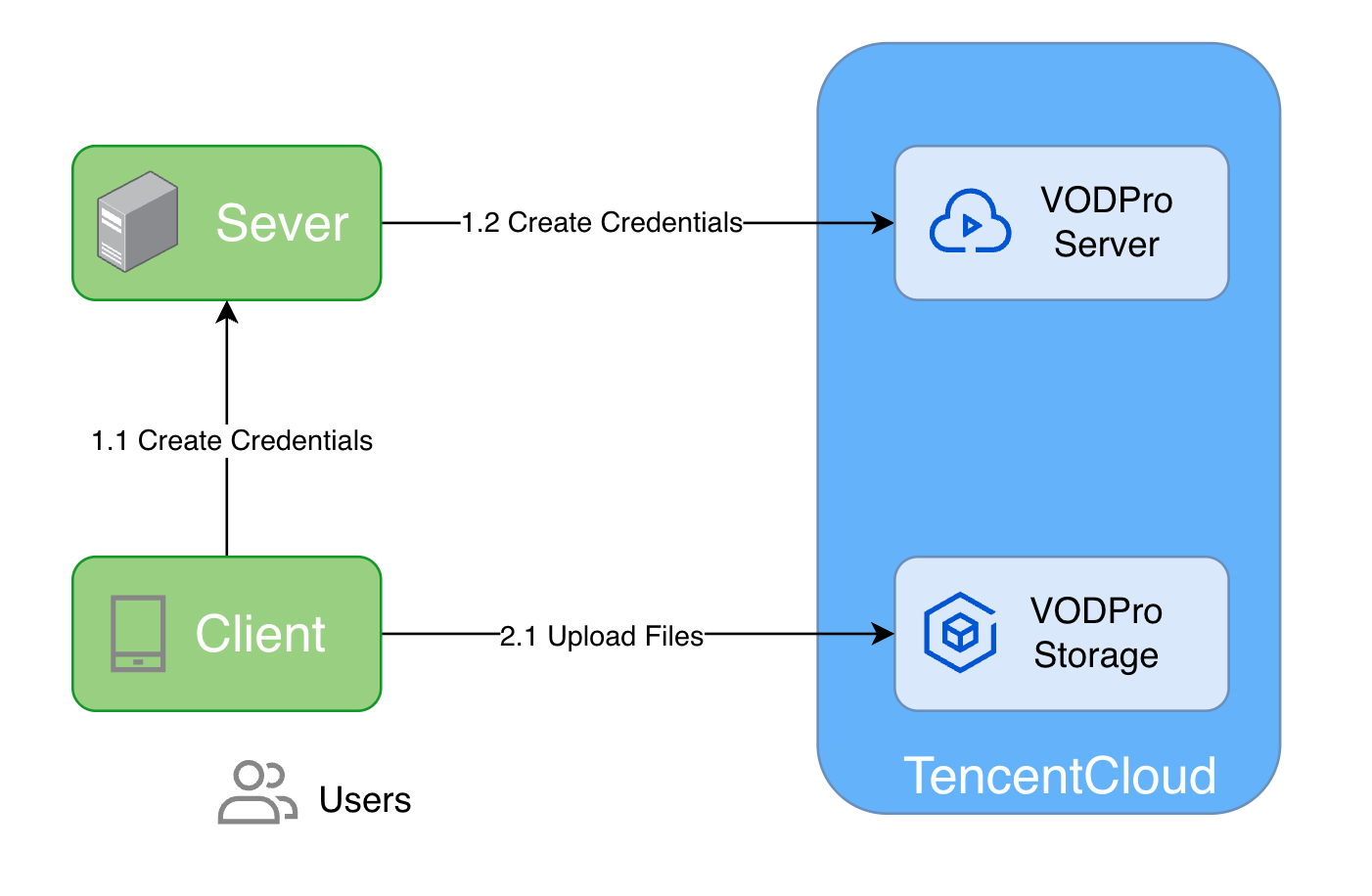
1. Apply for upload credentials.
1.1 Client requests upload credentials from App backend.
1.2 Server calls Professional Edition service's API: CreateStorageCredentials
2. Client uses credentials to upload files to Tencent Cloud VOD Professional Edition storage
Preparation
1. Create the Professional Edition application and bucket in the VOD Console. For specific steps, refer to Quick Start and Create Bucket.
2. Obtain Tencent Cloud account AccessKey pair:
2.1 Log in to Tencent Cloud Console, select Cloud Access Management > Access Key > API Keys, enter the "API Key Management" page.
2.2 Obtain Cloud API key. If you haven't created a key, click New Key to create a pair of SecretId and SecretKey.
Server Applying for Upload Credentials
The VOD Pro server uses
SecretId and SecretKey to call the Create Storage Credentials interface, obtains upload credentials, and distributes them to clients.Assume Professional Edition application ID is
1234567890, bucket region is ap-guangzhou, and bucket ID is bucketid1.Server applies for credentials to upload
upload/demo.mp4 to bucketid1 bucket:// Package mainpackage mainimport ("context""encoding/json""fmt""log""net/url""github.com/tencentcloud/tencentcloud-sdk-go/tencentcloud/common""github.com/tencentcloud/tencentcloud-sdk-go/tencentcloud/common/profile"vod20240718 "github.com/tencentcloud/tencentcloud-sdk-go/tencentcloud/vod/v20240718")const (appId = 251000000 // Tencent Cloud account APPIDsubAppId = 1234567890 // VOD Professional Edition application APPIDbucketId = "bucketid1" // VOD Professional Edition bucket IDfileKey = "upload/demo.mp4" // File KEY in storage after upload)// createStorageCredentialsPolicy Storage credential policytype createStorageCredentialsPolicy struct {Statement []policyStatement `json:"statement"`Version string `json:"version"`}// policyStatement Policy statementtype policyStatement struct {Action []string `json:"action"`Effect string `json:"effect"`Resource []string `json:"resource"`}// cred Temporary credentialstype cred struct {AccessKeyId stringSecretAccessKey stringSessionToken string}// getCredential Obtain credentialsfunc getCredential(context.Context) (*cred, error) {// 1. Obtain credentials// 1.1 Initialize Tencent Cloud API objectcredential := common.NewCredential("SecretId", // Tencent Cloud account SecretId"SecretKey", // Tencent Cloud account SecretKey)prof := profile.NewClientProfile()vodClient, err := vod20240718.NewClient(credential, "ap-guangzhou", prof)if err != nil {log.Fatalf("Failed to create VOD client: %+v", err)return nil, fmt.Errorf("Failed to create VOD client: %w", err)}// 1.2 Construct temporary credential requestpolicy := createStorageCredentialsPolicy{Statement: []policyStatement{{Action: []string{ // Currently supported actions"name/vod:PutObject","name/vod:ListParts","name/vod:PostObject","name/vod:CreateMultipartUpload","name/vod:UploadPart","name/vod:CompleteMultipartUpload","name/vod:AbortMultipartUpload","name/vod:ListMultipartUploads",},Effect: "allow",Resource: []string{fmt.Sprintf("qcs::vod:%s:uid/%d:prefix//%d/%s/%s","ap-guangzhou", // Bucket regionappId, // Tencent Cloud account APPIDsubAppId, // VOD Professional Edition application APPIDbucketId, // VOD Professional Edition bucket IDfileKey, // File KEY in storage after upload),},}},Version: "2.0",}req := vod20240718.NewCreateStorageCredentialsRequest()req.SubAppId = common.Uint64Ptr(subAppId)policyStr, _ := json.Marshal(policy)req.Policy = common.StringPtr(url.QueryEscape(string(policyStr)))// 1.3 Apply for upload credentialsresp, err := vodClient.CreateStorageCredentials(req)if err != nil {log.Fatalf("Failed to create storage credentials: %+v", err)return nil, fmt.Errorf("Failed to create storage credentials: %w", err)}log.Printf("Successfully created storage credentials: %+v", resp)creds := resp.Response.Credentialsreturn &cred{AccessKeyId: *creds.AccessKeyId,SecretAccessKey: *creds.SecretAccessKey,SessionToken: *creds.SessionToken,}, nil}
import com.tencentcloudapi.common.Credential;import com.tencentcloudapi.common.exception.TencentCloudSDKException;import com.tencentcloudapi.common.profile.ClientProfile;import com.tencentcloudapi.vod.v20240718.VodClient;import com.tencentcloudapi.vod.v20240718.models.CreateStorageCredentialsRequest;import com.tencentcloudapi.vod.v20240718.models.CreateStorageCredentialsResponse;import org.json.JSONArray;import org.json.JSONObject;import java.net.URLEncoder;import java.nio.charset.StandardCharsets;/*** Credential helper class for obtaining temporary storage credentials*/public class CredentialHelper {// Constant definitionsprivate static final long APP_ID = 251000000; // Tencent Cloud account APPIDprivate static final long SUB_APP_ID = 1234567890; // VOD Professional Edition application APPIDprivate static final String BUCKET_ID = "bucketid1"; // VOD Professional Edition bucket IDprivate static final String FILE_KEY = "upload/demo.mp4"; // File KEY in storage after uploadprivate static final String REGION = "ap-guangzhou"; // Bucket region/*** Credential object storing temporary credential information*/public static class Cred {private final String accessKeyId;private final String secretAccessKey;private final String sessionToken;public Cred(String accessKeyId, String secretAccessKey, String sessionToken) {this.accessKeyId = accessKeyId;this.secretAccessKey = secretAccessKey;this.sessionToken = sessionToken;}public String getAccessKeyId() {return accessKeyId;}public String getSecretAccessKey() {return secretAccessKey;}public String getSessionToken() {return sessionToken;}}/*** Obtain credentials** @return Temporary credential object* @throws Exception If credential acquisition fails*/public static Cred getCredential() throws Exception {try {// 1. Initialize Tencent Cloud API clientCredential credential = new Credential("SecretId", "SecretKey"); // Tencent Cloud account SecretId and SecretKeyClientProfile clientProfile = new ClientProfile(); // Client configurationVodClient vodClient = new VodClient(credential, "ap-guangzhou", clientProfile); // Create VodClient object// 2. Construct and encode policyString policyJson = createPolicyJson();String encodedPolicy = URLEncoder.encode(policyJson, StandardCharsets.UTF_8.name());// 3. Create and send requestCreateStorageCredentialsRequest req = new CreateStorageCredentialsRequest();req.setSubAppId(SUB_APP_ID); // VOD Professional Edition application APPIDreq.setPolicy(encodedPolicy); // Policy// 4. Get response and return credentialsCreateStorageCredentialsResponse resp = vodClient.CreateStorageCredentials(req);return new Cred(resp.getCredentials().getAccessKeyId(),resp.getCredentials().getSecretAccessKey(),resp.getCredentials().getSessionToken());} catch (TencentCloudSDKException e) {System.err.println("Failed to obtain storage credentials: " + e.getMessage());throw new Exception("Failed to obtain storage credentials", e);}}/*** Create policy JSON string using org.json library** @return Policy JSON string*/private static String createPolicyJson() {// Build resource pathString resource = String.format("qcs::vod:%s:uid/%d:prefix//%d/%s/%s",REGION,APP_ID,SUB_APP_ID,BUCKET_ID,FILE_KEY);// Build operation listString[] actions = {"name/vod:PutObject","name/vod:ListParts","name/vod:PostObject","name/vod:CreateMultipartUpload","name/vod:UploadPart","name/vod:CompleteMultipartUpload","name/vod:AbortMultipartUpload","name/vod:ListMultipartUploads"};// Build JSON using JSONObjectJSONObject policy = new JSONObject();policy.put("version", "2.0");JSONArray statements = new JSONArray();JSONObject statement = new JSONObject();JSONArray actionArray = new JSONArray();for (String action : actions) {actionArray.put(action);}statement.put("action", actionArray);statement.put("effect", "allow");JSONArray resources = new JSONArray();resources.put(resource);statement.put("resource", resources);statements.put(statement);policy.put("statement", statements);return policy.toString();}}
#include <tencentcloud/core/TencentCloud.h>#include <tencentcloud/core/profile/ClientProfile.h>#include <tencentcloud/core/profile/HttpProfile.h>#include <tencentcloud/core/Credential.h>#include <tencentcloud/vod/v20240718/VodClient.h>#include <tencentcloud/vod/v20240718/model/CreateStorageCredentialsRequest.h>#include <tencentcloud/vod/v20240718/model/CreateStorageCredentialsResponse.h>#include <string>#include <sstream>#include <iomanip>#include <iostream>#include <nlohmann/json.hpp>using json = nlohmann::json;const uint64_t APP_ID = 251000000; // Tencent Cloud account APPIDconst uint64_t SUB_APP_ID = 1234567890; // VOD Professional Edition application APPIDconst std::string BUCKET_ID = "bucketid1"; // VOD Professional Edition bucket IDconst std::string REGION = "ap-guangzhou"; // VOD Professional Edition bucket regionconst std::string OBJECT_KEY = "upload/demo.mp4"; // File KEY to apply permissions for// Credential structstruct Credential{std::string accessKeyId;std::string secretAccessKey;std::string sessionToken;};// URL encoding functionstd::string UrlEncode(const std::string &value){std::ostringstream escaped;escaped.fill('0');escaped << std::hex;for (char c : value){if (isalnum(c) || c == '-' || c == '_' || c == '.' || c == '~'){escaped << c;}else{escaped << std::uppercase;escaped << '%' << std::setw(2) << int((unsigned char)c);escaped << std::nouppercase;}}return escaped.str();}// Obtain credentialsCredential GetCredential(){// Initialize Tencent Cloud SDKTencentCloud::InitAPI();// Create VOD clientTencentCloud::Credential credential("SecretId", "SecretKey"); // Fill in Tencent Cloud account SecretId and SecretKeyTencentCloud::HttpProfile httpProfile;TencentCloud::ClientProfile clientProfile;clientProfile.SetHttpProfile(httpProfile);TencentCloud::Vod::V20240718::VodClient client(credential, "ap-guangzhou", clientProfile);// Build policyjson policy_json = {{"statement", {{{"action", {"name/vod:PutObject", "name/vod:ListParts", "name/vod:PostObject", "name/vod:CreateMultipartUpload", "name/vod:UploadPart", "name/vod:CompleteMultipartUpload", "name/vod:AbortMultipartUpload", "name/vod:ListMultipartUploads"}}, {"effect", "allow"}, {"resource", {"qcs::vod:" + REGION + ":uid/" + std::to_string(APP_ID) + ":prefix//" + std::to_string(SUB_APP_ID) + "/" + BUCKET_ID + "/" + OBJECT_KEY}}}}},{"version", "2.0"}};std::string policy = policy_json.dump();// Create request objectTencentCloud::Vod::V20240718::Model::CreateStorageCredentialsRequest req;req.SetSubAppId(SUB_APP_ID);req.SetPolicy(UrlEncode(policy));// Send requestauto outcome = client.CreateStorageCredentials(req);if (!outcome.IsSuccess()){std::cerr << "Failed to get storage credentials: " << outcome.GetError().GetErrorMessage() << std::endl;TencentCloud::ShutdownAPI();exit(1);}// Extract credentialsauto response = outcome.GetResult();auto creds = response.GetCredentials();Credential result;result.accessKeyId = creds.GetAccessKeyId();result.secretAccessKey = creds.GetSecretAccessKey();result.sessionToken = creds.GetSessionToken();// Clean up Tencent Cloud SDKTencentCloud::ShutdownAPI();return result;}
#!/usr/bin/env python3# -*- coding: utf-8 -*-import jsonimport urllib.parsefrom typing import NamedTuplefrom tencentcloud.common import credentialfrom tencentcloud.common.profile import client_profilefrom tencentcloud.vod.v20240718 import vod_client, models# Constant definitionsAPP_ID = 251000000 # Tencent Cloud account APPIDSUB_APP_ID = 1234567890 # VOD Professional Edition application APPIDBUCKET_ID = "bucketid1" # VOD Professional Edition bucket IDOBJECT_KEY = "upload/demo.mp4" # File KEY in storage after uploadREGION = "ap-guangzhou" # Regionclass Credential(NamedTuple):"""Temporary credentials"""access_key_id: strsecret_access_key: strsession_token: strdef get_credential() -> Credential:"""Obtain credentials"""# 1. Initialize Tencent Cloud API objectcred = credential.Credential("SecretId", # Tencent Cloud account SecretId"SecretKey", # Tencent Cloud account SecretKey)prof = client_profile.ClientProfile()vod_cli = vod_client.VodClient(cred, "ap-guangzhou", prof)# 2. Construct upload temporary credential requestpolicy = {"statement": [{"action": ["name/vod:PutObject","name/vod:ListParts","name/vod:PostObject","name/vod:CreateMultipartUpload","name/vod:UploadPart","name/vod:CompleteMultipartUpload","name/vod:AbortMultipartUpload","name/vod:ListMultipartUploads",],"effect": "allow","resource": [f"qcs::vod:{REGION}:uid/{APP_ID}:prefix//{SUB_APP_ID}/{BUCKET_ID}/{OBJECT_KEY}"],}],"version": "2.0",}req = models.CreateStorageCredentialsRequest()req.SubAppId = SUB_APP_IDreq.Policy = urllib.parse.quote(json.dumps(policy))# 3. Apply for upload credentialsresp = vod_cli.CreateStorageCredentials(req)creds = resp.Credentialsreturn Credential(access_key_id=creds.AccessKeyId,secret_access_key=creds.SecretAccessKey,session_token=creds.SessionToken,)
Using SDK to Upload Files
Below is an introduction to adapting common client SDKs to upload files to Professional Edition application buckets.
Domain
Professional Edition preset an upload acceleration domain for each application. All buckets in the application can use this domain for uploads.
Example application upload acceleration domain:
1234567890.vodpro-upload.com.Uploading Files Using VOD SDK
App clients use obtained credentials to upload files to Tencent Cloud VOD Professional Edition storage. For details, see: Flutter Upload SDK.
피드백