tencent cloud

TDMQ for CKafka

Release Notes and Announcements
Release Notes
Broker Release Notes
Announcement
Product Introduction
Introduction and Selection of the TDMQ Product Series
What Is TDMQ for CKafka
Strengths
Scenarios
Technology Architecture
Product Series Introduction
Apache Kafka Version Support Description
Comparison with Apache Kafka
High Availability
Use Limits
Regions and AZs
Related Cloud Services
Billing
Billing Overview
Pricing
Billing Example
Changing from Postpaid by Hour to Monthly Subscription
Renewal
Viewing Consumption Details
Overdue Payments
Refund
Getting Started
Guide for Getting Started
Preparations
VPC Network Access
Public Domain Name Access
User Guide
Usage Process Guide
Configuring Account Permission
Creating Instance
Configuring Topic
Connecting Instance
Managing Messages
Managing Consumer Group
Managing Instance
Changing Instance Specification
Configuring Traffic Throttling
Configuring Elastic Scaling Policy
Configuring Advanced Features
Viewing Monitoring Data and Configuring Alarm Rules
Synchronizing Data Using CKafka Connector
Use Cases
Cluster Resource Assessment
Client Practical Tutorial
Log Integration
Open-Source Ecosystem Integration
Replacing Supporting Route (Old)
Migration Guide
Migration Solution Overview
Migrating Cluster Using Open-Source Tool
Troubleshooting
Topics
Clients
Messages
​​API Reference
History
Introduction
API Category
Making API Requests
Other APIs
ACL APIs
Instance APIs
Routing APIs
DataHub APIs
Topic APIs
Data Types
Error Codes
SDK Reference
SDK Overview
Java SDK
Python SDK
Go SDK
PHP SDK
C++ SDK
Node.js SDK
SDK for Connector
Security and Compliance
Permission Management
Network Security
Deletion Protection
Event Record
CloudAudit
FAQs
Instances
Topics
Consumer Groups
Client-Related
Network-Related
Monitoring
Messages
Agreements
CKafka Service Level Agreements
Contact Us
Glossary

Go SDK

PDF
포커스 모드
폰트 크기
마지막 업데이트 시간: 2024-09-09 21:26:21

Overview

This document introduces the directions for using the Go client to connect to an elastic Topic of CKafka and send and receive messages.

Prerequisites

Directions

Step 1: Preparing the Environment

Install Kafka dependencies.
go get -v gopkg.in/confluentinc/confluent-kafka-go.v1/kafka

Step 2: Creating a Topic and Subscription Relationship

1. On the Elastic Topic list page of the console, create a Topic.


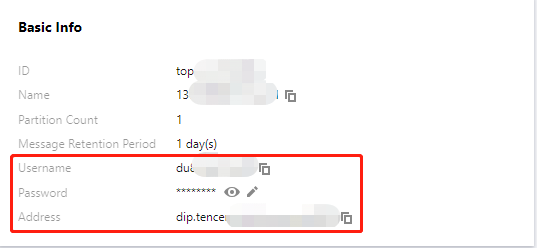
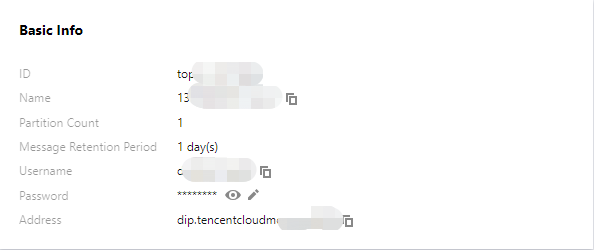
2. Click the ID of the Topic to enter the Basic Information page and obtain the username, password, and address information.

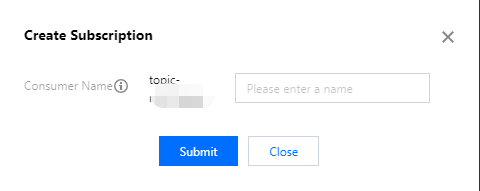
3. In the Subscription Relationships tab, create a subscription relationship (consumption group).


Step 3: Adding the Configuration File

Create the configuration file kafka.json.
{
"topic": [
"xxxx"
],
"sasl": {
"username": "yourUserName",
"password": "yourPassword",
},
"bootstrapServers": [
"xx.xx.xx.xx:port"
],
"consumerGroupId": "yourConsumerId"
}
Parameter
Description
bootstrapServers
The connection address. It can be obtained from the basic information page of an elastic Topic in the console.

username
The username. It can be obtained from the basic information page of an elastic Topic in the console.
password
The user password. It can be obtained from the basic information page of an elastic Topic in the console.
topic
The topic name. It can be obtained from the basic information page of an elastic Topic in the console.
consumerGroupId
The consumption group name. It can be obtained from the subscription relationship list of an elastic Topic in the console.


Step 4: Producing Messages

1. Write a message production program.
package main

import (
"fmt"
"gokafkademo/config"
"log"
"strings"

"github.com/confluentinc/confluent-kafka-go/kafka"
)

func main() {

cfg, err := config.ParseConfig("../config/kafka.json")
if err != nil {
log.Fatal(err)
}

p, err := kafka.NewProducer(&kafka.ConfigMap{
// To set connection points, obtain the corresponding Topic connection points through the console.
"bootstrap.servers": strings.Join(cfg.Servers, ","),
// The SASL authentication mechanism is PLAIN by default.
"sasl.mechanism": "PLAIN",
// Configure the ACL policy locally.
"security.protocol": "SASL_PLAINTEXT",
// The username is the configured username, and password is the configured user password .
"sasl.username": cfg.SASL.Username,
"sasl.password": cfg.SASL.Password,

// There are three ack mechanisms for a Kafka producer as described below:
// -1 or all: The broker responds to the producer and continues to send the next message or next batch of messages only after the leader receives the data and synchronizes it to the followers in all ISRs.
// This configuration offers the highest data reliability. There is no message loss as long as one synchronized replica is active. Note: This configuration cannot ensure that all replicas have completed read or write operations on the data before returning.
// It can be used together with the `min.insync.replicas` parameter at the Topic level.
// 0: The producer does not wait for the confirmation of synchronization completion from the broker and continues to send the next message (or the next batch of messages). This configuration offers the highest production performance but the lowest data reliability. (Data loss may occur in the event of server failure. If the leader is down but the producer is unaware, then the broker will not receive messages.)
// 1: The producer sends the next message (or the next batch of messages) after the leader has successfully received the data and confirmed it. This configuration is a balance between production throughput and data reliability. (If the leader is down but not replicated, the message may be lost.)
// When the user does not specify a configuration, the default value is 1. Users can adjust this value according to their business needs.
"acks": 1,
// The number of retries upon request error. It is recommended to set the value to be greater than 0. This can ensure failed requests are retried, maximizing the chances of preventing message loss.
"retries": 0,
// The time interval between a failed request and the next retry attempt.
"retry.backoff.ms": 100,
// Timeout period for network requests made by the producer.
"socket.timeout.ms": 6000,
// Set the internal retry interval of the client.
"reconnect.backoff.max.ms": 3000,
})
if err != nil {
log.Fatal(err)
}

defer p.Close()

// Deliver the produced messages to the report processing program.
go func() {
for e := range p.Events() {
switch ev := e.(type) {
case *kafka.Message:
if ev.TopicPartition.Error != nil {
fmt.Printf("Delivery failed: %v\\n", ev.TopicPartition)
} else {
fmt.Printf("Delivered message to %v\\n", ev.TopicPartition)
}
}
}
}()

// Asynchronously send messages.
topic := cfg.Topic
for _, word := range []string{"Confluent-Kafka", "Golang Client Message"} {
_ = p.Produce(&kafka.Message{
TopicPartition: kafka.TopicPartition{Topic: &topic, Partition: kafka.PartitionAny},
Value: []byte(word),
}, nil)
}

// Wait for message delivery.
p.Flush(10 * 1000)
2. Compile and run the program to send messages.
go run main.go
3. View the execution result. An example is shown below.
Delivered message to test[0]@628
Delivered message to test[0]@629

Step 5: Consuming Messages

1. Write the message consumption program.
package main

import (
"fmt"
"gokafkademo/config"
"log"
"strings"

"github.com/confluentinc/confluent-kafka-go/kafka"
)

func main() {

cfg, err := config.ParseConfig("../config/kafka.json")
if err != nil {
log.Fatal(err)
}

c, err := kafka.NewConsumer(&kafka.ConfigMap{
// To set connection points, obtain the corresponding Topic connection points through the console.
"bootstrap.servers": strings.Join(cfg.Servers, ","),
// The SASL authentication mechanism is PLAIN by default.
"sasl.mechanism": "PLAIN",
// Configure the ACL policy locally.
"security.protocol": "SASL_PLAINTEXT",
// The username is the configured username, and password is the configured user password .
"sasl.username": cfg.SASL.Username,
"sasl.password": cfg.SASL.Password,
// The configured message consumption group.
"group.id": cfg.ConsumerGroupId,
"auto.offset.reset": "earliest",

// When you use the Kafka consumption group mechanism, set the consumer timeout period. If the broker does not receive a heartbeat from the consumer within this period, the consumer is considered as failed and Broker
// Initiate the Rebalance process. Currently, this value needs to be configured between group.min.session.timeout.ms=6000 and group.max.session.timeout.ms=300000 in the broker configuration.

"session.timeout.ms": 10000,
})

if err != nil {
log.Fatal(err)
}
// The list of subscribed message topics.
err = c.SubscribeTopics([]string{"test", "test-topic"}, nil)
if err != nil {
log.Fatal(err)
}

for {
msg, err := c.ReadMessage(-1)
if err == nil {
fmt.Printf("Message on %s: %s\\n", msg.TopicPartition, string(msg.Value))
} else {
// The client will automatically try to recover all errors.
fmt.Printf("Consumer error: %v (%v)\\n", err, msg)
}
}

c.Close()
}
2. Compile and run the program to consume messages.
go run main.go
3. View the execution result. An example is shown below.
Message on test[0]@628: Confluent-Kafka
Message on test[0]@629: Golang Client Message


도움말 및 지원

문제 해결에 도움이 되었나요?

피드백