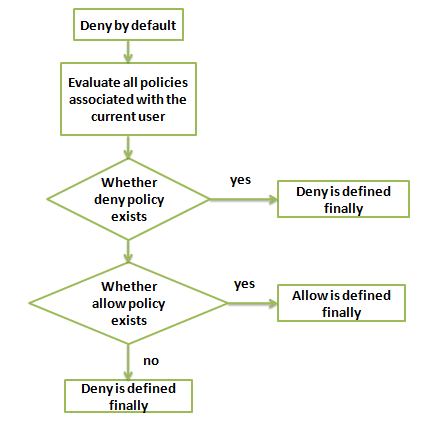
When a Tencent Cloud user accesses Tencent Cloud resources, CAM determines whether to allow or deny the request by using the following evaluation logic:
1. All requests will be denied by default.
2. CAM will check all the policies currently associated with the user.
1. It will determine whether any policies match, and if so, it will proceed to the next step. If not, the final result is "deny", and access to Tencent Cloud resources is not permitted.
2. It will determine whether any "deny" policies match, and if so, the final result will be "deny", and access to Tencent Cloud resources is not permitted. If not, it will proceed to the next step.
3. It will determine whether any "allow" policies match, and if so, the final result will be "allow", and access to Tencent Cloud resources will be permitted. If not, the final result is "deny", and access to Tencent Cloud resources is not permitted.
Note:
A root account has full access to all resources it owns by default. At present, cross-account resource access is only supported for COS.
There are some general policies that are associated with all CAM users by default. For more information, please see the General Policy Table below.
Other policies need to be explicitly specified. This applies to both allow and deny policies.
For services that support cross-account resource access, permission propagation applies. For example, if root account A grants a sub-account under root account B access to its resources, CAM will verify whether root account A has granted root account B access and whether root account B has granted the sub-account access. Both must be true for the sub-account of root account B to be allowed to access root account A's resources.A root account has full access to all resources it owns by default. At present, cross-account resource access is only supported for COS.
The followin
g table lis
ts currently supported general policies:
Policy Description
Policy Definition
MFA verification is required for querying keys
{
"principal":"",
"action":"account:QueryKeyBySecretId",
"resource":"",
"condition":{"string_equal":{"mfa":"0"}}
}
MFA verification is required for sensitive configurations
{
"principal":"",
"action":"account:SetSafeAuthFlag",
"resource":"",
"condition":{"string_equal":{"mfa":"0"}}
}
MFA verification is required for binding tokens
{
"principal":"",
"action":"account:BindToken",
"resource":"",
"condition":{"string_equal":{"mfa":"0"}}
}
MFA verification is required for unbinding tokens
{
"principal":"",
"action":"account:UnbindToken",
"resource":"",
"condition":{"string_equal":{"mfa":"0"}}
}
MFA verification is required for modifying email addresses
{
"principal":"",
"action":"account:ModifyMail",
"resource":"",
"condition":{"string_equal":{"mfa":"0"}}
}
MFA verification is required for modifying mobile numbers