tencent cloud

Web Application Firewall

Release Notes and Announcements
Release Notes
Product Announcement
Security Advisory
Product Introduction
Overview
Product Category
Strengths
Scenarios
Plans and Editions
Supported Regions
Basic Concepts
Getting Started
Getting Started
FAQs for Beginners
Operation Guide
Overview
Connection Management
Security Operations
Protection Policies
Service Settings
사례 튜토리얼
WAF CCP Overview
Bot Management
API Security
Integration
Protection Configuration
FAQS
Product Consultation
Connection
Usage
Permissions
Sandbox Isolation Status
WAF 정책
개인 정보 보호 정책
데이터 처리 및 보안 계약

WAF Working with API Gateway

PDF
포커스 모드
폰트 크기
마지막 업데이트 시간: 2023-12-29 14:53:05
This document describes how to configure WAF to protect APIs on API Gateway.

Prerequisite

You have activated WAF.
You have published an API on API Gateway as instructed in Getting Started.

Directions

Step 1. Bind a custom domain name in the API Gateway console

For more information about how to bind a custom domain name in the API Gateway console, see Configuring a Custom Domain Name .
Note
When a custom domain name is bound to API Gateway, the system will check whether you have configured CNAME and resolved it to the service subdomain name. Therefore, you need to configure CNAME and resolve the custom domain name to the subdomain name of API Gateway, modify the DNS record, and point the custom domain name to the WAF CNAME domain name.

Step 2. Configure WAF

1. Log in to the WAF console and select Connection Management on the left sidebar.
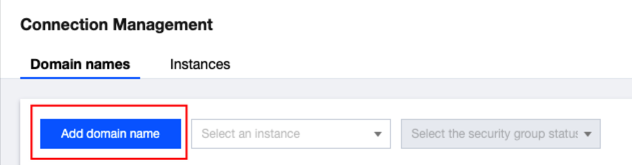
2. On the page that appears, click Add domain name.


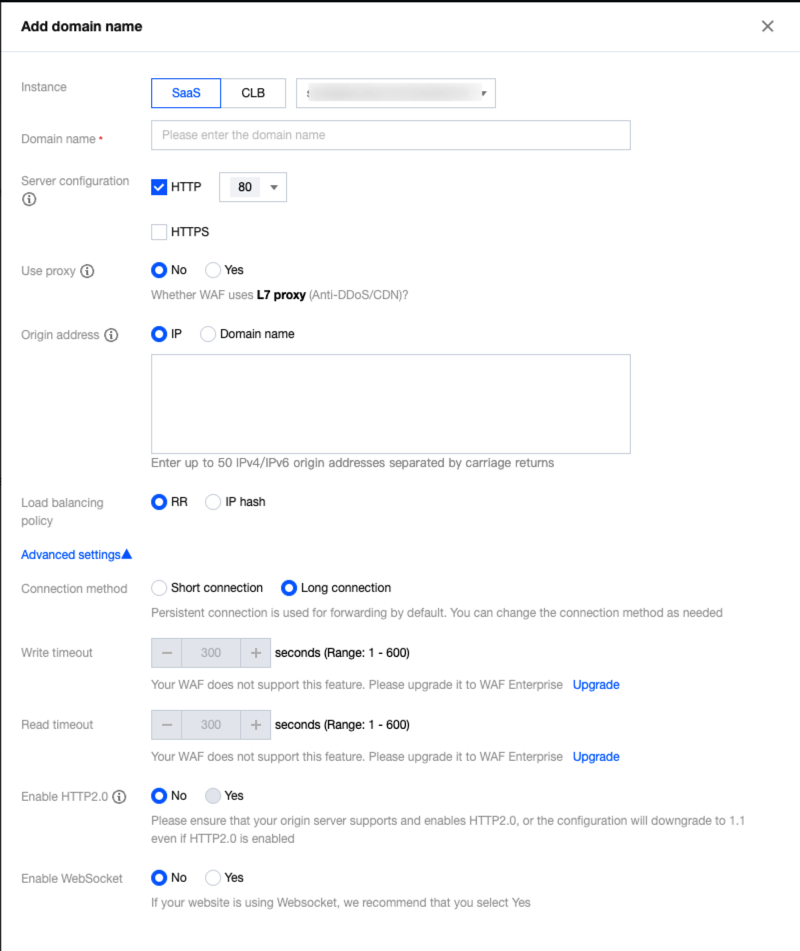
3. Configure required parameters and click OK.


4. The domain name should now be in the No CNAME records added status.


Step 3. Modify the CNAME record

1. Modify the CNAME record at your DNS service provider and resolve the custom domain name to the WAF domain name.
2. Log in to the WAF console, select Connection Management on the left sidebar and then the Domain names tab.
도움말 및 지원

문제 해결에 도움이 되었나요?

피드백
