If your Web service has enabled Tencent Cloud CLB (Cloud Load Balancer), you can enable precise domain name protection in the WAF instance or enable cloud-native object policy protection. This document describes how to enable default protection for cloud-native instance objects.
Note:
Object Onboarding is only supported in the Enterprise Edition and above. Please upgrade the corresponding WAF instance package to the Enterprise Edition to access cloud-native protection objects.
Background
Cloud-native object onboarding supports accessing WAF instance protection based on cloud-native instance objects (such as application CLB, cloud-native gateways, APISIX gateways) or hybrid cloud cluster objects accessed via other application gateway SDKs. After access, default Basic Security policy sets are automatically generated based on cloud-native instance ID objects or hybrid cloud cluster ID objects. This initiates default protection for Web traffic without domain name access configuration and allows customers to customize and manage corresponding protection policies.
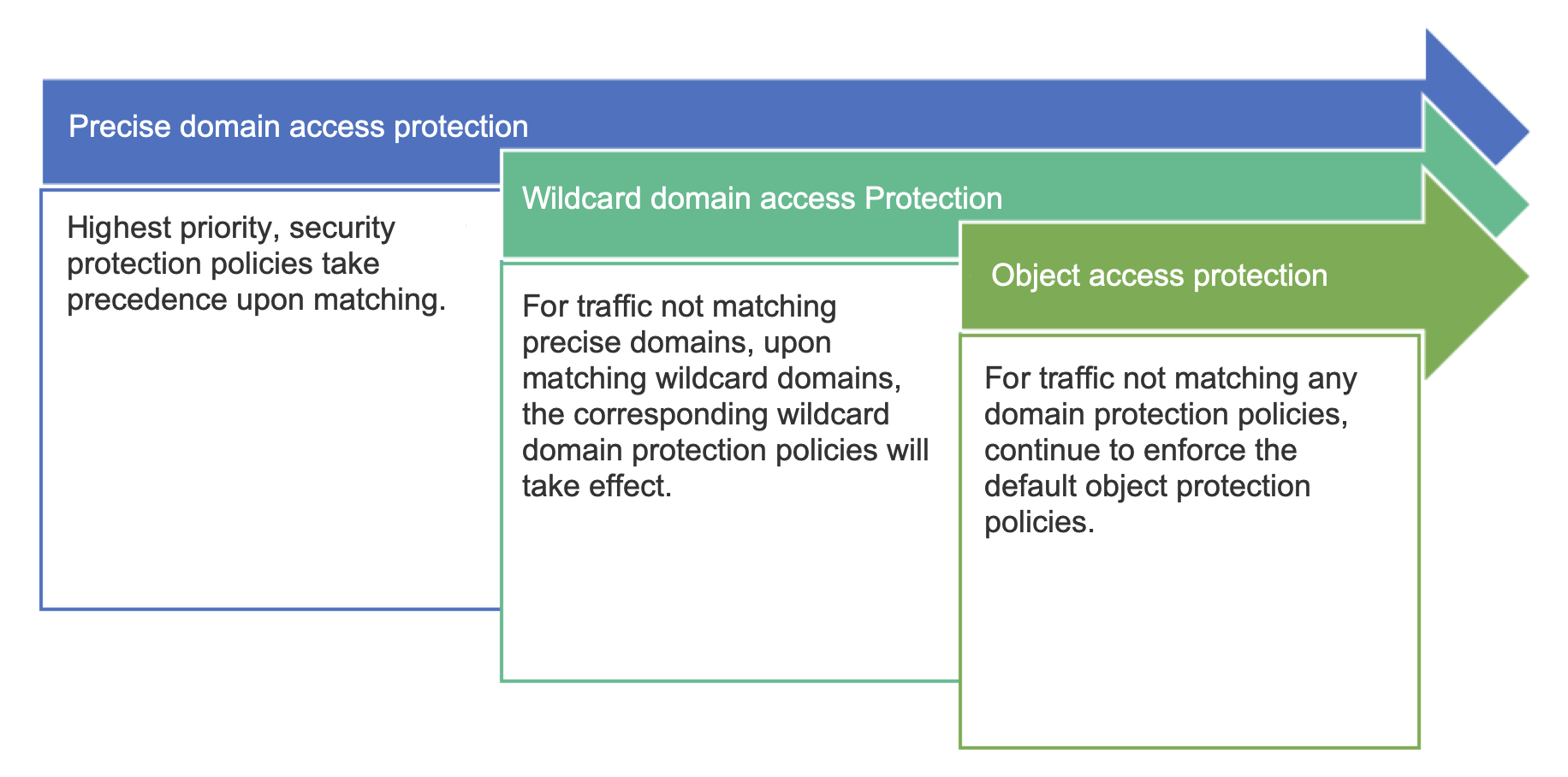
The order in which the relevant protection takes effect is as follows:
Configuration Instructions
1. Log in to WAF console, in the left sidebar, choose Connection Management > Instance Object Onboarding.
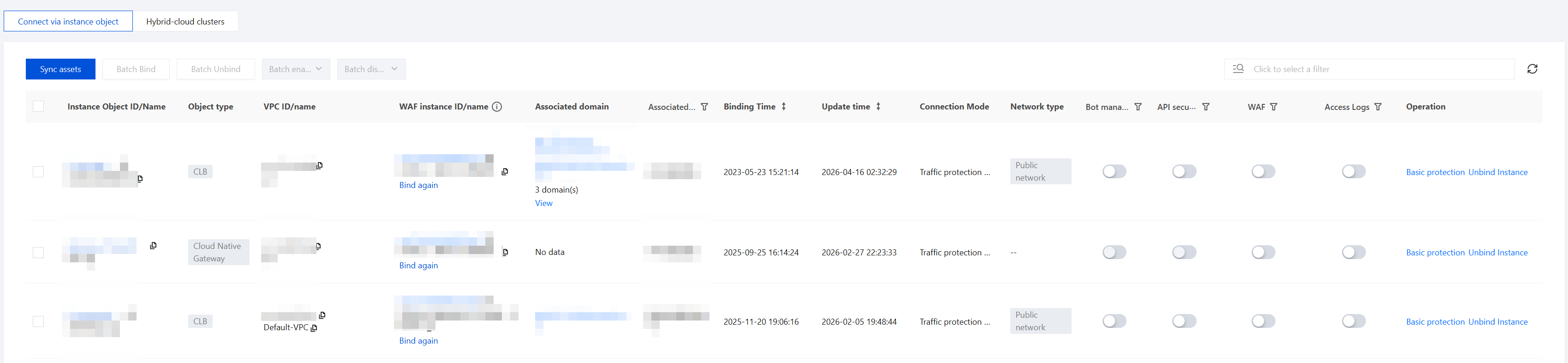
2. On the object onboarding page, you can view all instance information for CLB or cloud-native gateways.
After the current account is authorized, the system will automatically synchronize newly discovered CLB or cloud-native gateway instances within 5 minutes. If newly accessed CLB or cloud-native gateway instances are not listed, click Sync assets to synchronize the updated assets.
If part of the Web traffic for the current CLB or cloud-native gateway instance objects has been accessed via precise domain names, you can view it in the Associated Precise Domain Names column. For Web traffic already protected by precise domain names, the protection policy for precise domain names takes precedence. If no matching policy is found or the precise domain name protection policy is not triggered, the protection policy based on cloud-native instance objects will automatically take effect.
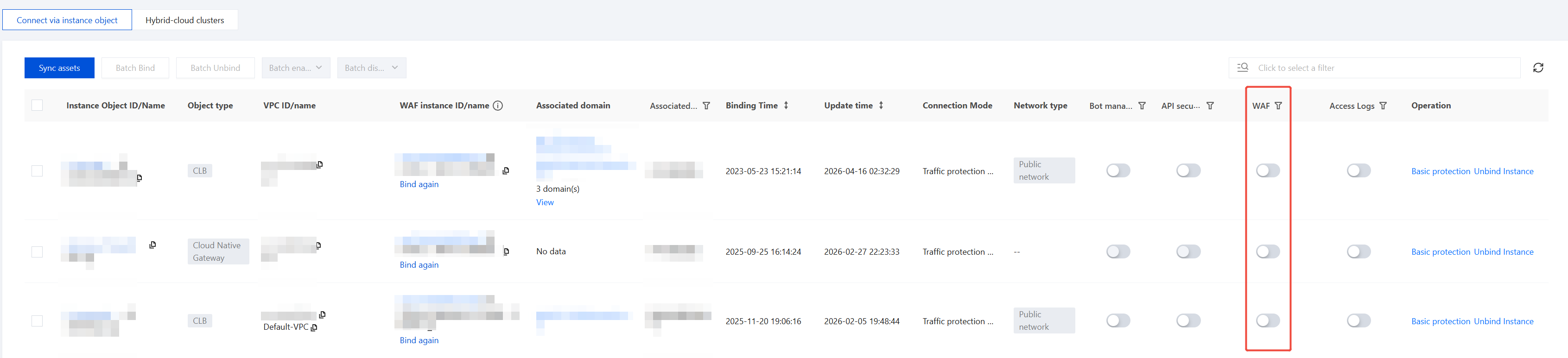
3. Enable WAF protection.
3.1 Select the CLB or cloud-native gateway instance for which you want to enable WAF protection, and click
in the WAF toggle column.
3.2 In the confirmation dialog box, click OK to enable WAF protection.
Note:
After enabling, WAF will protect traffic passing through CLB listeners by intercepting attack behaviors and logging attack records.
If you have only one cloud-native WAF instance, you can directly enable WAF protection with one click.
If you have multiple cloud-native WAF instances, first bind the CLB instance to the corresponding WAF instance in the Instance Object ID/Name column, then enable WAF protection with one click.
4. Disable WAF protection.
4.1 Select the CLB or cloud-native gateway instance for which you want to enable WAF protection, and click
in the WAF toggle column.
4.2 In the confirmation dialog box, click Disable to disable WAF protection.
Note:
After disabling, WAF will no longer protect traffic passing through CLB listeners, and all WAF features will become unavailable.
5. Enable the BOT management toggle.
5.1 Select the CLB or cloud-native gateway instance for which WAF protection is enabled, and click
in the BOT toggle column.
5.2 In the confirmation dialog box, click OK to enable BOT protection.